

Subscription includes
Support
CSV Order Status Changer is a WooCommerce extension that updates the statuses of existing orders from a CSV file. Give it a list of order IDs and the status each order should move to, and it applies those changes for you.
It is built for store owners and operations teams who receive order updates in spreadsheets. Instead of searching for each order, opening it, and changing its status by hand, you can prepare the updates in one file and process them together.
Your warehouse, payment records, and WooCommerce store do not always get updated at the same time. When you have a spreadsheet showing what needs to change, this extension helps you bring the order statuses in your store up to date.
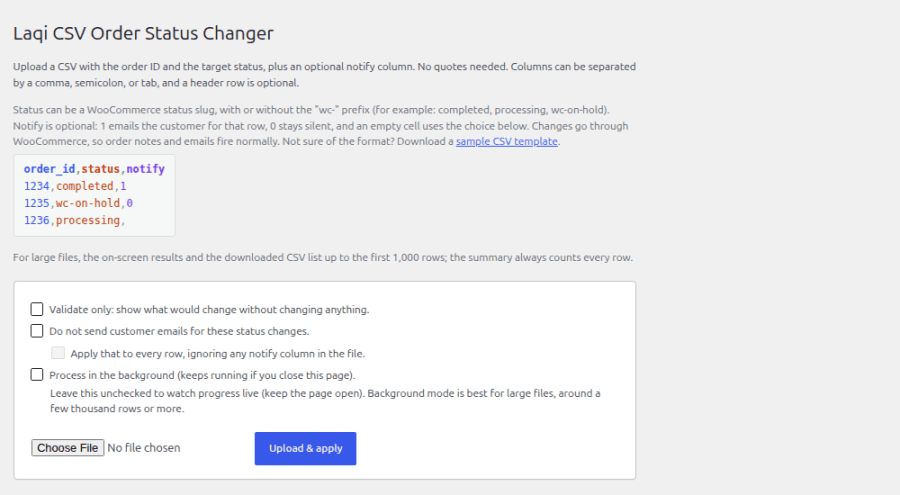
Update orders to any status available on your store, including custom order statuses. Each row can specify its own target, so one CSV can apply many different statuses to different orders in a single run.
Preview the proposed changes before applying them. Validation lets you check the file without changing orders or sending customer emails, so you can review the outcome first.
Choose whether customers receive the normal status notifications. Allow emails when customers need an update, or suppress them when correcting older records. You can make that choice for the whole file or individual rows.
Watch live progress as your updates run, or use background processing to continue working elsewhere. Afterwards, search, and filter the results to follow up on orders that need attention, and download the recorded results as CSV.
Start with a CSV saved from your spreadsheet application, or download the sample template from the plugin. You need the existing WooCommerce order IDs and the statuses you want to apply.
Each row needs the existing WooCommerce order ID and the status you want to apply. Download the sample CSV from the plugin to get started. If another extension changes your displayed order numbers, use the original WooCommerce order IDs.
Yes. Validate-only mode shows which rows would change and which need attention, without updating orders or sending customer emails. Correct any problems in the file, then upload it again to apply the changes.
Rows with invalid IDs or IDs that do not match an existing order are skipped without changing an order. The recorded results show the entered ID and explain why it was skipped. Malformed IDs also include the CSV row number.
Yes. Allow normal WooCommerce customer status emails or suppressthem, with control for the whole file or individual rows. Allowing emails follows WooCommerce’s normal notification rules. Administrator notifications continue normally.
Yes, if you select background processing before starting and your store’s scheduled tasks are running normally. Keep the page open when using interactive processing.
The plugin does not impose a row-count limit. Your hosting upload, request, storage, and PHP limits still apply. Processing runs in small chunks or background batches, and completion time depends on your hosting and the work triggered by each status change. The detailed table and CSV download retain the first 1,000 results; summary totals cover every processed row.
Yes. You can use custom statuses registered on your store. The plugin supports High-Performance Order Storage and legacy order storage, and is compatible with Cart and Checkout Blocks.
No. CSV Order Status Changer updates the statuses of existing WooCommerce orders. Each row identifies an order and the status it should move to. It does not create orders, import tracking numbers, or change order items and totals.
You need an active WooCommerce store, WordPress 6.8 or later, WooCommerce 7.1 or later, and PHP 7.4 or later. No separate service account or external subscription is required. Background processing uses the scheduler included with WooCommerce.
Select Documentation on this product page for setup instructions and usage guides. For assistance, select Get support and submit your request through WooCommerce.com. Your request will be routed to Laqi Logistics.
Categories
Extension information
Quality Checks
Countries