

Subscription includes
Support
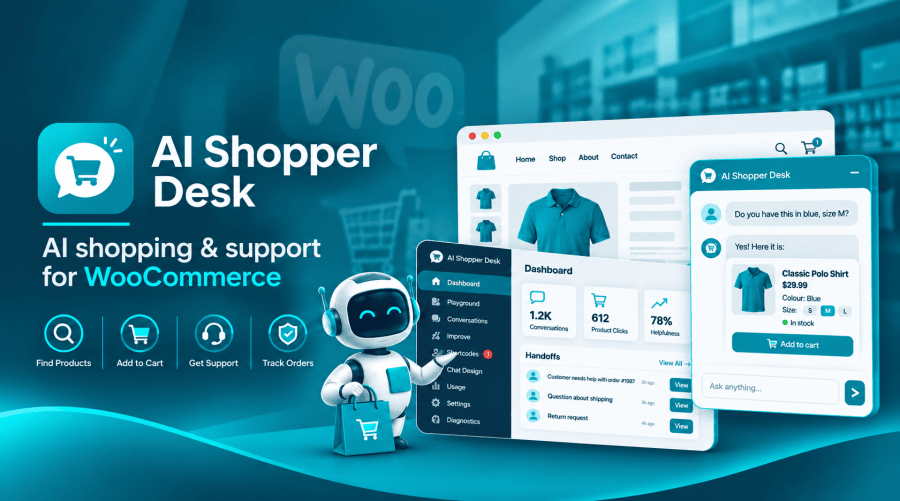
Give your customers an AI shopping assistant that understands your WooCommerce store, helps them find the right products, answers questions using live store information, assists with shopping and connects them with your team when they need a person.
AI Shopper Desk brings product discovery, shopping assistance and customer support together in one customizable chat experience. From checking product availability and comparing variations to adding products to the cart and looking up orders, customers can get help without navigating through multiple pages.
Help customers get the information they need and take the next step with confidence.
AI Shopper Desk brings together your WooCommerce catalogue, store knowledge and an AI provider to create a shopping assistant that works with your actual store information.
Help customers find relevant products without searching through your entire catalogue themselves.
The assistant can search products by keywords, categories, price ranges, attributes, stock status and more. Customers can explore product cards, compare available variations and get answers using current WooCommerce information.
Prices and stock are retrieved live from your store rather than stored in the knowledge index.
2. Shopping Assistance Directly in Chat
Make shopping more convenient by allowing customers to take selected actions without leaving the conversation.
When enabled, the assistant can:
You decide whether these actions are available. They are disabled by default.3.
3. Order Lookup and Shipment Tracking
Give customers a convenient way to check their order information.
Logged-in customers can look up orders belonging to their account. Guest customers can verify an order using their order number and billing email or phone number.
Customers can view order status, items, totals, and available shipment tracking links. Order lookup is read-only, the assistant cannot modify or cancel orders or issue refunds.
4. Human Handoff and Customer Requests
Not every question should be handled by AI. Customers can request help from your team whenever they need personal assistance.
AI Shopper Desk creates handoff requests in the Handoffs tab and emails your team with the conversation details. You can also reply to customers from the admin area. Your replies are sent by email and appear in the chat when the customer opens it again.
Customers can also submit messages, back-in-stock requests and, when enabled, return, or cancellation requests for your team to review.
5. Knowledge Base and Continuous Improvement
Give the assistant better information about your business using merchant-written Q&A answers and store notes.
AI Shopper Desk can use your products, selected public pages, store information and knowledge entries to answer questions. When customers ask something the assistant cannot answer, or mark a response as unhelpful, the question can be reviewed in the Improve tab.
Add your own answers so the assistant can use them in future conversations.
6. Playground and Accuracy Pack
Test your assistant before customers start using it.
The Playground lets you ask real questions and inspect the tools used to generate each response. You can also run the Accuracy Pack, which generates test questions from your store and checks areas such as product pricing, variations, shipping, coupons, and order lookup.
Review passed, failed, and manually reviewed results to identify areas that need improvement. Accuracy Pack uses heuristic grading, so it is a testing aid rather than a guarantee that every AI response will be correct.
7. Customizable Chat, AI Providers and Usage Controls
Make the assistant fit your store’s appearance and requirements.
AI Shopper Desk is designed to keep merchants in control. Shopping actions such as adding products to the cart, applying coupons and looking up orders are disabled until you enable them.
API keys are encrypted at rest. Guest order details are verified on the server before being displayed, and sensitive customer details such as full addresses, email addresses and payment data are not sent to the AI provider.
No. There is no Endorix account or subscription required. You connect your own AI provider or use a supported provider connected through WordPress.
You can use OpenAI, Anthropic, Google Gemini, OpenAI-compatible endpoints or the AI provider connected through WordPress, when supported by your site.
Yes. Enable Add products to the cart under Settings → Actions. The assistant can add products and selected variations when customers request it.
Yes. Enable Look up orders under Settings → Actions. Logged-in customers can access their own orders, while guests must verify their order number and billing email or phone.
No. It can collect return or cancellation requests when enabled and forward them to your team. Your team handles the actual order changes and refunds.
Yes. The Usage tab provides usage estimates and lets you configure daily and monthly spending caps in USD, along with visitor limits.