Product Icon

Invoice Payment Option for WooCommerce

Order Now and Pay Later! Allow your customers to select invoice payment option during checkout to place orders. Add conditions to show invoice payment options for specific products, categories, countries, cart total, user roles and more.
Choose a billing option
$59
Save 20%
$118 $94.40

Subscription includes

  • Product updates and improvements
  • Customer support
  • 30-day money-back guarantee

The Invoice Payment Option extension for WooCommerce enables you to add a new invoice payment method to let customers place orders without making any payment. Display the new payment option based on user roles, product in cart, order amount, quantity and other conditions.

You can rename the payment method to Pay Later, Pay by Invoice or give it any other name that suits your business requirements. Once the order is placed, the customer will receive the standard WooCommerce order email. If needed, you can also attach invoice PDF with the order emails.

After the order and payment confirmation, you can send a direct payment link using the default WooCommerce feature to let customers pay using the default WooCommerce checkout process. Alternatively, you can choose to receive payment via other channels such as banking checks, cash on delivery, etc.

Use Cases:

The following are use cases where this extension can be extremely helpful but not limited to!

B2B Orders:

When working with a company, they usually require an invoice before making the payment. Using this extension, you can allow your customers to place an order without payment. The admin can later on send the payment link to merchants to receive payment via WooCommerce default checkout.

Bulk Orders:

When placing bulk orders, the customers are sometimes reluctant to pay upfront and need assurance before paying. The extension allows them to place orders and once confirmed, they can proceed with the payment.

Features of Invoice Payment Method

  • Automatically creates new payment method “Pay by Invoice”
  • Customize title, description and default order status
  • Create multiple rules to show invoice payment method based on
    • Customers and user roles
    • Specific products, categories or tags
    • Minimum & maximum order quantity and amount
    • Country, state, city and zip codes
    • Shipping method
  • Generate and attach PDF invoice with orders emails (New)
  • Separate email notification for customer and admin when order is placed using invoice payment option  (New)

Customize payment method label:

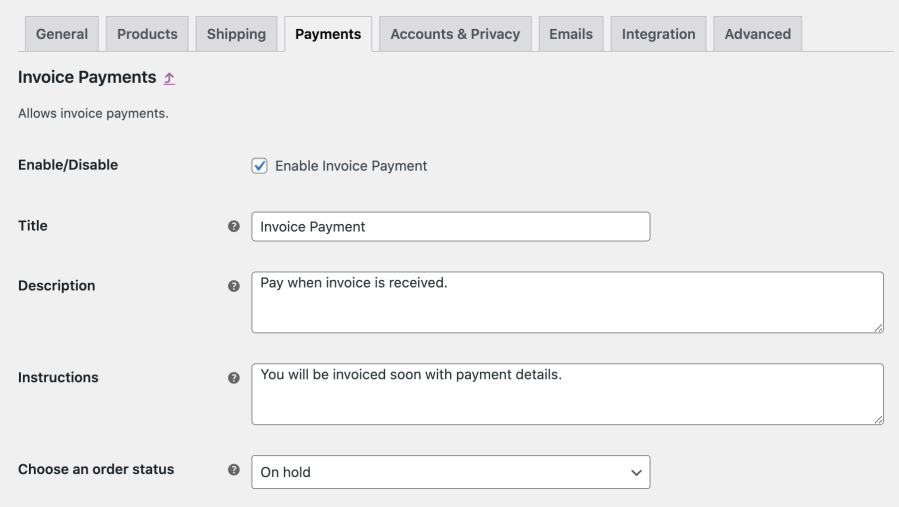
Once the extension is installed, you can configure the newly created invoice payment method from WooCommerce > Settings > Payments. You can customize the label and other details of the payment method. You can also configure the default order status for orders placed using this payment option.
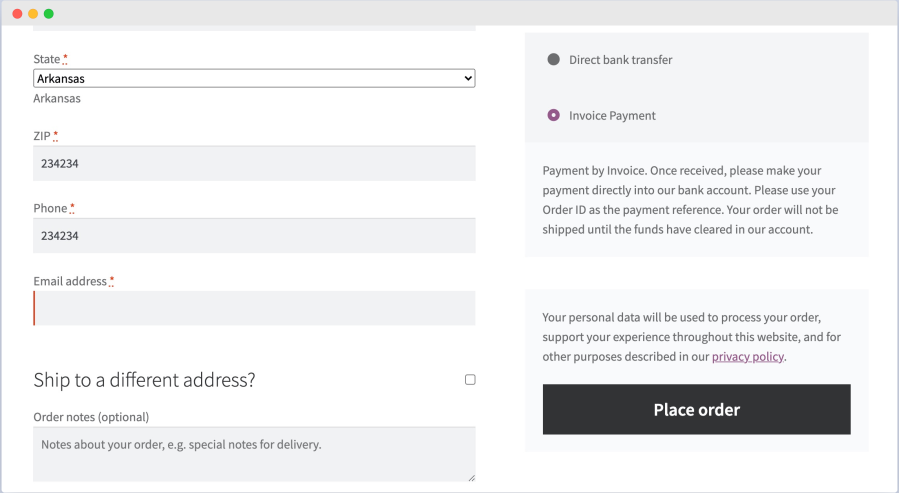
The invoice payment method appears along with other payment methods on the front-end.
Trigger Invoice Payment based on various condition:

You can create multiple rules to trigger the invoice payment option based on variations conditions like product in cart, order amount, user roles, country and more.

While creating a new rule, you can configure the following options:

  • Add rule title
  • Select shipping method (enable invoice payment option for selected shipping method)
  • Enable invoice payment for virtual products
  • Enable for selected customers and user roles
  • Enable for specific cart quantity and amount range
  • Enable for specific product, product category and tags
  • Show to selected countries, states, cities or zip codes

Invoice PDF

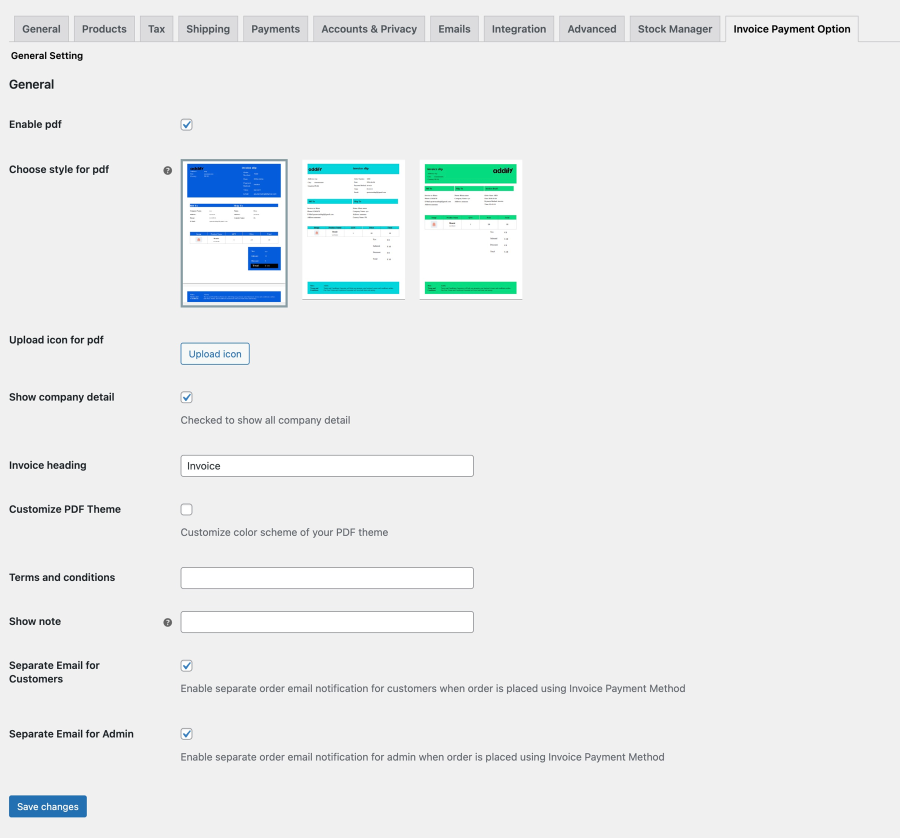
You can attach a customizable PDF invoice with the orders placed using this “Invoice Payment Method”. The extension offers 3 different PDF templates to choose from. You can customize the PDF content and color scheme to match your business needs.

Using the extension settings, you can trigger separate email notifications for both customer and merchants when an order is placed using the invoice payment option.
Requirements

Minimum PHP version: 7.2


Customer reviews

Average rating 4.7
12 reviews
5 stars, 92% of reviews
4 stars, 0% of reviews
3 stars, 0% of reviews
2 stars, 0% of reviews
1 star, 8% of reviews
12 reviews
  • arbiterpurple7647af9698
    Rated 5 out of 5
    Support
    Feb 17, 2026
    Support
    Thank you for the timely support and for offering a solution that worked!
    • Addify
      Feb 13, 2026
      Hello, Thank you for purchasing our product, and we’re sorry to hear that you’re experiencing issues. This may be due to a conflict with your theme or another plugin, and our team will be happy to help resolve it. Regarding your support request, we haven’t received any ticket from your account yet. We have just sent you an email—please take a moment to reply to it so we can assist you further. Alternatively, you can contact us directly at support@addify.co We look forward to helping you resolve this as soon as possible. Best regards, Team Addify
  • aholub
    Rated 1 out of 5
    Functionality
    Sep 14, 2024
    Functionality
    So far, I haven't been able to get it to work. There's a pay-by-invoice option on the check-out page, but the system does not send an invoice. The tech support process is convoluted (I have to set up an admin account for them, for example), and I haven't yet had the time to deal with it. Still, no software should silently fail with no indication of what's gone wrong, so this is a defect in the Inovice-Payment-Option plugin. They seem to be trying to turn it into a blame-the-victim it's-not-our-fault-because-of-some-other-plug-in problem. WooCommerce sends me emails every time an order is placed, so there's nothing wrong with the email mechanism in WordPress itself.
  • infoblisters4partscom
    Rated 5 out of 5
    Support
    Jul 16, 2024
    Support
    Hi y'all. I purchased this plugin and after a while a problem occurred. Another plugin started to get malfunctions caused by this plugin. I contacted the support team, and they added some code to their own plugin. Problem solved, and now available to all users of this plugin. Thumbs up for the support team.
  • jamesball79
    Rated 5 out of 5
    May 16, 2024
    Helpful team!
    When I ran into some issues with the plugin the team were on-hand to help fix the problem, which they did and I am very grateful for this hands-on approach to support.
  • cybersproutdev
    Rated 5 out of 5
    Mar 19, 2024
    Support was fantastic
    Sometimes you get leery when asking for support on a WooCommerce addon ... but Addify was great! They responded within reason and was able to fix the issue in a matter of a couple days.

Extension information

  • WordPress version required: 4.6
  • WooCommerce version required: 3.0.0
  • PHP version required: 7.4
  • Tested with WordPress: 6.*.*
  • Tested with WooCommerce: 10.*.*
  • Requires at least WordPress: 6.5
  • Requires at least WooCommerce: 4.0

Countries

  • Worldwide

Languages

English (United States)

Related Products

Price $279 annually
Rated 3.2 out of 5 stars
Price $49 annually
Rated 2.7 out of 5 stars
Price $29 annually
Rated 3.5 out of 5 stars
Price $39 annually
Rated 3 out of 5 stars
Price $49 annually
Price $199 annually
Rated 4 out of 5 stars
Price $109 annually
Rated 2.5 out of 5 stars
Price $119 annually
Rated 3.5 out of 5 stars
Price $109 annually
Rated 4.6 out of 5 stars