Aktive Installationen
10K+
Product comparison
Das Abonnement beinhaltet
Support
Hast du eine bestehende Website und eine treue Community und suchst du nach Methoden, deine Einnahmen zu diversifizieren? Oder möchtest du ein E-Commerce-Geschäft starten, ohne in die Erstellung einer eigenen Produktlinie zu investieren? Mit Product Vendors für WooCommerce kannst du sofort einen Woo-Shop in einen Marktplatz mit mehreren Anbietern, Produkten und Auszahlungseinstellungen umwandeln.
Erlaube mehreren Anbietern, über deine Website zu verkaufen, und berechne dafür eine Verkaufsprovision, um die Kosten für die Verwaltung der Website zu decken, während du dich auf den Aufbau einer Community konzentrierst.
Anbieter können:
Marktplatz-Besitzer können:
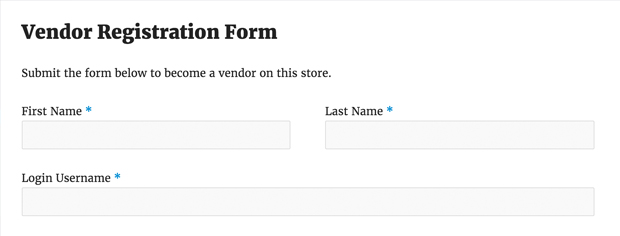
Verkäufer können sich anmelden und/oder bewerben, indem sie ein Anmeldeformular ausfüllen und damit ihr Interesse bekunden, in deinem Shop zu verkaufen. Diese Anträge können einzeln akzeptiert und genehmigt werden.
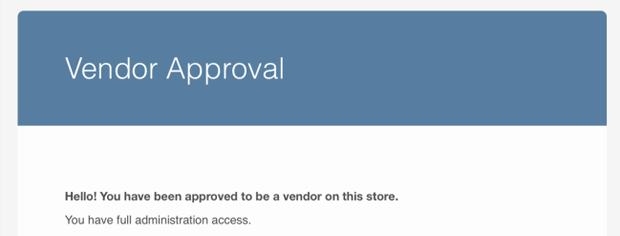
Du kannst potenzielle Anbieter ab sofort benachrichtigen, wenn ihr Antrag genehmigt wurde, indem du eine E-Mail direkt in ihren Posteingang sendest.
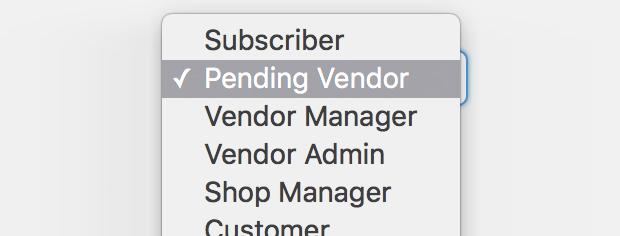
Wähle aus mehreren Einstellungen für die Anbieterrolle aus, einschließlich Anbieter-Administrator (hat Zugriff auf alle Anbietereinstellungen) und Anbieter-Manager (eingeschränkter Zugriff , kann keine Umsatzsteuer oder ähnliche Einstellungen sehen).
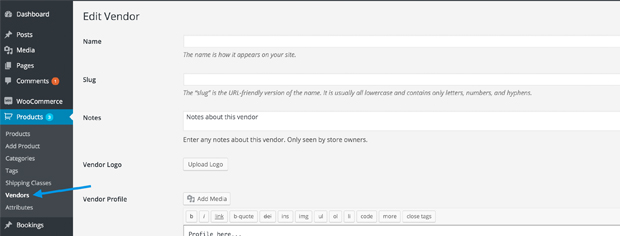
Richte einen oder mehrere WooCommerce-Benutzer ein, um die Informationen des Anbieters zu verwalten, einschließlich Profil, E-Mail-Adresse und Logo.
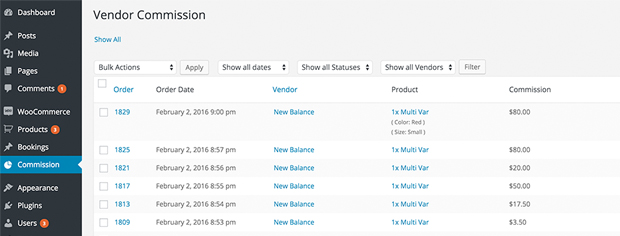
Verkaufsprovisionen können ein fester Betrag (z. B. 5 USD bei jedem Kauf) oder ein Prozentsatz (z. B. 25 % jedes Verkaufs) sein. Du kannst dies individuell pro Anbieter, pro Produkt oder pro Shop festlegen.
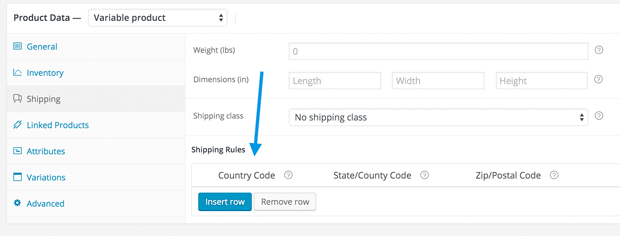
Produktanbieter können „Pro Produktversand“ nutzen und haben die Möglichkeit, private Notizen oder Kundennotizen (z. B. Sendungsverfolgungsnummern) hinzuzufügen.
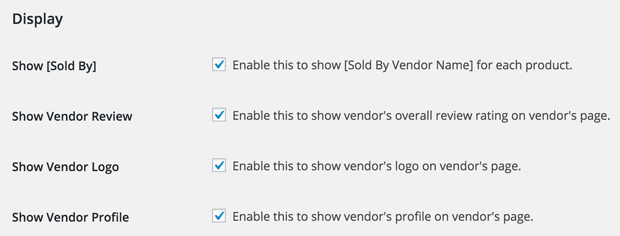
Wandle deinen Shop in einen echten Marktplatz um, indem du gezielt den Namen jedes Anbieters pro Produkt, Gesamtbewertung, Profilfoto und Profilinformation anzeigst.
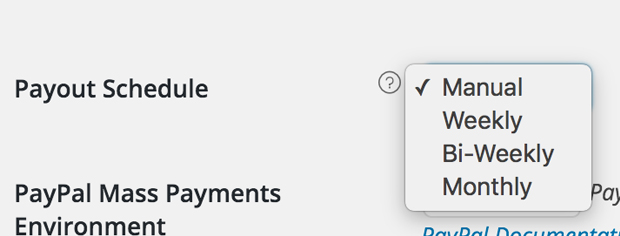
Zahlungen an Anbieter können sofort (diese Einstellung funktioniert nur anbieterspezifisch und arbeitet mit PayPal-Auszahlungen*), manuell, wöchentlich, zweiwöchentlich und monatlich erfolgen.
* vorbehaltlich der Genehmigung durch PayPal
Product Vendors is a WooCommerce marketplace extension that turns a single store into a multi-vendor marketplace. You can assign your existing products to vendors, or let approved vendors add and edit their own products to sell through your store. All sales run through your store's own payment gateways, and each vendor's share is paid to them as commission. If you are weighing up whether a shared marketplace model fits your business, this overview of how to create a multi-vendor marketplace on WordPress is a helpful starting point.
With Product Vendors, you keep full control of how much commission each vendor earns. You can set a default commission for the whole store, a rate for a specific vendor, or a rate on an individual product, with the more specific setting taking priority. Commission can be a fixed amount or a percentage of the product price, and you can add or edit commissions manually whenever you need to.
Product Vendors supports both. Automated payouts run through PayPal Payouts, which is built into the extension and requires a pre-approved PayPal Business account. You can schedule those payouts weekly, bi-weekly, or monthly, or enable instant pay so a vendor is paid as soon as an order is placed and payment is received. If you prefer, you can leave payouts on manual and pay vendors outside the extension, for example through your own payment method. Note that automated PayPal payouts are subject to country-specific availability, so it is worth confirming your region is supported before relying on them.
Yes. Automated commission payouts run through PayPal Payouts, and PayPal applies country-specific rules to where funds can be sent, received, and withdrawn. One clear example: automated payouts are not available in Germany, because German law requires the funds to be held in escrow and PayPal Payouts does not offer that. If automated payouts are not available in your country, you can still pay vendors manually, for example through your own payment method. It is worth confirming availability for your region before you commit to an automated payout workflow.
No. All sales and refunds are processed through the store owner's payment gateways, not each vendor's. Shoppers check out once through your store, and each vendor's revenue is then paid to them as commission from the funds you collect. This keeps the checkout unified for customers while you stay in control of payments and refunds.
When a customer buys a vendor's product, that order's details become available to the vendor so they can fulfill it. This includes the customer's shipping and billing address and the items ordered. Because customer data is shared with vendors in this way, it is good practice to mention this in your store's privacy policy so shoppers know how their information is handled during fulfillment. The exact data shared can vary depending on your settings and any additional extensions, so consider consulting a legal professional when deciding what to disclose.
Yes. Vendors with the right access can create and edit their own products, upload images, set prices, and manage their own inventory from the WordPress dashboard. New products submitted by a vendor arrive as Pending Review, and you are notified by email so you can approve them before they go live. This gives vendors day-to-day control of their catalog while you keep quality control over what publishes on your marketplace.
Vendors can register through a form or be added manually by the store owner. A new applicant starts with a Pending Vendor role and cannot sell until you approve them. Once you assign them a Vendor Admin or Vendor Manager role, they receive an email letting them know they are approved and can start setting up and managing their store. This gives you a clear gate to accept only the sellers that fit your marketplace.
Yes. Product Vendors is designed to help marketplace owners earn commission on every sale made by their vendors. You can set a standard rate across the store or offer different rates to different sellers, so vendor sales can contribute to your revenue and site running costs. As more complementary vendors join, each brings their own audience, which can expand the customer base for the whole marketplace. For more on the business case, see how to create a multi-vendor marketplace on WordPress.
Yes. Product Vendors includes Per Product Shipping, which is the shipping method that can pass a collected shipping amount along to vendors as part of their commission. Shipping costs are set on each product under the Shipping tab, and you can decide whether shipping charges are passed on to the vendor. If you want to understand this shipping method on its own, see Per Product Shipping.
Product Vendors gives you control over how taxes factor into commission. You can keep all taxes yourself and calculate commission on the product price only, pass the taxes charged to the customer into the vendor's commission, or split them so the full price including tax is used to calculate commission. This lets you match the tax approach to your marketplace agreements.
Yes, with an added extension. Product Vendors is compatible with WooCommerce Bookings, sold separately, so vendors can create and manage bookable products when you enable the bookings feature for them. One current limitation to note: vendors cannot access or manage booking resources. This is useful if you want a services or appointments marketplace rather than only physical goods.
Yes. When used with WooCommerce Subscriptions, vendors are assigned commission on both the initial sale and each recurring payment. This suits marketplaces where vendors sell memberships or other recurring products and you want commission to continue with each renewal. Learn more about selling subscriptions with WooCommerce.
Yes. On a Product Vendors marketplace, vendors can sell physical items, digital downloads, or both, using standard WooCommerce product types. This flexibility means one marketplace can host makers shipping physical goods alongside sellers offering downloadable files.
Product Vendors is built for exactly this. Vendors manage their own products, inventory, prices, and shipping rates, and can add customer notes to order confirmation emails so they speak to their buyers directly. They also get their own sales reports in the dashboard. Meanwhile you approve vendors and products, so day-to-day selling is shared while overall quality control stays with you.
Product Vendors gives both sides their own view of sales. As the store owner, you get vendor sales reporting alongside your standard WooCommerce reports, so you can see performance across the marketplace. Each vendor sees reporting for their own sales in their dashboard, without visibility into other vendors' numbers. This helps vendors track their results while you keep a marketplace-wide picture.
Yes. Product Vendors uses distinct roles so you can spread responsibility. A Vendor Admin has access to all vendor settings, while a Vendor Manager has more limited access to the vendor dashboard. As the store owner you can designate who can publish products, manage customers, and handle approvals, so you are not the only person keeping the marketplace running.
Product Vendors is a good fit for store owners who want to turn an existing WooCommerce store into a curated multi-vendor marketplace and earn commission on vendor sales. It suits marketplaces built around a community of complementary sellers who share a common audience, where the owner wants to approve vendors and products, control commission rates, and keep one unified checkout. It also works for stores selling their own products alongside items from partner sellers or consignment vendors.
Product Vendors may not suit you if you need each vendor to collect payments through their own separate payment gateway, since all sales are processed through the store owner's gateway and paid out as commission. Automated payouts also rely on PayPal Payouts and a pre-approved PayPal Business account, and they are subject to country-specific availability. In Germany, for example, automated payouts are not available because local law requires funds to be held in escrow. If automated payouts are not an option for you, you would need to pay vendors manually. If those constraints are dealbreakers, review the Product Vendors product page before committing.
For the core marketplace, Product Vendors includes what you need, including built-in Per Product Shipping and PayPal Payouts for automated commission payments. For automated payouts you will need a pre-approved PayPal Business account. Some capabilities depend on separate extensions: bookable products require WooCommerce Bookings, and per-renewal commission on recurring products requires WooCommerce Subscriptions.
Yes. Product Vendors gives you display options to show a "Sold by [Vendor Name]" label on each product, along with a vendor's logo, profile, and overall review rating on their vendor page. Showing the seller behind each product can help build trust with shoppers and give vendors their own identity within your marketplace.
Product Vendors includes a Commissions page that lists the commission for each product by order, along with commission, shipping, and fulfillment status. You can mark commissions paid, unpaid, void, fulfilled, or unfulfilled, and export commission data to CSV, including a full export of all unpaid commission for processing mass payouts. This gives you a clear record for reconciling what each vendor is owed.
Kategorien
Extension information
Quality Checks
Kompatibilität
Länder