
Instalaciones activas
200+
La suscripción incluye
Ayuda y soporte
In the fast-paced world of ecommerce, every moment counts. We understand the need to balance your business demands with some well-deserved breaks. That’s why we’ve developed the Store Vacation extension, which gives you complete control over your WooCommerce store’s downtime. With this extension, you can ensure that your online presence remains professional, reliable, and customer-friendly, even when taking time off.
Step into a world where your store is in control, your customers are happy, and you can take breaks guilt-free.

Maintain your search engine rankings and online visibility by ensuring uninterrupted access during breaks, setting the stage for a seamless return to your business.

Pick weekdays for regular store closures to suit your schedule.

Automatically activate Force Close when rapid orders, repeated IP activity, or payment failures reach your configured thresholds.

Preserve purchase intent by letting customers save their cart and restore the same items when they return.

Display a real-time countdown showing when the store will close (pre-notice) or reopen, creating urgency and clear expectations.

Hide the vacation notice on products that are allowed to be purchased during vacation mode.

Customize your notifications by personalizing their types, colors, and fonts to match your brand’s identity and style.

Customize the Add to Cart button label to display specific messages during vacation mode.

Effortlessly manage multilingual translations with .po and .mo files, WPML, and Polylang support.

Personalized vacation notices perfectly match your brand’s style, ensuring customers are both informed and engaged during your absence.

Activate vacation mode instantly to pause your store, ensuring immediate closure without prior notice.

See cart activity, completed checkouts, revenue, top products, shipping events, and Checkout Protection activity during closures.

Hide unavailable shipping methods or offer dedicated temporary delivery options while vacation rules are active.

Personalize the vacation notice by dynamically showing the customer’s username or full name, making the message more engaging and human.

Effortlessly display your vacation notices across different site sections using a shortcode, widget, or block.

Display notices before your store goes on vacation to assist customers plan their purchases.

Manage your schedule exclusions confidently, and shape your shop’s vacation strategy while optimizing downtime.

Export this extension’s settings and migrate data to another WooCommerce store.
Imagine easily scheduling weekend breaks, non-business hours, or extended closing times. With precise pause management features, Store Vacation allows you to manage your store’s schedule by pausing new orders and checkouts while welcoming visitors to browse your products.
Not only that, but you can also customize the availability options to organize product availability during breaks. This ensures that specific items remain purchasable even when your store is on vacation. As a result, your shop’s unique identity and essence can stand out, providing customers with an unparalleled shopping experience that aligns with your brand.
Clear communication is essential for any business, and the Store Vacation feature can help you keep your customers informed during closing times. With the built-in vacation notice feature, you can create personalized messages to notify customers of any changes, delays, or temporary closings. This fosters a transparent relationship with your customers, strengthening their loyalty to your brand.
Search Engine Optimization (SEO) is crucial to maintaining your business’s online presence. With Store Vacation, you can rest assured that your search engine rankings won’t be affected even when your shop is temporarily closed. During this period, your website will remain accessible to search engines. This will ensure that when you reopen, you can resume full operations without interrupting your online visibility.
Managing your store’s vacations has become effortless with our immediate empowerment and easy-to-use control options. The Force Close option lets you quickly close your shop, aligning it with the rhythm of your unique circumstances, whether a brief intermission or an extended hiatus. With this feature, you have instant control over your store’s operations.
The Vacation Calendar gives store owners a simple calendar view inside the settings area, making it easier to review scheduled vacations, recurring weekday closings, and upcoming store availability at a glance.
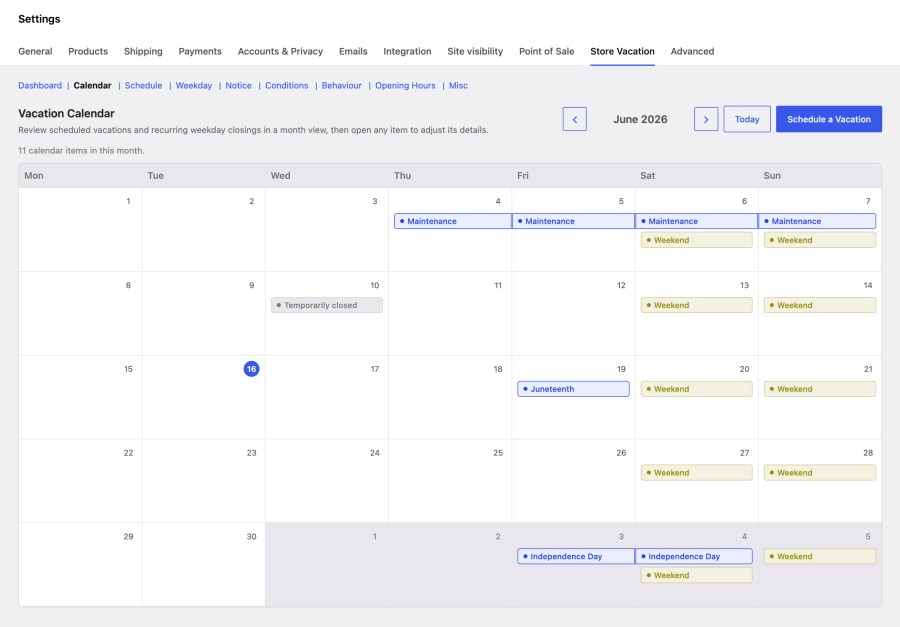
Instead of checking dates only through individual settings, you can quickly understand how vacation periods and weekly closing rules relate to each other. This makes planning easier, reduces scheduling mistakes, and gives you better visibility over when your store will be on vacation mode.
Display custom content only when your store is in vacation mode with the Vacation Content Block.
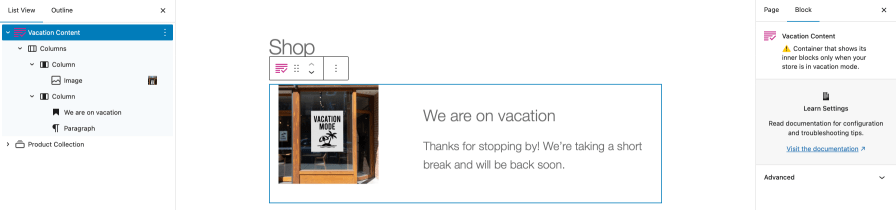
This flexible block acts as a wrapper for any block, ensuring that messages, banners, or special instructions appear only during scheduled downtime.
The Vacation Content Block helps you maintain a consistent, professional storefront while ensuring customers receive the right messages during your scheduled closures.
Take control of your store’s availability with the Opening Hours feature! Set your shop to automatically close during off-hours, complete with a fully customizable notice to keep your customers informed.
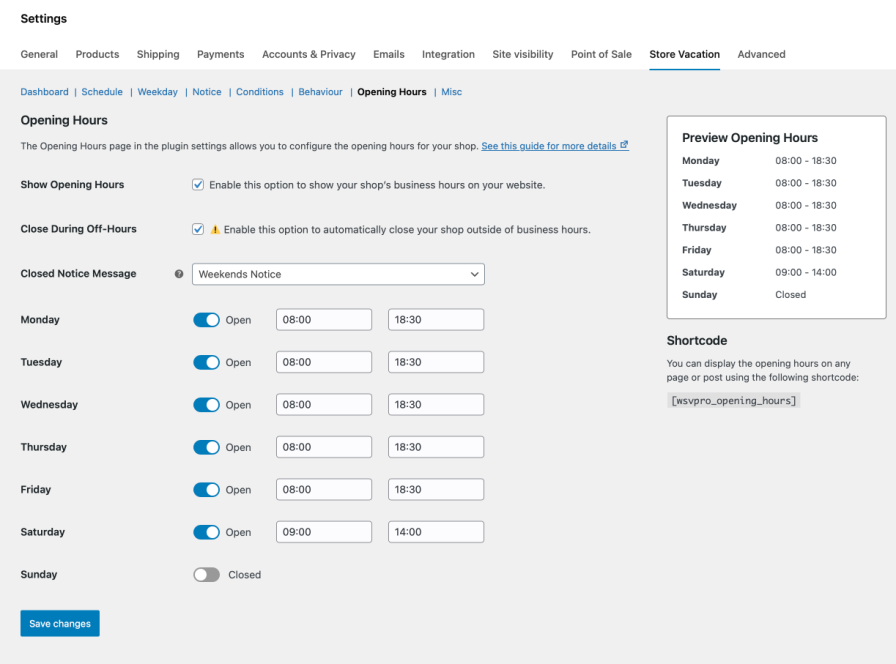
Configure your business hours, and showcase them on your site using the Opening Hours Block, shortcode, or widget. Keep your customers in the loop and run your store on your terms!
Improve product availability during vacations with customizable store experiences.

Ensure that specific products are purchasable even when you are away.

Enable vacation mode that allows purchases only for specific categories.

Allow specific tags to remain accessible even when the shop is closed.

Define rules based on product types such as Subscription, Booking, etc.

Restrict the vacation mode feature to specific shipping classes only.

Enable specific product brands to remain purchasable while your store is in vacation mode.
Never let your store enter vacation mode unnoticed.
With the Admin Reminder Email, Store Vacation can automatically notify you before your store goes into vacation mode. Choose when the reminder is sent from 5 minutes up to 24 hours in advance and stay fully in control.
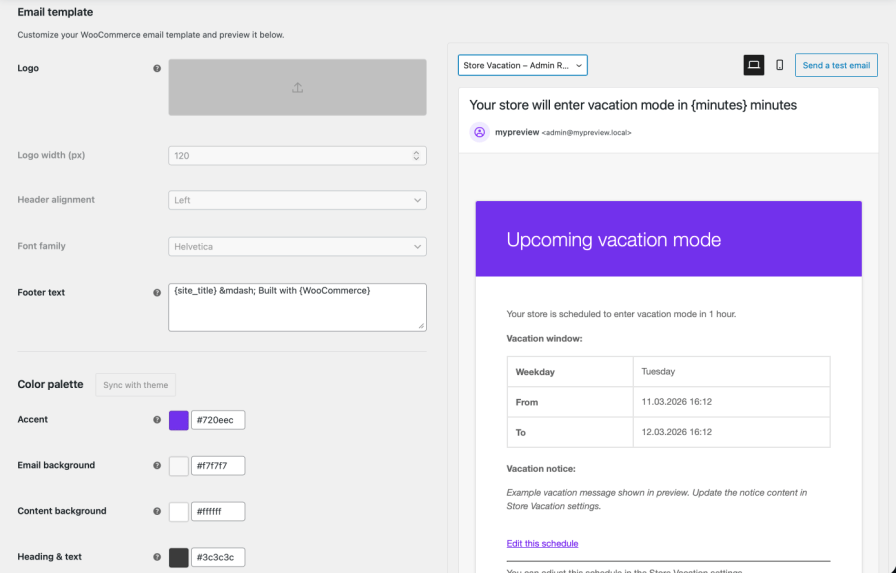
This feature adds an extra safety layer, ensuring you’re always informed and prepared before your store temporarily closes.
Temporarily disabling checkout does not have to mean losing interested customers. With Allow Cart Building enabled, shoppers can continue browsing your store and adding products to their cart while vacation mode is active. When they are ready, Save Cart for Later lets them keep that cart and return to it once checkout becomes available again.
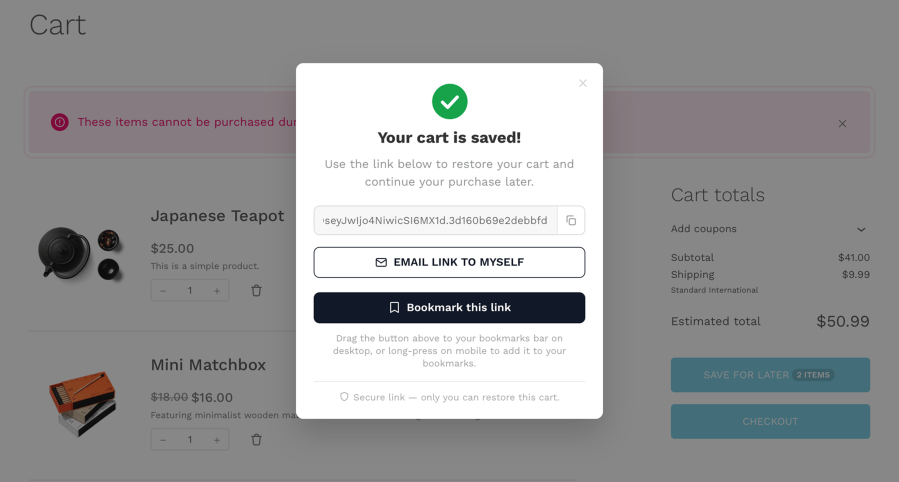
Customers can copy or bookmark a secure cart link that restores the same products and quantities later. Logged-in customers can also email their saved-cart link to themselves.
The saved-cart action appears on the classic Cart page and can also be added to Cart Block layouts or custom pages using the included block and shortcode. Its label can be customized, with an optional live item count to make the action clearer to shoppers.
Instead of asking customers to start their purchase again after your store reopens, Store Vacation helps preserve the purchase intent they already created.
Understand what happens in your store while vacation mode is active. Vacation Reports can track cart additions, removals and quantity changes, saved-cart emails, completed checkouts, revenue, unique customers, top products, shipping activity, and Checkout Protection incidents.
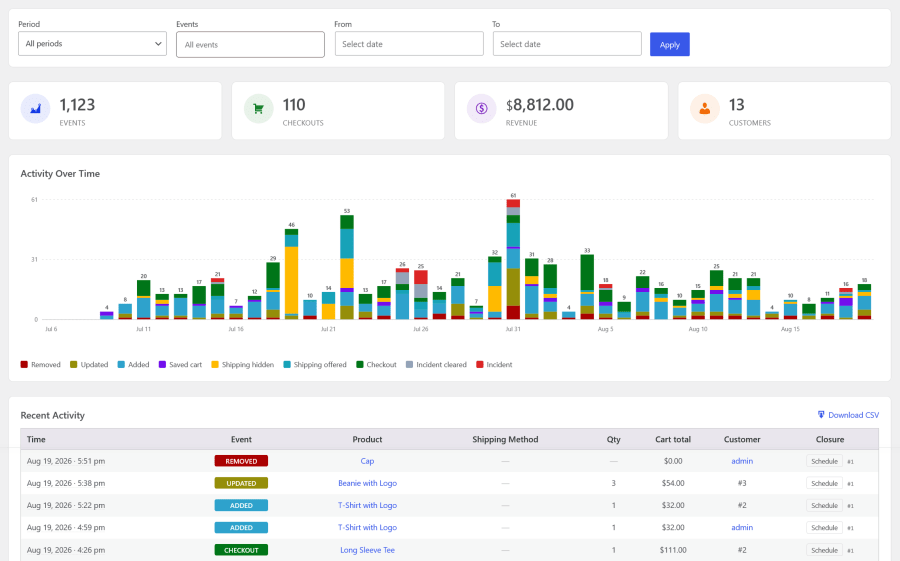
A dedicated dashboard brings this information together with summary metrics, an activity chart, Recent Activity, and Top Products, helping you see whether customers are continuing to engage with the store while purchasing is limited. Filter reporting by date range or vacation period and export Recent Activity to CSV when you need the data outside WordPress.
Reporting is optional. You can choose how long report data is retained or permanently clear recorded report activity without affecting your orders, saved carts, or Store Vacation settings.
Automatically pause checkout when unusual order activity suggests a possible carding attack or automated bot activity. Carding attacks happen when stolen payment details are repeatedly tested through an online checkout. They can result in large numbers of failed payments, fraudulent orders, processing costs, and unnecessary administrative work.
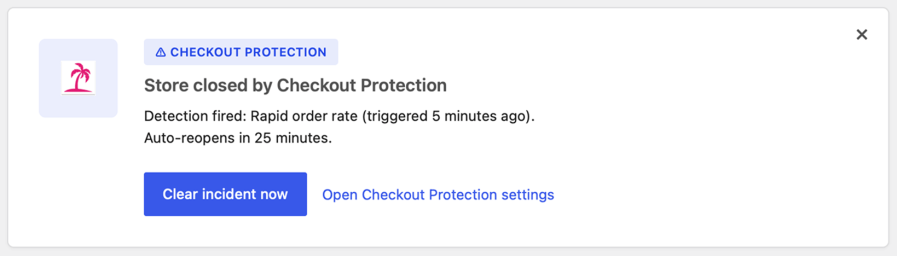
Checkout Protection monitors three configurable warning signs, rapid orders, repeated activity from the same IP, and payment failures. Each signal can have its own threshold and monitoring window. If any configured threshold is reached, Store Vacation automatically activates Force Close and prevents additional purchases. During a Checkout Protection incident, the emergency closure takes priority over cart building, product exclusions, Conditions, and purchasing bypasses, preventing another store rule from accidentally allowing checkout to continue.
Customers see the closure notice you select, while administrators can receive email notifications when protection is triggered and when the incident is cleared.
You remain in control. Review and clear an incident manually, or configure an automatic cooldown so checkout can reopen after suspicious activity has passed. Checkout Protection trigger and clear events can also be recorded in Vacation Reports for later review.
Keep your delivery options accurate when your normal fulfillment process is paused or limited. With Hide Shipping Methods, you can hide selected WooCommerce shipping methods during individual scheduled vacations and recurring weekday closures. For example, temporarily remove Express Delivery while keeping Standard Shipping or Local Pickup available.
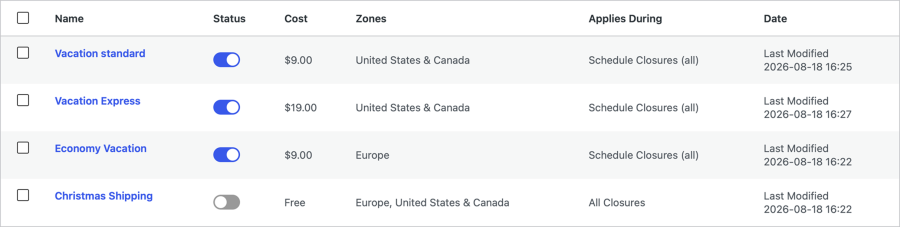
When you still want to accept certain orders during vacation mode, Vacation Shipping lets you offer dedicated temporary shipping options.
Each Vacation Shipping option can have its own name, cost, applicable shipping zones, checkout description, and applicable vacation periods.
Whether fulfillment is delayed, restricted to selected areas, or operating under temporary delivery terms, customers see shipping choices that reflect what your store can actually provide.
Sometimes you want customers to browse your store even when purchasing is temporarily unavailable.
With Hide Store Elements, you can automatically hide selected storefront components while vacation mode is active.
When the scheduled vacation period begins, the selected elements are hidden across the store. When the vacation ends, they automatically reappear.
This keeps your storefront clean and avoids confusing customers while your store is closed.
Not every vacation requires your WooCommerce store to stop taking orders. Store Vacation gives you control over what customers can see and do while a vacation period is active.
You can:
When purchasing is intentionally allowed through Bypass Restrictions, Store Vacation treats the store as open for orders even though the vacation period itself remains active.
If certain products remain purchasable during vacation such as excluded items or password-authorized purchases, you can enable Track Vacation Orders.
This feature marks orders placed while vacation mode is active, allowing you to easily filter and manage them later.
Pausing your WooCommerce shop requires only a few extra simple steps — Store Vacation will do all the automation and heavy lifting for you behind the scenes. Time to unwind and enjoy your well-deserved break.
Store Vacation does not add noindex or nofollow meta tags to your website. Your storefront and product pages can remain accessible to visitors and search engines while purchasing is temporarily unavailable.
Yes. If you want to inform customers about delays or temporary fulfillment changes without closing checkout, enable Bypass Restrictions while using the standard keep-shop-pages-open behavior. Your vacation notice remains active while customers can continue browsing, adding products, and checking out normally.
Yes. Vacation notices can be displayed using the included Notice block, shortcode, or widget, giving you flexible placement across pages, posts, headers, footers, and supported template areas.
Store Vacation also supports modern WooCommerce Cart and Checkout Blocks, and Save Cart for Later includes a dedicated block for Cart Block layouts and custom pages.
Yes. When Allow Cart Building and Save Cart for Later are enabled, customers can continue adding products to their cart and save a secure link that restores the same items and quantities later. Logged-in customers can also email the saved-cart link to themselves.
Yes. Shipping Rules let you hide selected shipping methods during individual scheduled vacations and recurring weekday closures.
You can also create one or more Vacation Shipping Options with their own name, cost, applicable zones, checkout description, and applicable vacation periods.
Vacation Reports can track cart additions, removals, quantity changes, saved-cart emails, shipping events, completed checkouts, revenue, unique customers, top products, and Checkout Protection activity during active vacation periods.
Reporting is optional, with date and vacation-period filtering, CSV export, configurable data retention, and controls for permanently clearing recorded report activity.
No. Checkout Protection is an additional emergency checkout safeguard.
It can automatically activate Force Close when rapid orders, repeated activity from the same IP, or payment failures reach your configured thresholds. It should be used alongside the fraud and carding protections provided by your payment gateway.
Categorías
Información de la extensión
Comprobaciones de calidad
Compatibilidad
Países
Idioma:
Requisitos







