

La suscripción incluye
Ayuda y soporte
example.com/shop/example.com/fr/boutique/example.com/de/laden//shop/ in English, /fr/boutique/ in French, /de/laden/ in Germanurl_to_postid() resolves translated slugs, and all permalink structures are supported| TIV Admin Tools | A set of utilities for WooCommerce shop owners, administrators, and developers to secure, tune, and debug their store. |
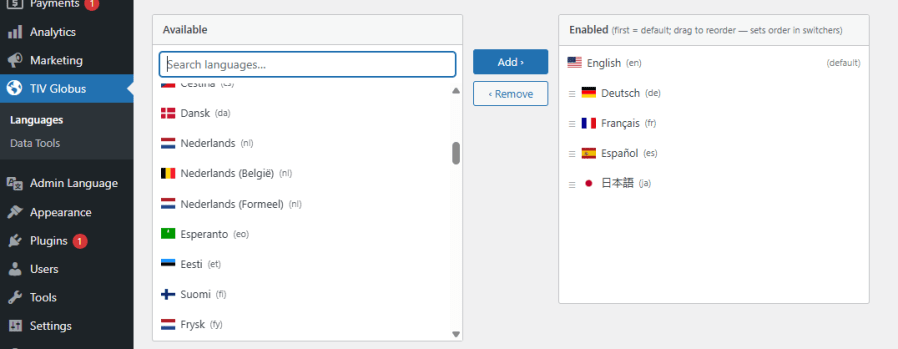
| TIV Globus | Makes WooCommerce multilingual – translate product descriptions, categories, attributes, and tags. |
| TIV Multi-currency | Lets customers pay in the currency of their choice. |
| TIV Paywall | Enables the monetization of various types of content, including videos, documents, etc., by allowing the sale of access to it. |
| TIV Sales Assistant | Manage store-wide sales from one place – schedule discounts by category, tag, and country instead of editing products one by one. |
No. All translations live inside a single product, page, or post. You enter the price, stock, SKU, and settings once, and they are shared across every language. To translate, you switch the editing language in the admin bar, type the translation, and save. This is the main difference from plugins like WPML and Polylang, which create one duplicate entry per language that you then have to link and keep in sync.
Open the product or page in the editor, switch the editing language in the admin bar, enter the text for that language, and save. The plugin merges your translation into the same record and leaves the other languages untouched. There is nothing to duplicate and nothing to connect.
Visitors see each language at its own clean URL prefix such as /fr/ or /de/. The default language has no prefix, so your primary market keeps its original URLs. A language switcher, available as a menu item, a sidebar widget, or a block, lets visitors change language anywhere on the site.
It translates the whole store. That includes product names, descriptions and short descriptions, categories, tags, brands and attributes, the Shop, Cart, Checkout and My Account pages (including block-based checkout), shipping method names, tax labels, and payment gateway titles and instructions. The cart and order item names are translated as well.
Order emails are sent in the language the customer used at checkout. The plugin saves the customer's language with the order and reuses it for every later email about that order, so a French customer keeps receiving French emails. Admin notification emails stay in your store's admin language.
Yes. Each language gets clean, translated URLs, a canonical URL, hreflang tags so search engines understand the language alternatives, and its own XML sitemap discovered through robots.txt. If you use Yoast SEO, the meta title, description, OpenGraph data, and schema are translated per language.
Yes, and this is a first-class feature rather than an afterthought. Elementor is supported with per-language builder data, so each language can have its own design. Avada and Fusion Builder work natively.
Not in this version. You enter translations yourself, which gives you full control over wording and tone. Automatic machine translation is planned for a future release.
Yes. A live demo is available so you can see the multilingual storefront, the language switcher, and the editing workflow in action before you decide: https://tivnet.com/
Categorías
Información de la extensión
Comprobaciones de calidad
Países







