
Instalaciones activas
900+
Product comparison
La suscripción incluye
Ayuda y soporte
Al intentar escoger entre muchos productos similares, los compradores online quieren comparar precios y otras funciones para encontrar el producto que mejor se adapte a sus necesidades.
Al añadir la opción de comparar productos, los propietarios de tiendas pueden ayudar a los clientes a elegir la opción correcta. Si tienes una tienda grande, con muchos productos similares, ofrecer a los clientes la opción de comparar puede marcar la diferencia.

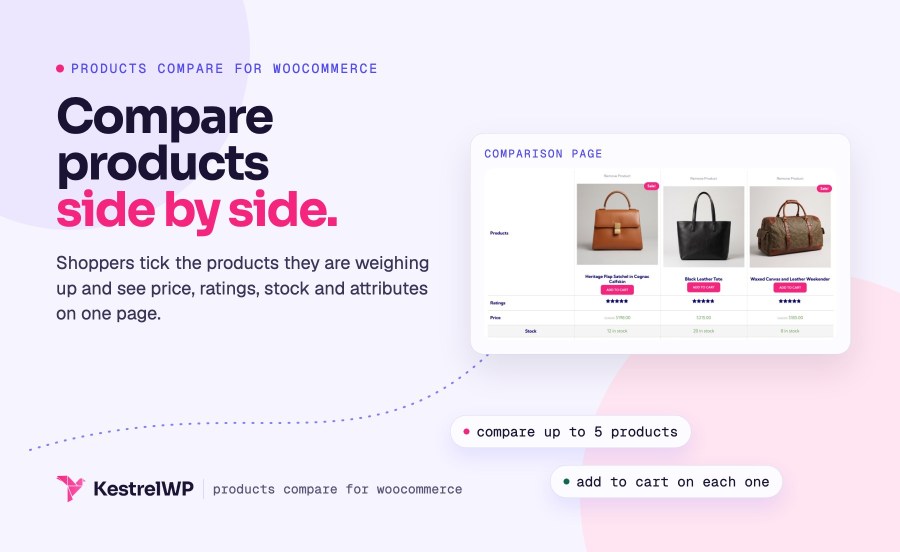
Gracias a esta extensión, los clientes verán la opción de comparar productos en las páginas de categorías. Los clientes pueden elegir las opciones que están considerado y ver en comparativa los detalles de cada una de ellas.

Cuando los clientes seleccionan una serie de productos para comparar, pueden ver una tabla detallada con precios, puntuaciones, nivel de existencias y descripciones.

No se limita a la página de categorías, cualquier página puede incluir la opción de comparar productos. Los productos que un cliente ya ha visto permanecerán visibles para que puedan añadir fácilmente más opciones a medida que los buscan por la tienda.
Creado por 
Activate Products Compare for WooCommerce. A Compare tick appears on your products, shoppers tick the ones they're weighing up, and the comparison page opens once at least two are ticked. There is no settings screen to configure, so the ticks work as soon as the plugin is active.
Yes, up to 5 at a time by default. A sixth tick shows a "maximum of 5" alert, and the woocommerce_products_compare_max_products filter changes the limit. The comparison page opens as soon as at least 2 products are ticked, and shoppers can remove any product from the table.
Each product's image, title, sale flash, add to cart button and price, then ratings (if any compared product has reviews), the short description, SKU, stock (for products that manage stock) and the attributes visible on the product page. A product without a value for a row shows a blank cell.
No. A variable product is compared as one product, not variation by variation. Only whole products are compared, and only published products that aren't hidden from the catalog can be added, so a variation can't be ticked on its own.
Yes. The list is kept in the shopper's browser for 7 days, so it survives closing the tab and works for guests. The comparison page address also lists the compared products, so it can be bookmarked or sent as a link. The list isn't tied to an account or shared across devices, and clearing browser data removes it.
Yes. On WordPress 6.7 or later, block themes show their header and footer on the comparison page, and the list is read in the browser, so page caches don't serve one shopper another's ticks. If your theme or builder skips the standard product hooks, or a block theme lacks the Add to Cart Button block, no Compare tick shows.
Categorías
Información de la extensión
Comprobaciones de calidad
Países