

Installations actives
30K+
Comparaison de produits
L’abonnement comprend
Assistance
Il y a une raison pour laquelle les boutiques en ligne les plus performantes proposent des cartes-cadeaux numériques : les cartes-cadeaux électroniques augmentent la fidélité des clients, génèrent plus de revenus et amènent de nouveaux clients vers votre boutique. Les clients les aiment aussi : il est pratique de donner et de recevoir des cartes-cadeaux électroniques, et le paiement avec ces cartes est rapide et sécurisé.
Découvrez Gift Cards, le moyen le plus intuitif et le plus simple de vendre et d’accepter des chèques-cadeaux électroniques prépayés et polyvalents sur votre boutique WooCommerce. Vous ne proposez pas encore de cartes-cadeaux ? C’est le moment idéal pour commencer !
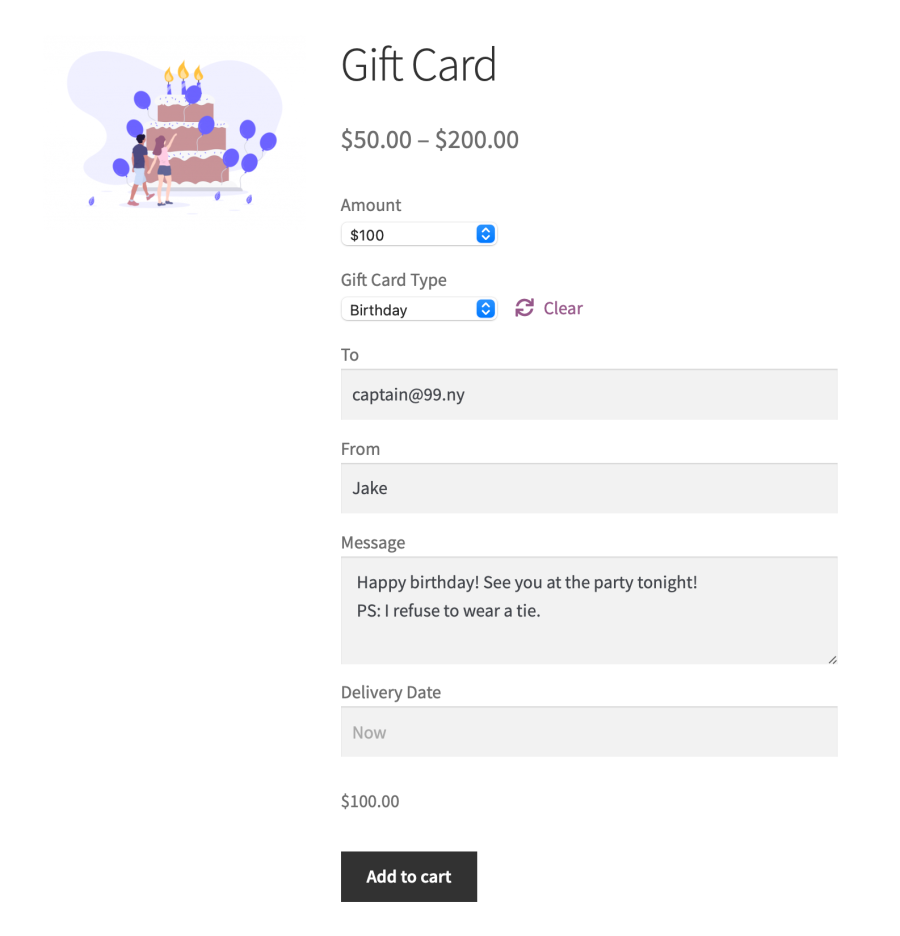
Avec Gift Cards, passer des commandes est presque instantané : au lieu d’utiliser leur carte de crédit, les clients fidèles peuvent payer avec les fonds provenant des cartes-cadeaux stockées sur leur compte.
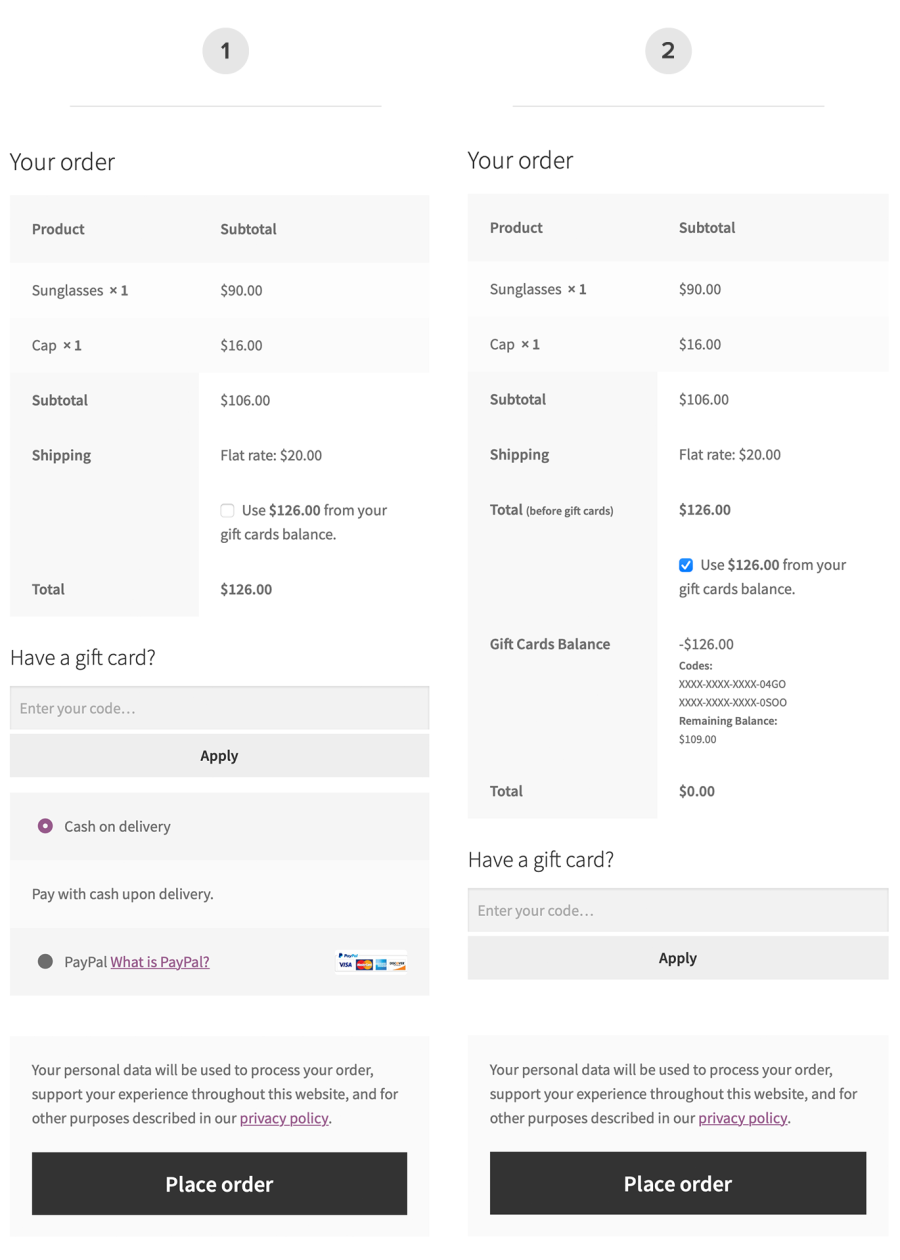
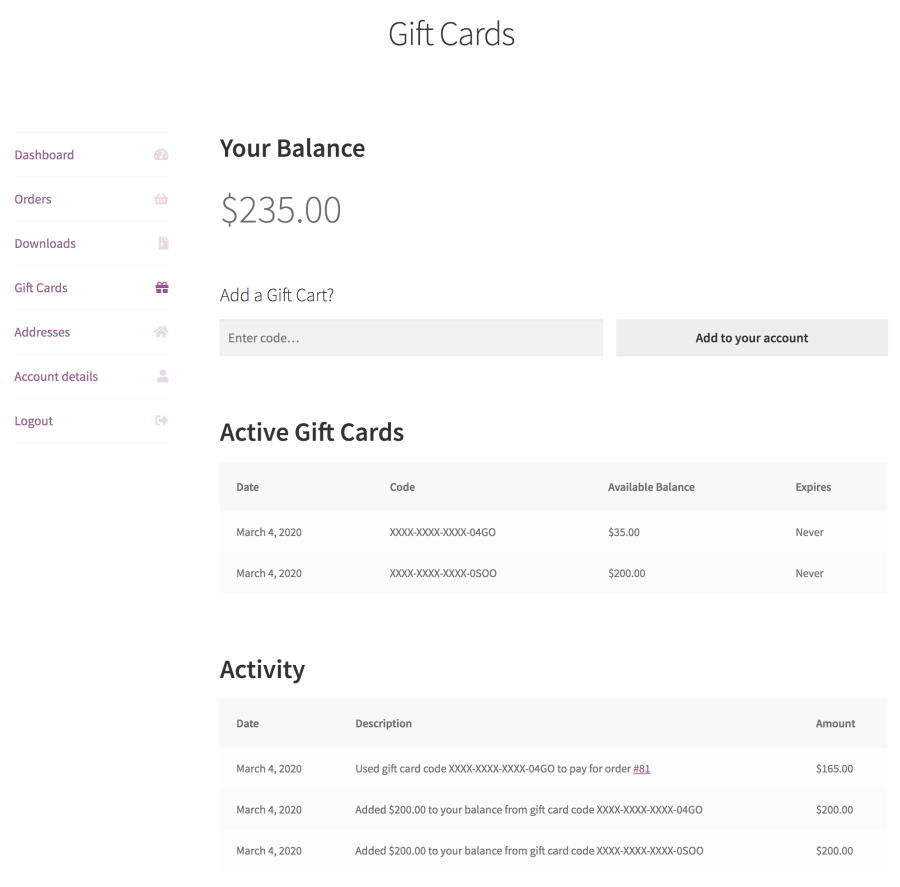
L’extension permet aux clients existants de :
C’est un accord gagnant-gagnant : votre client bénéficie d’un portefeuille numérique pratique et sécurisé intégré à votre boutique, tandis que vous profitez d’une plus grande fidélité et d’une meilleure rétention. Pour simplifier les choses pour les nouveaux clients, l’extension permet toujours d’appliquer des codes de carte-cadeau juste avant de passer une commande, tout comme les codes promo.
Facilitez le processus d’achat sur votre boutique pour les personnes qui recherchent un cadeau pratique et personnalisé ! Donnez à vos clients les plus fidèles une autre raison de revenir, ils présenteront votre boutique à de nouveaux clients.
L’extension contient exactement les fonctionnalités que vos clients apprécient le plus. Avec Gift Cards, ils peuvent :
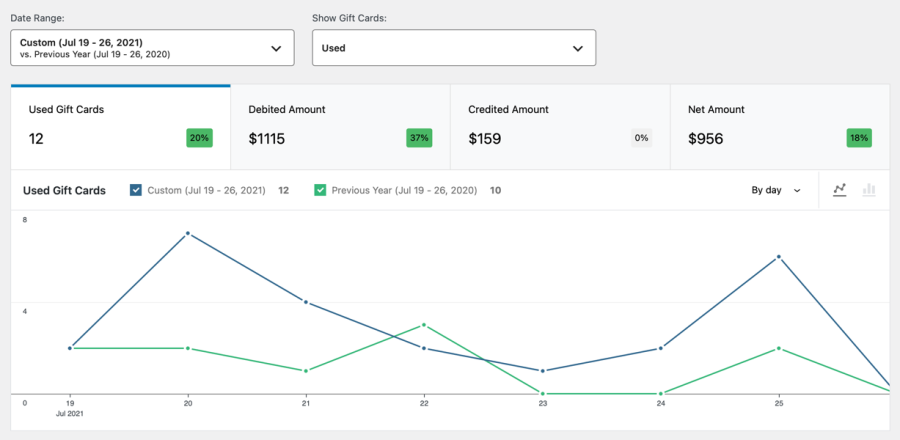
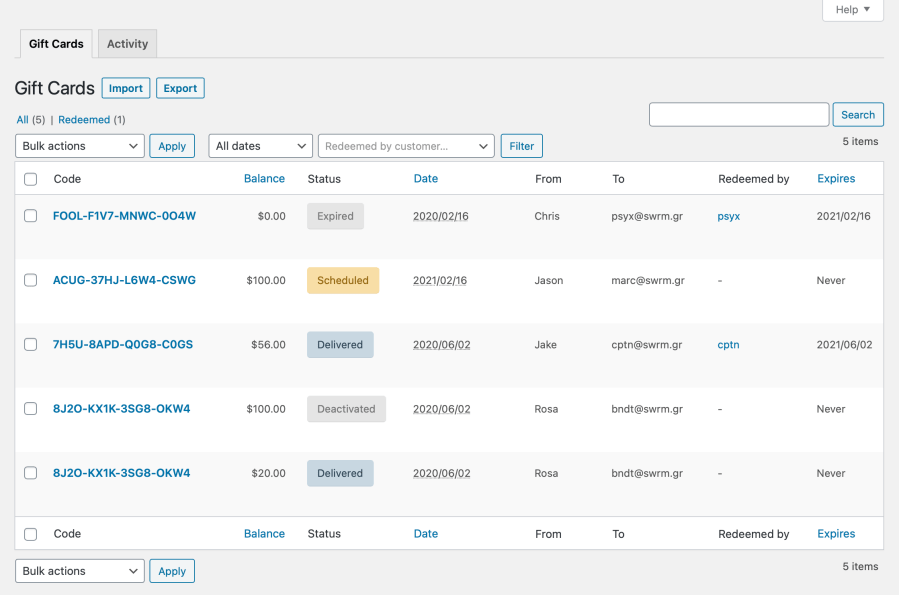
L’extension contient des fonctionnalités de gestion et de création de rapports qui vous permettent de garder une trace de chaque code émis :
Les chèques-cadeaux prépayés sont une forme de paiement et ne doivent pas être traités comme des codes promo. Commencez avec une extension qui les prend en charge, comme Gift Cards, et votre équipe comptable vous remerciera !
Vous voulez permettre aux clients de saisir un montant personnalisé lors de l’achat ? L’extension fonctionne parfaitement avec Name Your Price, l’extension WooCommerce la plus populaire et la plus robuste qui permet aux clients de décider ce qu’ils payent.
Gift Cards for WooCommerce is the official WooCommerce extension for selling prepaid, multi-purpose digital gift cards (also called e-gift vouchers). You create gift cards as products in your store, and customers buy them like any other item, then redeem the value at checkout. It supports both Simple gift cards (a single fixed value) and Variable gift cards (multiple denominations to choose from), so you can offer the price points that suit your shop.
Yes. When buying a gift card as a gift, the customer can add one or more recipients, include a personal message, and set the sender name that appears in the notification email. Recipients receive their gift card code by email, which makes Gift Cards for WooCommerce a good fit for birthdays, holidays, and other occasions.
Yes. Shoppers can choose a future delivery date so the gift card email arrives on the day they want, which is helpful for birthdays and holidays. The date picker is synchronized with the customer's own time zone, so scheduled deliveries land at the expected time.
Customers can apply a gift card code right before placing an order, similar to how they would apply a coupon. Logged-in customers can also add a gift card to their account, so its balance is stored and used automatically on future purchases without needing to re-enter the code. You can display the "Have a gift card?" form and balance option on the cart page as well as at checkout.
Yes. You can create expiring codes and set how long a gift card stays valid, counted from its delivery date. Expiration is configured per gift card, so you can offer different validity periods for different products.
The extension supports fixed-value Simple gift cards and multi-denomination Variable gift cards out of the box. If you want customers to enter a custom amount at purchase, Gift Cards for WooCommerce works with Name Your Price, which lets shoppers decide the value they pay. That combination is useful when you want fully flexible gift card pricing rather than set denominations.
No. Gift Cards for WooCommerce is designed for prepaid, multi-purpose digital gift cards that customers redeem online. It does not issue physical cards or generate printable or downloadable vouchers. If you need physical vouchers or printable certificates for in-store redemption, PDF Product Vouchers is the better fit.
A prepaid gift card is a form of payment loaded with real, purchased value, while a coupon is a promotional discount. Gift Cards for WooCommerce is built to treat gift cards correctly as prepaid balances rather than discounts, which keeps your accounting accurate. The extension is designed for prepaid, multi-purpose gift cards only, not free promotional codes, so it should not be used to hand out discount-style credit.
Yes. Gift Cards for WooCommerce includes management and reporting tools so you can keep track of every issued code. You can search, view, and edit gift cards by code, sender, or recipient, drill into detailed transaction logs, and generate balance reports for issued, used, and expired codes. Activity such as issuing, redeeming, paying with, and refunding a gift card is recorded for store-wide visibility.
Yes. The extension lets you import and export gift card codes using CSV files, which you can use to bring in existing codes created with the extension or to generate new codes in bulk. This is helpful if you are setting up many cards at once or moving them between environments. Note that importing cannot be used to sync codes between two separate stores or to update codes that already exist.
Gift cards can help bring in new customers and encourage repeat visits, since recipients often shop with you for the first time or spend beyond the card's value. Because Gift Cards for WooCommerce stores balances on the customer's account, unused amounts can be applied to future orders, which supports ongoing purchases. It gives you a straightforward way to add a gifting revenue stream and capture demand around holidays and special occasions.
Yes. Gift Cards for WooCommerce can be used to sell gift cards on a recurring basis when paired with WooCommerce Subscriptions. This is useful if you want to offer a gift card that is delivered and billed on a regular schedule, such as a monthly gift.
Yes. Customers buy gift cards like any other product in your store, so they check out through your standard WooCommerce payment methods. When a shopper pays with a gift card balance, that value is applied toward their order total at checkout.
Yes. Gift Cards for WooCommerce can work with Conditional Shipping and Payments, which lets you set rules around shipping methods and payment options. This is helpful if you want to adjust available methods when a cart contains a virtual gift card.
It is a strong fit for stores that want a lean, native way to sell and accept prepaid digital e-gift cards, with proper handling of gift card balances for clean accounting. It suits merchants who want scheduled delivery, multiple recipients, expiration controls, and clear reporting without extra complexity. Because it is built and maintained by Woo, it fits merchants who prefer an official extension that follows standard WooCommerce flows.
If your priority is physical gift cards, printable or PDF vouchers, or in-store redemption, this is not the right tool, since it only issues digital gift card codes. For those needs, look at PDF Product Vouchers instead. It also is not meant for promotional or discount-style codes, which are better handled as coupons.
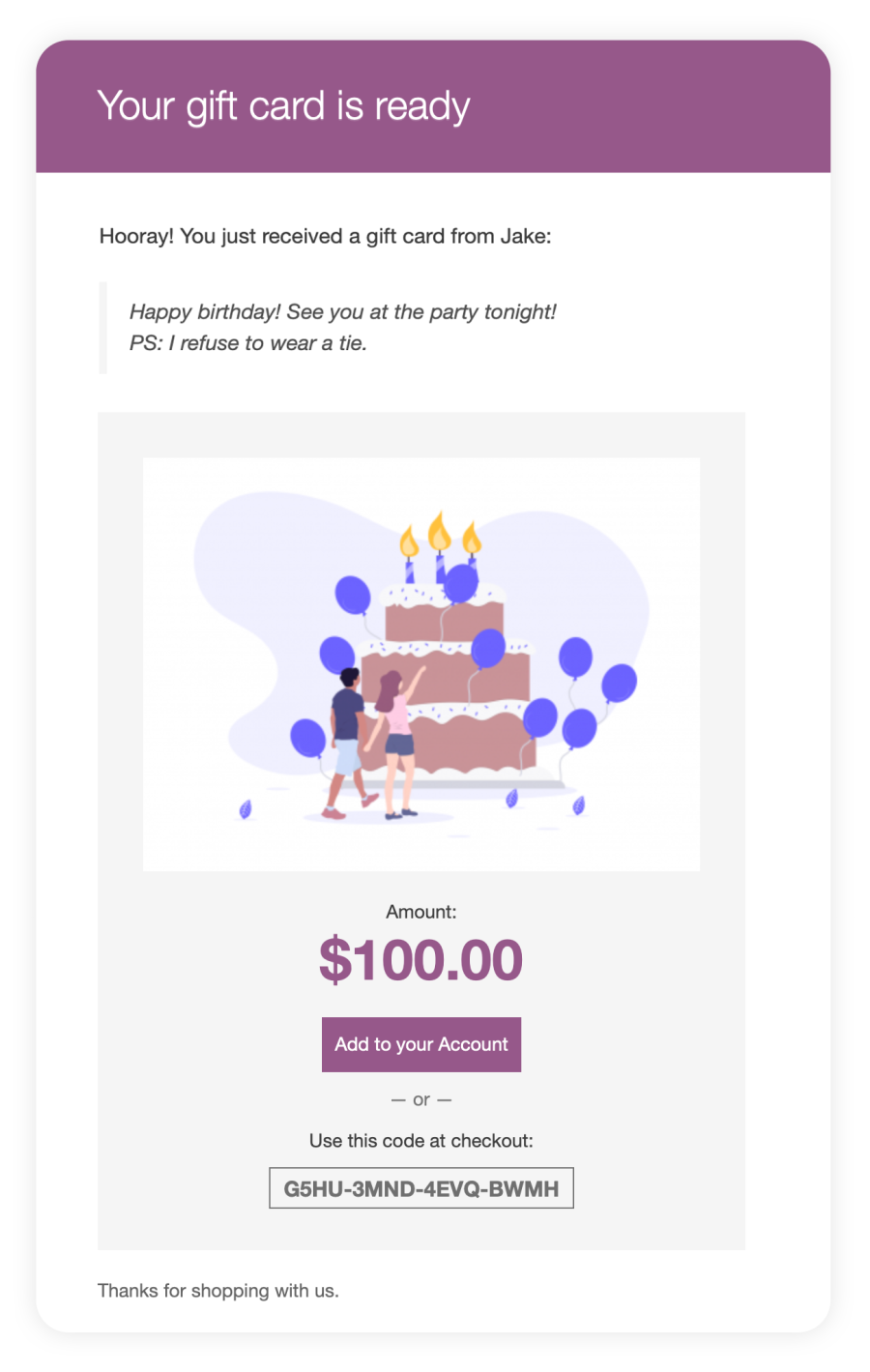
Yes. Once a gift card order is complete, the recipient is emailed their gift card code, and you can customize the design image shown in that email per product or variation. Delivery relies on background processing built into WooCommerce, so your hosting needs to support scheduled tasks for reliable delivery. If you schedule a future delivery date, the email is sent on that date.
You can set a recipient email design image for each gift card product or variation, and the emails follow the standard transactional WooCommerce email format. Deeper visual customization is limited, and the extension does not include ready-made card designs, so you supply your own image. For broader email styling, you would edit the WooCommerce email templates directly.
Catégories
Informations sur l'extension
Vérifications qualité
Compatibilité
Pays
Langues








