

Installations actives
10K+
Comparaison de produits
L’abonnement comprend
Assistance
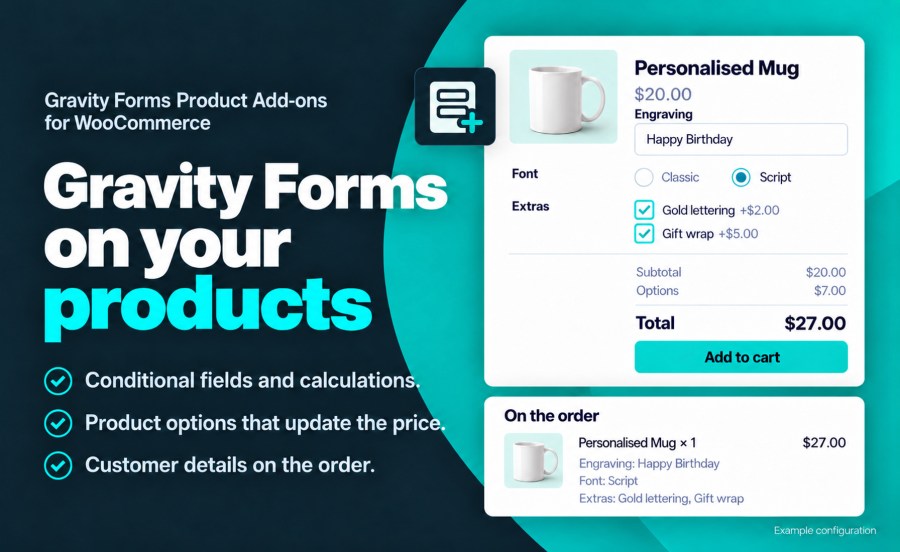
Avec l’extension Gravity Forms Product Add-ons, des formulaires de configuration de produit avancés peuvent être créés et liés à n’importe quel produit dans WooCommerce. Des formulaires contenant une logique conditionnelle, des champs de tarification, des prix saisis par l’utilisateur, des champs de tarification conditionnelle, une logique de bouton d’envoi conditionnel peuvent être créés pour vos produits. De plus, tout produit contenant un formulaire Gravity Form est suivi dans le panier pour garantir que, quelle que soit la complexité de votre formulaire de produit, seules des configurations uniques sont ajoutées au panier et les doublons sont incrémentés en quantité.
L’extension Gravity Forms Product Add-Ons vous donne un contrôle complet sur l’affichage des prix dans la boutique. Vous pouvez utiliser le prix par défaut affiché par WooCommerce ou, dans le cas d’un produit configurable contenant des champs de tarification, définir le prix sur une valeur comme « Seulement 1 000 $ ».
Vous avez également le contrôle du moment où le calcul de prix automatique intégré sera affiché, le cas échéant, ainsi que la possibilité de configurer chaque étiquette individuellement.
Champs standard :
Champs avancés :
Fonctionnalités :
Pas encore pris en charge :
Yes. Gravity Forms Product Add-ons requires Gravity Forms 2.9 or later, at any license level. Gravity Forms is sold separately.
The cart price is the WooCommerce product price plus the total of the form's Product and Option fields. A $20 mug with $7 of options is added to the cart at $27. Set the Regular Price to $0 when the form sets the whole price.
Yes. Assign a form to product categories and tags from the form's WooCommerce settings, and every product in them uses it. Settings made on the form apply to every product that uses it, and any product can override them section by section. See the documentation for both setups.
Yes. With cart editing enabled, an Edit link on the cart item reopens the product with the customer's selections filled in, and saving updates the item in the cart.
Yes. Form details show one per line in the Cart, Mini-Cart and Checkout blocks, and in the classic cart and checkout.
On the cart item, at checkout, on the order, in the customer's account, in order emails and in a Gravity Forms entry linked to the order. You choose whether the item shows every field, a selected set of fields, or a custom summary built from merge tags.
Yes. Map form fields to the cart item's weight, length, width, height and quantity, and shipping rates and labels use those values.
Gravity Forms Product Add-ons works with simple and variable products, WooCommerce Subscriptions, WooCommerce Bookings, Dynamic Pricing, Bulk Variation Forms, Quick View Pro, High-Performance Order Storage, and Gravity Perks such as Populate Anything, Conditional Pricing, Limit Choices and Nested Forms.
Questions before you buy go through the pre-sales form. After purchase, open a ticket from your WooCommerce.com account. Support tickets are answered by the Gravity Forms Product Add-ons developer.
Informations sur l'extension
Vérifications qualité
Compatibilité
Pays
Conditions





