


Subscription includes
Support
Points Made Simple is a WooCommerce plugin focused on earning, redeeming, and managing points based on customer purchases.
It combines straightforward settings with practical point calculations based on purchase amounts after discounts, making everyday points management easier.
Customers can redeem points at checkout, while store owners can manage balances, transaction history, and expiration dates directly within WooCommerce.
Some WooCommerce loyalty programs combine purchase rewards with product reviews, referrals, membership tiers, and other incentive systems.
These features can be valuable for some stores, but not every store needs them.
Many store owners simply want to award points for purchases and let customers use those points on future orders, without introducing unnecessary complexity.
Points Made Simple is designed for those stores.
Rather than offering as many features as possible, it focuses on the details that matter in everyday points management: accurate calculations, redemption, expiration dates, cancellations, and refunds.
The essential features you need, with settings and management kept simple.
That is the philosophy behind Points Made Simple.
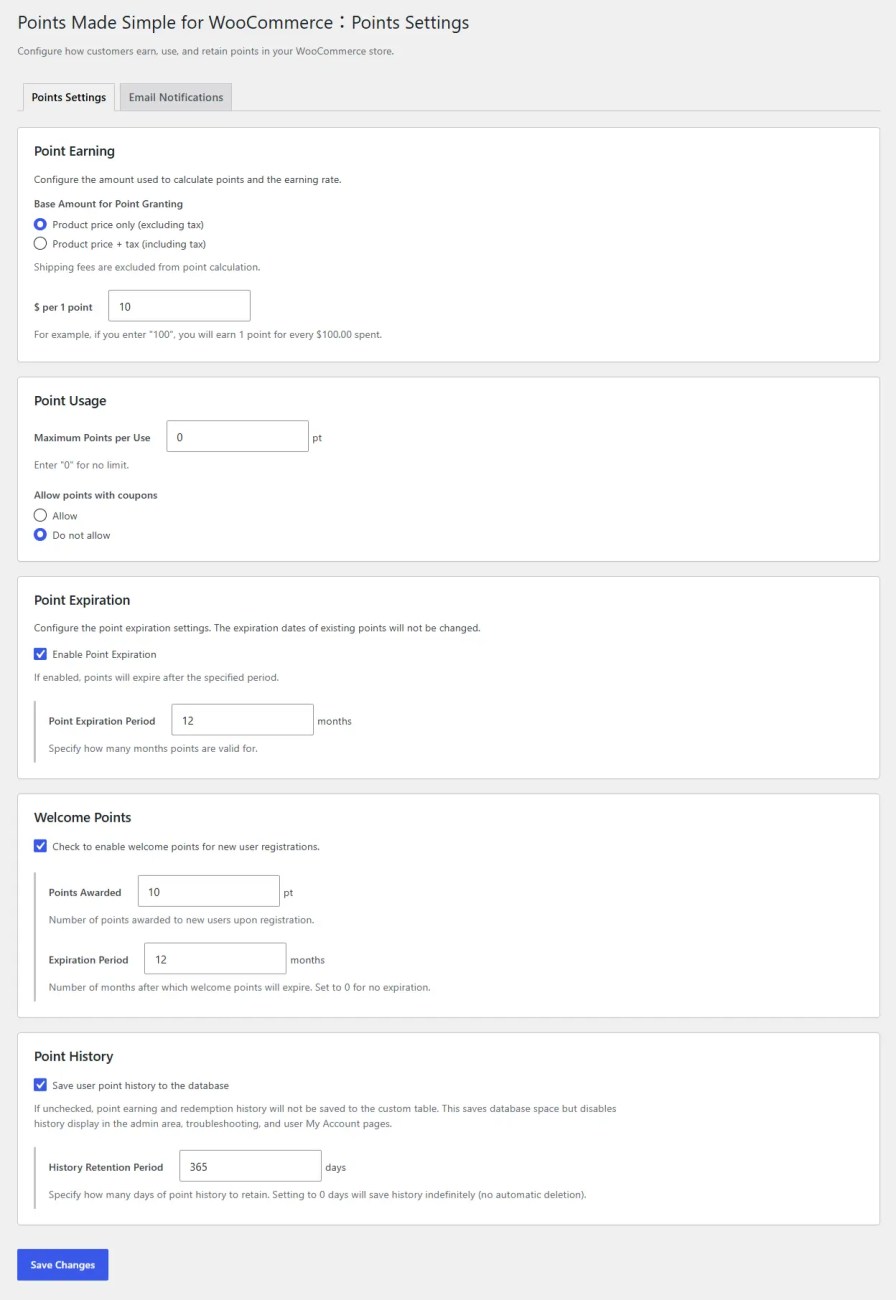
Instead of calculating points separately from individual product prices, Points Made Simple uses the final eligible product amount after coupon discounts and point redemption.
For example, if your store awards one point for every 10 currency units spent:
| Eligible purchase amount | Points earned |
|---|---|
| 100 | 10 points |
| 90 after discounts | 9 points |
| 85 after discounts | 8 points |
Fractional points are rounded down.
You can also choose whether points are calculated from product amounts including or excluding tax.
Shipping costs and shipping taxes are excluded from point earning in both modes.
This gives you control over how points are earned according to your store’s pricing and rewards policy.
Points Made Simple deducts redeemed points from the order total after WooCommerce has calculated product and shipping taxes.
One point is worth one unit of your store’s currency when redeemed.
For example, if an order total is 110 including tax and the customer redeems 10 points, the amount payable becomes 100.
The product tax amounts are not recalculated because points were redeemed.
The tax-inclusive or tax-exclusive setting used for earning points is independent of the tax treatment used during redemption.
This approach keeps point earning calculations and payment adjustments clearly separated.
Points can have expiration dates, and customers can hold both expiring and non-expiring points in the same balance.
When customers redeem points, the plugin automatically uses them in the following order:
Customers do not need to choose which point batches to use.
Expired points are automatically excluded from the available balance.
Points Made Simple records which earning batches were used during redemption.
If an order is canceled or fully refunded, redeemed points are restored with their original expiration information.
Points earned from the order are also reversed when applicable.
This means point adjustments take the original conditions into account rather than simply adding or subtracting numbers from the balance.
Note: Automatic proportional point adjustments for partial refunds are not supported. Store administrators can make manual adjustments when needed.
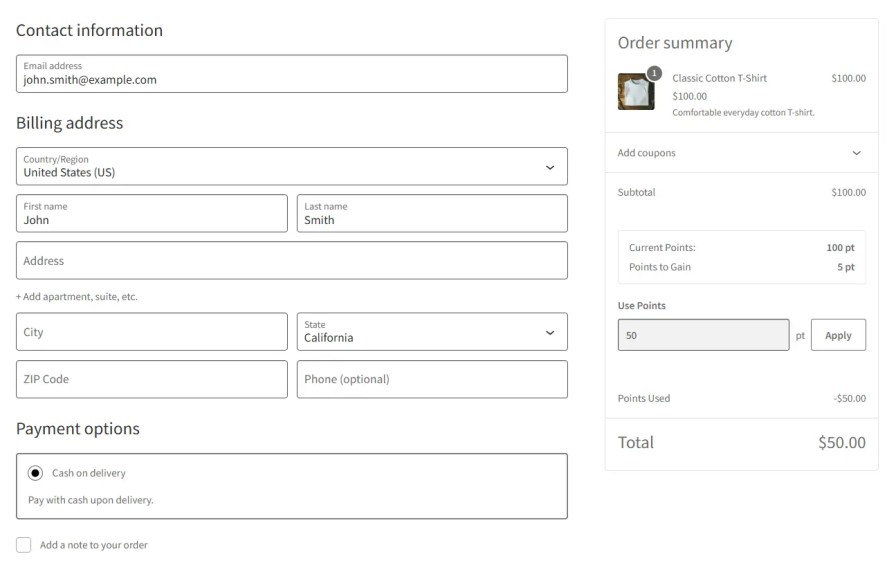
At checkout, customers can see their available point balance and the points they are expected to earn from the purchase.
They can enter the number of points they want to redeem, and the corresponding discount is reflected in the order total.
If the entered amount exceeds the available balance or redemption limit, it is automatically adjusted to the maximum usable amount.
Both Classic Checkout and Checkout Block are supported.
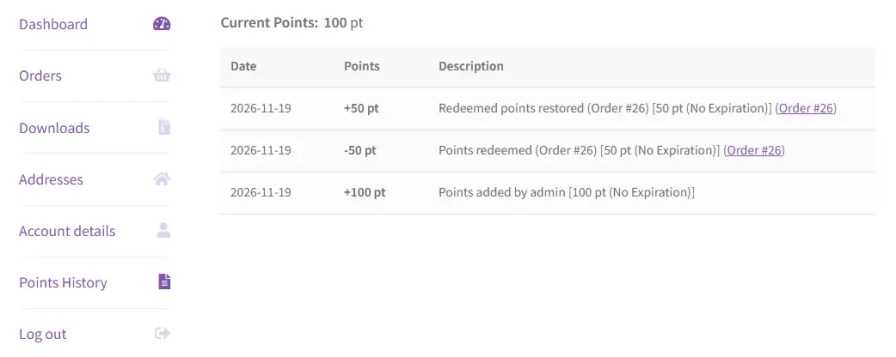
Customers can review their current point balance and transaction history through WooCommerce My Account.
The history includes point earnings, redemptions, restorations, and links to related orders.
This makes it easier for customers to understand how their balances change over time.
Awarding points is only part of a points program. Reminding customers about their available points can also encourage future purchases.
Points Made Simple includes two types of email notifications.
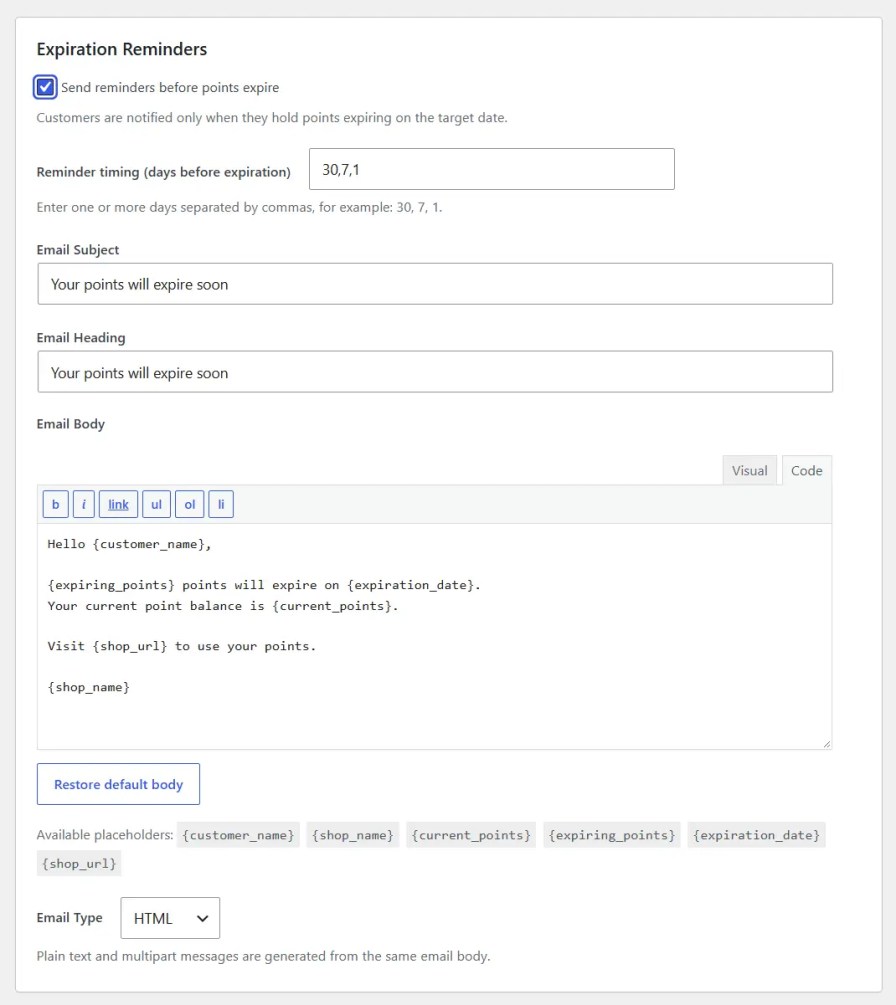
Automatically notify customers when their points are approaching expiration.
The default reminder schedule is 30, 7, and 1 day before expiration. These intervals can be customized.
Send periodic balance reminders to customers who hold non-expiring points.
Choose an interval of 1, 3, 6, or 12 months.
Both notification types use WooCommerce’s native email system.
Notification schedules, subjects, message bodies, and email formats can be configured together in a dedicated Points Made Simple settings tab.
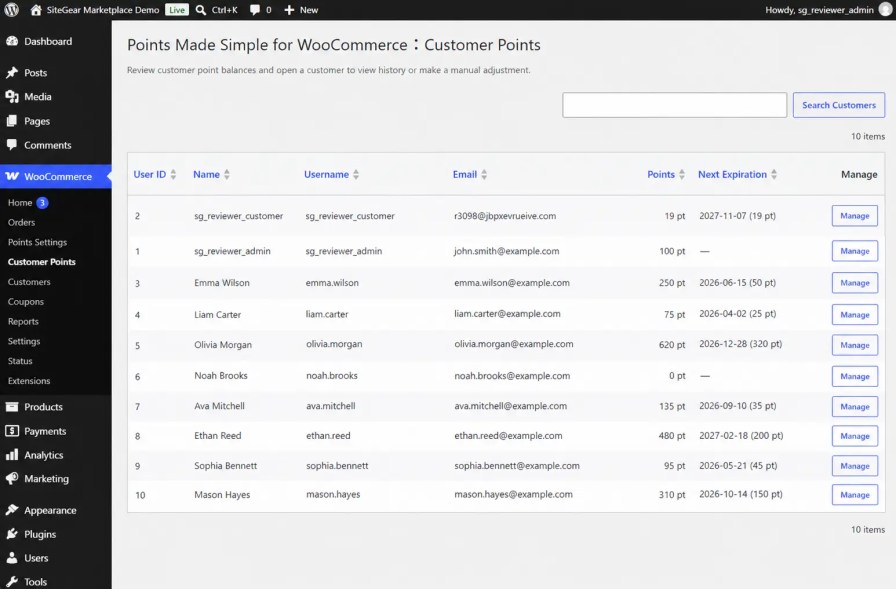
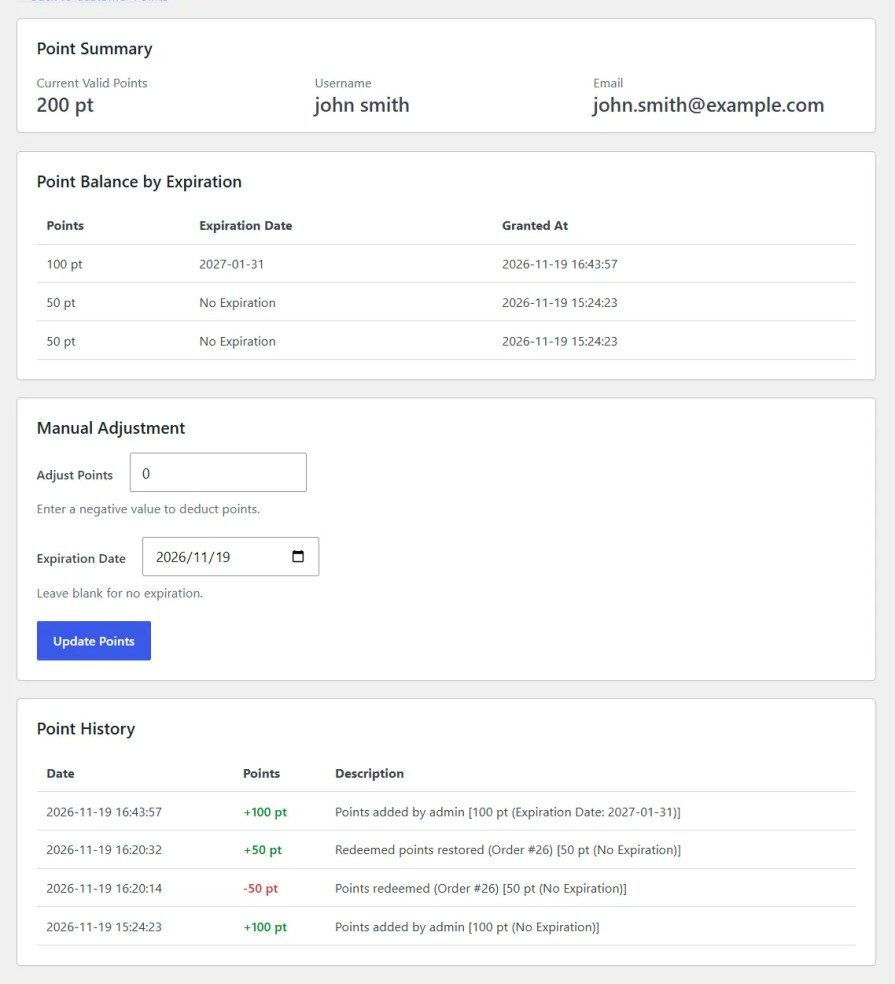
Store administrators can view and manage customer point balances from the WooCommerce dashboard.
Available information and actions include:
This makes it easier to respond to customer questions and manage individual adjustments without relying on an external service.
You can automatically award welcome points when a new customer registers.
Administrators can also add points to individual customer accounts and assign expiration dates to manually awarded points.
These features can be used for store-specific promotions, special rewards, or individual customer support.
Points Made Simple is designed around WooCommerce’s native features and workflows.
The plugin includes safeguards against duplicate point awards and repeated redemptions, with a focus on reliable day-to-day store operations.
Points Made Simple is designed for stores that want a straightforward, reliable purchase-based points program.
If you want customers to earn points from purchases, redeem them on future orders, and have those points managed accurately with expiration and transaction history, Points Made Simple provides the essential tools.
If you need a comprehensive loyalty platform with automated review rewards, social media incentives, referral programs, or VIP membership tiers, another solution may be more appropriate.
Points Made Simple focuses on doing the essentials well.
For installation instructions and detailed configuration guidance, please refer to the product documentation.
Yes. Points Made Simple supports both WooCommerce Checkout Block and Classic Checkout. The point redemption interface is added automatically, so no additional blocks or shortcodes are required.
Points are calculated based on the final eligible product amount after discounts and point redemption. You can choose whether the calculation includes or excludes product taxes. Shipping charges and shipping taxes are excluded.
No. Points are deducted from the order total after WooCommerce calculates taxes. Redeeming points does not recalculate or change the calculated tax amount.
You can manually award points to individual customers for promotions, reviews, events, or other purposes. However, Points Made Simple does not automatically detect reviews, referrals, or other customer activities to award points.
When an order is cancelled or fully refunded, redeemed points are restored with their original expiration information, and points earned from the completed order are reversed. Partial refunds do not trigger automatic proportional point adjustments; administrators can adjust points manually when necessary.
Points with the nearest expiration date are redeemed first. If multiple batches have the same expiration date, the oldest batch is used first. Points without expiration dates are redeemed after points with expiration dates.
Categories
Quality Checks
Countries