Instalações ativas
900+
A assinatura inclui
Suporte
Note: AutomateWoo Birthdays requires AutomateWoo to be installed and active on your store.
Who doesn’t like receiving kind wishes on their birthday? Send birthday emails that increase brand loyalty and build stronger relationships with your customers. And yes, it’s a piece of cake!
Because it’s really good for your business.
Birthday emails are one of the most effective emails you can send. Compared to regular promotional emails, they have a:
Even the least active of your customers will be pleased to get a personal birthday email wishing them a happy birthday. An eye-catching email and well-worded birthday message can help drive traffic to your site and remind customers about the products you offer.
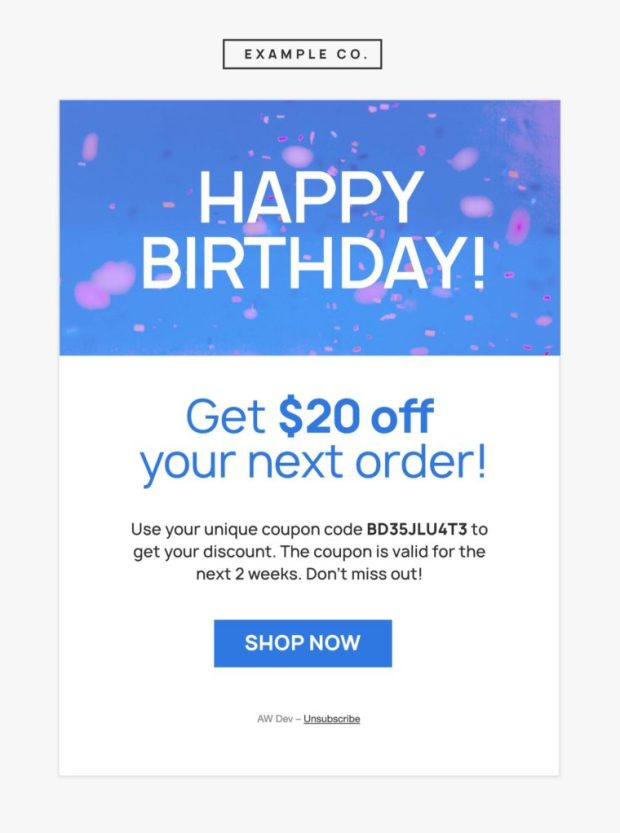
Encourage customers to treat themselves with a special WooCommerce birthday discount, deal, or offer from your store. Since it’s their birthday they’ll feel more inclined to make an unplanned purchase — and a coupon with a genuine offer might be just the nudge they need.
Craft a special WooCommerce birthday email that’s on-brand. Add a fun image or GIF for a lighthearted and celebratory tone. Don’t forget to add your customer’s name to the subject line and message! A simple and genuine message goes a long way.
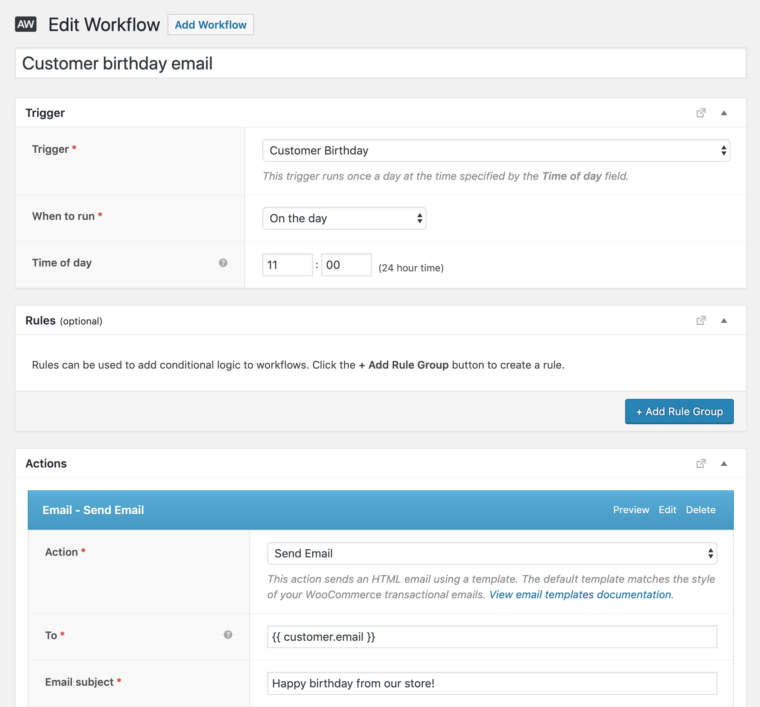
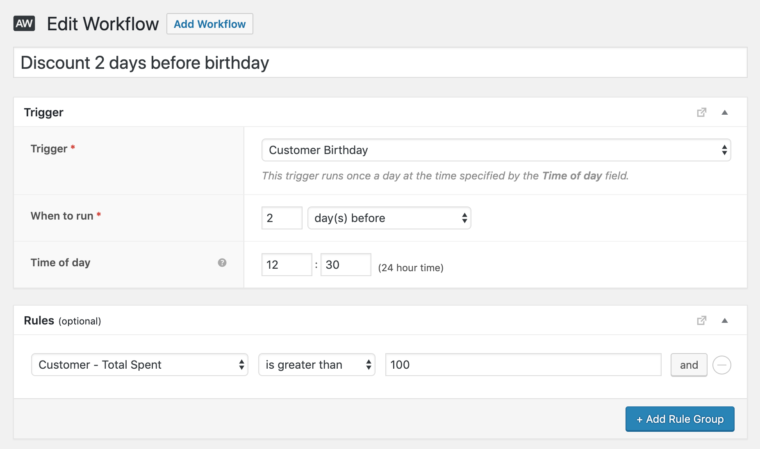
Even the most organized business couldn’t possibly keep track of every customer’s birthday! Fortunately, you don’t have to. With AutomateWoo, you can automatically send WooCommerce birthday emails when certain conditions are met — before, on, or after the customer’s birthday.
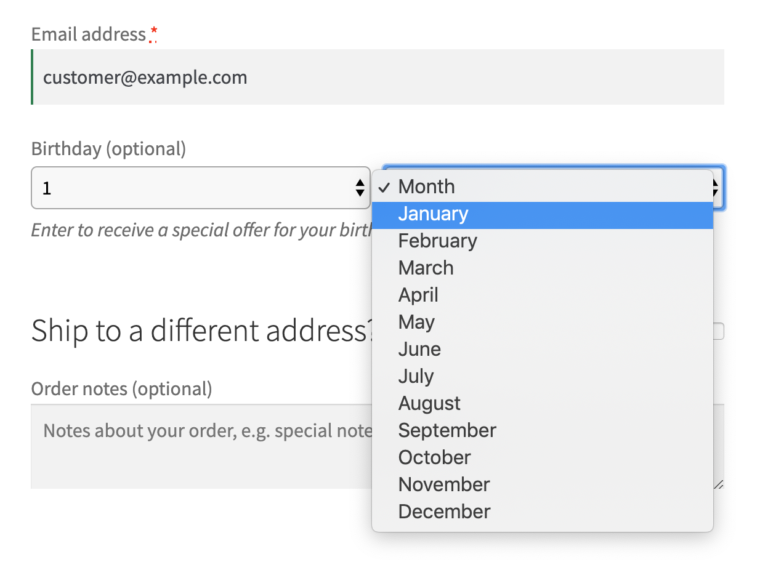
Need to gather birthday information from your customers? All you have to do is ask. Add a birthday field to your checkout and let customers know they’ll get a complimentary treat on their birthday.
We’re all about privacy.
The AutomateWoo Birthdays add-on lets your WooCommerce store send automated birthday emails, and an optional coupon, to customers on their special day. It adds a Customer Birthday trigger to AutomateWoo so you can run a workflow before, on, or after a customer's birthday, along with a birthday variable you can drop into your message to personalize the greeting. It is designed to help you strengthen customer relationships and encourage repeat visits without tracking anyone's birthday by hand.
Yes. The Birthdays add-on extends AutomateWoo, so you need AutomateWoo installed and active on your store for the add-on to work. AutomateWoo is the marketing automation engine that runs the workflows, and Birthdays adds the birthday-specific trigger, rules, and personalization on top of it. If you do not yet have AutomateWoo, you would purchase it separately.
The Birthdays add-on gives you two built-in ways to gather birthdays: an optional birthday field at checkout and an optional field in the My Account area under Account details. You choose to enable one or both in the AutomateWoo settings, and you can let customers know they will get a birthday treat as an incentive to share the date. You can also choose whether to collect the year of birth or only the month and day.
Yes. The Birthdays add-on is designed to pair a personalized birthday greeting with a special coupon, so customers get a genuine offer on their day. You can generate a custom, one-time coupon inside the workflow and include it in the birthday email, which gives shoppers a reason to treat themselves and come back to your store. Because the workflow is automated, the right offer goes out at the right time without manual work.
It can help. Birthday emails give even less active customers a friendly, personal reason to return, and pairing the message with a coupon can nudge an unplanned purchase. By automating a well-timed, on-brand birthday offer, the Birthdays add-on gives you tools to build loyalty and drive repeat visits over time. As with any marketing campaign, results vary by store, audience, and the offer you make.
Yes. Using the Customer Birthday trigger, you can schedule the workflow to run before, on, or after a customer's birthday, so you can send an early heads-up, a day-of greeting, or a follow-up reminder. AutomateWoo handles the timing automatically once the workflow is set up, so you do not have to track individual dates yourself.
Yes. Birthday emails are built in AutomateWoo's workflow editor, so you can add the customer's name to the subject line and message, include an image or GIF, and match your store's branding. The add-on also provides a birthday variable you can insert to personalize the greeting further. This helps each message feel genuine rather than generic.
Yes. Besides the Customer Birthday trigger, the add-on provides two rules, Customer – Next Birthday Date and Customer – Last Birthday Date, that you can use inside other AutomateWoo workflows. For example, you could send a "treat yourself" abandoned cart email to shoppers whose birthday is in the current month, add a small gift to orders placed during a customer's birthday month, or tailor a win-back email for customers with an upcoming birthday. This lets birthday data enrich your wider marketing, not only a single annual email.
Yes. The add-on is built with privacy in mind and supports GDPR. Because the year of birth is not required for most birthday features, you can choose to collect only the month and day, which limits the personal data you store. Birthday fields are optional for customers, so they share the date only if they want the birthday perk.
The Birthdays add-on is a good fit for WooCommerce stores that already use, or plan to use, AutomateWoo and want a straightforward way to reward customers and encourage loyalty. It suits shops where a personal touch and a timely offer can prompt repeat purchases, such as fashion, food and beverage, beauty, gifts, and other consumer brands. If you want to expand into broader automated marketing like follow-up emails, abandoned cart recovery, and win-back campaigns, those are handled by AutomateWoo itself.
AutomateWoo is the marketing automation extension for WooCommerce that runs workflows made up of triggers, rules, and actions, covering things like follow-up emails, abandoned cart recovery, and win-back campaigns. The Birthdays add-on is a smaller extension that plugs into AutomateWoo to add birthday-specific features: a Customer Birthday trigger, birthday date rules, a birthday personalization variable, and checkout and account fields for collecting birthdays. In short, AutomateWoo is the engine, and Birthdays adds birthday campaigns on top of it.
Yes. Birthday collection works when customers have an account, since the birthday field appears to logged-in customers at checkout and in the My Account area. If account creation at checkout is turned off in your store settings, birthdays will not be collected, so it is worth confirming that customers can create accounts before you launch birthday campaigns.
Not currently. The Birthdays add-on does not include a built-in way to import birthdays collected in a different field or plugin, so migrating existing birthday data would require a custom approach. If you are starting fresh, you can begin collecting birthdays through the checkout and account fields the add-on provides.
A common approach is to use AutomateWoo with its Birthdays add-on. Together they let you collect customer birthdays at checkout or in the account area, then automatically send a personalized birthday email, with an optional coupon, before, on, or after the customer's birthday. Because the workflow runs on its own, you set it up once and it continues to celebrate customers throughout the year.
Categorias
Informações da extensão
Verificações de qualidade
Compatibilidade
Países
Requisitos