

Comparação de produtos
A assinatura inclui
Suporte
Your pricing strategy is more complex than a single number — and your store should reflect that. Order Discounts and Conditional Fee for WooCommerce lets you create rules that automatically apply discounts or fees based on over 15 cart conditions: weight, dimensions, subtotal, user role, purchase history, shipping zone, payment method, coupon codes, product category, and more. One plugin. Every pricing scenario your business needs, handled automatically in real time.
A wholesale buyer who orders $500 worth of goods should pay a different effective price than a guest buying one item. A customer in a remote shipping zone costs more to serve — that should be reflected at checkout. A loyal customer who has placed ten orders deserves a reward that a first-time visitor does not. A cart over 20kg has real additional handling costs that your flat shipping fee does not cover.
Right now, if none of these scenarios are handled automatically, one of two things is happening: you are leaving money on the table, or you are manually adjusting orders after the fact — which does not scale and creates errors.
Order Discounts and Conditional Fee for WooCommerce closes every one of these gaps with a rule you set once and that runs automatically from that point forward.
Build a rule in minutes. Choose your conditions, set whether the result is a discount or a fee, define the amount or percentage, and save. From that point on, every cart that meets your conditions triggers the rule automatically — applied in real time, displayed clearly to the customer, and requiring zero manual work from your team.
Apply custom discounts or additional fees based on specific cart conditions — cart subtotal thresholds, product weight, order dimensions, user roles, or any combination of conditions you define. The same rule engine handles both sides: reward customers who meet your criteria, and recover costs from orders that require extra handling. One system for your entire pricing strategy.
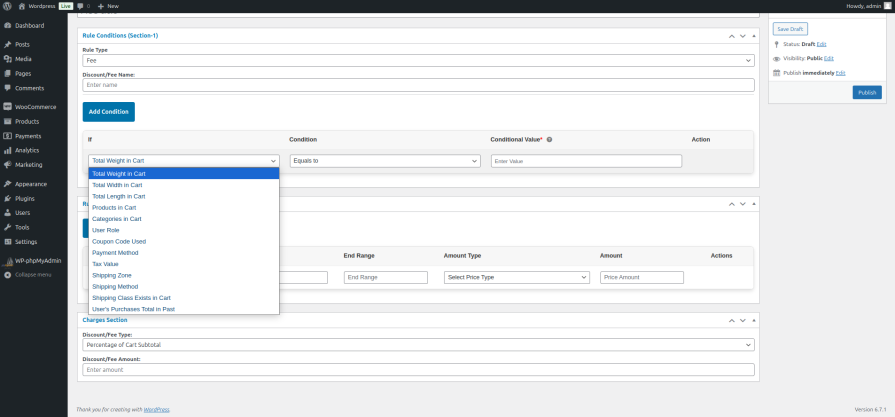
The condition library covers every variable that meaningfully affects your pricing decisions. Cart properties include total weight, dimensions, and subtotal. Customer attributes include user role, past purchase history, and shipping zone. Order details include payment method, applied coupon codes, and tax values. Combine multiple conditions in a single rule for precise targeting — a discount that only applies to wholesale buyers in a specific zone ordering above a certain value, for example.
As a customer adds items, changes quantities, selects a shipping method, or enters a coupon, the applicable discounts and fees recalculate and update instantly. Customers see the impact of their choices in real time — which is one of the most effective nudges toward adding one more item to unlock a threshold discount.
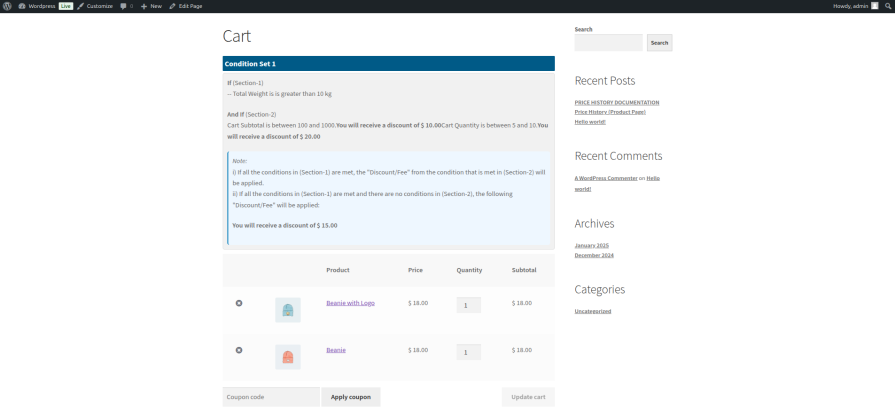
Active discount rules appear directly on the cart page — showing customers what discount they have earned and, critically, what they are close to unlocking. “Add $12 more to get free shipping.” “Spend $200 to unlock 10% off.” Visible progress toward a reward is one of the most reliably conversion-lifting mechanics in ecommerce, and this plugin puts it directly in front of your customer at the moment it matters most.
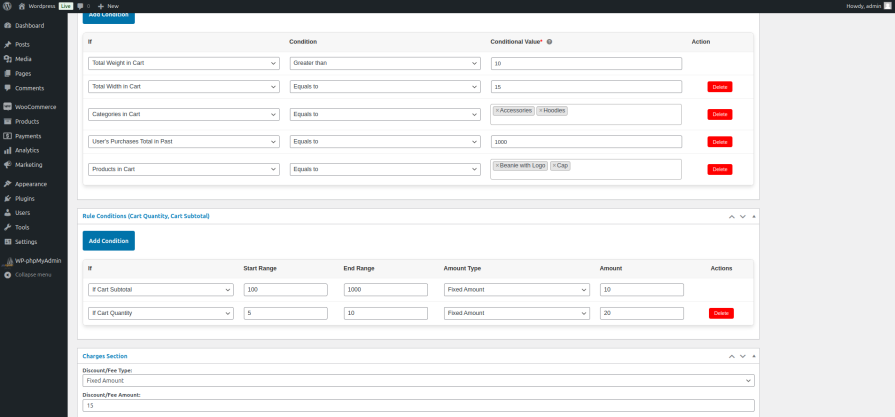
The rule builder is designed for store owners, not developers. Select your conditions from a dropdown, set the discount or fee value, define whether it applies as a fixed amount or percentage, and save. No code, no custom development, no ongoing maintenance. Complex pricing logic that used to require a developer is now a five-minute admin task.
Apply automatic discounts to orders placed by customers with a wholesale or member user role — a different effective price for different buyers, applied automatically at checkout without requiring separate product listings or manual processing.
Reward customers who spend above a defined amount with a percentage discount or free shipping. Display the threshold on the cart page and watch customers add one more item to reach it — consistently, on every qualifying order.
Orders above a certain weight or with large dimensions cost more to fulfil. Add a conditional handling fee that applies automatically when cart weight or dimensions exceed your threshold — recovering real costs without changing your base shipping rates.
Credit card processing fees eat margin on every transaction. Apply a small surcharge to orders using card payment and offer a discount for bank transfer or other lower-cost methods — automatically, at checkout, with no manual work.
International or remote zone orders cost more to ship. A conditional fee that applies based on the customer’s shipping zone reflects that cost accurately — without raising prices for everyone or manually adjusting orders after they are placed.
Automatically apply a discount to customers who have placed a defined number of previous orders. Reward loyalty without building a separate loyalty program — the purchase history condition handles the targeting automatically.
Yes. Rules can combine multiple conditions — for example, a discount that only applies to wholesale buyers who order above a specific subtotal and are shipping within a defined zone. The more specific your targeting needs to be, the more conditions you can layer.
Yes. Multiple rules can be active at the same time. A cart can trigger a discount from one rule and a fee from another — both apply in real time, both display clearly to the customer.
No. Rules are evaluated efficiently at cart level without impacting product page performance or checkout speed.
Yes. Active rules and their conditions are displayed on the cart page — customers see what they have earned and what triggered the rule.
Yes. Coupon codes are one of the available conditions, so you can create rules that apply additional discounts or fees when a specific coupon is present in the cart.
You are covered by a full 30-day money-back guarantee. If it does not fit your pricing strategy, request a refund — no questions asked.
Categorias
Informações da extensão
Verificações de qualidade
Países






