
Ícone do produto

Hotel Booking para WooCommerce

Run reservations, pricing, deposits, and guest details for your hotel, homestay, or rental property, all inside WooCommerce, with no double bookings and no manual follow-up.
Escolha uma opção de cobrança
$59
Economize 20%
$118 $94.40

Comparação de produtos

A assinatura inclui

  • Melhorias e atualizações de produtos
  • Suporte ao cliente
  • Garantia de 30 dias para reembolso

Key benefits

  • Never lose revenue to overbooking. Occupancy limits, blocked dates, and a live calendar keep every room’s availability accurate.
  • Price like a real hotel, not a flat rate. Daily rates, seasonal pricing, and length-of-stay discounts adjust automatically.
  • Get paid without chasing guests. Deposits are optional, and the remaining balance invoice and payment link go out automatically.
  • Collect exactly what each booking needs. Guest types, extra services, and 11 custom field types adapt to any property.
  • Run online and offline bookings from one place. Manual entries, request forms, and instant bookings all land in the same dashboard.

Who is this plugin for?

Hotel Booking fits any property that takes date-based reservations, from a single guesthouse to a multi-property rental business.

  • Hotels and motels. Manage multiple room types, seasonal rates, and front-desk-style manual bookings from one dashboard.
  • Homestays and guesthouses. Offer a simple instant booking form with deposits, without the overhead of a full property management system.
  • Villas and serviced apartments. Handle longer stays with length-of-stay discounts and custom guest information fields.
  • Bed and breakfasts. Sell breakfast and other add-on services priced per guest type alongside the room.
  • Vacation rentals with multiple listings. Keep every property’s availability, pricing, and bookings in one WooCommerce store.
  • Resorts. Combine multiple room types, seasonal pricing, and paid add-on services like spa packages or airport transfers.
  • Hostels. Set guest-type pricing and occupancy limits to manage shared rooms and beds alongside private rooms.
  • Cabins. Apply minimum-stay rules and weekday restrictions to match seasonal availability in remote or nature locations.
  • Boutique hotels. Match the booking form to your brand with custom colors, fonts, and a personalized checkout experience.

How it works

From setting up a room to welcoming the guest, the whole process runs in one flow.

  • Create room. Add a room as a WooCommerce product with photos, description, and amenities.
  • Set price. Configure daily pricing, seasonal rates, and length-of-stay discounts for that room.
  • Set availability. Define allowed and blocked dates, advance booking windows, and stay length rules.
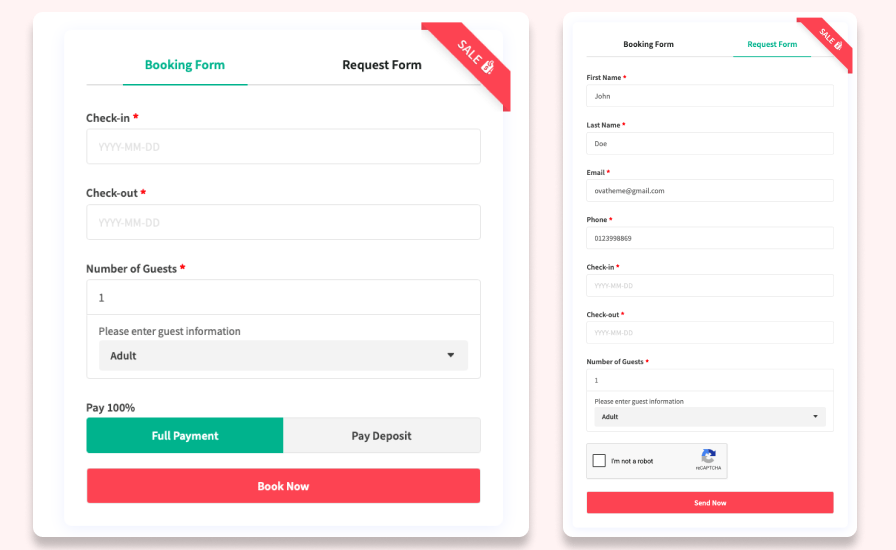
  • Accept booking. Guests reserve instantly or send a request for approval through the front-end form.
  • Receive payment. Guests pay in full or leave a deposit through your existing WooCommerce payment gateways.
  • Manage booking. Track the reservation on the booking calendar and dashboard, alongside any manual entries.
  • Send reminder. An automatic reminder email goes out ahead of arrival to reduce no-shows.
  • Check-in. The guest arrives at the default check-in time, with all booking and guest details already on file.

Reservations built on WooCommerce, not bolted onto it

Hotel Booking turns WooCommerce into a reservation system for hotels, motels, homestays, and rental properties. Because every booking is a WooCommerce order, you keep the payment gateways, tax rules, and reporting you already trust, instead of running a separate booking tool alongside your store.

Price rooms the way real properties do

Set daily pricing to charge more on weekends and less midweek, or seasonal pricing to raise rates for peak season and lower them in the off-season. Reward longer stays with length-of-stay discounts, for example, $50/night for 3–5 nights and a lower rate for 6–10 nights, without creating duplicate room listings.

Keep availability accurate, automatically

Occupancy limits and extra-guest pricing stop rooms from being oversold. Shape exactly when guests can book with rules such as:

  • Advance booking windows. Set minimum and maximum days ahead of arrival guests can book.
  • Stay length limits. Set minimum and maximum nights per booking.
  • Weekday restrictions. Block specific weekdays, with an override option when you need one.
  • Allowed and blocked dates. Open or close date ranges on top of the rules above.

The front-end and back-end calendars stay in sync with every rule, so what guests see is what you actually have.

Turn deposits into cash flow, not chasing

Guests can pay in full or reserve with a deposit, fixed or percentage-based. Once the deposit is in, the plugin emails the guest an invoice for the remaining balance with a payment link, so collecting the rest doesn’t depend on someone remembering to follow up.

Capture the right details for every guest

Define guest types, such as adults and children, each with its own pricing and information fields. Sell add-on services like airport transfers, breakfast, or spa packages, priced per guest type. Eleven custom checkout field types, including text, checkbox, select, file upload, phone, and email, mean the booking form asks for exactly what your property needs, nothing more.

Meet guests where they are: instant or on request

Some guests want to book and go; others need approval first. Offer an instant booking form for the former and a request form for the latter, so the same plugin fits a boutique guesthouse and a fully automated rental operation.

Protect revenue with reminders, cancellations, and spam control

Automatic reminder emails cut down on no-shows, and admins get an instant alert the moment a booking is canceled. Cancellation rules set a minimum notice period and a cutoff for accepting cancellations at all, so a high-value booking can’t be pulled at the last minute. reCAPTCHA keeps both the booking and request forms free of spam.

One dashboard for every booking, online or offline

Phone, email, and walk-in reservations get recorded manually, with details auto-filled for repeat guests. From there, every booking, online or offline, lives in one dashboard: edit details in a popup and filter by customer, product, date, or status to find what you need in seconds.

Full price transparency before checkout

Guests see guest information, extra services, and totals with taxes throughout the cart and checkout, so there’s nothing to dispute after the booking is confirmed.

Make it look like your property, not a plugin

Adjust colors, font sizes, weights, and heights for headings, text, borders, buttons, and labels, so the booking form matches your site instead of looking bolted on.

Try every feature before you buy

Explore the full plugin in a free, no-signup sandbox before you decide.

Why choose Ova Hotel Booking?

  • Runs on WooCommerce, not a separate system. Keep the payment gateways, tax rules, and order reporting you already use.
  • Fits any property type. The same plugin covers hotels, motels, homestays, villas, and vacation rentals.
  • Collects payment without manual follow-up. Deposits, remaining-balance invoices, and payment links are handled automatically.
  • Prevents overbooking. Occupancy limits, date rules, and synced calendars keep availability accurate.
  • Backed by documentation and support. Setup guidance and a support channel are available after purchase.

Perguntas frequentes

Does this replace WooCommerce checkout, or work alongside it?

It works alongside it. Bookings become standard WooCommerce orders, and the plugin supports both the WooCommerce Cart and Checkout blocks and the classic checkout.

Can guests pay a deposit instead of the full amount?

Yes. Set deposits per room as a fixed amount or a percentage. Once paid, guests automatically receive an invoice and payment link for the remaining balance.

Can I charge different prices for weekends, seasons, or longer stays?

Yes. Daily pricing, seasonal pricing, and length-of-stay discounts can all run on the same room at the same time.

Is this only for hotels, or does it work for homestays and short-term rentals too?

It works for any property that takes date-based reservations, including motels, homestays, villas, and serviced apartments.

Can I add bookings that came in by phone or email?

Yes. Manual booking creation records offline reservations and manages them in the same dashboard as online bookings.

Will this slow down my site?

Booking scripts and styles load only on pages with booking forms or room products, keeping the impact on the rest of your store minimal.

What if I need help after I buy?

Documentation covers setup and configuration in full, and support is available through the Marketplace support channel.

Avaliações de clientes

Estamos aceitando avaliações para este produto e as exibiremos quando tivermos mais algumas.

Informações da extensão

  • Versão PHP necessária: 7.4
  • Testado com WordPress: 6.9.4
  • Testado com WooCommerce: 10.6.1
  • Requer pelo menos o WordPress: 6.0
  • Requer pelo menos o WooCommerce: 9.3

Países

  • Em todo o mundo

Related Products

Preço: $79 Anualmente
Classificado com 3.4 de 5 estrelas
Preço: $279 Anualmente
Classificado com 3.2 de 5 estrelas
Preço: $59 Anualmente
Classificado com 3.1 de 5 estrelas
Preço: $109 Anualmente
Classificado com 2.7 de 5 estrelas
Preço: $49 Anualmente
Classificado com 4.1 de 5 estrelas
Preço: $109 Anualmente
Classificado com 2 de 5 estrelas
Preço: $109 Anualmente
Classificado com 2.3 de 5 estrelas
Preço: $39 Anualmente
Classificado com 2.8 de 5 estrelas
Preço: $109 Anualmente
Classificado com 2.6 de 5 estrelas
Uso dos seus dados pessoais
Nós e nossos parceiros processamos seus dados pessoais (como dados de navegação, endereços IP, informações de cookies e outros identificadores únicos) com base em seu consentimento e/ou nosso interesse legítimo para otimizar nosso site, atividades de marketing e sua experiência de usuário.




