

Active installs
400+
Product comparison
Subscription includes
Support
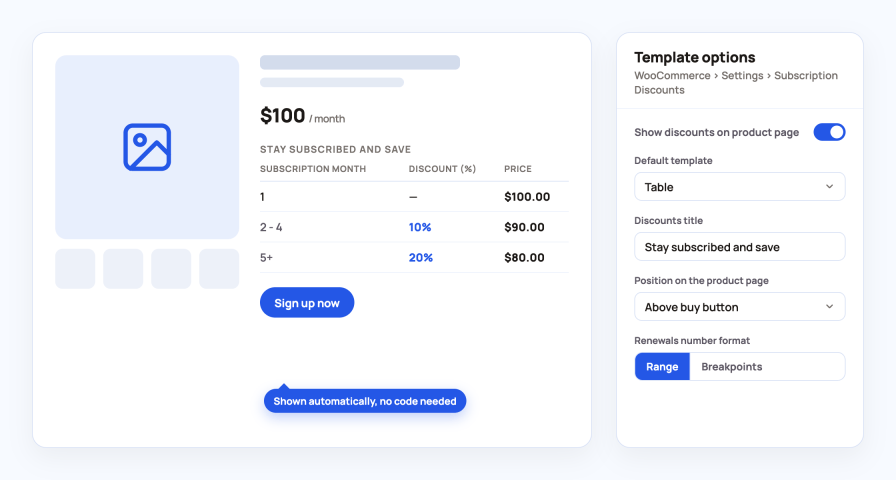
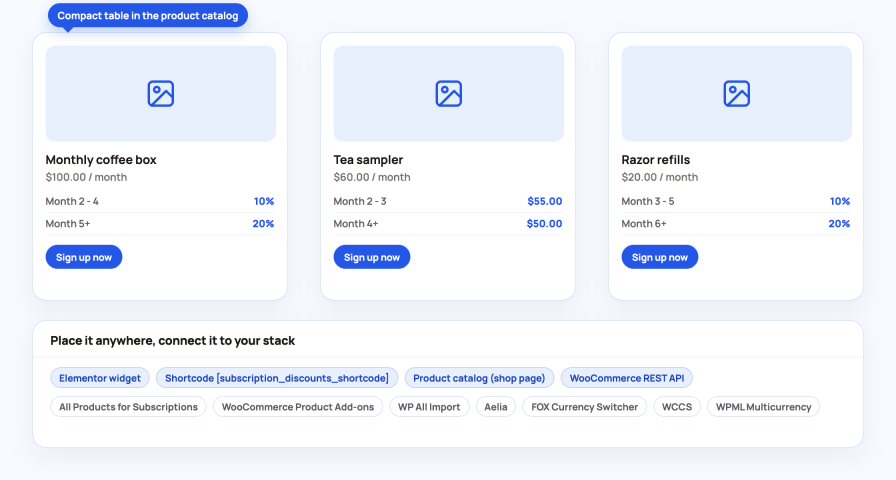
Customers see what they will pay in month 1, month 2 and later before they sign up. The table appears next to the price with no code and no template edits.
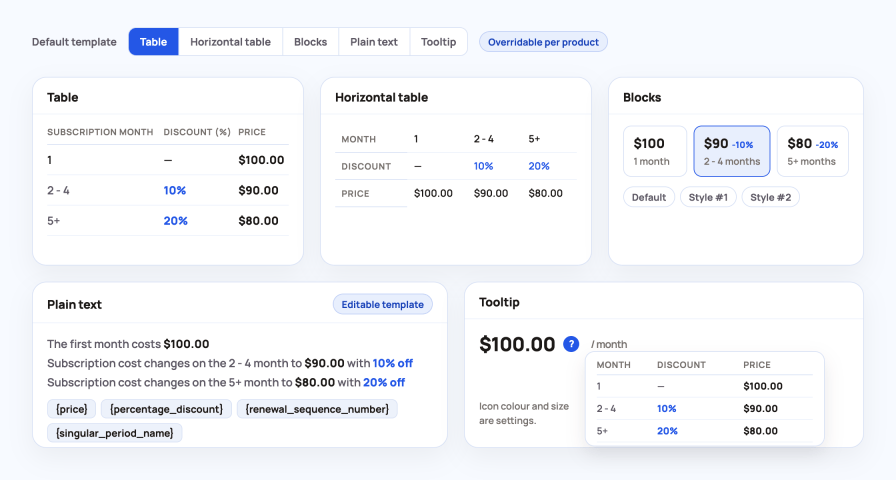
Pick a store default and override it per product.
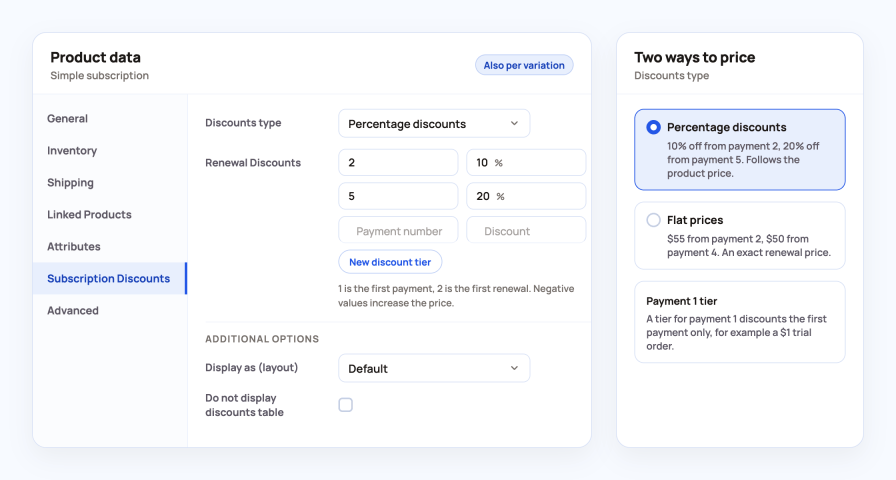
Every subscription product gets a Subscription Discounts tab. Add a tier, enter the payment number it starts from and the discount, and you are done.
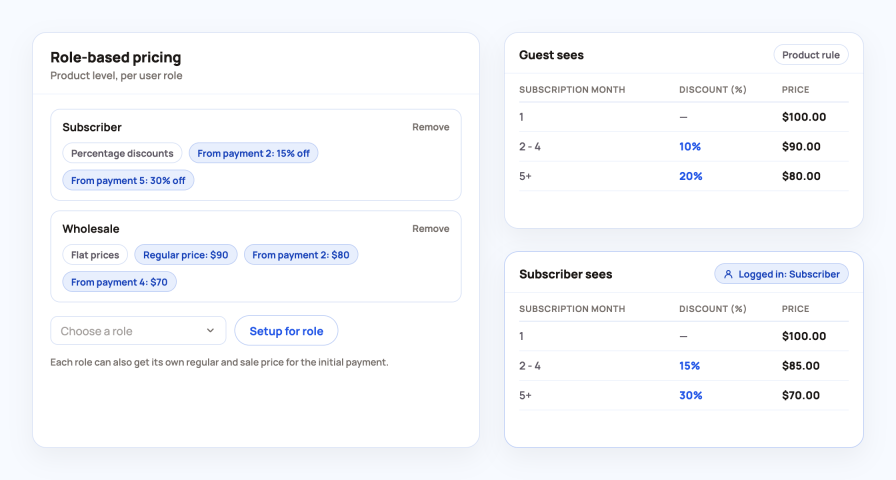
Reward existing customers or trade buyers on the same product without creating duplicate products.
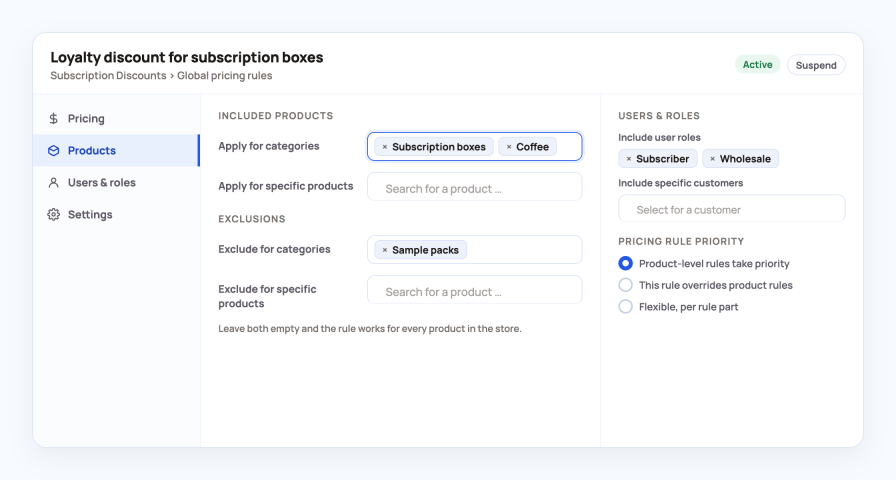
Create a rule once and apply it across the store instead of editing products one by one.
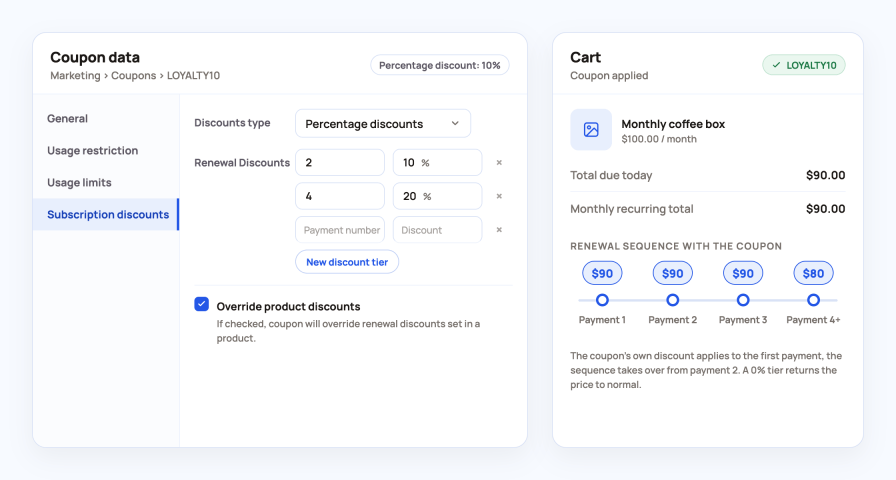
Every WooCommerce coupon gets a Subscription discounts tab. The sequence applies only when the code is used, which makes it ideal for campaigns and partner offers.
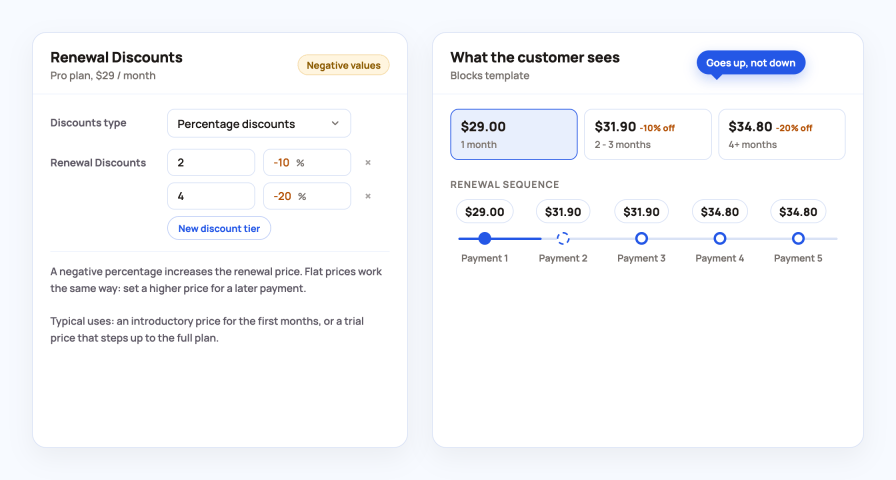
The same sequence can go the other way. Start low and step up to the full price.
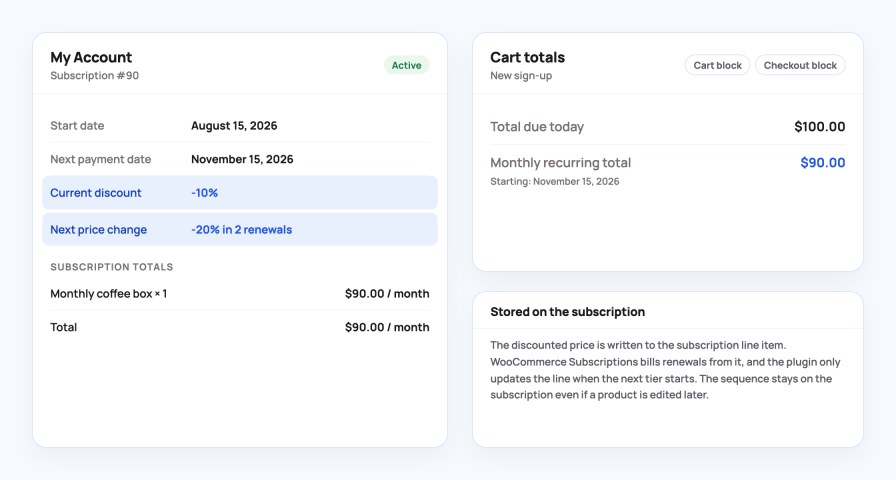
The discount is written to the subscription at checkout and updated when the next tier starts, so both sides always see the real renewal price.
The discounts are not limited to the product page.
The plugin is an add-on for WooCommerce Subscriptions. It changes the subscription totals and leaves scheduling and payment handling to WooCommerce Subscriptions and your gateway.
Perfect for: coffee, food and pet boxes, cosmetics, razors, supplements, magazines, memberships, SaaS plans and any subscription where staying longer should cost less, or where an introductory price should step up over time.
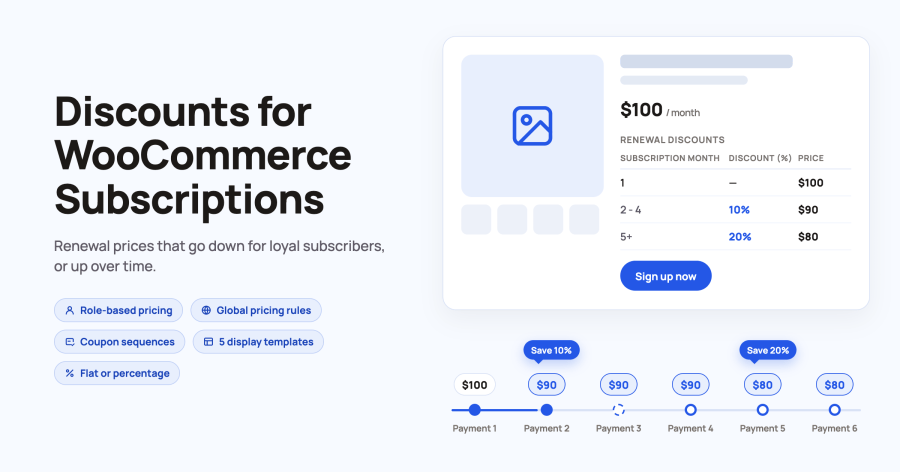
Each tier starts at a payment number. Payment 1 is the sign-up order, payment 2 is the first renewal. A tier from payment 2 with 10% off and a tier from payment 5 with 20% off means the customer pays the full price once, 10% less on renewals two to four and 20% less from the fifth payment on. A tier for payment 1 discounts the first order only, which is useful for a cheap first box or a card verification order.
Percentage discounts are calculated from the product price at the time of the renewal, so they follow price changes. Flat prices set an exact renewal price per tier, for example 55 for payments from 2 and 50 from 4. You choose the type per product, per role, per coupon and per global rule. Two settings control the calculation: use the regular price instead of the sale price for percentages, and round the result.
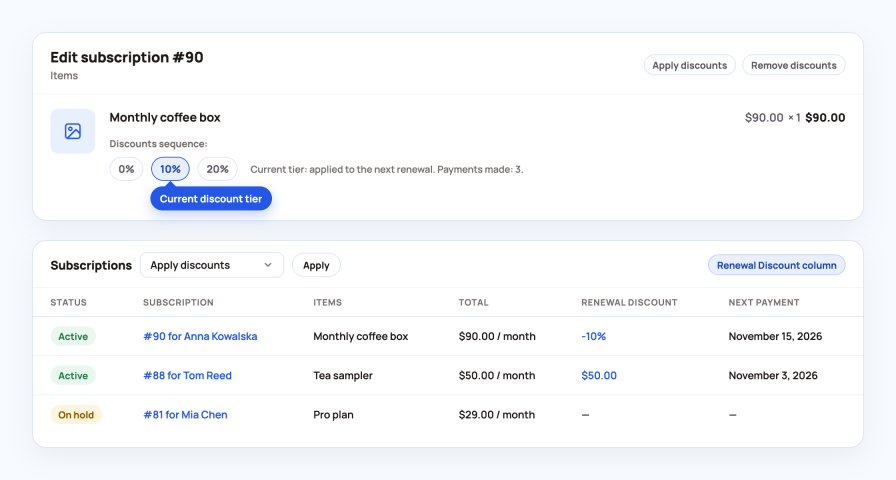
It is stored. At checkout the plugin writes the discount sequence and the price for the next payment to the subscription line item. WooCommerce Subscriptions creates every renewal order from those line items, so renewals charge the stored price. The plugin touches the subscription again only when a new tier starts, after a payment. If the plugin is deactivated, existing subscriptions keep their current price.
Yes. Enter a negative percentage, for example -10 on payment 2 and -20 on payment 4, and the price goes up with each tier. With flat prices you simply set a higher price for a later payment. This is how stores run introductory prices and trial pricing that steps up to the full plan.
New sign-ups get the sequence automatically. For existing subscriptions you decide: open the subscription in wp-admin and use the Apply discounts action, or select several subscriptions in the list and run the Apply discounts bulk action. Remove discounts works the same way. The subscriptions list shows a Renewal Discount column so you can see which ones have a sequence.
Yes, in two ways. On a product, choose a role, click Setup for role and enter a separate sequence, plus an optional regular and sale price for that role's initial payment. For many products at once, create a global pricing rule and include or exclude user roles or specific customers. Guests and roles without a rule keep the standard product rule.
A global pricing rule is one set of prices and discounts applied to categories, products, roles or customers. Its Settings tab decides the priority: product-level rules win, the global rule overrides them, or a flexible mix where the initial price and the renewal discounts are decided separately. When several global rules match, the most recently created one is used. Rules can be suspended and reactivated without deleting them.
Every WooCommerce coupon gets a Subscription discounts tab where you enter tiers, exactly like on a product. The coupon's own amount applies to the first payment and the sequence applies to the renewals, so the discount only exists for customers who use the code. The Override product discounts option decides whether the coupon replaces a sequence set on the product. A 0% tier (or a flat tier with the regular price) returns the subscription to its normal price after a number of renewals.
Choose one of five templates: Table, Horizontal table, Blocks, Plain text or Tooltip. Set the position in the settings, from above the product title to below the add-to-cart form, or switch automatic output off and place the table with the shortcode or the Elementor widget. The title, column headings and the plain text sentence are editable, and you can show payments as a range (2 - 4) or as breakpoints (2+). Each product can use a different template or hide the table while the discounts still apply.
Yes. Variable subscriptions get a sequence per variation, with an optional default variation shown before the attributes are selected. With a free trial, the first paid payment counts as payment 1. Synchronised renewals are supported too: the waiting period until the billing day is not treated as a trial. Sign-up fees are charged as set on the product, and the sequence applies to the recurring price.
No. The plugin does not communicate with payment gateways. It adjusts the subscription totals, and your gateway charges the amount of each renewal order, which is the standard way WooCommerce Subscriptions handles automatic renewals. Any gateway that supports automatic renewals with WooCommerce Subscriptions works.
The product page shows the full sequence before sign-up. The cart and checkout show the recurring total with the discount, in the cart and checkout blocks and in the classic templates. In My Account, the subscription page gets a Current discount row and a Next price change row, for example "-20% in 2 renewals".
All Products for WooCommerce Subscriptions (sequences for subscription plans on simple, variable and bundle products), WooCommerce Product Add-Ons, WP All Import, and the multicurrency plugins Aelia, FOX Currency Switcher, WCCS and WPML Multicurrency. The discount fields are included in the WooCommerce product CSV export and import and in the REST API. High-Performance Order Storage is supported.
Categories
Extension information
Quality Checks
Compatibility
Countries
Languages
Requirements






