Product Icon

Sequential Order Numbers Pro for WooCommerce

Tame your order numbers! Upgrade from Sequential Order Numbers with advanced features and with optional prefixes/suffixes.
Choose a billing option
$49
Save 20%
$98 $78.40

Subscription includes

  • Product updates and improvements
  • Customer support
  • 30-day money-back guarantee

Use sequential order numbers with custom prefixes and suffixes

Custom Order Numbers for WooCommerce

The WooCommerce Sequential Order Numbers Pro plugin allows your store to have sequential, rather than random, order numbers. Additionally you can customize your order numbers by setting a starting number, order number length, and custom prefixes and suffixes. Instead of your order numbers looking like 15, 16, 37, and so on, they could now be WT-01000-UK, WT-01001-UK, or whatever format you prefer!
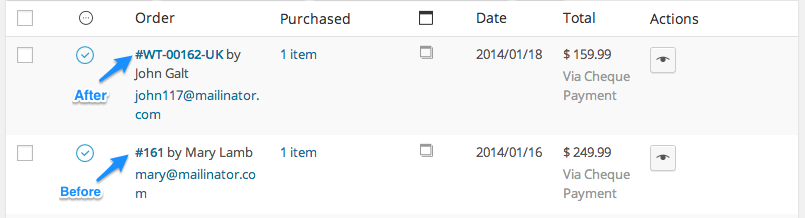
WooCommerce Sequential Order Numbers Pro Updated Order Numbers
Updated Order Numbers

Tame your WooCommerce order numbers!

This plugin works equally well for new and established stores: if your WooCommerce site already has orders placed, the sequential order numbers will pick up from the last order number, or begin with the starting number you configure. It’s your choice!
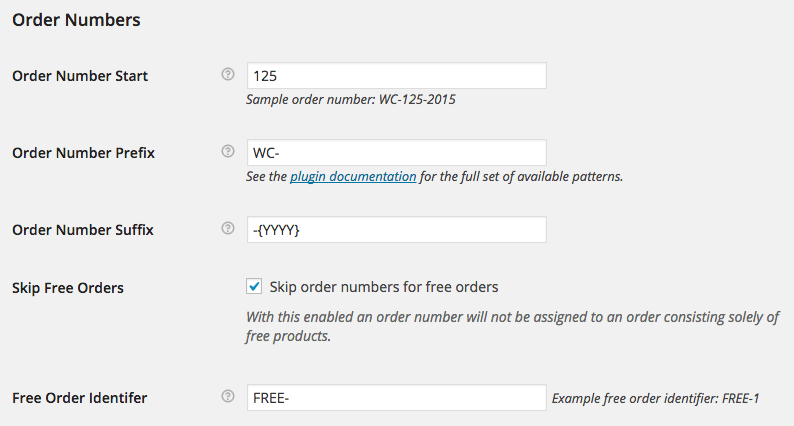
WooCommerce sequential order numbers pro settings
Highly Configurable Custom Order Numbers

Why Use Sequential Order Numbers Pro?

  • Generate sequential order numbers for your shop
  • Start the order numbering at any number (or for shops with existing order numbers, any number greater than your current largest order number)
  • Set a custom order number prefix
  • Set a custom order number suffix
  • Include the current day, month, or year in your custom order number prefix or suffix
  • Include the current time: hour, minute, second in your custom order number prefix or suffix
  • Order number length can be set automatically by adding as many zeroes to the beginning of the order number as needed
  • Orders with only free products can be excluded from the paid order sequence for accounting purposes, and assigned their own custom prefix

How to Get Started

  1. Buy this extension 🙂
  2. Download and install into your WooCommerce store
  3. Update your Order Numbers under WooCommerce Settings > General and save
  4. That’s it! Sit back and enjoy order numbers that make sense!

See the full documentation for more detailed help in setup.

Need any more reason to buy? When you purchase a SkyVerge-developed extension, you’re getting the highest quality extensions for your WooCommerce store. Gain peace of mind by knowing that when you purchase our products, your store’s performance is as important to us as it is to you.


Customer reviews

Average rating 3.7
23 reviews
5 stars, 57% of reviews
4 stars, 9% of reviews
3 stars, 9% of reviews
2 stars, 4% of reviews
1 star, 22% of reviews
23 reviews
  • Coaches Rising BV
    Rated 2 out of 5
    Documentation
    Jan 8, 2026
    Documentation
    same problem, after 1.21.7 things broke. Many woocommerce subscriptions orders are now being given order numbers of FREE even though they're not free orders. Support has been unable to fix.
    • SkyVerge
      Feb 25, 2026
      Thanks for sharing this. Version 1.21.7 introduced issues for some stores, which were addressed in version 1.21.8.

      If you’re seeing order numbers such as “FREE” assigned unexpectedly, we’d very much like to investigate further. Please contact support with specific order examples so we can review logs and ensure everything is functioning correctly. - S.M.
  • mikeassad
    Rated 5 out of 5
    Functionality
    Dec 16, 2025
    Functionality
    Does exactly what it says. Latest version works with the high performance database. Allows me to use the WebToffee order import when moving from Staging to production and works perfectly.
    • SkyVerge
      Dec 26, 2025
      Thanks for the 5 star review! We’re happy to hear everything is working smoothly with HPOS and that your migration workflow went well. We appreciate you taking the time to share your experience! - S.M.
  • John Veerkamp
    Rated 5 out of 5
    Functionality
    Dec 9, 2025
    Functionality
    Same here! After the latest update, Sequential Order Numbers Pro stopped working correctly. The plugin now skips order numbers, which causes confusion in our workflow. It used to work perfectly, but this issue makes it unreliable at the moment. Hoping for a quick fix from the developers. Fortunately, the developers reacted quickly and released a fix shortly after, so everything is working smoothly again. 👍
    • SkyVerge
      Dec 26, 2025
      Thanks for the follow-up , we really appreciate you acknowledging the quick turnaround. We’re glad to hear the fix in version 1.21.8 resolved the issue and that everything is running smoothly again!👍 - S.M.
  • frankadamus
    Rated 1 out of 5
    Functionality
    Dec 9, 2025
    Functionality
    Same here! After the latest update to 1.21.7 , Sequential Order Numbers Pro stopped working correctly. The plugin now skips 3 order numbers, which causes confusion in our workflow. Change order status causes a new order number for the same order and more. Hoping for a quick fix from the developers.
    • SkyVerge
      Dec 26, 2025
      Thanks for sharing these details. The issue you described was related to a bug introduced in a recent release for stores not using HPOS. A fix was released shortly after in version 1.21.8 (2025-12-09).

      Updating should resolve this behavior, but our support team is happy to help if you have any lingering concerns. - S.M.
  • marcelvbijsterveld
    Rated 1 out of 5
    Functionality
    Dec 9, 2025
    Functionality
    After the latest update, Sequential Order Numbers Pro stopped working correctly. The plugin now skips order numbers, which causes confusion in our workflow. It used to work perfectly, but this issue makes it unreliable at the moment. Hoping for a quick fix from the developers.
    • SkyVerge
      Dec 26, 2025
      We understand how disruptive skipped order numbers can be. This behavior was caused by a bug affecting non-HPOS stores and was fixed in version 1.21.8, released on December 9, 2025.

      If you update to the latest version and still notice anything unusual, please reach out to our support team so we can assist further. - S.M.

Extension information

  • WordPress version required: 5.2
  • WooCommerce version required: 3.6.0
  • PHP version required: 7.4
  • Tested with WordPress: 6.9
  • Tested with WooCommerce: 10.3.6
  • Requires at least WordPress: 5.6
  • Requires at least WooCommerce: 3.9.4

Compatibility

  • Cart & checkout blocks
  • High performance order storage (HPOS)

Countries

  • Worldwide

Languages

English (United States), Italian

Related Products

Price $29 annually
Rated 3.5 out of 5 stars
Price $119 annually
Rated 3.5 out of 5 stars
Price $49 annually
Rated 3.8 out of 5 stars
Price $109 annually
Rated 4.6 out of 5 stars
Price $49 annually
Rated 2.7 out of 5 stars
Price $79 annually
Rated 4.2 out of 5 stars
Price $79 annually
Rated 4 out of 5 stars
Price $279 annually
Rated 3.2 out of 5 stars
Price $199 annually
Rated 4 out of 5 stars