Product Icon

Import Export Suite for WooCommerce

Migrate or update all your WooCommerce data with the all-in-one Import Export Suite for WooCommerce.
Choose a billing option
$129
Save 20%
$258 $206.40

Subscription includes

  • Product updates and improvements
  • Customer support
  • 30-day money-back guarantee

Migrate and Update All Your WooCommerce Data

WebToffee Import Export Suite for WooCommerce is an all-in-one WooCommerce import and export plugin that allows you to migrate or update all your WooCommerce data. This includes the default WooCommerce fields, custom fields, and hidden metadata in bulk or based on your selection.

Bulk Import WooCommerce Products, Orders, Coupons, Subscriptions, and Customers

The WooCommerce Import Export Suite plugin allows you to bulk import WooCommerce products (all product types), product reviews, product categories, product tags, orders, coupons, subscriptions, and customers with the help of a .csv or .xml file.

This makes it an all in one import solution for WooCommerce for easy and efficient migration of data from one store to another. 

Advanced All in One Export Plugin for WooCommerce

With this WooCommerce All Import Export Plugin, you can export WooCommerce products, product reviews, orders, coupons, subscriptions, and customers, along with other metadata.
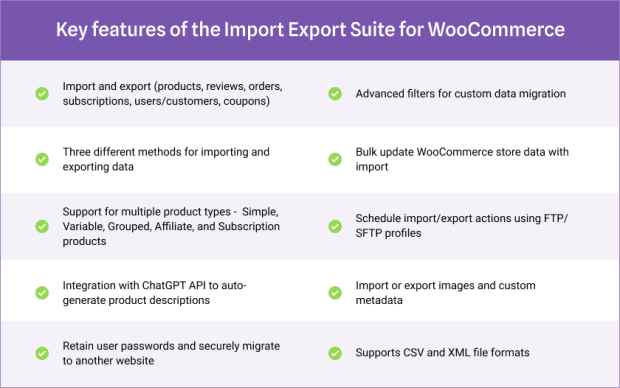
Advanced features for Import and Export of WooCommerce Data

Key features of WooCommerce Import Export Suite

WooCommerce CSV Importer and Exporter 

The features of the plugin enable a store owner to quickly and easily populate and, or update WooCommerce data and get all the existing data exported to a .csv or .xml file. The plugin offers extended WooCommerce import-export functionality. It includes advanced features like scheduling imports and exports so that the process runs in the background while users are working on other parts of the website.

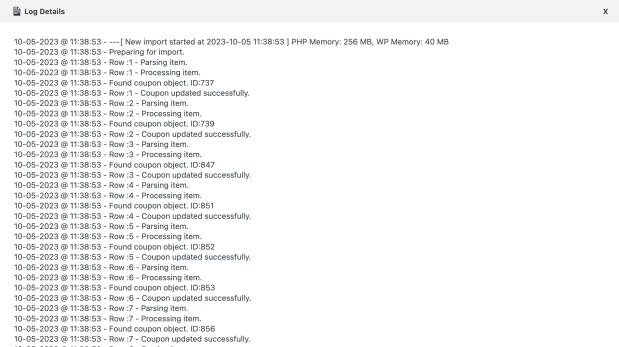
The suite stores the history of all imports and exports. It enables you to re-run the same import/export or view all the data related to the process. Debug logs in the plugin provide details that help you troubleshoot if any process fails.

All-in-One WordPress Import Export Plugin for WooCommerce

You can import and export all product types, product reviews, product categories, product tags, customers, orders, coupons, and subscriptions.

Import Data Type

Multiple Methods for Import/Export of WooCommerce Data

Import or Export WooCommerce store data using multiple methods such as Quick, Advanced, and Pre-saved templates. You can also choose to import from or export to Local storage, URL, and FTP.

Multiple Import Methods

Multiple File Formats for Import and Export

This WooCommerce Import Export Suite plugin supports both CSV and XML formats for importing and exporting data in WooCommerce.

Export File Format

Schedule or Automate Import and Export Actions 

Configure automated import or export by scheduling them at your preferred time intervals and run the process in the background while you work elsewhere on your site or even if you leave your site completely. 

Configure scheduled import/export to take place at regular intervals by providing the starting time and intervals between import/export. You can create and manage multiple FTP profiles for either one-time or scheduled migrations. 
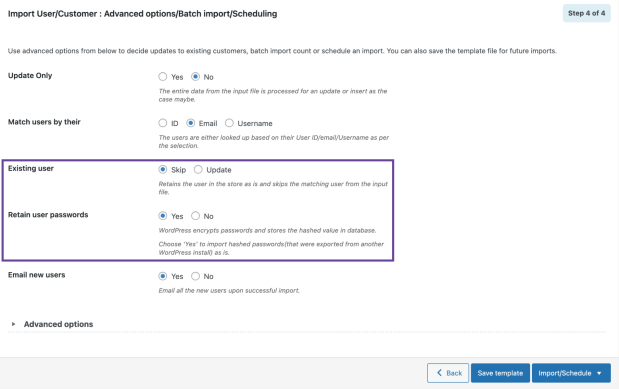
Securely Migrate User/Customer Data with Their Passwords

Retain WordPress user password on import

You can ensure the secure migration of users’/customers’ data with their encrypted passwords and retain the original password on the website you migrate to. When migrating your users’ or customers’ data to a new website, you have the option to notify them about the data transfer through email. This helps you adhere to legal requirements and ensure that your users are informed when their data is being transferred.

Note: This WordPress Import Export plugin also allows you to import or export membership data created by the WooCommerce membership plugin. For more information, refer to this documentation.

Auto-Generate Product Descriptions Using ChatGPT

The plugin allows you to integrate ChatGPT API to create product descriptions when importing products. It will automatically generate product descriptions for items without descriptions. You can choose different language tones (formal, casual, flowery, or convincing) for generating product descriptions. 
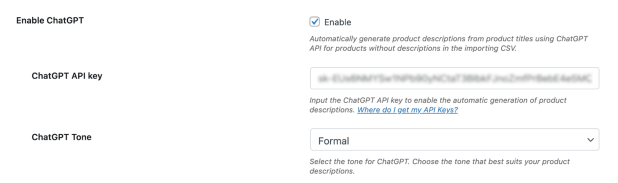
Setting to add ChatGPT credentials to create product descriptions while importing for products without descriptions.

This feature helps you enhance your product catalog and ensure your newly imported products don’t miss out on product descriptions.

Other Features of WooCommerce Import Export Suite

Import and export custom fields (meta) and hidden metadata
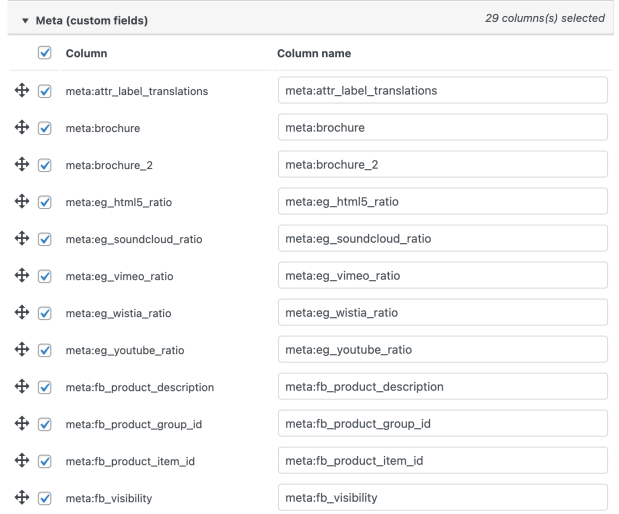
Add custom meta fields

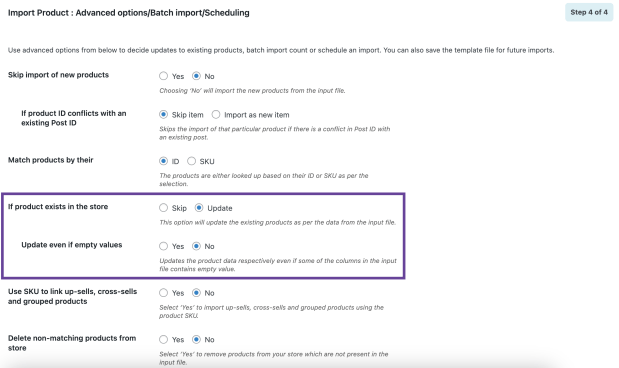
Bulk update all WooCommerce data

Update if products exists

Various filters enable the custom export of data
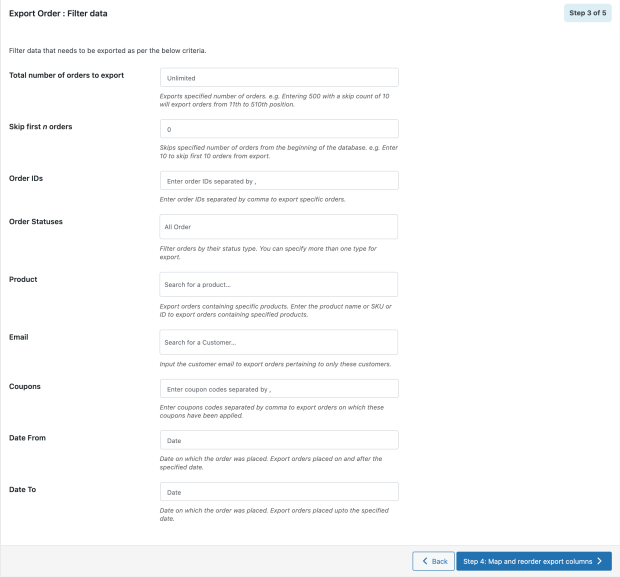
Filter data when exporting WooCommerce order

Export data to a local device or an FTP location
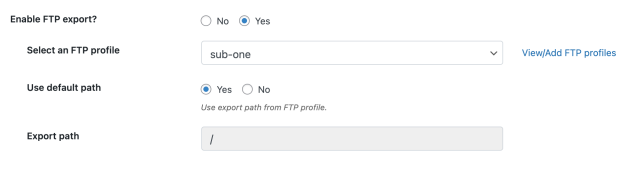
Enable FTP export option

Maintain a history of all the import and export processes
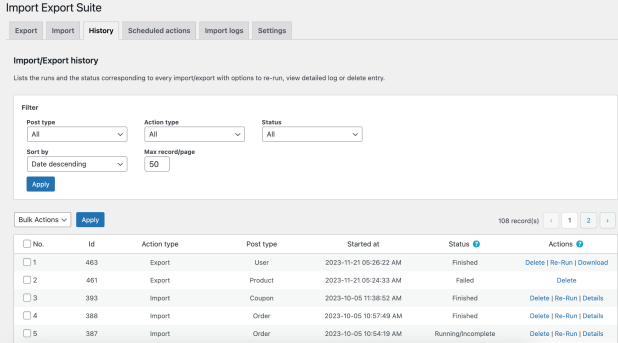
Import Export History

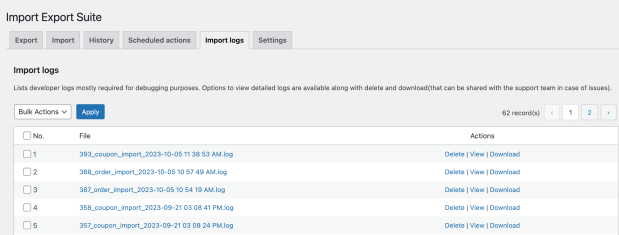
View debug logs for troubleshooting

Import Logs page

View log details

Import Export Suite for WooCommerce will save hours you would otherwise spend transferring a WooCommerce store’s data from one store to another. It can run the imports and exports on a scheduled basis, allowing store owners to work on other issues.


This WooCommerce import export suite plugin offers an all-in-one solution that will help import and export multiple WooCommerce post types, including products, product reviews, product categories, product tags, customers, orders, subscriptions, and coupons. The plugin adds advanced features that allow quick and effortless data transfer to and from a WooCommerce website.Credits
phpseclib – PHP Secure Communications Library


Frequently asked questions

Is there a limit on the number of products or records I can import/export using the plugin?

There is no hard limit imposed by the plugin. However, performance depends on your hosting environment. For large stores, use scheduled imports/exports and FTP uploads to ensure a smooth process.

Can I import products with custom taxonomies or attributes not native to WooCommerce?

Yes, the plugin supports importing products with custom taxonomies and attributes. During the import process, you can map your CSV columns to these custom fields to ensure they're correctly assigned to your products.

Is it possible to import subscription products, orders, and users along with their associated subscription details?

Yes, you can import subscription products, orders, users, and their details. Ensure your CSV includes all necessary subscription-related fields and map them appropriately during the import process.​

What happens if there are errors during import/export? Will it affect my existing data?

If an error occurs, the plugin logs it in the debug log without affecting existing data. The import/export process will skip faulty records and continue with the rest. You can review the logs and fix any issues before retrying.

How does the plugin handle duplicate records during import?

The plugin can identify existing records based on unique identifiers (such as product SKU or order ID) and will update them rather than creating duplicates, if configured to do so. You can also choose to skip or overwrite duplicates based on your needs.

How are product images handled during import? Can I import images from external URLs?

Yes, you can import product images from external URLs. Include the image URLs in your CSV file under the 'Images' column, and the plugin will fetch and assign them to the respective products during import.​

Is it possible to schedule recurring imports or exports, such as daily inventory updates?

Yes, the plugin offers scheduling features that allow you to set up recurring imports or exports at specified intervals, facilitating tasks like daily inventory updates.

How does the plugin handle large datasets? Are there any performance considerations?

The plugin is designed to handle large datasets efficiently. However, for optimal performance, it's recommended to increase server resources, such as memory limit and execution time. Additionally, utilizing the scheduling feature can help manage large imports by breaking them into smaller batches.

Can I import orders with custom order statuses or custom fields?

Yes, the plugin supports importing orders with custom statuses and fields. Ensure your CSV includes these custom fields and map them appropriately during the import process.

Customer reviews

Average rating 4.1
17 reviews
5 stars, 65% of reviews
4 stars, 6% of reviews
3 stars, 12% of reviews
2 stars, 6% of reviews
1 star, 12% of reviews
17 reviews
  • Erwin Trepka
    Rated 5 out of 5
    Functionality
    Jan 12, 2026
    Functionality
    It does exactly what it should. Regards Erwin
    • WebToffee
      Jan 7, 2026
      Hi@wperwin5394 We are glad to hear the plugin is just what you needed! We really appreciate your support.
  • Ilana
    Rated 5 out of 5
    Support
    Dec 23, 2025
    Support
    These guys are incredibly quick to respond to support requests and usually come back straight away with clear fixes or practical suggestions, without a lot of back and forth. The team is professional, helpful, and easy to deal with. I have purchased several WebToffee plugins over time and would happily recommend them. I will definitely continue using their plugins in the future.
    • WebToffee
      Jan 7, 2026
      Hi @llanaborsje, Thank you for the kind words! We're really glad to hear the plugin worked just as expected and met your needs. Your feedback is much appreciated. thanks again for your support!
  • cory201117
    Rated 2 out of 5
    Functionality
    Aug 11, 2025
    Functionality
    I'm having same issues as other users. Basic functionality is only half working. I have got lots of support but it's all the same thing: - keep increasing your PHP - don't use that feature And then it takes three weeks to get any movement. It's been a total headache and I wish I had went with another plugin. Do your research OUTSIDE OF THIS MARKETPLACE! This plugin has potential, I've seen it work. But I can't use it to run my business the way it is advertised. Mark, I appreciate your work but until we get it working I can't recommend this plugin. I will update my review if I am able to rely on this purchase. So far though, it's delayed my website redesign massively.
    • WebToffee
      Aug 18, 2025
      Thank you for sharing your honest feedback — we truly appreciate it and understand your frustration. As per your support ticket raised with us, we want to reassure you that we’ve already looked into your site and shared a code snippet that prevents third-party hooks from interfering with the import process. We also tested this directly on your site, and it was working as expected. We completely agree that the plugin should handle such cases more gracefully. Our development team is actively working on implementing this fix in the upcoming plugin release, so you won’t need to rely on the snippet in the future. In the meantime, you can continue using the snippet to ensure smooth imports. Rest a...
  • Jason Hebert
    Rated 1 out of 5
    Functionality
    Jul 15, 2025
    Functionality
    This plugin quite frankly does not work. It refuses to export a single thing. You can't install it on more than 1 site at a time which more or less makes it useless. You can't get a refund either so they basically just are out to steal people's money. AVOID THIS POS AT ALL COSTS. I came back to further explain how useless this plugin is. I have tried every possible setting and no matter what you cannot export anything at all. I wasted an afternoon trying to get this to work. This company is run by scam artists. They should be reported and shut down.
    • WebToffee
      Jul 16, 2025
      Hi Jason, We’re really sorry to hear about the trouble you’ve run into, and we genuinely understand how frustrating it can be when something doesn’t work the way you expect—especially when you’ve invested your time and trust in a tool. We want to assure you that we’re here to help in any way we can. From what you’ve described, it sounds like there may be a site-specific issue or a configuration conflict affecting the export. If you’re open to it, we’d love the chance to take a closer look and help get things working properly. Regarding licensing, the plugin license is intended for use on one site at a time and can be managed under the My Account section. Since the purchase was made through t...
  • wdsa-anastasiades
    Rated 5 out of 5
    Ease of use
    Dec 3, 2024
    Ease of use
    Yet looks easy - I would like to have an option to import custom data and the plugin to create the custom fields and meta data. Maybe can be achieved with ACF partnership.
    • WebToffee
      Dec 12, 2024
      Thank you for your feedback. We would like to inform you that you can import custom fields created by third-party plugins, such as ACF, using our plugin. If you encounter any issues while importing these custom fields, please don't hesitate to contact our support team. We will be happy to assist you further.

Extension information

  • WordPress version required: 5.0
  • WooCommerce version required: 3.0.0
  • Tested with WooCommerce: 10.5.2
  • Requires at least WooCommerce: 3.0.0

Countries

  • Worldwide

Languages

Arabic, Dutch, French (France), German, Portuguese (Brazil)

Requirements

  • WooCommerce 3.0+
  • WordPress 4.4+

Related Products

Price $279 annually
Rated 3.2 out of 5 stars
Price $199 annually
Rated 4 out of 5 stars
Price $29 annually
Rated 3.5 out of 5 stars
Price $49 annually
Rated 2.7 out of 5 stars
Price $119 annually
Rated 3.5 out of 5 stars
Price $109 annually
Rated 4.6 out of 5 stars
Price $99 annually
Rated 4.7 out of 5 stars
Price $59 annually
Rated 2.8 out of 5 stars
Price $49 annually
Rated 3.8 out of 5 stars