
Product Icon

Cart Sorting for WooCommerce

Add cart-sorting options to your WooCommerce store.
Choose a billing option
$49
Save 20%
$98 $78.40

Das Abonnement beinhaltet

  • Product updates and improvements
  • Kundensupport
  • 30-tage geld-zurück-garantie

WooCommerce Cart Sorting – Sort Products in Cart and Order by Name, Price or Quantity

Need a simple way to sort products in cart on your WooCommerce store? When customers add multiple items to their cart, scanning through a long, unorganized list makes it harder to compare prices, verify quantities, or locate a specific product. This leads to frustration, hesitation, and ultimately — abandoned checkouts.

Cart Sorting for WooCommerce solves this by adding intuitive cart sorting and cart search functionality directly inside the WooCommerce cart page. With just one click, customers can instantly reorganize their cart items before checkout, improving usability and removing friction from the entire buying process.

Whether your store serves everyday shoppers or high-volume wholesale buyers, giving customers the ability to sort products in cart transforms a cluttered cart into a clean, organized order summary they can review with confidence.
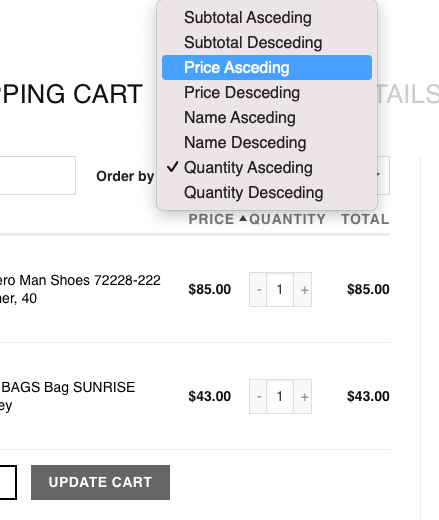
Sort products in cart by name price or quantity in WooCommerce

Sort Products in Cart by Name, Price or Quantity

With Cart Sorting for WooCommerce, your customers can sort products in cart using simple, one-click sorting controls that appear directly on the cart page:

  • Sort by product name (A–Z or Z–A) — Quickly locate items alphabetically, making it easy to scan through large orders and find specific products without scrolling endlessly.
  • Sort by price (low to high / high to low) — Compare costs at a glance, identify the most or least expensive items, and make informed decisions about what to keep or remove before checkout.
  • Sort by quantity — Review bulk items grouped together, spot duplicates, and verify order quantities are correct before completing the purchase.

Sorting is applied instantly on the cart page — no page reload required. The cart layout updates in real time, keeping customers in full control of how their cart is displayed. This makes the entire shopping experience smoother, faster, and far more intuitive than the default WooCommerce cart.
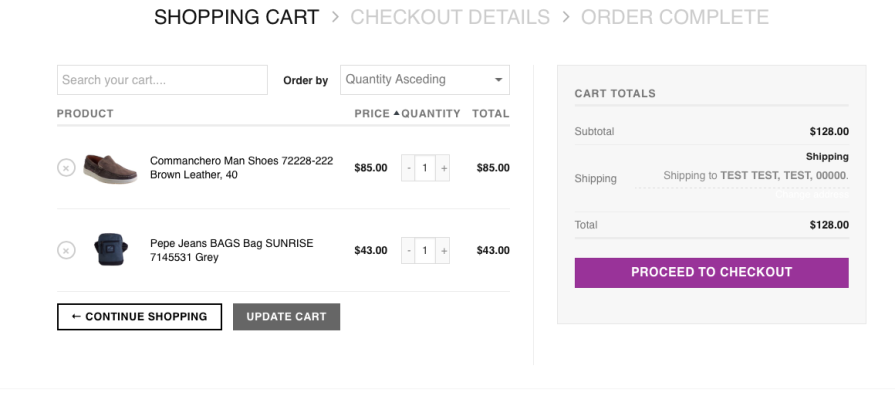
WooCommerce cart with products sorted by price from high to low


Search Products in Cart

Beyond sorting, Cart Sorting for WooCommerce also lets customers search products directly inside the cart by typing a product name into a built-in search field. As they type, matching items are instantly filtered and highlighted, while non-matching products fade out of view.

This is a game-changer for stores where customers frequently build large carts. Instead of scrolling through dozens — or even hundreds — of line items, they find exactly what they need in seconds:

  • Wholesale buyers searching for a specific SKU among a bulk order
  • Parents looking for one item on a long school supply list
  • Event planners verifying that a particular product was added to the cart
  • B2B customers checking quantities for a specific product line
  • Returning customers quickly locating a reordered item

The search feature works seamlessly alongside the sorting controls. Customers can first sort products in cart by price or name, and then narrow down results further with a keyword search — giving them complete flexibility over how they navigate their cart contents.
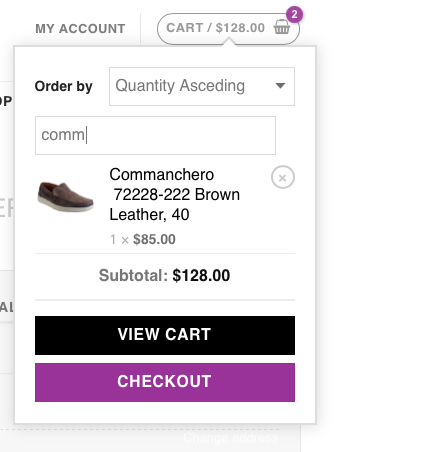
Search products inside the WooCommerce cart page to find items quickly

Why Sort Products in Cart? Real Benefits for Your Store

Adding the ability to sort products in the WooCommerce cart does more than improve how the cart looks — it directly impacts your store’s performance and your customers’ satisfaction:

  • Compare product prices side by side — Customers can sort by price to see their most and least expensive items grouped together, helping them make budget-conscious decisions before checkout.
  • Review and adjust quantities accurately — Sorting by quantity groups bulk items together, making it easy to spot errors like accidental duplicates or incorrect amounts.
  • Find and remove unwanted items quickly — In large carts, locating a specific product to edit or remove is effortless when items are sorted alphabetically or filtered by search.
  • Reduce checkout abandonment — Cart confusion is a leading cause of checkout drop-offs. An organized, scannable cart gives customers the clarity they need to proceed with confidence.
  • Speed up the review process — Returning customers and wholesale buyers who reorder frequently can review their carts in seconds instead of minutes, encouraging repeat purchases.
  • Lower support requests — When customers can clearly see and verify their order contents, they submit fewer “wrong item” or “wrong quantity” support tickets after purchase.

A well-organized cart builds buyer confidence. When customers can easily verify every detail of their order, they complete checkout faster, submit fewer corrections, and leave with a better impression of your store. The result: higher conversion rates, stronger customer retention, and lower cart abandonment across your entire WooCommerce store.


How It Works — Simple Setup, Instant Results

Getting started with Cart Sorting for WooCommerce takes less than a minute:

  1. Install and activate the plugin from your WordPress dashboard.
  2. Sorting and search controls appear automatically on your WooCommerce cart page.
  3. Customers start sorting — no configuration, shortcodes, or theme modifications needed.

There are no complicated settings panels or setup wizards. The plugin is designed to work out of the box with any WooCommerce theme. Once activated, your customers immediately gain the ability to sort products in cart by name, price, or quantity — and search through their items instantly.
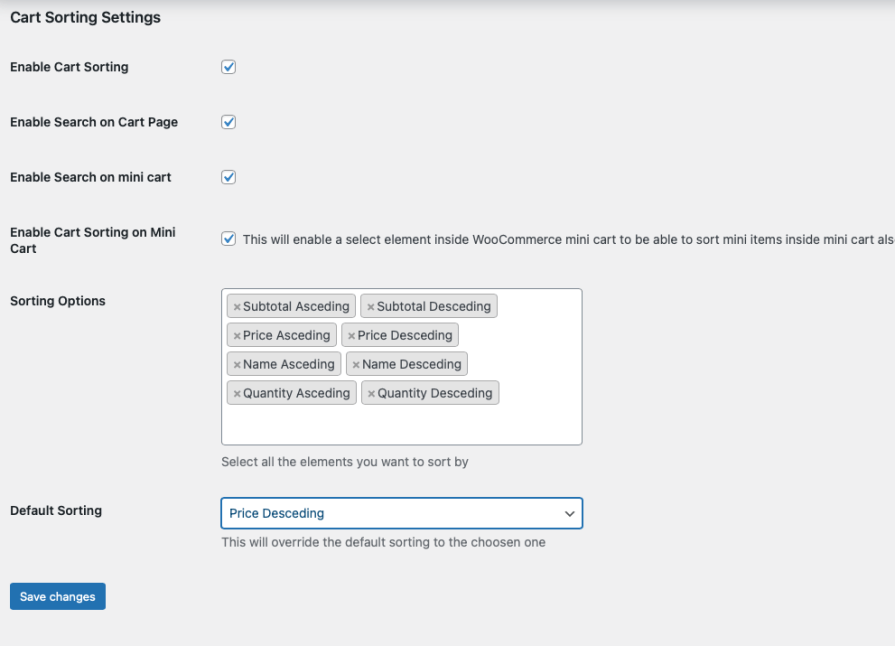
Cart Sorting for WooCommerce plugin setup showing sort and search settings panel

Ideal For Stores With Large or Complex Carts

While every WooCommerce store benefits from a more organized cart, Cart Sorting for WooCommerce is especially valuable for stores where customers regularly add many items to a single order:

  • Wholesale and B2B stores — Buyers placing orders of 50+ items need fast ways to review and verify their cart before submitting large purchase orders.
  • School and office supply shops — Parents and administrators shopping from long checklists need to quickly confirm every required item is in the cart.
  • Grocery and food delivery stores — Weekly grocery orders can easily reach 30–60 items, making sorting and search essential for a smooth checkout.
  • Seasonal and gift shops — During holidays and peak shopping periods, customers buying gifts for multiple people benefit from sorting items by price to manage their budget.
  • Print-on-demand and custom product stores — Customers ordering multiple customized items need to verify each product variant, making alphabetical sorting incredibly useful.
  • Any WooCommerce store — Even stores with modest cart sizes benefit from the improved usability and professionalism that cart sorting adds to the customer experience.


Fully Compatible with WooCommerce Cart & Checkout Blocks

This plugin fully supports the modern WooCommerce Cart and Checkout blocks introduced in recent versions of WooCommerce, as well as the classic shortcode-based cart page. No matter which cart setup your theme or store uses, customers can sort products in cart and search through their items without any compatibility issues.

Cart Sorting for WooCommerce has been tested and verified to work with:

  • WooCommerce Cart Block (block-based editor)
  • Classic cart page using the shortcode
  • Popular WooCommerce themes including flavor flavors like flavor flavor, flavor flavor, and flavor flavor
  • Custom-built themes with standard WooCommerce cart templates

Whether you’re running the latest version of WooCommerce or maintaining a long-standing store setup, the plugin integrates seamlessly without conflicts or additional configuration.

Lightweight, Fast & Performance-Optimized

Unlike heavy cart customization plugins that slow down your store, Cart Sorting for WooCommerce is built with performance as a priority:

  • Minimal footprint — The plugin loads only the assets it needs, only on the cart page, keeping your store fast everywhere else.
  • No database queries — Sorting and searching happen entirely on the client side, so there’s zero additional server load.
  • Instant response — Cart items are reorganized in real time with no page reloads, providing a smooth, app-like experience.
  • No conflicts — The plugin is designed to work alongside other WooCommerce extensions without interference.

Your store stays fast, your cart stays responsive, and your customers enjoy a frictionless experience from cart to checkout.

Give your customers the power to sort products in cart, search through their items, and check out with complete confidence. Install Cart Sorting for WooCommerce today and transform your WooCommerce cart into a smarter, more organized shopping experience.

Requirements

  • Minimum PHP version: 5.2
  • WooCommerce installed and activated

Häufig gestellte Fragen

Can I sort products in the WooCommerce cart ?

Yes. Cart Sorting for WooCommerce allows customers to sort cart items by product name (A–Z), price, or quantity directly on the cart page.

Can customers search for products inside the cart?

Yes. The plugin adds a cart search feature that lets customers quickly find a specific product when they have multiple items in their WooCommerce cart.

Does WooCommerce support cart sorting by default?

No. WooCommerce does not include built-in cart sorting functionality. This plugin extends the default cart by adding sorting and search capabilities.

Is the plugin compatible with WooCommerce Cart and Checkout Blocks?

Yes. Cart Sorting for WooCommerce works with both the classic WooCommerce cart page and the modern block-based Cart and Checkout experience.

Will cart sorting improve the shopping experience?

Sorting and searching cart items helps customers compare prices, review quantities, and locate products faster. This creates a smoother checkout process, especially for large or wholesale orders.

Does this plugin work with large carts or bulk purchases?

Yes. The plugin is especially useful for stores where customers frequently add many products to their cart, such as wholesale shops, school supply stores, or B2B WooCommerce sites.

Does the plugin modify product data or order data?

No. The plugin only changes how items are displayed and sorted in the cart interface. It does not alter product information or stored order data.

Kundenbewertungen

Extension information

  • WordPress version required: 4.6
  • WooCommerce version required: 3.6.0
  • Tested with WooCommerce: 10.5.1
  • Requires at least WooCommerce: 3.4

Länder

  • Worldwide

Sprachen

English (United States)

Related products

Price $79 Jährlich
Rated 3.4 out of 5 stars
Price $59 Jährlich
Rated 3.1 out of 5 stars
Price $109 Jährlich
Rated 2.9 out of 5 stars
Price $49 Jährlich
Rated 4.1 out of 5 stars
Price $109 Jährlich
Rated 2 out of 5 stars
Price $109 Jährlich
Rated 2.3 out of 5 stars
Price $109 Jährlich
Rated 2.6 out of 5 stars
Price $109 Jährlich
Rated 2 out of 5 stars
Price $109 Jährlich
Rated 2.3 out of 5 stars




