Aktive Installationen
10K+
Das Abonnement beinhaltet
Support
1 von 10 Personen, die ihren Warenkorb verlassen, tun dies, weil der Bezahlvorgang zu lange dauert*. Verringere die Anzahl verlassener Warenkörbe, indem du mit WooCommerce One Page Checkout den gesamten Kaufprozess auf einer einzigen Seite anbietest.
* Basierend auf einer Umfrage unter 1.200 Online-Käufern, durchgeführt von Webcredible.
Mit One Page Checkout kannst du jede Seite in eine Bezahlseite umwandeln. Diese individuellen Bezahlseiten erleichtern deinen Kunden auch das Einkaufen, indem sowohl die Produktauswahl als auch die Bezahlformulare auf einer einzigen Seite angezeigt werden.
Kunden können Produkte zu ihrem Warenkorb hinzufügen oder daraus entfernen und die Zahlung abschließen, ohne die Seite verlassen und auf das Laden einer neuen Seite warten zu müssen.
Bezahlfelder können auch auf der Seite eines einzelnen Produkts angezeigt werden, oder du kannst das Feld für besondere Werbeaktionen zu individuellen Zielseiten hinzufügen. Eine Einzel-Bezahlseite ist einfach erstellt, und sobald du damit fertig bist, ist es für deine Kunden noch einfacher, die Produkte auf dieser Seite zu kaufen.
 One Page Checkout zeigt die Produktauswahl und die Bezahlformulare auf einer einzigen Seite an. Kunden können Produkte zu einer Bestellung hinzufügen (oder daraus entfernen) und die Zahlung abschließen, ohne die Seite zu verlassen.
 Erstelle einzigartige Zielseiten für besondere Events, Werbeaktionen oder ausgewählte Kunden. Füge den Shortcode zu einer beliebigen Seite (oder einem beliebigen Beitrag) hinzu und füge dann deine Inhalte über dem Shortcode ein, um vor dem Kaufvorgang einen individuellen Verkaufstext anzuzeigen.
 One Page Checkout kann mit mehr als einem Dutzend Erweiterungen integriert werden, damit du Abonnements, Buchungen, Pakete und viele weitere einzigartige Produkttypen verkaufen kannst.
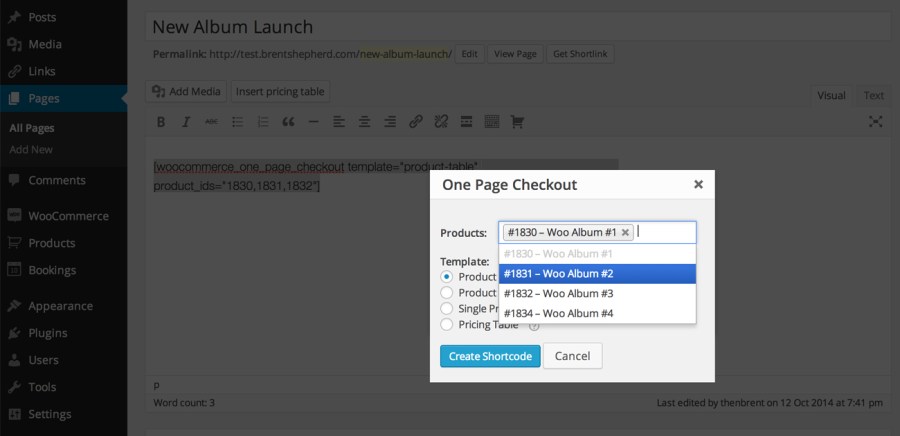
 Bezahlseiten können mithilfe der grafischen Benutzeroberfläche erstellt werden, die dem klassischen WordPress-Editor hinzugefügt wurde. Jede Produktseite kann durch Klicken auf ein einzelnes Kontrollkästchen auch zu einer Bezahlseite werden.
 Du wählst die Produkte aus, die auf jeder Bezahlseite angezeigt werden sollen. Erstelle eine Seite nur für das eine vorgestellte Produkt, für einige verwandte Produkte für eine Werbeaktion oder für den gesamten Katalog deines Shops, wenn dieser nur wenige Produkte anbietet.
 One Page Checkout beinhaltet mehrere integrierte Templates, darunter eine einfache Preistabelle und eine Produktliste. Wähle das für deine Seite am besten geeignete Template aus oder, wenn die integrierten Templates für deine Zwecke nicht passen, erstelle ein individuelles Template.
Ganz gleich, ob du Dienste wie ein persönliches Workout-Programm oder physische Waren wie ein monatliches Süßigkeiten-Abo verkaufst, beim Verkaufen mit WooCommerce kannst du mit One Page Checkout deine Umsätze steigern.
Wenn deine Kunden die Möglichkeit haben, auf einer einzigen Seite einzukaufen, profitieren sie von einem schnelleren Bezahlvorgang mit weniger Unterbrechungen. Für dein Unternehmen bedeutet das mehr Umsatz und zufriedenere Kunden.
WooCommerce One Page Checkout is a cart and checkout extension that displays product selection and checkout forms together on a single product, post, or page. Customers can add products to their order, remove them, and complete payment without leaving the page or waiting for a new page to load. It turns any page into a checkout page, so you can build focused buying experiences around the products you want to feature.
Yes, that is one of the main reasons stores use it. A long or multi step checkout is a common reason shoppers drop off before paying. By presenting product selection and the checkout form on one page, One Page Checkout shortens the purchase path and gives customers a faster, less interrupted way to buy, which can help recover sales that a longer flow might lose.
Yes. You can add the One Page Checkout shortcode to any page or post, then place your own sales copy, event details, or promotional content above it. This makes it well suited to campaign and landing pages where you want customers to read a pitch and then buy in the same place, without being sent off to a separate cart and checkout flow.
No. You can turn any product page into a checkout page by ticking a single checkbox in the product data panel. For pages and posts, there is a graphical interface in the classic WordPress editor that helps you pick products and a template and then generates the shortcode for you. If you prefer, you can also add the shortcode manually and set its attributes yourself.
Yes. You decide which products display on each One Page Checkout page. You can feature a single product, group a few related products together for a promotion, display products from selected categories, or show your whole catalog if your store carries only a few items. You also control the order in which products appear.
One Page Checkout includes several built-in templates so you can match the layout to the products you are selling. The Product table template suits a small set of products where images help the choice. The Product list template shows products with radio buttons when descriptions or photos are not needed. The Single product template mirrors your standard product page, including the description, images, and gallery. There is also a pricing table template. If none of these fit, you can create a custom template.
Yes. One Page Checkout integrates with more than a dozen WooCommerce extensions, so you can sell subscriptions, bookings, product bundles, and other product types on a single page checkout. If you want to sell recurring products this way, see WooCommerce Subscriptions. For appointment or reservation based products, see WooCommerce Bookings, and for grouped offers, see Product Bundles.
Yes. The Single product template is the option that displays the selection boxes shoppers use to choose a variation of a variable product, so they can pick their options and check out in one place. Other templates display each variation as a separate item rather than through variation dropdowns.
It is designed to work with any WooCommerce payment gateway extension that uses the standard WooCommerce payment section. That means your existing checkout payment options can carry over to your One Page Checkout pages without a separate setup.
No. Your store still needs the standard WooCommerce Cart and Checkout pages in place. The checkout page continues to handle order confirmation and the receipt after purchase. One Page Checkout adds a streamlined buying experience on the pages you choose, and you can point menu links or promotions to those pages, but it works alongside your existing checkout rather than removing it.
It is built to support that goal. Whether you sell services like personal training or physical goods like a monthly subscription box, letting customers buy on a single page gives them a faster experience with less interruption, which can lead to more completed purchases. It gives you tools to build focused, distraction light buying pages around the products you most want to move.
It is a strong fit for stores that want to sell a focused set of products quickly: single product sales, curated promotions, event or campaign landing pages, and stores with a small catalog. It works across product types, including subscriptions, bookings, and bundles, so service businesses and product sellers alike can use it to create a shorter path to purchase.
It is designed around curated, focused buying pages rather than large scale catalog browsing. If your main goal is to give shoppers a big catalog to browse, filter, and search across many categories before deciding, a full storefront flow will serve that better. One Page Checkout shines when you already know which products you want to feature and want customers to select and pay in one place.
Kategorien
Extension information
Länder