
Variation Monster for WooCommerce includes a powerful Variation List feature that replaces WooCommerce’s default variation selection on the single product page with a faster and more user-friendly list view.
What Is the Variation List?
↑ Back to topIn default WooCommerce, customers must select each attribute separately (for example, size and color). With the Variation List, all available variations are displayed as a single list.
When a customer selects an item from the list:
- The corresponding variation is automatically selected
- No additional attribute selection is required
- The buying process becomes faster and simpler
This significantly reduces the time and effort needed to choose a variation.
How to Enable the Variation List (Global Setting)
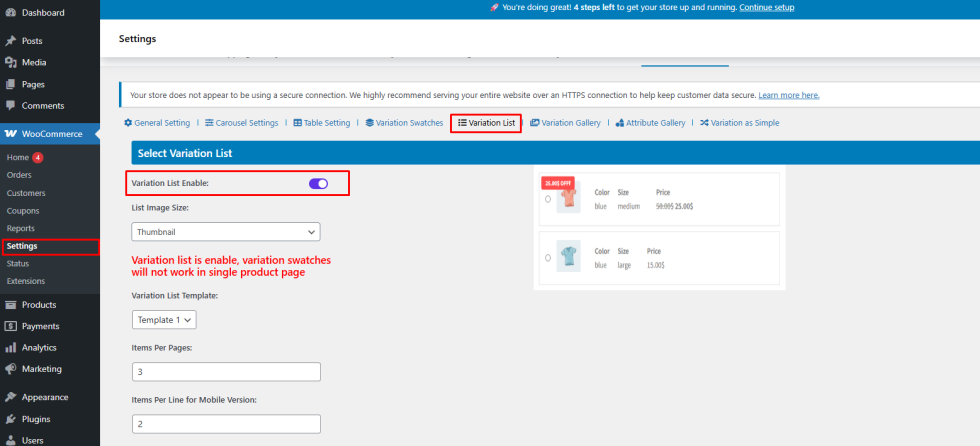
↑ Back to top- Go to WooCommerce → Settings → Variation Monster
- Open the Variation List section
- Enable Variation List Enable
- Save the settings
Enable the Variation List for Specific Products
↑ Back to topAfter enabling it globally:
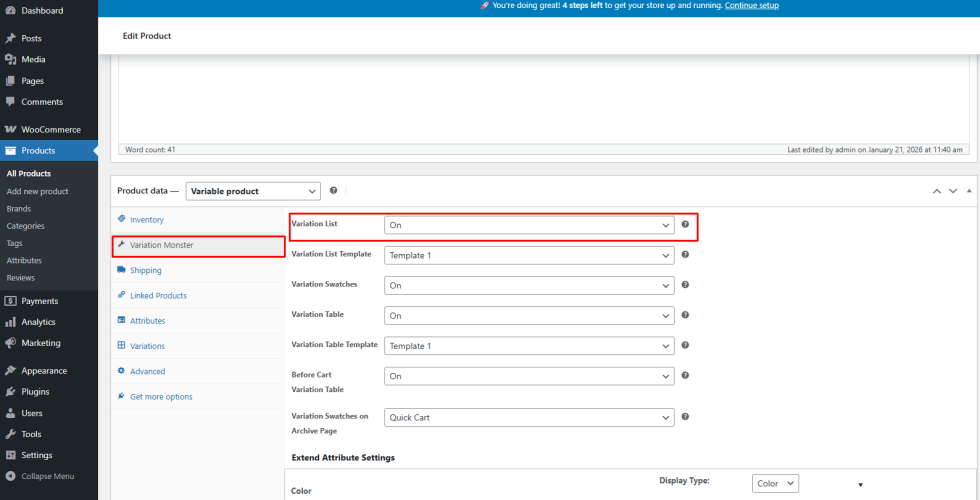
- Go to Products → Edit Product
- Open the Variation Monster tab under Product Data
- on the Variation List for that product
- Update the product
Only products with this option enabled will display the variation list.
Frontend Result
↑ Back to topOnce configured:
- Default WooCommerce variation dropdowns are replaced
- All variations appear in a clean list format
- Customers can select a variation with a single click
- The single product page becomes faster and easier to use

Benefits
↑ Back to top- Faster variation selection
- Reduced customer confusion
- Improved user experience and conversions
- Ideal for products with multiple attributes