
Variation Monster for WooCommerce includes a powerful Variation Table feature designed for stores that need bulk purchasing and fast variation selection. This feature is especially useful for wholesale sellers and B2B stores.
What Is the Variation Table?
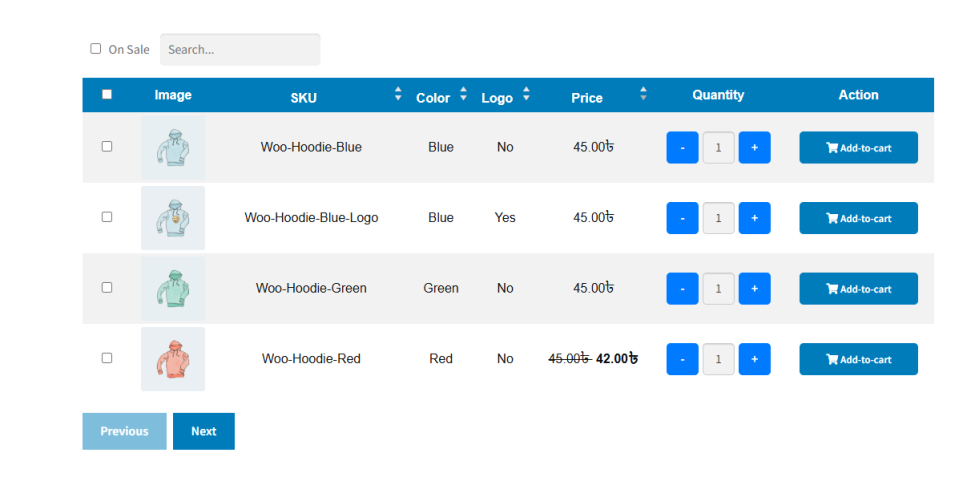
↑ Back to topThe Variation Table displays all variations of a product in a structured table format, allowing customers to view, compare, and purchase multiple variations at once.
You can also choose to enable this table only for specific products, giving you full control over where it appears.
Key Features of the Variation Table
↑ Back to topWithin the variation table, customers can:
- View all variations of a product in one place
- Search variations instantly using a search input
- Filter sale items to quickly find discounted variations
- Sort data in ascending or descending order by:
- SKU
- Color
- Logo
- Price
- Set quantities per variation and add multiple items to the cart at once
All essential variation details are clearly displayed, making bulk ordering fast and efficient.
Ideal Use Cases
↑ Back to top- Wholesale and bulk sellers
- B2B eCommerce stores
- Products with many variations
- Customers who need quick comparison and ordering
Customer Experience
↑ Back to topInstead of selecting variations one by one, customers can:
- Scan all available options
- Choose exact quantities for each variation
- Add everything to the cart in a single action
This significantly reduces ordering time and improves conversion rates.
Summary
↑ Back to topThe Variation Table in Variation Monster transforms complex variable products into a clean, powerful ordering interface—perfect for modern eCommerce and wholesale businesses.