
Variation Monster for WooCommerce includes a useful feature that lets you control how many attribute terms are visible at one time in variation swatches. This helps keep your product pages clean and prevents clutter when an attribute has many options.
What Is Attribute Display Limit?
↑ Back to topThe Attribute Display Limit allows you to define the maximum number of variation swatches (such as colors, images, or buttons) shown initially. Any additional attributes are handled automatically based on the plugin’s display behavior, creating a cleaner and more user-friendly layout.
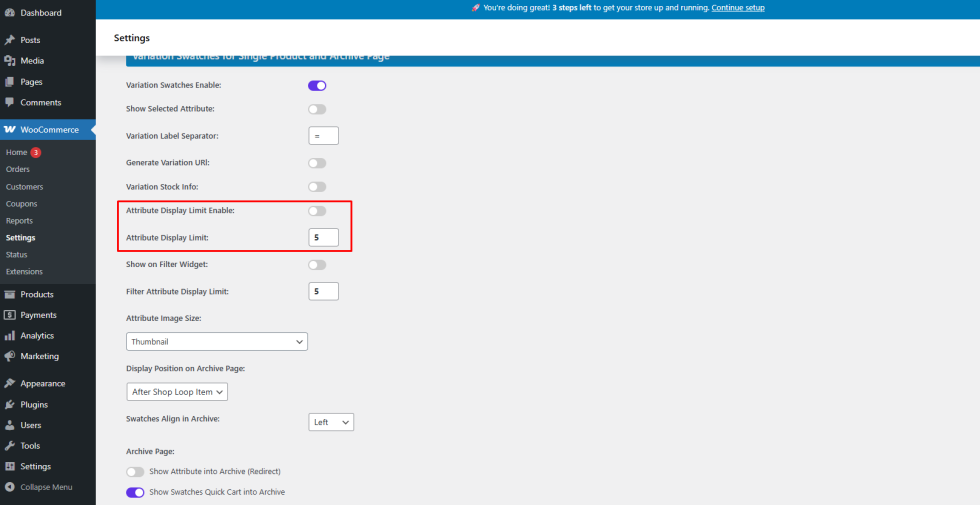
Step 1: Enable Attribute Display Limit
↑ Back to top- Go to WooCommerce → Settings → Variation Monster
- Open the Variation Swatches section
- Enable Attribute Display Limit
Step 2: Set the Display Limit
↑ Back to topAfter enabling the option:
- Enter the number of attributes you want to display (for example: 4, 5, or any custom value)
- Save the settings
This number determines how many swatches are shown at once on the frontend.
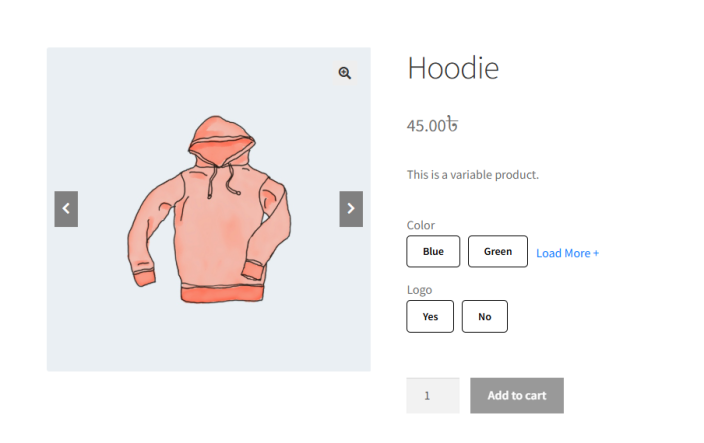
Frontend Result
↑ Back to topOnce configured:
- Variation swatches will respect the defined display limit
- The product page remains clean and well-organized
Benefits
↑ Back to top- Prevents overcrowded variation layouts
- Improves user experience
- Keeps product pages visually balanced and professional