
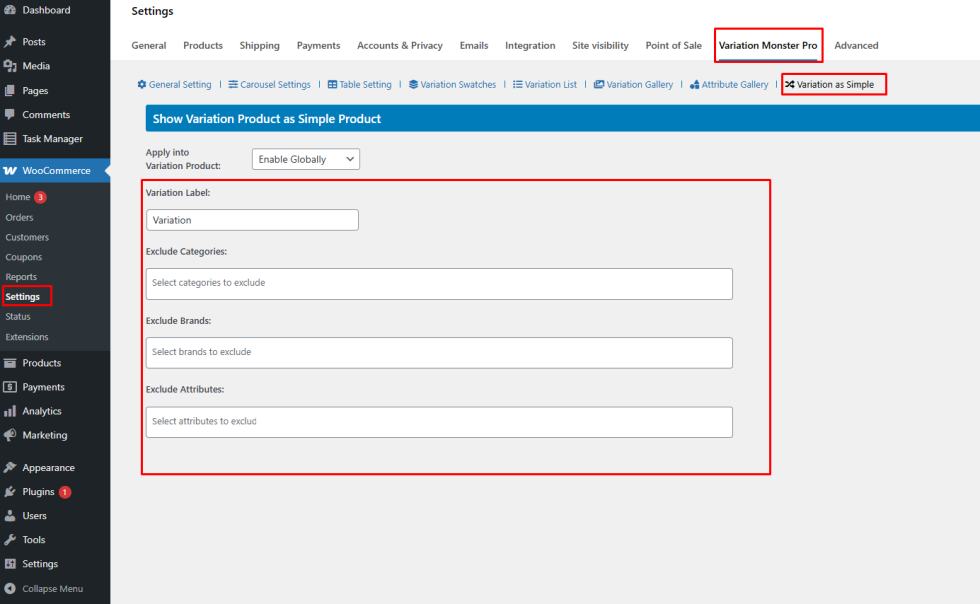
When using the Variation as Simple Product feature in Variation Monster Pro, you can also add a custom label beside the variation title. This helps customers easily identify that the product displayed on the shop page is actually a variation of a variable product.
For example, the product title can appear like this on the shop page:
Hoodie – Blue, Yes (Variation)
Adding a clear label such as (Variation) improves transparency and helps customers understand that the item is part of a variable product.
How to Configure the Variation Label
↑ Back to topTo add or modify the variation label:
- Go to your WordPress Dashboard.
- Navigate to WooCommerce → Settings.
- Click the Variation Monster Pro tab.
- Open the Variation as Simple section.
- Find the option Variation Label.
- Enter the text you want to display after the variation title (for example: Variation or Variant).
- Click Save Changes.
After saving, the label will automatically appear next to variation titles displayed as simple products on the shop page.
Category, Brand, and Attribute Exclusions
↑ Back to topVariation Monster also provides advanced filtering options so administrators can control where this feature should apply.
Exclude Categories
↑ Back to topYou can select specific product categories where the “Variation as Simple Product” feature should not be applied.
This is useful if certain categories should keep the standard WooCommerce variation behavior.
Exclude Brands
↑ Back to topIf your store uses a brand taxonomy, you can exclude specific brands from displaying variations as simple products.
Exclude Attributes
↑ Back to topYou can also exclude products that contain specific attributes from being displayed as separate variations on the shop page.
Why These Options Are Useful
↑ Back to topThese flexible controls allow store administrators to:
- Maintain better control over shop page layout
- Avoid showing too many variations in certain categories
- Customize how variations appear across different product types
- Keep the shop page organized and user-friendly
With the Variation Label and Exclusion settings, administrators can easily manage how variation products are displayed, ensuring a clear shopping experience for customers and efficient store management.