
Variation Monster for WooCommerce allows admins to display additional WooCommerce meta data in the Variation List, giving complete control over what information is shown to customers on the single product page.
This feature is ideal when you want to show more than the default fields and customize the variation list based on your store’s needs.
How This Feature Works
↑ Back to top- Variation Monster retrieves all available WooCommerce meta data via AJAX
- Any existing product or variation meta data can be selected
- The chosen meta data is displayed directly in the Variation List on the frontend
Step 1: Enable Meta Data for Variation List
↑ Back to top- Go to WooCommerce → Settings → Variation Monster Pro
- Open the Variation List section
- Enable Show Meta Data
- Save the settings
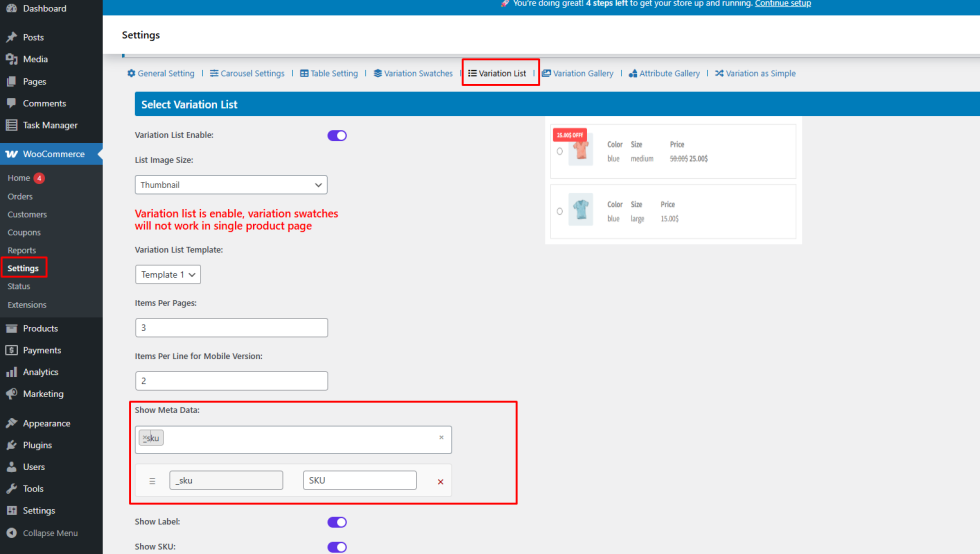
Step 2: Select the Meta Data to Display
↑ Back to topAfter enabling the option:
- Choose the meta data fields you want to show (from available WooCommerce meta data)
- These fields will automatically be applied to the Variation List
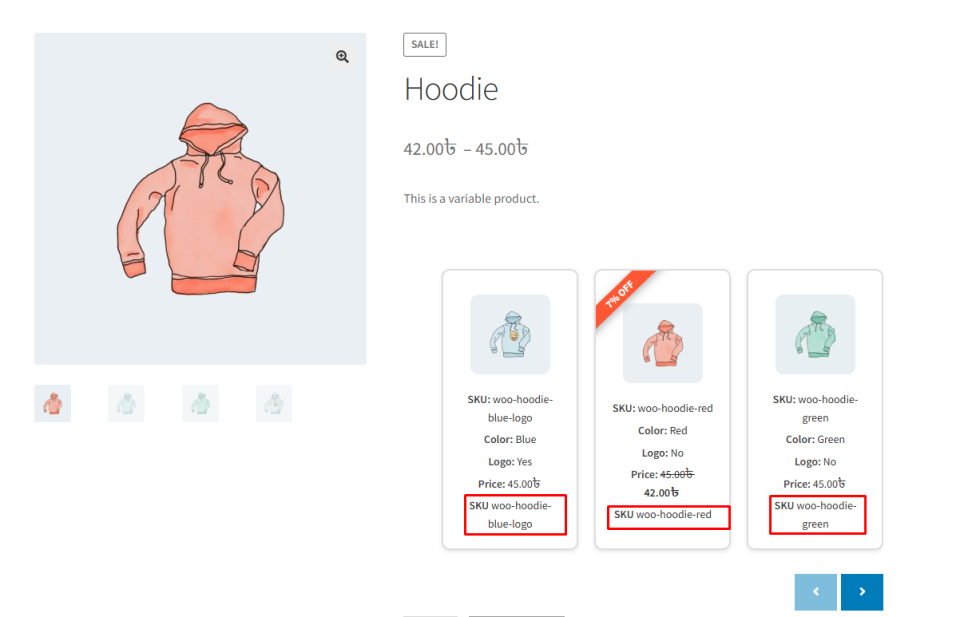
Frontend Result
↑ Back to topOnce configured:
- The selected meta data appears in the Variation List on the single product page
- Customers can view detailed variation information at a glance
- Variation selection becomes faster and more informative
Benefits
↑ Back to top- Full control over variation list content
- Better product transparency
- Improved customer decision-making