
Variation Monster Pro for WooCommerce provides flexible Variation List template controls, allowing store owners to manage how many variation items are displayed at a time, on both desktop and mobile devices.
This makes the Variation List more scalable, visually clean, and suitable for products with a large number of variations.
Pagination and Display Control
↑ Back to topThe Variation List includes a built-in pagination system. Instead of displaying all variations at once, you can control how many items appear per page. This is especially useful when products have many variations and customers want a smooth browsing experience.
You can:
- Show fewer items (for a compact layout)
- Show more items (for faster selection)
- Balance performance and design based on your store needs
Desktop Configuration
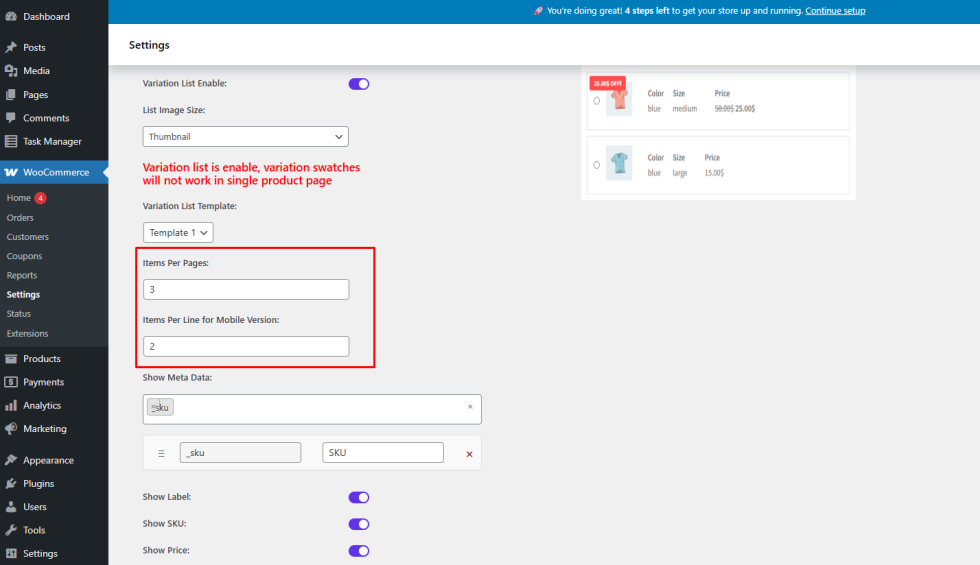
↑ Back to topFor desktop and larger screens, you can control how many variation items are shown at a time by setting:
- Items Per Page
This determines how many variation list entries appear before pagination is applied.
Mobile Device Configuration
↑ Back to topVariation Monster also lets you optimize the Variation List for mobile users:
- Items Per Line for Mobile Version
This controls how many variation items appear in each row on mobile devices, ensuring a clean, touch-friendly layout.
How to Configure These Settings
↑ Back to top- Go to WooCommerce → Settings → Variation Monster Pro
- Open the Variation List section
- Configure:
- Items Per Page
- Items Per Line for Mobile Version
- Save the settings
Frontend Result
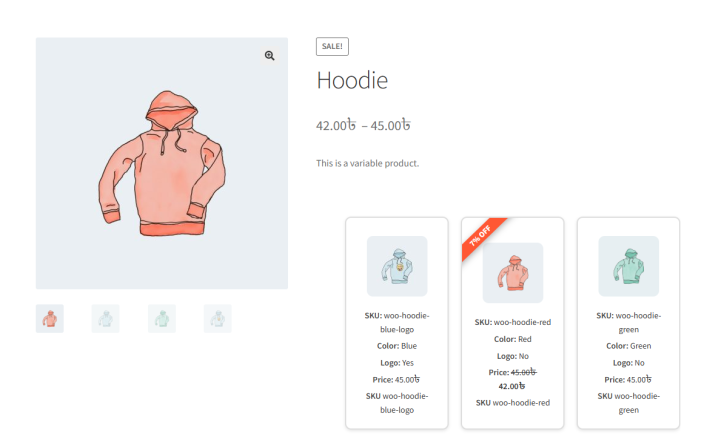
↑ Back to topAfter configuration:
- The Variation List respects the defined pagination and layout settings
- Desktop and mobile views are optimized separately
- Customers enjoy a smoother and more organized variation selection experience on the single product page
Benefits
↑ Back to top- Better performance for products with many variations
- Mobile-friendly variation browsing
- Clean and customizable store design