
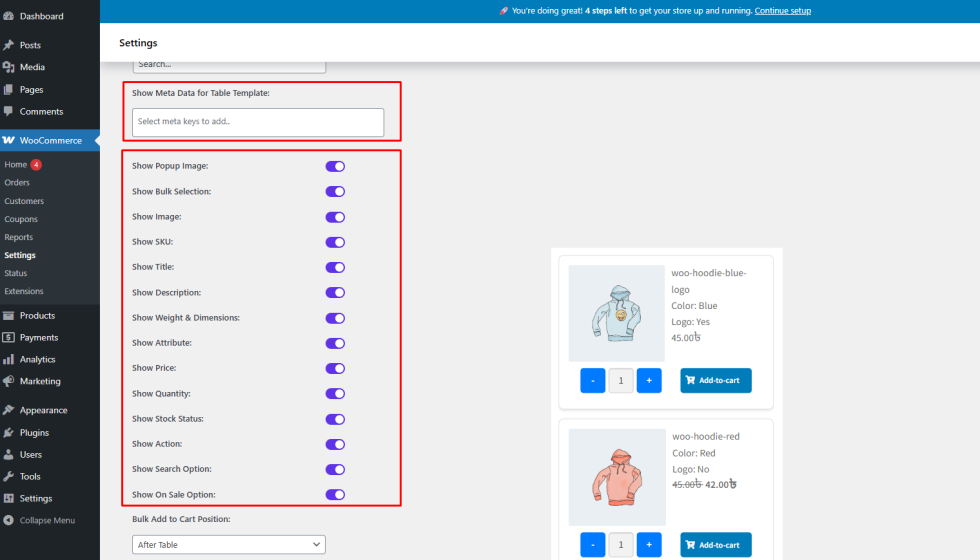
Variation Monster for WooCommerce gives you full control over the meta data displayed in the Variation Table, allowing you to show only the information that matters most to your customers.
Available Meta Data Controls
↑ Back to topFrom the Variation Table settings, you can easily show or hide common product meta data, including:
- SKU
- Product Title
- Short Description
- Price
- Stock Status
- Product Image
- And more
These options help you customize the table layout to suit your store’s needs, whether you’re running a retail or wholesale shop.
Show Meta Data for Table Template
↑ Back to topVariation Monster also includes an advanced option called “Show Meta Data for Table Template”.
- This option loads all available WooCommerce meta data for each variation
- Data is retrieved dynamically via AJAX.
- You can select exactly which meta fields you want to display in the variation table
This gives you maximum flexibility when designing custom table templates.
How to Configure Meta Data Display
↑ Back to top- Go to WooCommerce → Settings → Variation Monster
- Open the Variation Table section
- Use the Show / Hide Meta Data options to enable or disable specific fields
- Configure Show Meta Data for Table Template to include additional WooCommerce meta data
- Save the settings
Frontend Result
↑ Back to topOnce configured:
- The variation table displays only the selected meta data
- The table remains clean, informative, and easy to scan
- Customers can quickly compare variations and make purchase decisions
Benefits
↑ Back to top- Fully customizable variation table layout
- Faster customer decision-making
- Ideal for bulk and wholesale ordering