
Icono del producto

Email Customizer for AutomateWoo

Customize AutomateWoo custom workflow emails using YayMail – WooCommerce Email Customizer
Elige una opción de facturación
$49
Ahorra un 20 %
$98 $78.40

La suscripción incluye

  • Actualizaciones y mejoras del producto
  • Atención al cliente
  • Garantía de devolución de 30 días

Want to enhance your WooCommerce follow-up emails?

Email Customizer for AutomateWoo is a powerful extension that allows WooCommerce merchants to personalize and optimize email marketing campaigns without coding.

With this YayMail Addon plugin, you can easily customize the content, layout, and design of WooCommerce follow-up emails. It offers a WYSIWYG drag-and-drop email builder to make WooCommerce email customization a piece of cake.

One of the key advantages of the YayMail email builder is its ability to add extra elements to automated follow-up emails based on customer activities, such as abandoned cart reminders, related products, or product recommendations.

By delivering relevant messages to customers at the right time, you will be able to generate more sales and drive revenue growth.

Customizing WooCommerce Emails Sent by AutomateWoo Workflows

With an intuitive drag-and-drop interface, Email Customizer for AutomateWoo integrates newly created AutomateWoo workflow emails with YayMail Builder. Then you can fully customize the email templates, including:

  • Content: Edit text, heading, greetings, order details table, and other information.
  • Design: Insert images, logos, banners, videos, etc. The email blocks can have different background colors and designs.
  • Layout: Add multiple columns, product grid or email signature.
  • Extra WooCommerce block: Add unlimited custom email blocks, and more!
  • Shortcodes: It supports all AutomateWoo email variables like personalized coupons and abandoned cart reminders.

How to customize AutomateWoo email templates?

Before you start, be sure to have these plugins installed and activated:
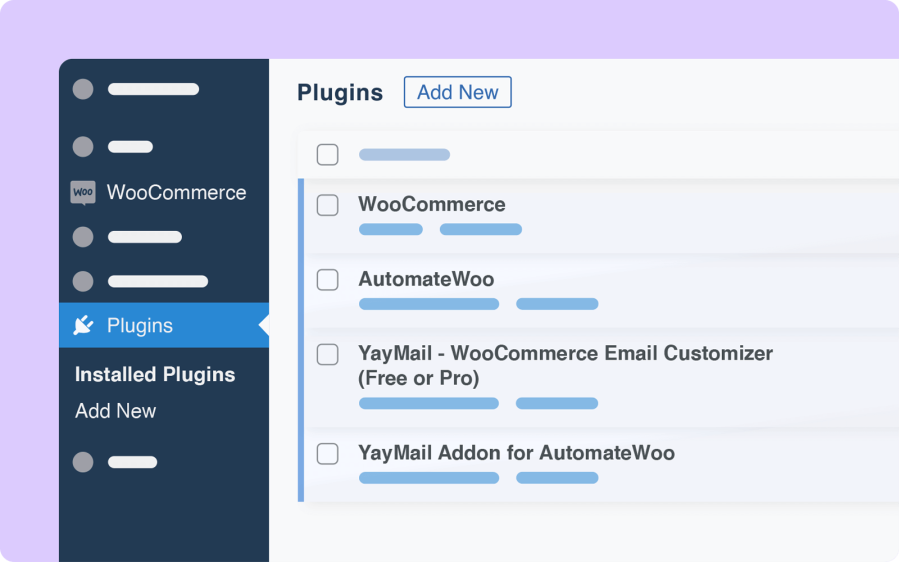
Activate extensions of Email Customizer for AutomateWoo

Of course, you should have created automated workflows in your AutomateWoo menu using Triggers, Rules, and Actions within WooCommerce.

Then you will be able to find the email templates by navigating to YayCommerce → YayMail.

In the email builder interface, please go to Settings → Enable/Disable Templates to find all the available email templates. There, you can choose to activate all the templates you want to use.

For each enabled template, a green light indicates it is now in use in the automation workflow of WooCommerce.

At any time, you can send a test email to make sure it looks correct on different email clients and devices.
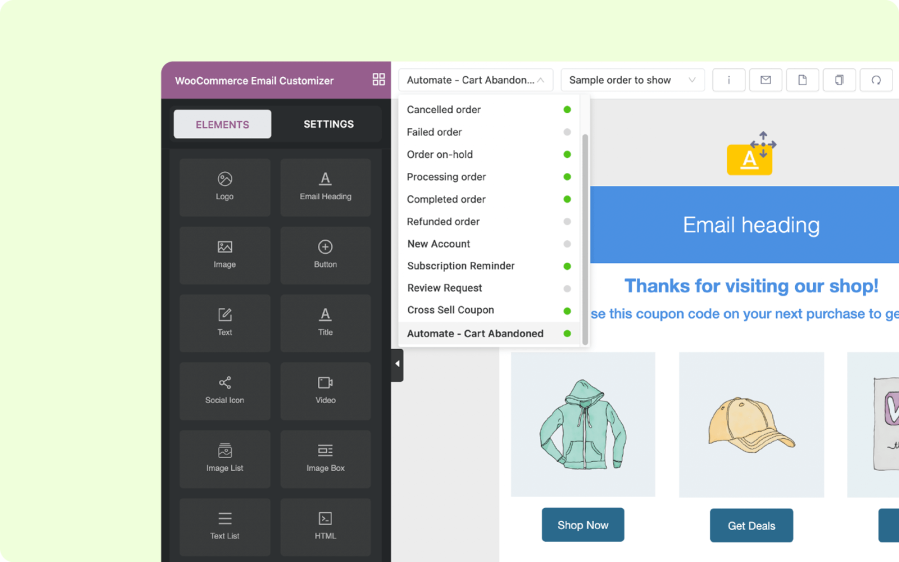
Features of Email Customizer for AutomateWoo

Email template builder options

  • Copy an element to another template
  • Clone a full template to reuse in the current email template
  • Reset template to the default
  • Set a header or footer email block as a default to apply to all available templates
  • Preview selected email templates on different devices
  • Send test email to your own email address
  • View actual order details and workflows of your store’s past orders

Email template list in Email Customizer for AutomateWoo

General settings

  • Language direction: you can compose emails in left-to-right or right-to-left languages
  • Container width: resizable widths for the whole email body
  • Product image: automatically insert any product image with custom position and image sizes
  • Custom CSS: add your own creative adjustments
  • Shortcodes: insert personalized content to any emails

YayMail gives you more control over how and when to use variables/shortcodes in your emails. Please note that AutomateWoo variables are template-specific, which means that they can only be used in the email templates that they are defined in.
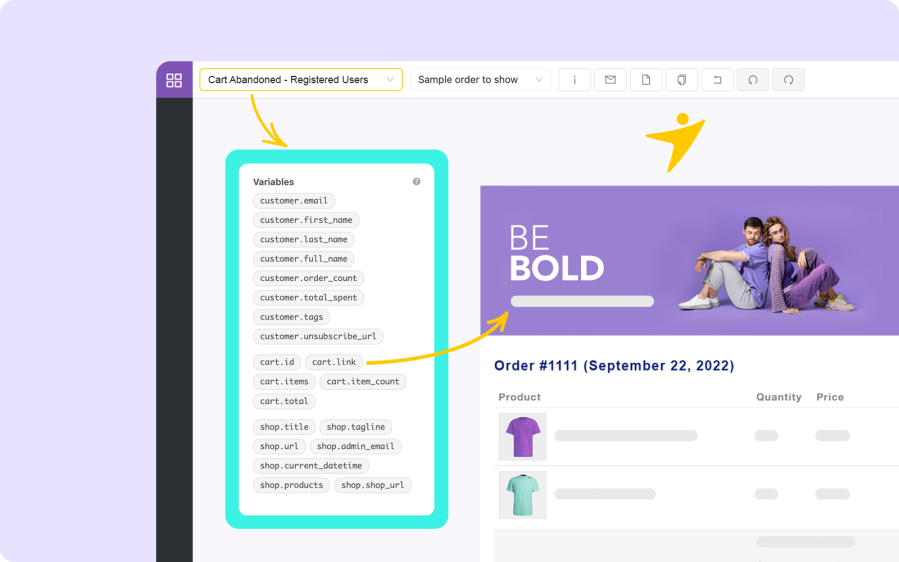
Email Customizer for AutomateWoo with variables

Like Gutenberg blocks, you can upload and insert your logo and images quickly to an email body. You can resize it by using the image size slider and adding padding/margin area to the image element.

Adding extra elements like videos, animations, gifs, and rich content is made possible with YayMail.

You can use custom blocks to make the WooCommerce email templates stand out, as well as apply colors to text and their backgrounds. You can also embed social media links as brand info to appeal to your readership. These types of customization techniques are extremely easy to do since they are built in the YayMail email editor.

And once you finish the work, you can achieve the look and feel you’ve always wanted for customizing WooCommerce AutomateWoo email templates.

Compatibility

If you use Email Customizer for AutomateWoo in combination with Email Customizer for WooCommerce, you will have fully translatable email templates. It supports these WordPress multilingual plugins:
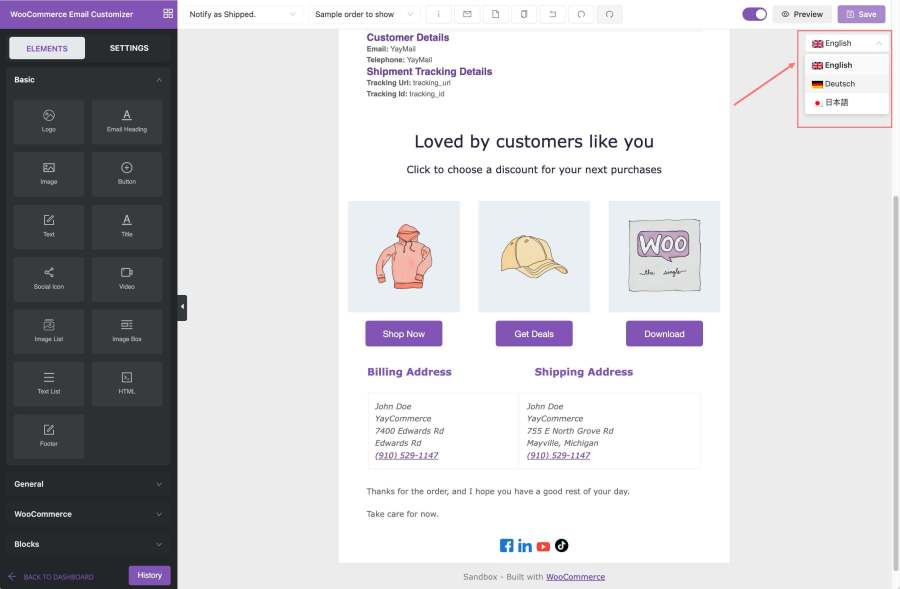
  • WPML & WooCommerce Multilingual with WPML
  • Polylang
  • TranslatePress
  • Weglot

WooCommerce Email Templates by AutomateWoo is compatible with WPML

Premium integration with multilingual plugins (YayMail Pro only) will allow you to keep a full backup of your email designs and customizations. It’s easy to export all email templates to JSON files and then import them to use in future email campaigns.
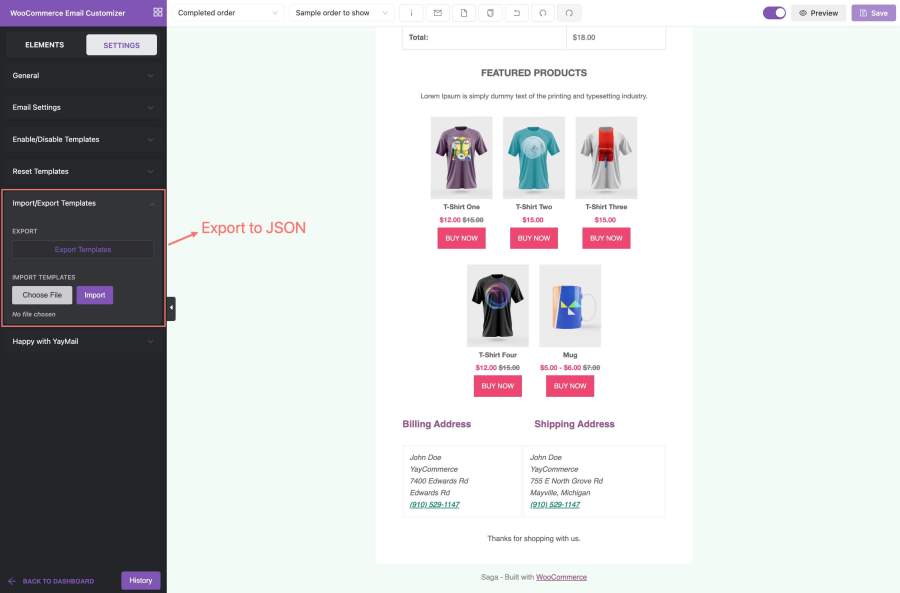
YayMail export all templates all languages to JSON

YayMail Pro also offers an extended history of your email edits. These include the list of recent unsaved editing actions and saved email revisions.
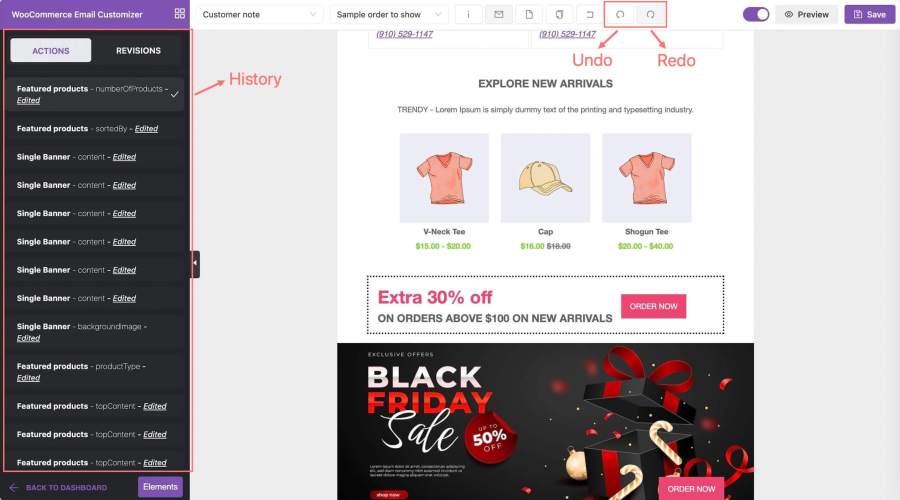
Email Customizer history actions revisions

Requirements

Minimum PHP version: 5.6
Plugins:

FAQs on Customizing AutomateWoo Emails

Where do I edit AutomateWoo email templates?

  • Once you’ve added a new workflow in AutomateWoo, it will generate a new email with the given name. Now you just go to WordPress admin dashboard → YayCommerceYayMail and select that email from the top left dropdown.

How do I edit an existing AutomateWoo email template?

  • All existing AutomateWoo emails will be quickly synchronized into YayMail email builder. If you think there are some emails missing, just contact us and we’ll troubleshoot the issue.

Where are the WooCommerce email template files?

  • If you enable a WooCommerce email template in YayMail, the email template designed by YayMail will override the default AutomateWoo email. So you don’t need to modify it in your child theme templates or theme directory files.

Can I use AutomateWoo variables in the YayMail editor?

  • Yes, you can insert AutomateWoo variables into the email blocks. When your workflow runs and sends out emails, it will automatically display the values of those variables according to the recipient information. Please note that these variables are template-specific, so please make sure you copy/paste the variables supported in each email template.


Opiniones de clientes

Promedio de valoraciones 3.7
3 reseñas
5 estrellas, 67 % de valoraciones
4 estrellas, 0 % de valoraciones
3 estrellas, 0 % de valoraciones
2 estrellas, 0 % de valoraciones
1 estrella, 33 % de valoraciones
3 reseñas
  • Kevin Nguyen
    Valoración: 1 de 5
    Nov 24, 2023
    It's bad
    Got so many issue with email. Even blank and sometimes doesn't work like the preview. Please refund me. Waste of time and money. WooCommerce team should check the plugin quality carefully before allowing to sell here or you'll also loose your reputation and customers
    • yaycommerce
      Abr 19, 2023
      Hi, Thank you for taking the time to leave us a review. I'm sorry to hear that you didn't have a good experience with our Email Customizer for AutomateWoo extension. We hope to have more chances to discuss things further. So would you please get in touch with our WooCommerce experts at https://yaycommerce.com/support? Our team will fix the issue for you with the highest priority. We hope we'll be able to sort this out for you very soon! If it doesn't work out, please proceed to request a refund from your user dashboard, and the WooCommerce team will issue a refund for you as soon as possible. Thanks and best regards, YayCommerce Support Team
  • Oliver Palomares Anguix
    Valoración: 5 de 5
    Sep 4, 2023
    The best option to customize your Woocomerce notifications.
    The title of my review may seem very commercial, but that's how it is. The plugin offers many customization options, the support is good (they offer you quick solutions). In general, it is an excellent plugin to use in any store created with Woocommerce. If I had to make a complaint it would be that the add-ons could be a little cheaper. It would be a good option to offer Yaymail customers a discount coupon if you buy 2 or more addons at the same time.
    • yaycommerce
      Oct 12, 2023
      Hi, Thank you for writing us a review. We're glad to have you as a customer. Also, at YayCommerce, we offer exclusive discounts for YayMail Addons if you are a YayMail Pro license holder. There are discounts for NGOs, and coupons if you buy 2 or more addons at the same time as well. Thanks again and I wish you a great day ahead. We look forward to hearing back from you soon! Best regards, YayCommerce Support Team
  • rscrouse
    Valoración: 5 de 5
    Nov 3, 2022
    Excellent Plugin with Great Support Team
    If you're offering subscription sales at your site, and you use the excellent YayMail plugin for customizing email, adding this plugin to compliment AutomateWoo (if you also use that) is a no brainer. It works very well and the support team is outstanding.

Información de la extensión

  • Versión mínima de WordPress requerida: 5.2
  • Versión de WooCommerce requerida: 4.6.0
  • Se requiere una versión de PHP: 7.4
  • Se ha probado con WooCommerce: 10.4.3
  • Se necesita al menos WooCommerce: 9.0.0

Países

  • Todo el mundo

Idioma:

English (UK), English (United States), German, Italian, Spanish (Spain)

Related products

Precio: $279/anualmente
Valoración: 3.2 sobre 5 estrellas
Precio: $79/anualmente
Valoración: 3.4 sobre 5 estrellas
Precio: $59/anualmente
Valoración: 3.1 sobre 5 estrellas
Precio: $49/anualmente
Valoración: 4.1 sobre 5 estrellas
Precio: $109/anualmente
Valoración: 2.8 sobre 5 estrellas
Precio: $109/anualmente
Valoración: 2 sobre 5 estrellas
Precio: $109/anualmente
Valoración: 2.3 sobre 5 estrellas
Precio: $109/anualmente
Valoración: 2.6 sobre 5 estrellas
Precio: $109/anualmente
Valoración: 2 sobre 5 estrellas




