
Instalaciones activas
7K+
Product comparison
La suscripción incluye
Ayuda y soporte
Configura los pedidos anticipados en tu tienda de Woo para que los clientes puedan pedir productos antes de que estén disponibles. Puedes autorizar y ejecutar pedidos de forma automática o manual cuando estén listos y dejar que la extensión gestione todo lo demás.
La venta anticipada es completamente personalizable y admite el cobro antes y después del lanzamiento de los productos. Si utilizas una pasarela de pago compatible, los pedidos anticipados se pueden cobrar tras el lanzamiento de los productos sin que el cliente tenga que volver a la tienda para pagar el pedido.
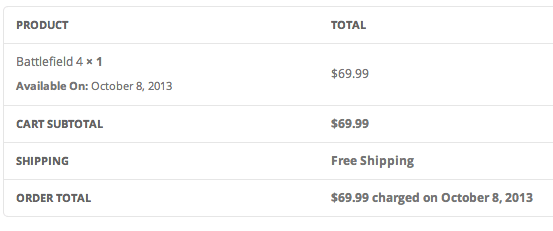
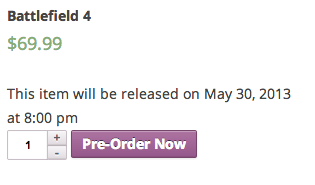
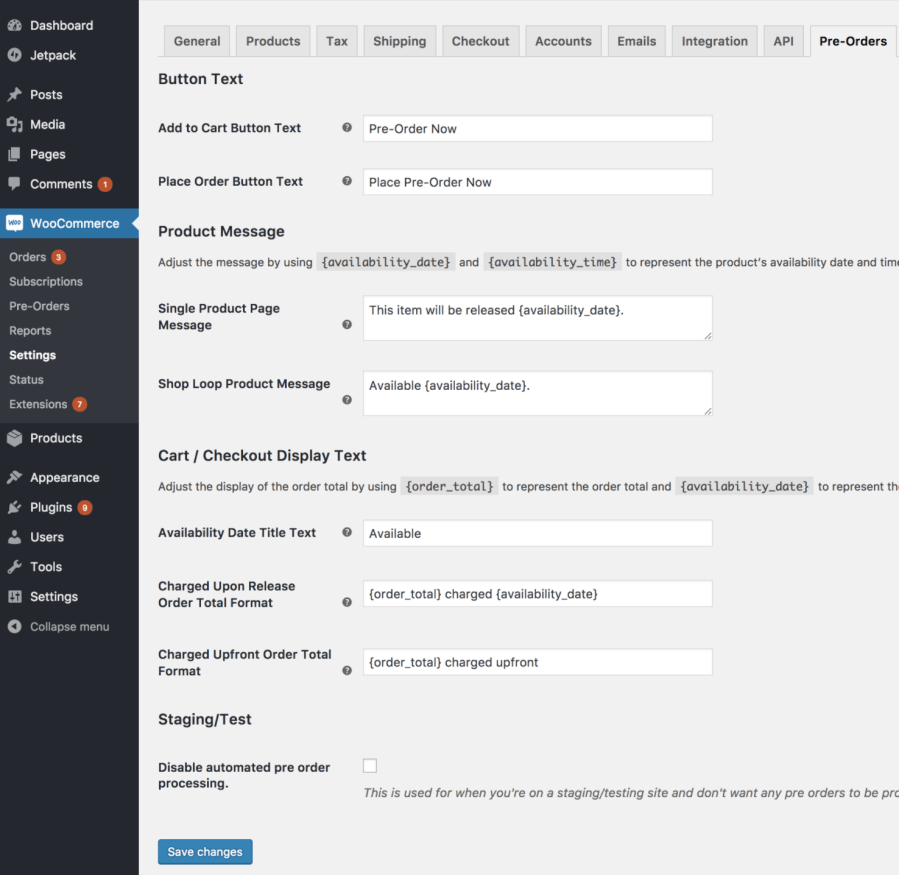
Controla cómo se verán los productos de los pedidos anticipados con los ajustes integrados para el texto del botón, los mensajes de los productos y otros recursos. Muestra el tiempo que falta para que un producto esté disponible en cualquier parte de tu sitio con un shortcode de cuenta atrás que se puede personalizar mediante CSS.
Los pedidos anticipados se pueden cobrar de dos maneras: antes o después del lanzamiento del producto. Al cobrar un pedido anticipado por adelantado, el cliente paga el importe íntegro del pedido.
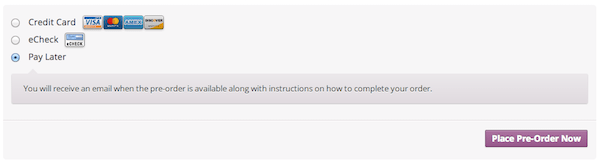
Al cobrar un pedido anticipado tras el lanzamiento del producto, el método de pago elegido por el cliente se procesa cuando se lanza el producto (al llegar la fecha de disponibilidad, si está configurada, o manualmente en el administrador de pedidos anticipados) mediante una pasarela de pago compatible. Si no hay ninguna pasarela compatible, el cliente recibirá un correo electrónico cuando salga a la venta el producto para que vuelva a la tienda y realice al pago.
Todos los pedidos anticipados se pueden gestionar a través de una página específica. En esa página, el administrador puede retrasar, completar, cancelar o enviar por correo electrónico los pedidos anticipados seleccionados, o bien aplicar la misma acción en todos los pedidos anticipados de un producto determinado.
Si utilizas una de las pasarelas de pago compatibles, puedes cobrar automáticamente a tus clientes cuando el pedido esté disponible. Todas las pasarelas admiten el pago manual de los pedidos anticipados por medio del envío de un correo electrónico al cliente en el que se le solicita que vuelva a la tienda y pague su pedido cuando se lance el producto.
WooCommerce Pre-Orders is a WooCommerce extension that lets customers order products before they launch. You set an optional availability date and time, and once that moment arrives, the product stops being a pre-order and behaves like a regular product. It works with both simple and variable products, so you can open reservations for new releases, upcoming items, and limited runs while you finish production.
Yes. WooCommerce Pre-Orders supports two charging options: upfront or upon release. When charged upfront, the customer pays the full amount at checkout, like a normal purchase. When charged upon release, the customer is billed when the product becomes available, either automatically on the availability date or manually from the Pre-Orders admin. This gives you flexibility to match your cash flow and product strategy.
It depends on your payment gateway. If you use a supported payment gateway, the customer's payment method can be charged automatically when the pre-order is released, so they do not need to return to your store. For any other gateway, WooCommerce Pre-Orders includes a built-in Pay Later option and sends the customer an email prompting them to come back and complete payment once the product is available.
Yes, this is one of the most common reasons merchants use pre-orders. By opening reservations before a product is in stock, WooCommerce Pre-Orders gives you a clear early signal of interest so you can plan production and inventory with more confidence. It is well suited to new product lines, limited-edition drops, made-to-order goods, and seasonal releases where you want to secure sales before manufacturing or ordering in bulk.
Yes. You can set an optional availability date and time for each pre-order product, and you can change the release date later from the Pre-Orders admin. WooCommerce Pre-Orders also lets you email everyone who pre-ordered a product, so you can keep customers informed if a launch date shifts. Note that while active "pay upon release" pre-orders exist, the fee and charging method are locked until those pre-orders are completed or cancelled, though the release date can still be updated.
Yes. WooCommerce Pre-Orders lets you add an optional pre-order fee on top of the regular product price, in your store's currency. This is useful if you want to cover early handling costs or offer a distinct pre-order price point. The fee is set per product in the Pre-Orders product settings.
Yes. WooCommerce Pre-Orders gives you built-in settings to change the "Add to Cart" and "Place Order" button text, so a product can show "Pre-Order Now" instead of "Add to Cart." You can also add custom messages on the single product page and shop pages that announce when a product will be available, using placeholders for the availability date and time. There is also a countdown timer shortcode you can place around your site, with styling controlled through CSS.
Yes, WooCommerce Pre-Orders works with both simple and variable products. One thing to keep in mind: pre-orders apply at the product level, which means all variations of a product are marked as pre-order items. Customers can choose which variation they want to pre-order, but you cannot set only certain variations as pre-orders while others remain regular stock. If per-variation control matters for your store, factor this into your decision.
Yes. WooCommerce Pre-Orders includes a setting to enable pre-orders for compatible products when they go out of stock. This is helpful when you want to keep capturing demand for popular items during a restock rather than losing the sale. Keep in mind that pre-orders and backorders are different: pre-orders are for items not yet released, while backorders apply to released items that are temporarily unavailable.
WooCommerce Pre-Orders adds a dedicated "pre-order" order status so you can filter and identify pre-orders separately from your regular orders. From the Pre-Orders admin, you can complete pre-orders (which charges customers using a supported gateway or sends a payment request), cancel pre-orders that are no longer available, change release dates, and email everyone who pre-ordered a given product. Once a pre-order is completed, it moves into your normal WooCommerce order workflow.
You can cancel one or more pre-orders from the Pre-Orders admin, and you can optionally send customers an email with a custom message explaining the cancellation. One important detail for planning: for pre-orders that were charged upfront, any payments are not reversed automatically and need to be refunded manually, the same way you would handle a standard WooCommerce refund.
Yes, WooCommerce Pre-Orders works with WooCommerce Subscriptions. A subscription product can be charged upon release using the built-in Pay Later gateway or a gateway that supports automatic payments, with the subscription starting from the pre-order completion date. It can also be charged upfront, billing the first subscription period at checkout. One limitation to note: pre-orders are not compatible with the synchronized renewals or free trial features of WooCommerce Subscriptions on the same product.
WooCommerce Pre-Orders is a strong fit for merchants launching new products, releasing limited editions, selling made-to-order goods, or timing seasonal and holiday drops. It is also a good choice for stores that want an officially supported, Woo-built pre-order extension with control over charging timing, release dates, and customer notifications. If you want to build anticipation for an upcoming launch while securing early sales, it gives you the core tools to do that.
WooCommerce Pre-Orders may not be the right fit if you need per-variation pre-orders, since pre-order status applies to the whole product and all its variations together. It also does not split a mixed cart into separate charges for in-stock and pre-order items on its own, so if a shopper needs to buy available and pre-order products with different billing in one flow, plan for that. If your real need is conditional rules around which payment or shipping methods appear based on cart contents, Conditional Shipping and Payments may be a better companion or alternative.
Pre-orders and backorders solve related but different problems. Pre-orders let customers reserve a product before its official release, when it is not yet in stock, which is ideal for launches and upcoming items. Backorders apply to products that have already launched but are temporarily out of stock. WooCommerce Pre-Orders is built for the pre-release scenario, with availability dates, launch messaging, and flexible charging, and it can also open pre-orders when a compatible product goes out of stock.
Categorías
Información de la extensión
Comprobaciones de calidad
Tiene compatibilidad con
Compatibilidad
Países
Requisitos