





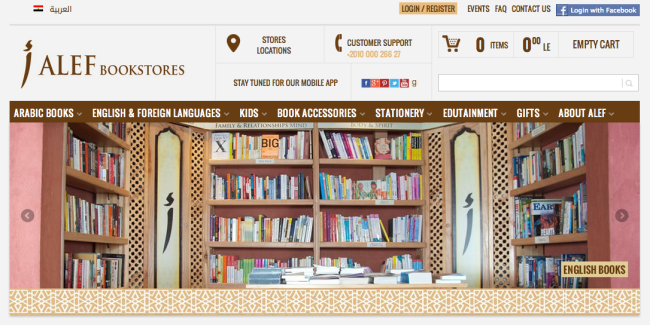
Galal Aly from Robustastudio explains how WooCommerce enabled ALEF Bookstores, one of Egypt’s fastest growing bookstores, to scale in order to solve tracking challenges and take their blooming business to even greater heights.
ALEF Bookstores had embraced eCommerce for expansion but faced problems with scalability that threatened to slow them down. They needed to be able to track the many thousands of books within their inventory – whether available in their main warehouse or at branches – but due to many of the books having the same identifiers, they were often untraceable.
Some background
↑ Back to topALEF Bookstores were using an ERP system, hosting over 34,000 products, built on top of the famous Opentaps (an open source ERP system). The main requirement was to use the ERP system as the single interface for entering products and the commerce website therefore had to synchronize both data.
The synchronization model at first was designed to synchronize all data four times a day so that the products’ data appear the same on the website as on the system. The ERP was configured to export all of the updated product’s data since last export in an XML file. Initially, this contained all products.
WordPress and WooCommerce
↑ Back to topThe website was created using WordPress and WooCommerce. The synchronization part was initially created as a WordPress plugin that parses the XML and uses the WordPress functions to insert the product and update its data; wp_insert_post and update_post_meta. Products inserted had categories, tags, prices, descriptions, photos, weights and dimensions, and other custom attributes like Author of the book and so on.
For WooCommerce functionality, we used the get_product function to be able to apply product’s functions on the inserted product (e.g. setting stock). The synchronization plugin was written at first to handle all 34,000+ products which took 18 hours at first.
Improving duration and solving memory problems
↑ Back to topThis duration was reduced to one third by turning off the term counting. This was done using the wp_defer_term_counting function before starting to insert the products in the database (for new products) and turning it on afterwards. After that’s done, the 34,000+ all details synchronization took six hours.
A problem was raised. The server sometimes ran out of memory when we were processing 34000 products at once. Therefore, the XML was divided to smaller XMLs (100 products each). This solved the memory problem a little.
However, six hours was not an acceptable rate. We had to optimize the logic of the synchronization itself. To identify the products, we had to use a unique identifier that was common on the ERP system and the website. We used the ID of the ERP system and saved it as a meta value in our database.
This ID was used to detect whether we already had the product in our database or not. For a new product for the website, we inserted it and got the post ID to use it afterwards. For an existing product, we got its post ID directly. This was typically executed using the query:
This is a very heavy query to execute out of the box with no modifications to the database itself. We had to index the meta_value column reduce time taken and. in addition, all the insertions and updates were done in batches (before using any of the insertions and updates we turned the AUTOCOMMIT off, and committed every 10,000 products, and when done, turned the AUTOCOMMIT on again),
By doing so, the synchronization was halved to take only three hours – an acceptable duration for us that we haven’t optimized further since we need to keep the WordPress and WooCommerce usage in our code.
The 34,000+ products synchronization case had to be handled for bulk changes made on the ERP system for all of the products (even if rare). This scenario is run only once per day so as to avoid overloading the server and because the products’ data (other than quantities) are not changed frequently and can wait till the next day to be applied without any problems to the eCommerce process.
Stock quantities
↑ Back to topThe one attribute that is being constantly updated is the stock quantity. The ERP system is being used in all ALEF Bookstores branches and when an offline sale happens, the stock changes in the ERP. This needed be reflected on the website to avoid overselling of any of the products.
Unfortunately, we couldn’t get an exported XML from the ERP system with the updated attributes only. We get all of the product’s details if the product had been updated since last synchronisation. So, another synchronization scenario had to be created to update the quantities.
First, we exported XMLs from the ERP system, and for each product, set its stock using WooCommerce functions. This took approximately the same time (three hours) as the all information synchronization described above and wasn’t acceptable.
We had to further optimize the synchronization script. The ERP system was configured to export the quantities of the products along with the unique identifier to a MySQL table in the database. When done, a simple join MySQL query got the product IDs of the changed quantities and the new quantities values. This join was saved as a view and contained the website quantity, ERP quantity, and product ID.
A simple loop to initialize a WooCommerce product from the IDs and set the stock to the new value completed the task but the time taken when this synchronization was run was still a full hour. Better but still not acceptable because the intention was to run the quantities update hourly.
The WooCommerce set stock function for a product made unnecessary checks (for our case): the back-ordering and that the stock is being managed on the website. Therefore, a copy of this function was created that omits these checks, and turned off the AUTOCOMMIT while updating. These last changes reduced the time required to update the quantities for the 34,000+ products to under 2 minutes.
Moral of the story? What takes 18 hours in a first attempt can be sliced down to just two minutes. Maximum respect to the Robustastudio team and to ALEF Bookstores for their journey so far and where they’re headed.


About



I would love to know what the web server infrastructure that this store uses?
Do you have this information?
Thanks
Great case study.
Thanks for sharing.