
Product Icon

reCaptcha Integration for WooCommerce

Protégez votre boutique eCommerce contre les attaques malveillantes et automatisées en utilisant reCaptcha pour WooCommerce.
Choisissez une option de facturation
$29
Save 20%
$58 $46.40

L’abonnement comprend

  • Mises à jour et améliorations du produit
  • Assistance client
  • Remboursement garanti sous 30 jours

  • Prise en charge de la validation de la commande classique et du bloc Validation de la commande
  • Prise en charge de reCaptcha V2 (case à cocher) et reCaptcha V3
  • Protection contre les indésirables
  • Protection contre les tentatives de connexion non autorisées
  • Blocage des fausses inscriptions
  • Blocage des fausses commandes invités
  • Interactions aisées pour les utilisateurs et meilleure adhésion
  • Simple pour les clients, complexes pour les bots
  • Activation aux endroits souhaités uniquement

Description

Actuellement, la sécurité constitue le problème le plus important pour chaque site Web et boutique de eCommerce. Votre site manque de performances à cause des outils automatiques et des bots. De nombreux outils automatiques existants peuvent affecter votre site de manière indésirable. Par conséquent, chaque site Web ou de eCommerce doit avoir un captcha le protégeant des bots automatiques. Google reCaptcha « Je ne suis pas un robot » offre la meilleure protection en impliquant l’interaction humaine pour résoudre le captcha. Grâce à sa capacité à étudier et distinguer les bots des personnes réelles, reCaptcha protège votre site contre les programmes automatisés. Toutefois, de vrais clients peuvent être amenés à rencontrer ce bouclier.

Solution idéale, reCaptcha pour WooCommerce fournit un captcha tout en un pour WooCommerce et WordPress. La configuration est simple : il suffit d’activer ou de désactiver le captcha aux endroits requis. Cerise sur le gâteau, cette extension est parfaitement intégrée à WooCommerce et à WordPress, et ne risque pas de perturber le bon fonctionnement de votre site.
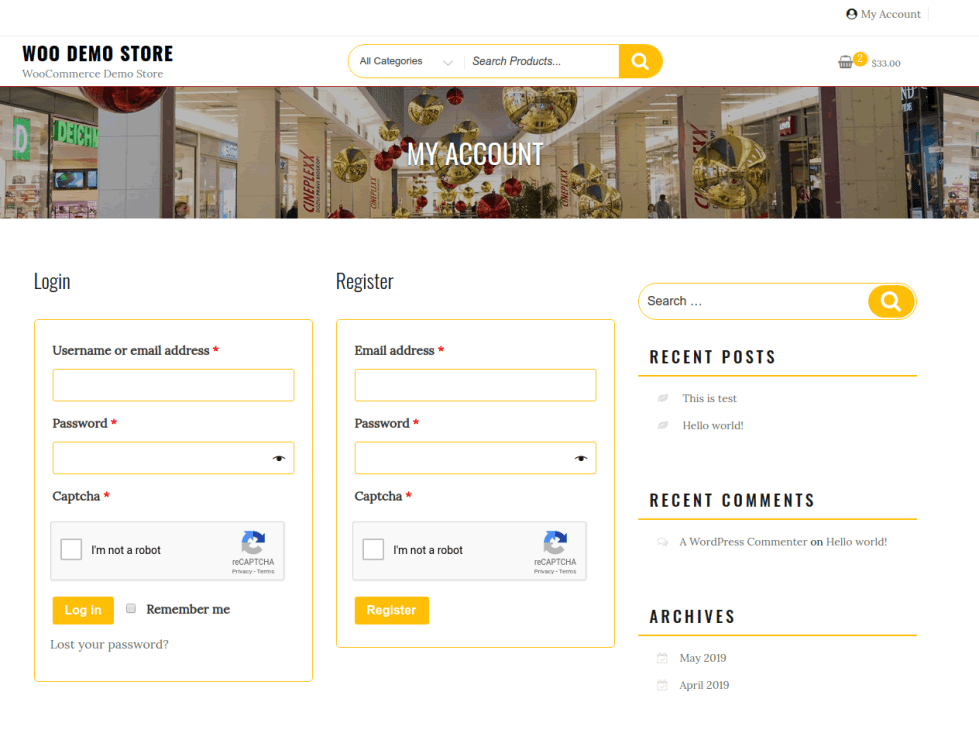
Fonctionnalités

  • reCaptcha de connexion
  • reCaptcha d’inscription
  • reCaptcha de perte de mot de passe
  • reCaptcha de validation de commande invité
  • reCaptcha de validation de la commande à la connexion de l’utilisateur
  • reCaptcha d’ajout d’un mode de paiement
  • Captcha de paiement de la commande WooCommerce
  • Captcha d’avis sur le produit WooCommerce
  • Captcha de suivi des commandes WooCommerce
  • Captcha de formulaire de commentaire WordPress
  • reCaptcha de connexion WP
  • reCaptcha d’inscription WP
  • reCaptcha de perte de mot de passe WP
  • reCaptcha pour les formulaires JetPack
  • Étiquette personnalisée pour reCaptcha
  • Message d’erreur personnalisé.
  • Thème sombre/clair de reCaptcha
  • Mode captcha complet/compact
  • Choix de la langue du captcha pour V2.
  • Détection automatique de la langue de l’utilisateur
  • Bouton Envoyer désactivé jusqu’à la résolution du captcha
  • Réinitialisation du captcha en cas d’erreur de commande
  • Désactivation du reCaptcha pour IP / plage

Nouvelle fonctionnalité

reCaptcha pour WooCommerce prend désormais en charge le reCaptcha du bloc Validation de la commande. Cliquez ici pour consulter l’intégralité de la vidéo sur reCaptcha pour le bloc Validation de la commande de WooCommerce
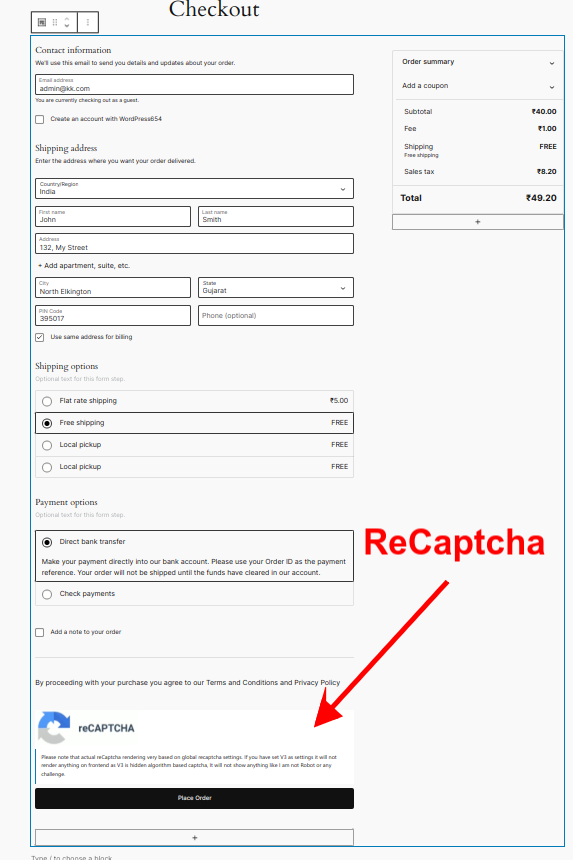
reCaptcha-pour-bloc-validation-de-la-commande-WooCommerce


Foire aux questions

What is “reCaptcha for WooCommerce”?

It is a plugin/extension for WooCommerce (and WordPress) that integrates Google reCAPTCHA (or enterprise reCAPTCHA) into your store — helping to block spam, bot interactions, fake registrations or orders, and unauthorized automated actions.

Which versions of reCAPTCHA does the plugin support?

It supports both reCAPTCHA V2 (classic visible challenge) and reCAPTCHA V3 (invisible, background check).

Does reCaptcha for WooCommerce work with the new WooCommerce Checkout Block?

Yes, It support. Click here to check the full video on ReCaptcha For Chckout Block of WooCommerce

On which pages/forms can I enable reCAPTCHA?

You can enable reCAPTCHA on many WooCommerce and WordPress pages, for example: login, registration, lost password, guest checkout, logged-in checkout, payment method addition, pay-for-order, product reviews, order tracking, WordPress comments, WP login/registration, etc. It also works with some third-party forms like JetPack forms.

What is the “hybrid” reCAPTCHA mode?

The plugin offers a hybrid mode — where it uses V3 by default (invisible), but falls back to V2 (visible challenge) if the V3 check fails (to prevent locking out legitimate users). This helps balance between user experience and security.

When should I enable reCAPTCHA?

It’s recommended to enable reCAPTCHA on login, registration, checkout (guest or user), payment-method addition, order-tracking, product review/comment forms — basically, all places where bots or automated scripts can exploit forms. If you use the newer block-based checkout, ensure you enable reCAPTCHA for “Checkout Block” mode.

What is Cloudflare Turnstile?

A modern CAPTCHA alternative that verifies users with minimal interaction and respects privacy.

How does Cloudflare Turnstile differ from reCAPTCHA?

Cloudflare Turnstile is offering a smoother experience for customers while still blocking bots.

What is hCaptcha?

hCaptcha is a privacy-focused CAPTCHA solution that helps protect websites from spam, bots, and automated abuse. It verifies whether a visitor is human by presenting a simple challenge (such as selecting specific images) only when needed.

Unlike some verification systems that rely heavily on background tracking, hCaptcha is designed to give website owners greater control over data handling while still providing strong bot protection.

How does hCaptcha differ from reCAPTCHA and Cloudflare Turnstile?
  • Privacy-focused alternative

  • Uses interactive challenges when needed

  • Gives site owners more control over data handling

  • Suitable for stores prioritising compliance and flexibility

Avis Clients

Moyenne des notes 3.5
46 avis
5 étoiles, 48 % des avis
4 étoiles, 7 % des avis
3 étoiles, 13 % des avis
2 étoiles, 17 % des avis
1 étoile, 15 % des avis
46 avis
  • hbomb21
    Noté 5 sur 5
    Fonctionnalité
    Fév 2, 2026
    Fonctionnalité
    A few years back when we started using this plugin it helped us out of a tight spot where spammers were causing some havoc, it helped us to reduce some fraudulent activity. Of course this isn't some sort of one trick solution for fraud prevention, but it is one good tool for your fraud prevention tool belt. Overall it was pretty easy to configure and it has settings for all the main Woo and Wordpress forms that we care about. I don't believe I recall any breaking changes, which is important to me
  • jeanettedepatie
    Noté 1 sur 5
    Facilité d’utilisation
    Jan 23, 2026
    Facilité d’utilisation
    Doesnt work anymore. Using V2 or V3 of recaptcha. Admin interface is not properly saving settings anymore.
    • nikgandhi
      Jan 24, 2026
      Hello, Please let us know isseu, We know that google has moved reCaptcha keys creation to cloud. We have already updated guide to get keys from there. Thanks
  • mikennedy19
    Noté 4 sur 5
    Fonctionnalité
    Jan 2, 2026
    Fonctionnalité
    Woocommerce also has a vulnerability where bad actors use woocommerce to test stolen credit cards and test those stolen cards on web sites using woocommerce. Without utilizing reCaptcha it causes a lot of headache on woocommerce engine sending a heavy number of failed transactions.
  • magazinedelicatelyae2fdc9620
    Noté 2 sur 5
    Facilité d’utilisation
    Déc 19, 2025
    Facilité d’utilisation
    The new reCaptcha setup from Google has gone from completely uncomplicated to unusable unless you have training. I am sure this is a great app... I don't know because I could never get it to work... I will re-attempt a setup when I have a few days to spend on figuring out the spaghetti menus and hoops to jump through...
  • afibadges
    Noté 3 sur 5
    Fonctionnalité
    Nov 14, 2025
    Fonctionnalité
    I purchased the plugin for $29. It stopped the card attack checkouts however, it did not stop the hundreds and hundreds of fake customer accounts that were being created. I don't think that is the intended functionality of this plugin, so I'm not going to hold that against this plugin. **BUT** The issue that I had with implementation is that it broke the "Proceed to PayPal" button for the Storefront theme at the bottom of the checkout page. When you click on that button now, the page flashes and then resets, does not take you anywhere. I've lost quite a few customers this week that gave up on trying to check out, even though the express checkout options were still working. **How do I get a r...
    • nikgandhi
      Nov 15, 2025
      Hello There, Please create ticket, We will help you to stop fake account creation. I will also assist you to fix express checkout issue. Thanks

Extension information

  • PHP version required: 7.4
  • Tested with WordPress: 7.4
  • Tested with WooCommerce: 6.9
  • Requires at least WordPress: 3.0
  • Requires at least WooCommerce: 3.2

Compatibilité

  • Cart & checkout blocks
  • High performance order storage (HPOS)

Pays

  • Mondial

Related Products

Prix $119 par an
Noté 3.5 sur 5 étoiles
Prix $109 par an
Noté 4.6 sur 5 étoiles
Prix $279 par an
Noté 3.2 sur 5 étoiles
Prix $49 par an
Noté 2.7 sur 5 étoiles
Prix $199 par an
Noté 4 sur 5 étoiles
Prix $79 par an
Noté 4.2 sur 5 étoiles
Prix $49 par an
Noté 3.8 sur 5 étoiles
Prix $99 par an
Noté 4.7 sur 5 étoiles
Prix $79 par an
Noté 4 sur 5 étoiles
