Installations actives
10K+
Comparaison de produits
L’abonnement comprend
Assistance
Vous recherchez un moyen d’offrir des kits de produits personnalisables, comme des ordinateurs, des skateboards, des coffrets cadeaux personnalisés ou des bijoux sur mesure ? Ne cherchez pas plus loin ! Permettez aux clients de créer leurs propres produits avec Composite Products : le créateur de produits le plus flexible et le plus robuste pour WooCommerce.
Composite Products vous permet d’utiliser des produits existants pour créer les kits de produits et les produits configurables les plus engageants. Conçue spécifiquement pour les applications de création de kits avec des exigences avancées de gestion des stocks, l’extension se prête à de nombreuses utilisations, grâce à :

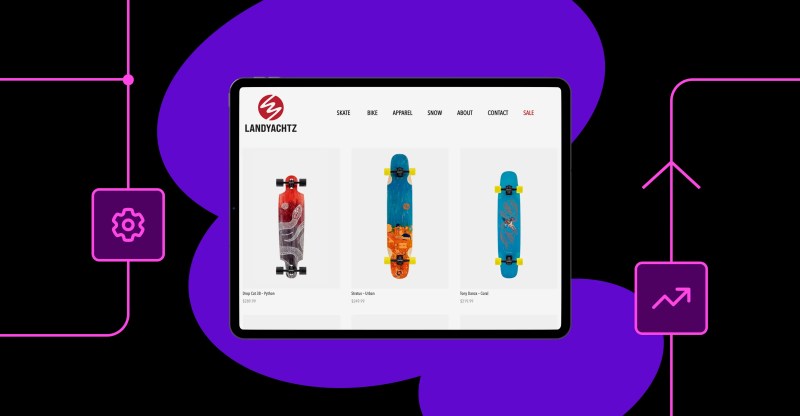
Vous voulez proposer un skateboard personnalisé ? Commencez par créer ses composantes : un deck, des trucks, des roues, des roulements et la quincaillerie. Ensuite, remplissez chaque composante avec des options en choisissant des produits, ou des catégories, dans votre catalogue. Enfin, choisissez une mise en page et un flux qui attireront les clients, et commencez à vendre !

Grâce aux mises en page et aux styles d’options flexibles à votre disposition, chaque produit composite peut être adapté pour offrir une expérience d’achat simplifiée et personnalisée.
Composite Products rend presque tout possible via la prise en charge des produits simples et variables, des formules de produits et même des versions téléchargeables / virtuelles de ces types de produits.

Votre catalogue de skates contient des milliers de decks, de trucks et de roues ? Il est évident que vous voudrez tous les proposer dans votre configurateur de skateboard personnalisé !
Pas de problème, choisissez un affichage des options qui prend en charge la pagination, le tri et le filtrage pour aider vos clients à trouver exactement ce qu’ils recherchent.

Besoin de contrôler sous condition la visibilité d’étapes de configuration entières ou d’options individuelles ? Avec Composite Products, c’est possible !
Consultez la documentation pour savoir comment faire !
Composite Products est la base idéale pour votre prochain projet de création de kits. Grâce à la prise en charge de l’API REST, ainsi qu’à une grande quantité de crochets d’action et de filtre, l’extension peut être adaptée aux besoins de votre projet.
Composite Products is a WooCommerce kit-building and product configurator extension that lets you create customizable product kits from your existing products. You define the building blocks (called Components), then fill each one with options for shoppers to choose from, so they can assemble products like custom computers, skateboards, gift boxes, camera kits, or made-to-order jewelry. It is built for kits made of multiple components, each with several options to choose from.
Yes. Composite Products is designed specifically for build-your-own and configurable product experiences in WooCommerce. You create a step-by-step or single-page flow where customers select each part of the product, with live pricing and validation as they build. It supports customizable layouts and option styles, so the configurator can match anything from a short, guided flow to a large kit builder with thousands of options.
Yes. Composite Products lets you build kits and configurators from products already in your catalog, so you do not have to recreate them. You can add products to a Component one by one, or point a Component at whole product categories. Simple products, variable products, and Product Bundles can all be used as Component Options.
Yes. Because each Component Option is a real product in your catalog, stock is tracked at the individual component level. This is useful when parts of a kit have limited stock, since out-of-stock options become unavailable in the builder. It was engineered for kit-building applications with advanced inventory management needs, which makes it well-suited to stores that need precise stock control across many components.
The two extensions solve related but different problems. Product Bundles is designed for product packages with mostly static contents, such as a fixed kit or a discounted set. Composite Products is designed for kits made of multiple components where customers choose from several options at each step, such as a configurable computer or a build-your-own skateboard. If your product has fixed contents, Product Bundles may be the simpler fit; if shoppers need to configure each part, Composite Products is built for that.
Use Product Add-Ons when you want to add extra options or personalization to a single product, such as custom text, engraving, gift wrap, or a checkbox upgrade. Composite Products is a better fit when customers are assembling a product from multiple other products that you want to track as separate, inventory-managed items. In short, Product Add-Ons personalizes one product, while Composite Products builds a kit out of several products.
It can. By letting customers build a more complete, tailored product in a single purchase, Composite Products encourages larger orders and can raise the perceived value of what you sell. You can also enable per-component pricing and apply discounts that reward adding optional parts or accessories to the kit. For more ideas, see this guide on how to increase average order value.
Yes. Composite Products is built to scale from small kits to configurators with thousands of options. You can choose an options view that supports pagination, sorting, and filtering, so customers can narrow down to exactly the part they want. This makes it suitable for stores with deep catalogs, such as a skate shop offering many decks, trucks, and wheels.
Yes. Composite Products includes conditional logic, so you can show or hide entire configuration steps or individual options depending on what the customer has already selected. This helps guide shoppers toward valid combinations and keeps the builder relevant to their choices. It is useful for products where certain parts only make sense with specific earlier selections.
Yes. You can set a base price for the whole composite product, and you can also preserve the individual prices of the products chosen in each Component. When a Component is priced individually, you can apply a percentage discount, which is a straightforward way to reward customers for adding optional parts or accessories to their build.
Yes, with some limitations. You can add variable products as Component Options, but you cannot offer individual variations as options, and the extension is not optimized for variable products that have a large number of variations. If your kit relies heavily on selecting specific variations, it is worth reviewing these limits before building. The product documentation covers the details.
By default, each Component is designed to choose a single option. If you want customers to select multiple products within one Component, you will also need Product Bundles alongside Composite Products. This combination supports multi-select steps within a composite build.
It is best for stores selling configurable or made-to-order products that are assembled from several inventory-managed parts. Common examples include custom computers, skateboards, bikes, furniture sets, gift boxes, camera kits, and made-to-order jewelry. It is a strong fit when you need precise stock control for each part and a guided, step-by-step buying experience.
If you only need to sell fixed product packages with static contents, Product Bundles is often the better fit and simpler to set up. If you only need to add personalization or small extras to a single product, such as custom text or gift wrap, consider Product Add-Ons. Composite Products is most valuable when customers are configuring a product from multiple component choices.
Yes. Composite Products is compatible with the Cart and Checkout blocks available in WooCommerce core, so you can use it alongside the block-based, conversion-focused checkout experience. It is also compatible with High Performance Order Storage. This helps it fit into a modern WooCommerce store setup.
Yes. Composite Products adds a dedicated Composites report to WooCommerce Analytics, so you can review metrics for a chosen period. The report covers composite products sold, products sold within components, net sales, and orders containing composite products. This gives you a clear view of how your kits contribute to your store.
Composite Products runs on a WooCommerce store and builds kits from products in your catalog, so it is most useful once you have your component products set up. For most kit-building and configurator use cases, no additional extension is required. One exception is letting customers choose multiple products within a single step, which also needs Product Bundles.
Catégories
Informations sur l'extension
Vérifications qualité
Compatible avec
Compatibilité
Pays
Langues