


Installations actives
20K+
Comparaison de produits
L’abonnement comprend
Assistance
Offrez à vos clients la possibilité de faire des réservations, de prendre des rendez-vous ou de louer par eux-mêmes, sans avoir à passer d’appel téléphonique. Gagnez du temps et remplissez votre calendrier de réservations en laissant votre site faire le travail pour vous.

Quelles que soient les options que vous souhaitez proposer à vos clients, Bookings est là pour vous :
Quelle que soit l’option retenue, vous pouvez également bloquer une période comme non réservable, de manière à disposer de temps pour gérer d’autres priorités, et vous pouvez créer une marge entre les réservations, pour garantir que le planning vous convient.
Définissez vos créneaux horaires avec la précision que vous souhaitez. L’extension prend en charge les réservations en jours, heures et mêmes en minutes.

Vous pouvez définir le nombre minimal et maximal de participants : limitez une réservation à un rendez-vous individuel ou permettez à plusieurs personnes de réserver un cours ou un voyage.

Proposez des remises aux groupes ou personnes réservant plusieurs créneaux horaires, affichez des prix réduits pour les lève-tôt, des prix plus élevés pour les week-ends ou des tarifs spéciaux pour les enfants. Bookings vous permet de personnaliser les prix à votre guise.
Si vos services sont en ligne ou si vous assurez la livraison au client, indiquez votre disponibilité dans le fuseau horaire du client afin qu’il puisse réserver le créneau horaire dont il a vraiment besoin. Que les réservations proviennent de New York, de New Mexico ou de Nouvelle-Zélande, elles correspondront aux horaires que vous avez définis. Il n’y aura donc aucune surprise concernant les rendez-vous !
C’est parfait pour les cours virtuels, les rendez-vous en ligne ou les locations à remettre au client.
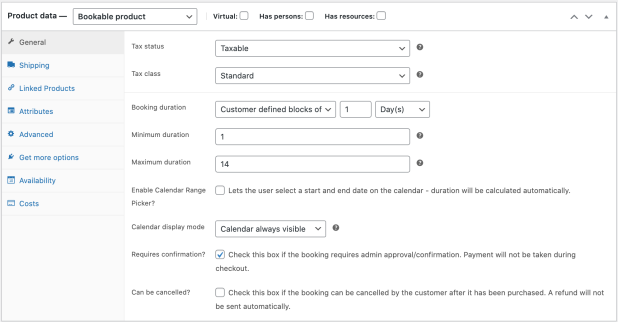
Configurez les confirmations en vous laissant le temps de vérifier les réservations avant de les valider. Envoyez automatiquement des rappels avant les réservations pour réduire les non-présentations et précisez si les réservations sont annulables.

Rappelez leurs rendez-vous aux clients avec des e-mails de notification pratiques une fois la réservation effectuée, confirmée et un jour avant la date de réservation.
Si vous souhaitez en faire plus, vous pouvez envoyer un rappel spécial directement à partir de votre site.
Évitez les doubles réservations en affectant les ressources requises à une réservation particulière. Par exemple, si une future mariée réserve un essayage à 14 h 00 et la présence d’un styliste jusqu’à 15 h 30, ce styliste ne sera pas disponible pour une future mariée réservant un essayage à 15 h 00. Vous n’aurez plus à vous excuser de proposer la même ressource à deux clients en même temps.

Utilisez l’aperçu du calendrier pour voir l’organisation de votre journée ou de votre mois. Mettez à jour les réservations ou vos disponibilités, ou filtrez pour afficher des services ou des ressources spécifiques.
Des clients continuent de vous appeler pour réserver ? Ajoutez-les manuellement à partir du calendrier pendant la conversation téléphonique.
Gérez les réservations sur votre boutique, et constatez qu’elles apparaissent dans votre Google Agenda en moins d’une minute.
Pour une expérience entièrement personnalisée, pensez à ces modules que d’autres clients de WooCommerce utilisent avec Bookings.
WooCommerce Bookings is a scheduling and reservations extension for WooCommerce. It lets customers book appointments, reserve time slots, or rent equipment directly on your store, without leaving your site or calling to check availability. It is designed for appointment-based businesses, rentals and hires, reservations, and other time-based services, so you can sell time and availability the same way you sell products.
To accept bookings in WooCommerce, you create a bookable product, which works like a standard product but adds settings for availability, duration, pricing, people, and resources. WooCommerce Bookings gives you these tools directly inside WooCommerce, so bookings flow into your existing store, cart, and checkout. You can start from included bookable product templates to configure common scenarios more quickly, or build a product from scratch. Read more in our guides on Creating a Bookable Product and Introduction to WooCommerce Bookings.
Yes. WooCommerce Bookings lets you set availability rules at the store level, the product level, and the resource level, and these rules work together to determine which time slots can be booked. You can define booking duration, lead time, buffer periods between bookings, and which days or times are available. This helps you keep bookings within the hours you actually work and reduces the risk of overbooking. Read more about the availability settings.
Yes. You can set a fixed booking duration in blocks (for example, a one-hour session), or let customers define how many blocks they want, such as booking several hours in a co-working space. Duration can be measured in minutes, hours, days, weeks, or months. For day-based bookings, you can also enable a calendar range picker so customers select a start and end date directly on the calendar.
Yes. WooCommerce Bookings supports flexible pricing so your rates can reflect how you actually charge. You can set a base cost applied once per booking and a block cost that scales with the length of the booking, charge different rates for different time periods, and offer discounts for certain bookings. You can also charge per person and set different prices for different person types, such as adults and children.
Yes. The resources feature lets you define assets such as staff members, rooms, or equipment, each with its own availability schedule and capacity. You can link a resource to one or more bookable products, so a single staff member or room is not double-booked across the different services that use them. You can let customers choose a resource, or have the system assign the first available one automatically.
Yes. With the person setting, customers can make a booking for multiple people at once. You can define different person types with their own costs, such as adults and children, and set minimum and maximum numbers of people per booking. You can also count each person as a booking so that capacity and resources are reserved accordingly.
Yes. You can require confirmation on a bookable product, so instead of paying at checkout right away, the customer submits their booking details for your approval. Once you approve the booking, the customer receives an email requesting payment. This is useful when you want to review availability or details before committing to a booking. Read more on Creating a Bookable Product: Requiring Confirmation.
Yes, when you add the separate WooCommerce Deposits extension. Together, the two let customers pay an initial deposit to secure a booking, with the balance due later, and you can set deposits as a fixed amount or a percentage of the total. Collecting a deposit can help reduce last-minute cancellations and support a more predictable revenue stream, which is helpful for higher-value services and rentals.
Yes. You can sync your site's bookings with a Google Calendar so your schedule stays current alongside your other tools. Inside your store, you can also view bookings in a calendar or list view and filter them by product and resource, which helps you keep track of upcoming appointments and reservations in one place.
Yes, with the WooCommerce Bookings Availability add-on (sold separately). It adds a calendar block that shows available slots on a weekly or monthly calendar, and a schedule block that lists available slots for a day, week, or month. Customers can customize and add a booking to their cart directly from these blocks, which can help surface your availability beyond the product page.
WooCommerce Bookings works with any WooCommerce payment gateway, so you can collect payment for bookings using the same payment methods you already use for other products. Because bookings flow through your normal WooCommerce cart and checkout, you do not need a separate payment setup to start accepting paid bookings.
Yes. For hotel rooms, bed and breakfasts, or vacation rentals, you can pair WooCommerce Bookings with the free WooCommerce Accommodation Bookings add-on. This add-on is built for overnight stays, including setting a site-wide check-in and check-out time, so night-based reservations behave the way guests expect.
You can, by combining WooCommerce Bookings with WooCommerce Subscriptions to add a recurring payment option for appointment-based offerings. This suits businesses like coaching or classes, where a customer pays on an ongoing basis. Note that WooCommerce Bookings on its own is designed for scheduled bookings rather than automatically repeating events.
Yes, when you pair WooCommerce Bookings with Product Add-Ons. This lets you offer additional free or paid options on a bookable product, such as extras, upgrades, or custom requests. Offering relevant add-ons at the point of booking can help increase the value of each booking while giving customers a more tailored experience.
WooCommerce Bookings is a strong fit for service and rental businesses that sell time or availability, such as salons, consultants, coaches, trainers, tour operators, equipment and vehicle rentals, and venues. It is especially useful if you already run your store on WooCommerce and want bookings to live inside the same store, cart, checkout, and product catalog rather than in a separate tool.
WooCommerce Bookings is not designed for one-off event tickets or for recurring events. If you are selling tickets to a single event or workshop, WooCommerce Box Office is a better fit, because an event is distinct from a scheduled booking. For events that repeat on a regular weekly or monthly cadence, WooCommerce Bookings is not built to handle recurring events on its own.
It can, through a few of its options. Requiring confirmation lets you review bookings before payment, and pairing it with WooCommerce Deposits lets you collect an upfront deposit that encourages customers to keep their booking. You can also decide whether customers are allowed to cancel a booking. These tools give you more control over commitment and scheduling, though outcomes will vary by business.
Yes. WooCommerce Bookings adds an admin area where you can review all bookings, view or edit the details of a booking, and see bookings in a filterable calendar view. You can also manually add bookings, send notices to customers who booked a specific product, and import or export bookings using a CSV file, which helps you stay organized as your booking volume grows.
Catégories
Informations sur l'extension
Vérifications qualité
Compatible avec
Compatibilité
Pays




