
Icona del prodotto

AutomateWoo

Automazione del marketing potente per WooCommerce. AutomateWoo dispone degli strumenti di cui hai bisogno per far crescere il tuo negozio e guadagnare di più.
Scegli un'opzione di fatturazione
$159
Risparmia 20%
$318 $254.40

L'abbonamento include

  • Aggiornamenti e miglioramenti del prodotto
  • Servizio clienti
  • Garanzia di rimborso entro 30 giorni

Fai crescere il tuo negozio e guadagna di più con AutomateWoo

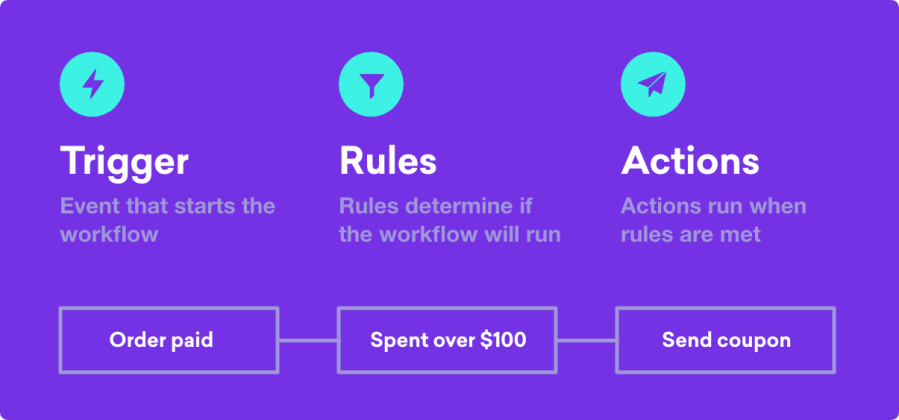
Utilizzando la potente automazione ricca di funzioni disponibile all’interno di AutomateWoo, puoi creare una gamma pressoché infinita di flussi di lavoro automatizzati che ti aiuteranno a far crescere il tuo negozio con una frazione dello sforzo! AutomateWoo consente di creare flussi di lavoro composti da diverse combinazioni di trigger, regole e azioni all’interno di WooCommerce.

  • I trigger stabiliscono le circostanze in cui il flusso di lavoro verrà eseguito. Un trigger di esempio sarebbe compiere una determinata azione quando viene effettuato un ordine.
  • Le regole consentono di eseguire una logica più avanzata sui flussi di lavoro in modo che si attivino solo in determinate situazioni. Una regola di esempio potrebbe essere attivare il flusso di lavoro solo per gli ordini con un totale superiore a 100 dollari.
  • Le azioni definiscono cosa succede quando viene attivato un flusso di lavoro. Con AutomateWoo hai a disposizione una serie di azioni personalizzabili, come l’invio di un’e-mail o la modifica degli stati degli ordini, oppure se sei uno sviluppatore puoi definire una funzione personalizzata.

Una volta creato il flusso di lavoro, puoi pianificare il flusso di lavoro in modo che venga eseguito praticamente in qualsiasi momento. Sia immediatamente, dopo un determinato periodo di tempo oppure anche in una particolare ora o giorno della settimana.

Converti e fidelizza i clienti con il marketing che fa il lavoro più faticoso al posto tuo

Automatizza e ottimizza la comunicazione con i clienti inviando belle e-mail di follow-up.
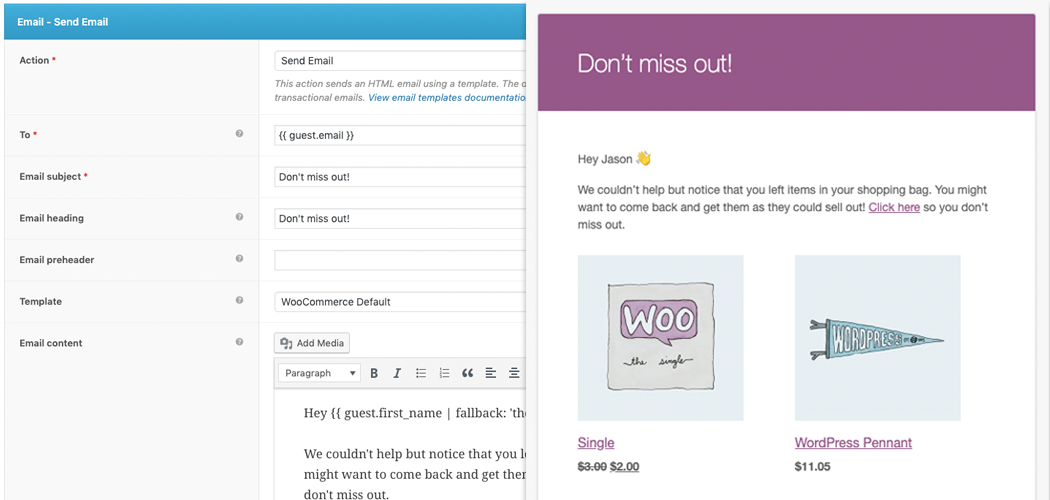
Imposta le e-mail relative ai carrelli abbandonati per WooCommerce: con un 63% di possibilità di recuperare una vendita persa, l’invio delle e-mail per l’abbandono del carrello è uno dei modi migliori per far crescere il tuo negozio.

Funzionalità di AutomateWoo

  • E-mail di follow-up: invia automaticamente un’e-mail ai clienti che acquistano prodotti specifici e chiedi una recensione o suggerisci altri prodotti che potrebbero piacere loro.
  • Carrello abbandonato: utilizzando e-mail a intervalli prestabiliti ricorda ai clienti che hanno lasciato degli elementi nel carrello.
  • Riconquista i clienti inattivi: rivolgiti ai clienti inattivi con campagne di marketing e-mail. Includi offerte speciali e raccomandazioni.
  • Notifiche SMS: invia notifiche SMS a clienti o amministratori per uno qualsiasi dei numerosi trigger di AutomateWoo (è richiesto un account Twilio a pagamento).
  • Premi per le recensioni: incoraggia le recensioni di prodotti offrendo sconti a chi ne pubblica di più. Limita lo sconto in base al numero di recensioni pubblicate e alla valutazione data.
  • Marketing basato sulla lista dei desideri: invia e-mail di promemoria temporizzate della lista dei desideri e avverti quando un prodotto desiderato viene messo in vendita. Integra con liste dei desideri di WooCommerce o YITH.
  • E-mail di auguri per il compleanno: delizia i clienti con speciali e-mail e coupon di auguri di compleanno da parte di WooCommerce utilizzando il componente AutomateWoo Birthdays (disponibile separatamente).
  • Notifiche di scadenza della carta: avvisa i clienti prima della scadenza di una carta di credito o di debito salvata. Questo può ridurre il numero dei pagamenti che non vanno a buon fine e l’abbandono durante la vendita di abbonamenti.
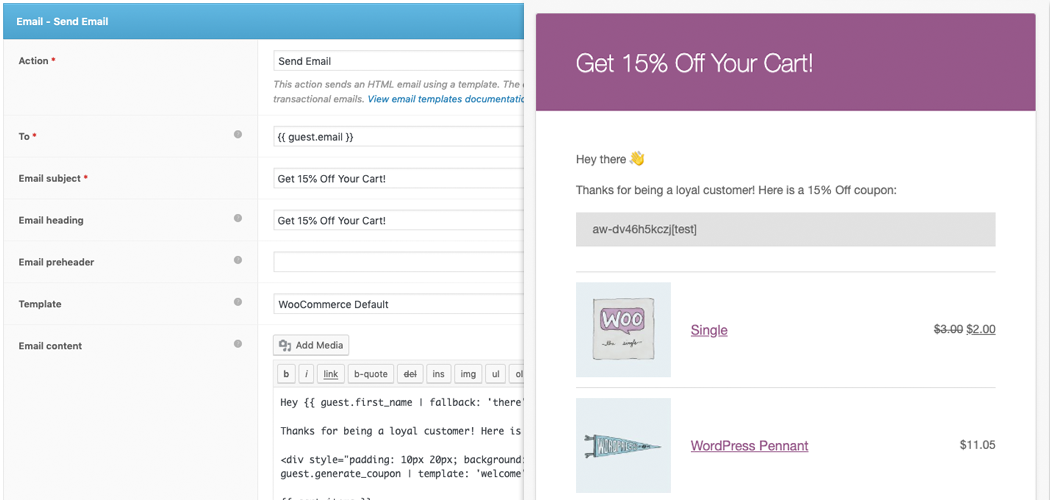
  • Coupon personalizzati: genera coupon personalizzati dinamici per aumentare il tasso di acquisto da parte dei clienti.
  • Automazione di Subscriptions: si tratta di azioni al verificarsi di eventi di WooCommerce Subscriptions come cambiamenti di stato, pagamenti non andati a buon fine e promemoria di rinnovo.
  • Automazioni di Bookings: invia e-mail al verificarsi di eventi di WooCommerce Bookings come la conferma o il completamento della prenotazione.
  • Refer A Friend: aumenta le vendite legate al passaparola con il componente aggiuntivo AutomateWoo Refer A Friend (disponibile separatamente).
  • VIP automatico: premia i tuoi migliori clienti con lo status di VIP in base alle diverse esigenze di spesa.

Perché usare AutomateWoo?

Configura e gestisci senza sforzo, direttamente dal tuo backend WordPress

Inizia a inviare e-mail immediatamente utilizzando il modello già impostato per le e-mail transazionali di WooCommerce. Realizza e-mail nel familiare editor di WordPress arricchito da variabili che ti consentono di inserire prodotti utilizzando svariate opzioni di visualizzazione e di inserire contenuti dinamici.
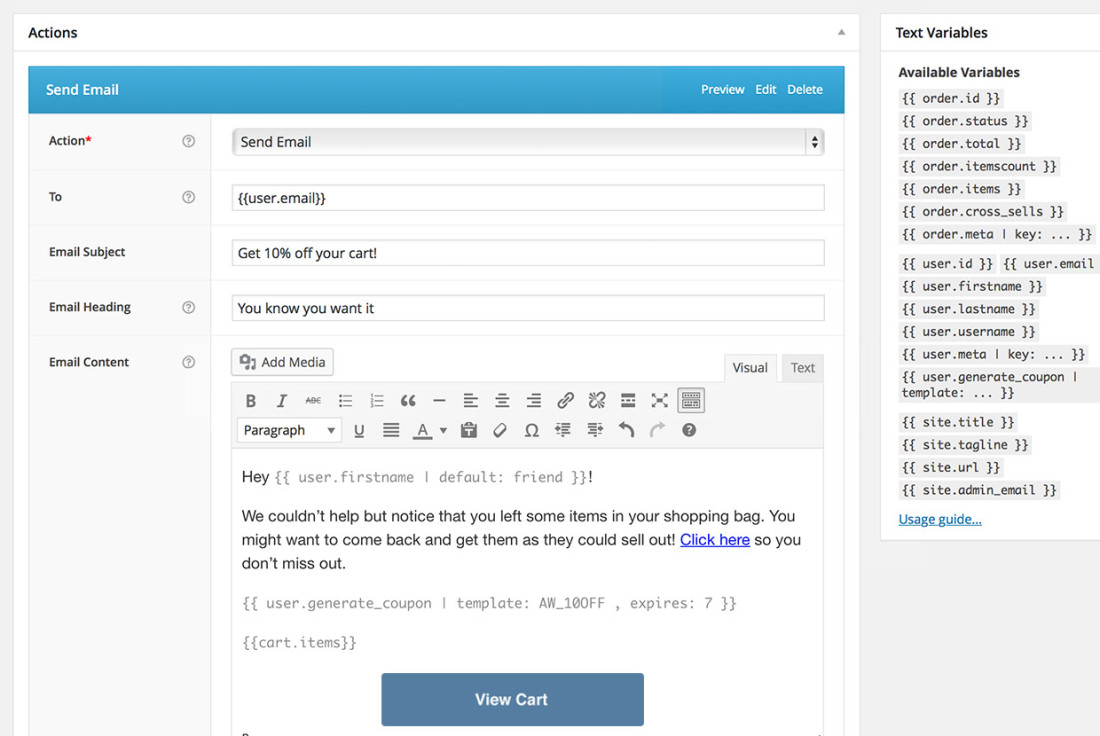
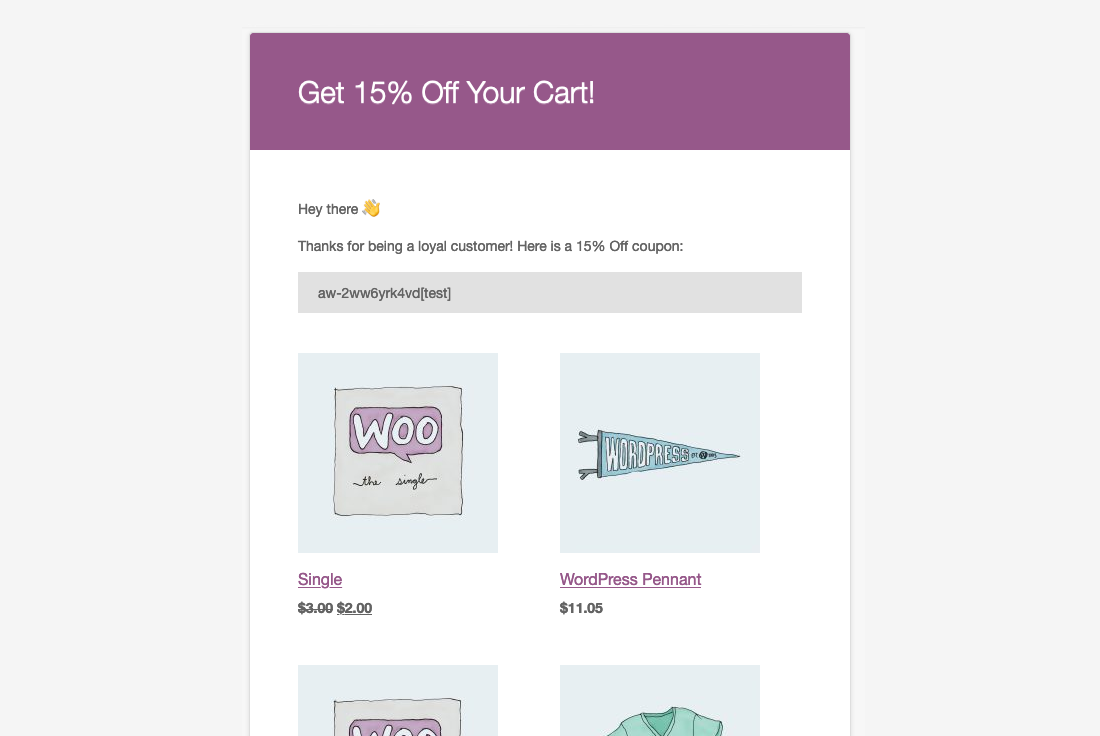
Invia campagne mirate in più fasi e offri incentivi ai clienti

AutomateWoo ti dà il controllo completo sulle campagne. Pianifica diverse e-mail da inviare a intervalli o dopo specifiche interazioni con i clienti e offri incentivi utilizzando il sistema di coupon personalizzato.
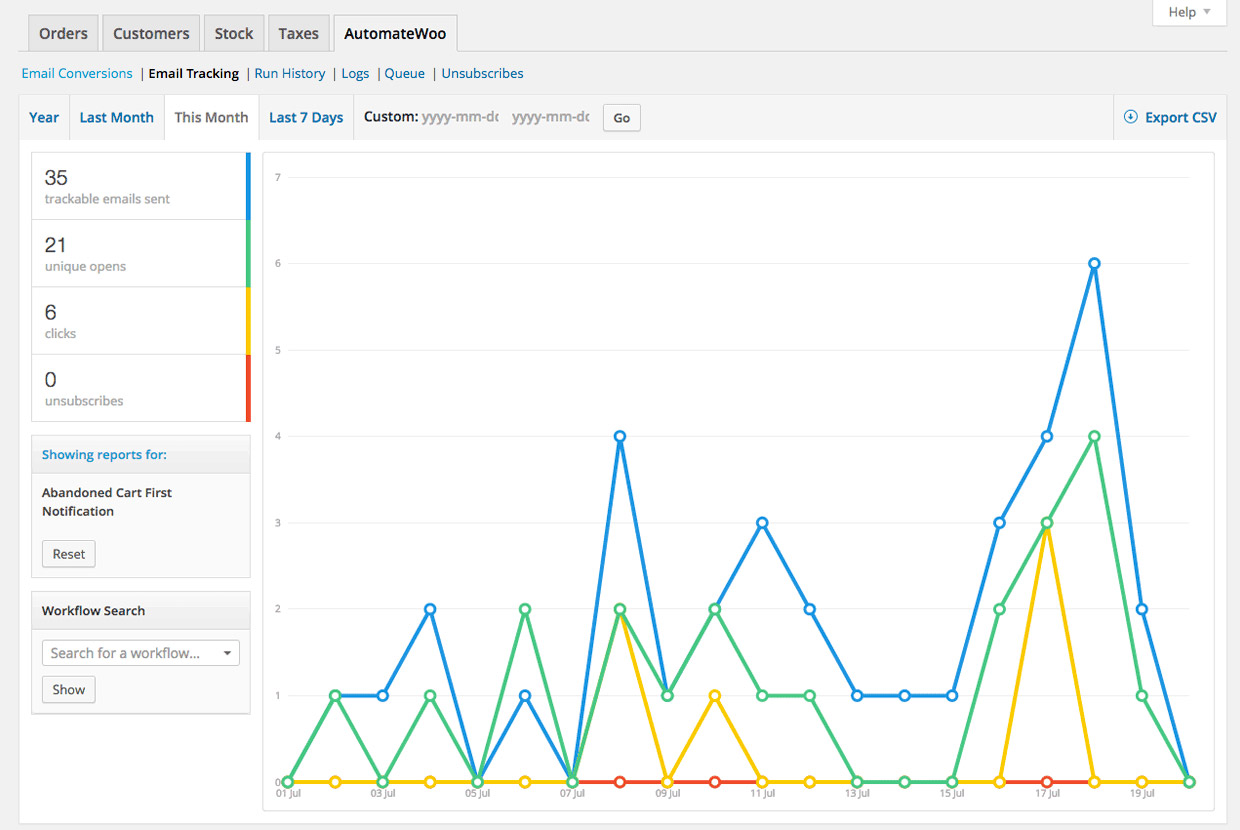
Tieni traccia delle aperture, dei clic e delle conversioni

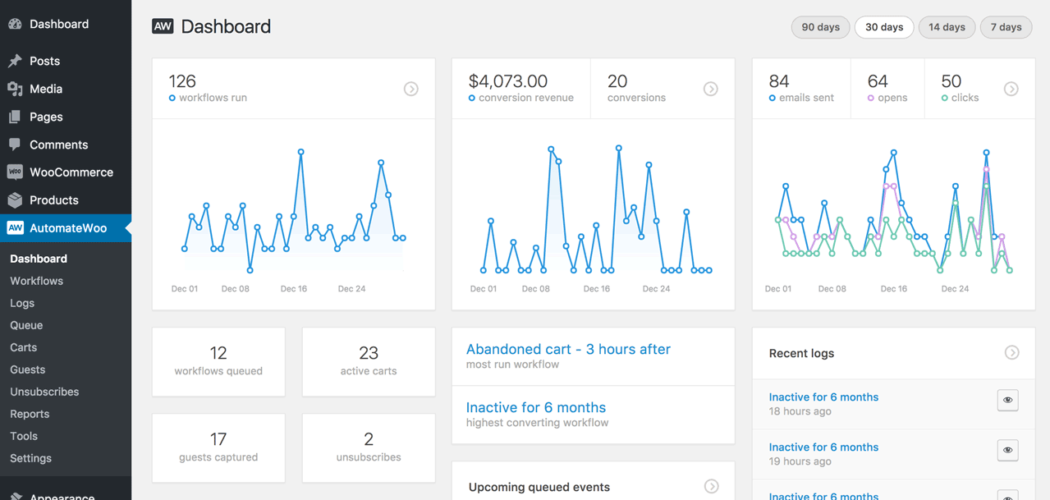
AutomateWoo amplia il reporting di WooCommerce: misura il successo delle tue campagne con i numerosi report inclusi in AutomateWoo. Puoi visualizzare un log dettagliato di ogni e-mail inviata e di ogni conversione registrata.
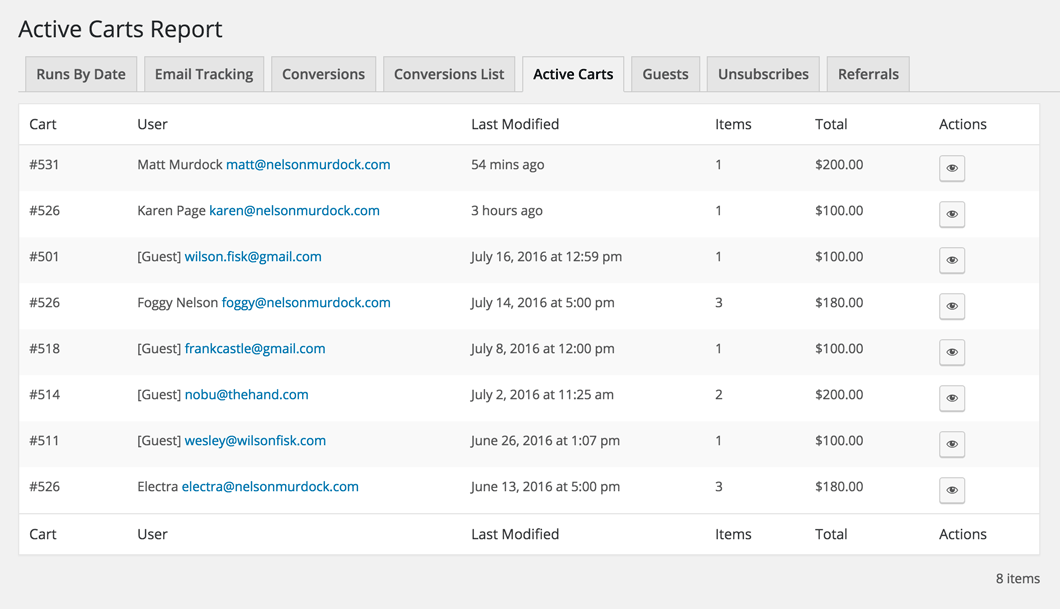
Monitoraggio intelligente delle sessioni e acquisizione dei dati prima dell’invio

La tecnologia di tracciamento delle sessioni di AutomateWoo è in grado di rilevare gli utenti registrati anche prima dell’accesso e può catturare le e-mail degli ospiti durante il pagamento utilizzando la comune tecnica di acquisizione dei dati prima dell’invio. Le e-mail degli ospiti possono anche essere catturate da qualsiasi modulo sul tuo sito web, come l’iscrizione alla newsletter.
Invio illimitato di e-mail

Molti servizi vengono addebitati in base al volume dell’e-mail. Con AutomateWoo non devi preoccuparti di superare il piano.

Adatto agli sviluppatori

AutomateWoo è flessibile al 100% e dispone di esempi di codice nella documentazione che aiutano gli sviluppatori a iniziare.

Supporto WPML

Hai bisogno di inviare e-mail multilingue? AutomateWoo supporta il popolare plugin WPML.


Integrazioni

AutomateWoo si integra con i tuoi plugin e servizi preferiti, dandoti il vantaggio di cui hai bisogno per il tuo marketing.

  • WooCommerce Subscriptions: con WooCommerce Subscriptions gestire gli abbonamenti non richiede praticamente alcuno sforzo. Utilizzando AutomateWoo, puoi creare flussi di lavoro in base agli eventi di abbonamento, ad esempio un cambiamento di stato o un mancato pagamento del rinnovo.
  • WooCommerce Memberships: AutomateWoo rappresenta il passaggio al livello superiore di WooCommerce Memberships. Crea flussi di lavoro che inviano automaticamente e-mail di follow-up, premia i clienti più fedeli con lo status di VIP e tieni d’occhio le cancellazioni delle membership.
  • WooCommerce Bookings: integra WooCommerce Bookings con AutomateWoo per contribuire a migliorare l’esperienza dei clienti, diminuire le cancellazioni o persino effettuare l’upsell nelle e-mail automatiche di conferma o di completamento della prenotazione.
  • WooCommerce Points and Rewards: configura flussi di lavoro automatizzati con AutomateWoo per premiare azioni specifiche dei clienti e creare facilmente scenari di ricompensa complessi per WooCommerce Points and Rewards. Dare punti è un ottimo modo per costruire la lealtà.
  • WooCommerce Wishlists: potenzia WooCommerce Wishlists. Utilizza trigger personalizzati in AutomateWoo per informare i clienti quando i prodotti nella loro lista dei desideri è in vendita e/o invia promemoria per gli elementi non acquistati a diversi intervalli per riportarli al tuo sito.

E altro ancora…

  • ActiveCampaign
  • AgileCRM
  • Campaign Monitor
  • MadMimi
  • MailChimp
  • Twilio SMS
  • YITH Wishlist

Componenti aggiuntivi di AutomateWoo

  • Refer A Friend: aumenta le vendite legate al passaparola con il componente aggiuntivo AutomateWoo Refer A Friend.
  • Birthdays: delizia i clienti e incrementa le vendite organiche con speciali e-mail e coupon di auguri di compleanno da parte di WooCommerce.
AutomateWoo è compatibile con i nuovi blocchi Carrello e Pagamento: un’esperienza di pagamento personalizzabile e ottimizzata per le conversioni presto disponibile su WooCommerce.

FAQ


Domande più comuni

What is AutomateWoo, and what can it do for my store?

AutomateWoo is a marketing automation extension for WooCommerce that helps you convert and retain customers without adding manual work. It runs on Workflows, which combine Triggers (when something happens, such as a completed order), Rules (conditions that narrow when a workflow runs, such as an order total over a set amount), and Actions (what happens next, such as sending an email or SMS). You can use it for follow-up emails, abandoned cart reminders, win-back campaigns, review requests, personalized coupons, and more, all managed from your WordPress dashboard.

Can I run custom code using AutomateWoo?

Yes. You can use custom code in a few ways—including Custom Triggers and Custom Actions/Functions—to build out the site’s automations. Note that our support team doesn’t write or troubleshoot custom code, but we can point you to trusted WooCommerce developers for hire.

Do you have a demo of the AutomateWoo extension we could try out before deciding to purchase?

We don’t offer a demo of AutomateWoo. We encourage you to buy the extension and take advantage of our 30-day refund policy if it doesn’t meet your needs.

How can I automate abandoned cart emails in WooCommerce?

AutomateWoo includes abandoned cart automation that reminds shoppers who left items in their cart with a series of emails sent at intervals you choose. You can personalize each message with the customer's name and the products they left behind, and add a personalized coupon to encourage them to return. This is one of the highest-impact ways to recover sales that would otherwise slip away. For more on building an effective recovery sequence, see this guide to converting more abandoned carts.

Can AutomateWoo help me recover lost sales?

Yes. AutomateWoo is designed to help recover sales through abandoned cart emails, win-back campaigns for inactive customers, and card expiry notifications that can reduce failed subscription payments. Its session tracking can detect registered customers before they sign in, and it can capture guest emails during checkout so you can follow up even when a shopper does not complete an order. These tools give you multiple ways to re-engage shoppers at the moments they are most likely to come back.

Can AutomateWoo help increase repeat purchases and customer loyalty?

Yes. AutomateWoo gives you tools to build repeat business, including follow-up emails that suggest related products, win-back campaigns for customers who have not ordered in a while, automatic VIP status for your best customers, and review reward coupons. You can also send personalized coupons to encourage the next purchase. For broader ideas on keeping customers coming back, see these customer retention strategies for stores.

Can AutomateWoo help reduce manual marketing work?

Yes. AutomateWoo runs your campaigns in the background using workflows, so once you set up a trigger, rules, and an action, the extension handles the sending for you. You can schedule messages to go out immediately, after a set delay, or at a specific hour or day of the week. Preset workflows for common use cases give you a starting point you can customize to fit your store.

Can I send SMS messages with AutomateWoo?

Yes. AutomateWoo can send SMS notifications to customers or admins for any of its triggers, which is useful for order updates, reminders, and time-sensitive campaigns. SMS sending is handled through an integration with Twilio, so you will need a paid Twilio account to use this feature. Email and SMS can be combined across your workflows to reach customers on the channel they respond to best.

Does AutomateWoo work with WooCommerce Subscriptions?

Yes. AutomateWoo integrates with WooCommerce Subscriptions so you can create workflows based on subscription events such as status changes, failed payments, and renewal reminders. It also offers card expiry notifications that warn customers before a saved card expires, which can help reduce failed payments and churn. This makes it a strong companion for stores that rely on recurring revenue.

Does AutomateWoo integrate with other WooCommerce extensions?

Yes. AutomateWoo integrates with several WooCommerce extensions to extend what you can automate, including WooCommerce Subscriptions, WooCommerce Memberships, WooCommerce Bookings, WooCommerce Points and Rewards, and WooCommerce Wishlists. It also connects with email and messaging services such as Mailchimp, ActiveCampaign, Campaign Monitor, and Twilio for SMS. These integrations let you trigger automations from events across your store.

Can AutomateWoo help me manage bookings and reduce cancellations?

Yes, when paired with WooCommerce Bookings. AutomateWoo can send automated emails on booking events such as confirmations and completions, which helps improve the customer experience and can reduce no-shows and cancellations. You can also follow up after a booking to upsell related products or services.

Can I add a referral program with AutomateWoo?

Yes, with the AutomateWoo Refer A Friend add-on, which is a separate purchase and requires AutomateWoo to be installed and active. It lets you run coupon-based or link-based referral campaigns, where advocates share a unique coupon or link and earn store credit for successful referrals. The add-on includes built-in fraud prevention, reporting, and post-purchase share widgets to encourage word-of-mouth sales.

Can I send automated birthday emails to customers?

Yes, with the AutomateWoo Birthdays add-on, which is a separate purchase. It lets you send a special birthday email and coupon to customers on their day, which can encourage a purchase and add a personal touch to your marketing.

Can I track how my campaigns are performing?

AutomateWoo styles its emails using the same template as your default WooCommerce transactional emails, and you can personalize content with variables that insert products, customer details, and dynamic content. It is built for automation rather than advanced email design, so if you want a feature-rich email builder with more template customization, MailPoet may be a better fit for that part of your marketing. Many stores use AutomateWoo for behavior-based automation alongside a dedicated email design tool.

Can I fully customize the design of my emails in AutomateWoo?

AutomateWoo styles its emails using the same template as your default WooCommerce transactional emails, and you can personalize content with variables that insert products, customer details, and dynamic content. It is built for automation rather than advanced email design, so if you want a feature-rich email builder with more template customization, MailPoet may be a better fit for that part of your marketing. Many stores use AutomateWoo for behavior-based automation alongside a dedicated email design tool.

Who is AutomateWoo best for?

AutomateWoo is a good fit for WooCommerce store owners who want behavior-based marketing automation tied directly to store events, without moving their data to a separate platform. It is especially useful for stores selling subscriptions, memberships, or bookings, and for any store that wants to recover abandoned carts, win back inactive customers, and reward loyal shoppers. Because it offers unlimited email sending, it suits stores that want to send a high volume of automated messages without volume-based pricing.

When might AutomateWoo not be the right fit?

AutomateWoo focuses on automated, event-driven workflows inside WooCommerce rather than being a full email design and broadcast newsletter platform. If your main goal is designing highly styled newsletters or managing large contact lists with advanced template editing, a dedicated email marketing tool such as MailPoet may suit you better. Some stores run AutomateWoo for automation and pair it with an email platform for campaign design.

Does AutomateWoo support multilingual stores?

AutomateWoo has built-in support for WPML, though this excludes multiple currencies. When WPML is active, emails are sent in the language the customer uses to view your site. Other multilingual plugins may work, but compatibility is not guaranteed.

Do I need to worry about email sending limits?

No. AutomateWoo offers unlimited email sending, so you are not charged based on email volume the way many marketing services are. This can make it a cost-predictable choice for stores that plan to send a large number of automated emails.

How does AutomateWoo handle marketing opt-ins and unsubscribes?

AutomateWoo lets you choose opt-in or opt-out mode for your workflows and adds an unsubscribe link to the footer of every non-transactional email. In opt-in mode, customers can subscribe at checkout, during account registration, in their account area, or through the AutomateWoo signup page. Transactional workflows can be excluded from the opt-in requirement, which helps you stay aligned with customer communication preferences.

What is the best way to set up marketing automation in WooCommerce without a developer?

AutomateWoo is built for store owners, not only developers, and you create automations by combining a trigger, optional rules, and an action inside your WordPress dashboard. Preset workflows for common scenarios, such as a welcome email for new customers, give you a ready-made starting point you can adjust to your store. Over 80 variables let you add dynamic content like a customer's name or their recent products at the click of a button.

Can AutomateWoo help me get more product reviews?

Yes. AutomateWoo can automatically follow up with customers after a purchase to request a review, and its Review Rewards feature can offer a discount to encourage more reviews. You can set conditions based on the number of reviews posted and the rating given, which helps you gather social proof while managing how rewards are used.

Recensioni dei clienti

Valutazione media 3.5
28 recensioni
5 stelle, 43% delle recensioni
4 stelle, 14% delle recensioni
3 stelle, 18% delle recensioni
2 stelle, 4% delle recensioni
1 stella, 21% delle recensioni
28 recensioni
  • fariazz
    Valutato 3 su 5
    Funzionalità
    Jun 9, 2026
    Funzionalità
    Poor for 2026. Lacking webhook support as trigger or action. Lacking ability to create workflows using json so that one could use AI to write them like in n8n. It was a 5-star plugin maybe two years ago. Today it's far behind what one would want from an automation plugin.
    • simplysaru
      Jun 9, 2026
      Hey, thanks for taking the time to share this — and we can tell it comes from a place of genuinely wanting AutomateWoo to be great! Webhook support and JSON-based workflow creation are solid feature ideas, especially as AI-assisted automation becomes more of an expectation. We'd love to make sure these get in front of the right people — the best place to share them is our feature request board at https://woocommerce.com/feature-requests/automatewoo/, where you can post the details and other users can vote them up. Feedback like yours is exactly what shapes the roadmap, so we appreciate you flagging it!
  • chrismark1usa
    Valutato 2 su 5
    Supporto
    May 13, 2026
    Supporto
    Using all the plugin's features, when they worked, were great. I am experiencing a bug where manual workflows require the use of the WooCommerce Admin plugin, which is no longer supported or available for download. The contact form for tech support is non-functional. Update: Woo reached out to us after I posted this review and is attempting to resolve the issue.
    • simplysaru
      May 12, 2026
      Hi, thank you for your feedback — we're sorry to hear about your experience. We want to assure you this isn't reflective of our intentions, and we take your concerns seriously. We've reached out to you directly via email to work through the WooCommerce Admin plugin dependency issue and ensure your issues with AutomateWoo are resolved. Please keep an eye on your inbox and we look forward to making this right.
  • rob0976
    Valutato 1 su 5
    Supporto
    May 7, 2025
    Supporto
    There's a total lack of support, they make it impossible to contact them even when you're trying to report one of the many bugs in their products that you have paid for. Plus their products are massively over priced and really are a rippoff
  • anonymized-2727349
    Valutato 4 su 5
    Funzionalità
    Apr 3, 2025
    Funzionalità
    I am using this plugin for years. There are 2 things I don't like. 1. Plugin has plugins. Like birthday and referrals. They should not be sold separately. 2. There is almost no new features. Maybe 1 in every 2-3 years. Updates are mostly to maintain.
  • woollywormhead
    Valutato 3 su 5
    Facilità d'uso
    Feb 15, 2025
    Facilità d'uso
    I've revised my original 1-star review. 9 months ago I purchased this plug-in, recommeded by Woo on the forums, for managing updates to digital purchases. For months I went round in circles with support, getting next to no help - one agent even suggested I manually email the new PDFs! - that I was ready to give up. After pushing through, I did eventually get someone to listen to what was needed and they were very helpful, hence editing my review from 1-star to 3-star. I can't give it higher for 2 reasons: a) it should not have taken that long to get the help I needed b) there are limitations to the plug-in for digital products; it is geared towards tangibles, and I'm still not sure it's the...

Informazioni sull'estensione

  • Testato con WordPress: 7.0
  • Testato con WooCommerce: 10.9
  • Richiede almeno WordPress: 6.9
  • Richiede almeno WooCommerce: 10.8

Compatibilità

  • Cart & checkout blocks
  • High performance order storage (HPOS)

Paesi

  • Mondiale

Requisiti

  • WooCommerce 6.7+
  • WordPress 5.9+

Related Products

Prezzo $109 Annualmente
Valutato 2.3 su 5 stelle
Prezzo $109 Annualmente
Valutato 2.6 su 5 stelle
Prezzo $109 Annualmente
Valutato 2 su 5 stelle
Prezzo $109 Annualmente
Valutato 2.3 su 5 stelle
Prezzo $49 Annualmente
Valutato 4.1 su 5 stelle
Prezzo $109 Annualmente
Valutato 2 su 5 stelle
Download gratuito
Valutato 2.4 su 5 stelle
Prezzo $59 Annualmente
Valutato 4.1 su 5 stelle
Prezzo $39 Annualmente
Valutato 2.8 su 5 stelle
Uso dei tuoi dati personali
Noi e i nostri partner trattiamo i tuoi dati personali (come dati di navigazione, indirizzi IP, informazioni sui cookie e altri identificatori univoci) sulla base del tuo consenso e/o del nostro legittimo interesse per ottimizzare il nostro sito web, le attività di marketing e la tua esperienza utente.





