Icona del prodotto

Order Bump per WooCommerce

Order Bump for WooCommerce helps you to increase the Average Order Value of your site by presenting last minute offers to your customers.
Scegli un'opzione di fatturazione
$79
Risparmia 20%
$158 $126.40

L'abbonamento include

  • Aggiornamenti e miglioramenti del prodotto
  • Servizio clienti
  • Garanzia di rimborso entro 30 giorni

Use Order Bump for WooCommerce to show customers last-minute product offers through Order Bumps and Upsell Funnels and add value to their purchase while increasing your average order value!

Why use Order Bump?

1. Increases your average order size

When a customer accepts an Order Bump offer, they’ll spend more than they’d initially planned to spend.

2. Improves customer experience

Displaying targeted, customized offers based on customers’ current cart contents improves the overall customer experience, which means more customer loyalty.

3. Attracts New Customers

Customers who have benefited from the Order Bump are likely to refer new users to your site.

How does it work?

Order Bump

Order Bumps are last-minute offers presented to the users on the checkout page. These offers are generally applicable to the entire cart. You can present offers like Express Delivery, Purchase Protection, etc using Order Bumps.

You can present the offer in a Single Order Bump or in Multiple Order Bumps based on your requirements. Your users can accept any number of Order Bump offers in a single transaction when Multiple Order Bump is allowed to be chosen.

Offers will be sorted based on the configured display priority and number of Offers will be decided based on the configured display count when Multiple Order Bumps is allowed to be chosen.

Quantity for Offered Product

The offered product’s quantity can be defined in two ways,

Fixed Quantity

The customer will be allowed to accept the Offer Product with the Fixed Quantity.

Customer Selection

The customer will be allowed to accept the Offer Product with the allowed Minimum and Maximum Quantity selection.

Offer Product Acceptance

The offered product acceptance can be done in the following ways,

Checkout page

The customer will be allowed to accept the Offer Product on the Checkout page.

Product Page

The customer will be redirected to the Product page and they can add it in there when they are trying to accept the offer. In this case, the customer will get clear idea about the Offered Product as well as make the best choice.

Offer Product Image

Product Image
The image of the selected product will be displayed as Offer Product Image.
Custom Image
You can upload a unique image that will be displayed for the Product when it becomes for the Offer.

Criteria

Offer Product can be awarded based on the below criteria conditions,

  • Order based Criteria – Product, Category, Sub-Total, Order Total, Product Type.
  • User based Criteria – Purchase History, User Role, Product/Category based Purchase condition.
  • Specific Period based – Specific Weekdays/Specific Date range.

Example:

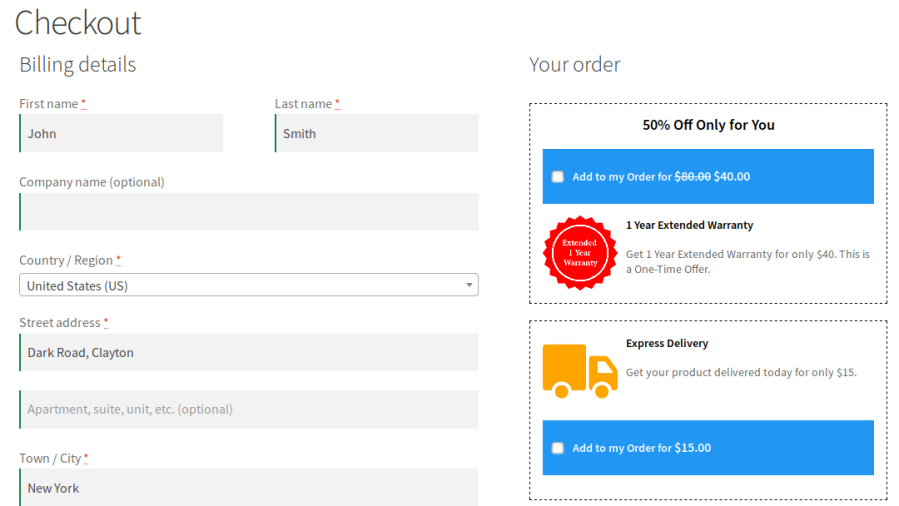
A customer buying a mobile phone proceeds to the checkout page. There they’ll see a one-time discount on an additional 1 year warranty for the mobile phone:

Single Order Bump on Checkout Page

If the shopper wants to accept the offer, checking the “Add to my Order” box automatically adds the item to the cart at the discounted price.
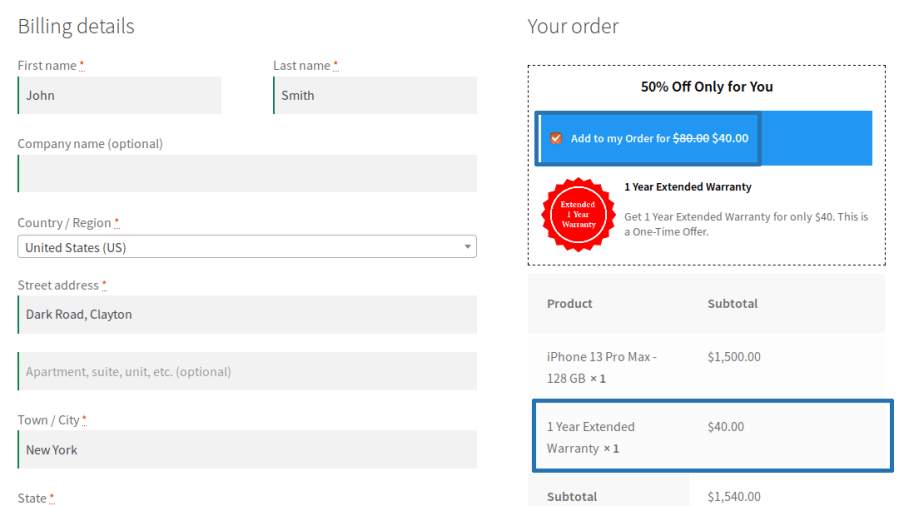
Single Order Bump Accepted on Checkout Page
Multiple Order Bump on Checkout Page

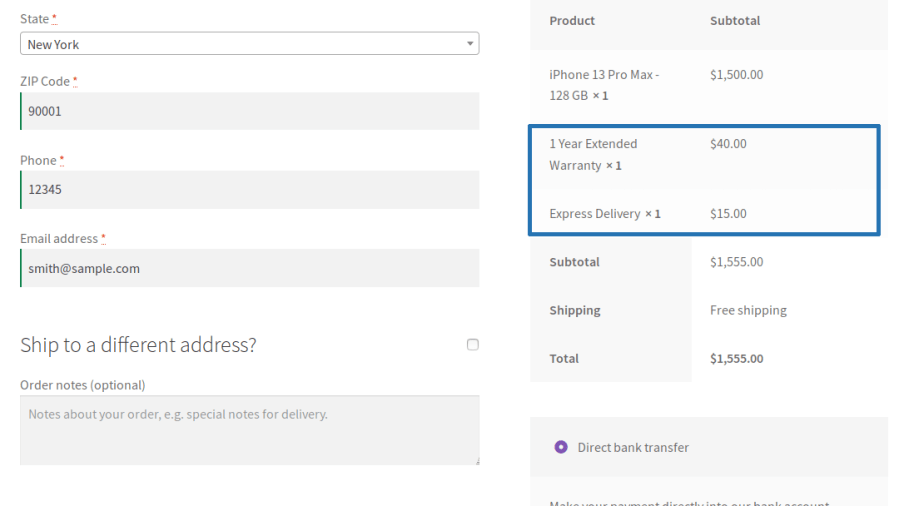
Multiple Order Bump Accepted on Checkout Page
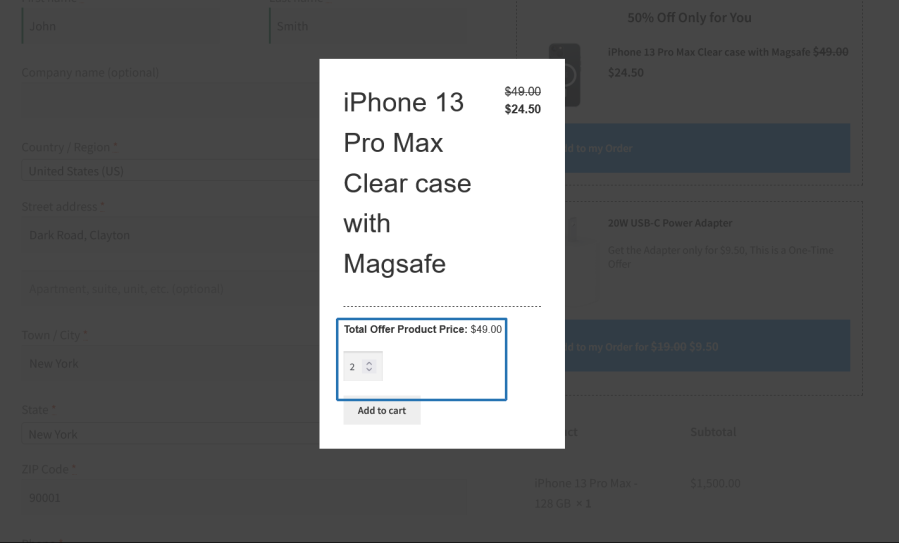
Order Bump with Quantity Selection
Order Bump Added with Selected Quantity

Upsell Funnels

Upsell Funnels are last-minute offers on products presented to the users on the checkout page. The offer products can be products related to the items in the cart.

Offer Products will be decided based on the type[i.e Related Products, Best Selling Products & more]. The number of Offer Products will be displayed based on the configured Number of Products to display value.

Quantity for Offered Product

The offered product’s quantity can be defined in two ways,

Fixed Quantity

The customer will be allowed to accept the Offer Product with the Fixed Quantity.

Customer Selection

The customer will be allowed to accept the Offer Product with the allowed Minimum and Maximum Quantity selection.

Condition

Offer Product can be awarded based on the below conditions,

  • Based on the Product and Category Filters.
  • Based on the Product Price range.

Criteria

Offer Product can be awarded based on the below criteria configurations,

  • Order based Criteria – Product, Category, Sub-Total, Order Total, Product Type.
  • User based Criteria – Purchase History, User Role, Product/Category based Purchase condition.
  • Specific Period based – Specific Weekdays/Specific Date range.

Offered Products Display

The Offered Products display can be customized using various display options and color customization.

Example

A customer buying a mobile phone proceeds to the checkout page. There they’ll see a one-time discount on the accessories for the mobile phone:

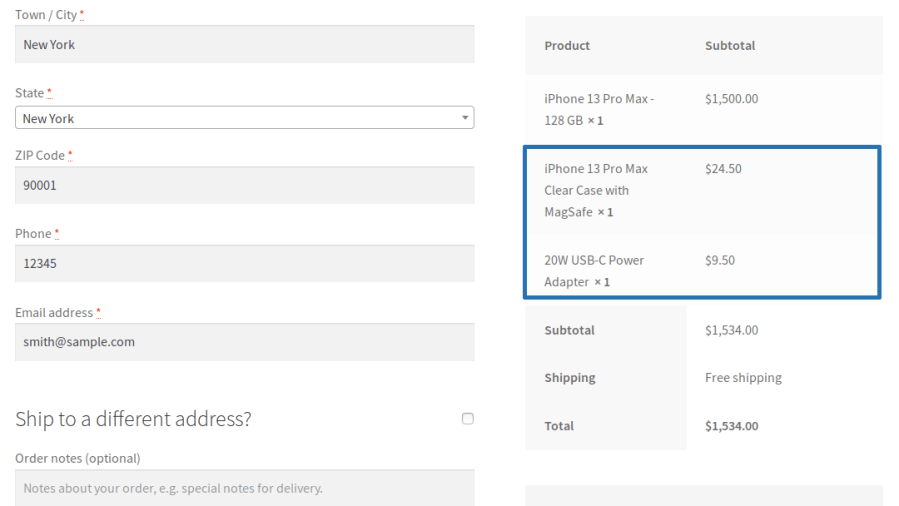
Upsell Offers on Checkout Page
Accepted Upsell Offers in Checkout Page
Upsell Offer with Quantity Selection
Upsell Offer Added with Selected Quantity

Reports

The site admin can get insights on the following data for Order Bumps and Upsell Funnels,
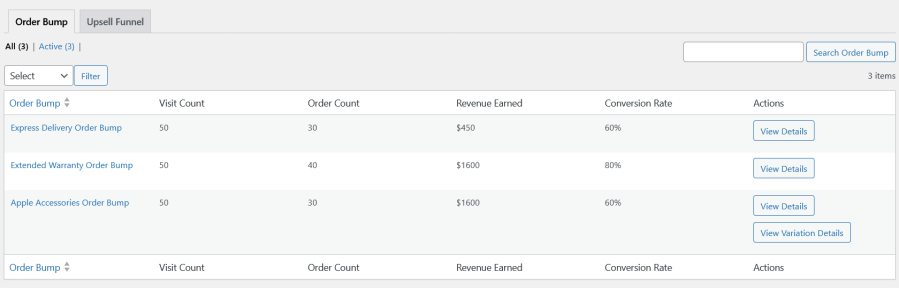
  • Visit Count
  • Order Count
  • Revenue Earned
  • Conversion Rate
  • Template based Reports
  • Variation of the Offered Variable Product
Order Bump Reports
Template Based Order Bump Reports
Upsell Funnel Reports

Popular Features

1. Smart Order Bumps

Increase average order value by presenting targeted product offers directly on the checkout page when customers are most likely to accept them.

Key Capabilities

  • Display checkout order bump offers with discounted pricing.
  • Offer fixed-price, fixed-amount, or percentage-based discounts.
  • Show single or multiple offer products.

2. Checkout Upsell Funnels

Present customers with additional product recommendations during checkout to maximize sales opportunities without disrupting the purchase flow.

Key Capabilities

  • Display upsell offers at multiple checkout locations.
  • Configure the number of offer products to be displayed.
  • Support discounted upsell pricing.
  • Customize customer-facing offer messaging.

3. Advanced Targeting Rules

Show the right offer to the right customer using flexible conditions and eligibility rules.

Key Capabilities

  • Target offers based on cart contents.
  • Create product, category, tag, and product-type conditions.
  • Restrict offers by customer purchase history.
  • Control offer visibility using user-based criteria.
  • Create multiple criteria groups for advanced targeting.

4. Customizable Offer Designs – Order Bump

Match order bump offers to your store branding with customizable layouts and styling controls.

Key Capabilities

  • Multiple predefined templates for Order Bump offer display.
  • Product image display controls: Product image or custom image upload.
  • Custom offer content and messaging.
  • Product names with optional links support.
  • Custom CSS support and color/appearance customization.

5. Strategic Checkout Placement

Optimize conversions by displaying offers at the most effective point in the checkout experience.

Key Capabilities

  • Show offers before the order summary.
  • Display offers before or after payment methods.
  • Place offers before the order submission button.
  • Configure display locations globally.

6. Offer Quantity Controls

Provide customers with flexible purchasing options while maintaining control over promotional offer quantities.

Key Capabilities

  • Set default, minimum, and maximum quantity limits.
  • Support quantity-based offer selection and pricing.
  • Control inventory exposure through offer rules.

7. Coupon Discount Controls

Protect promotional pricing and maintain profitability when offers and coupons are used together.

Key Capabilities

  • Restrict coupon discounts on offer products.

8. Smart Offer Restrictions

Prevent duplicate or unnecessary promotions and ensure customers see only relevant offers.

Key Capabilities

  • Skip offers when the promoted product is already in the cart.
  • Restrict offer visibility based on usage history.
  • Limit offer frequency by customer activity.
  • Improve overall offer relevance.

9. Product Carousel Display – Upsell Funnel

Show multiple promotional products in an engaging format designed to increase visibility and customer interaction.

Key Capabilities

  • Responsive product carousel layouts.
  • Separate display settings for desktop and tablet devices.
  • Support for multiple products per offer campaign.
  • Mobile-friendly, enhanced product browsing experience.

10. Conversion Tracking & Reporting

Measure the effectiveness of every order bump and upsell campaign with detailed performance insights.

Key Capabilities

  • Track offer impressions and usage.
  • Monitor conversion rates.
  • View generated revenue and sales data.

11. Order Bump & Upsell Funnel Management

Manage multiple campaigns simultaneously with dedicated administration tools.

Key Capabilities

  • Create unlimited order bump and upsell funnel offers.
  • Duplicate existing campaigns.
  • Activate or deactivate offers instantly.
  • Centralized campaign management.
  • Automated rule-based product recommendations and discount application.

Extensive Features List

  • Show one-click product offers directly on the checkout page.
  • Display order bumps anywhere within the checkout flow.
  • Show one or multiple eligible offers to customers.
  • Choose how multiple offers are sorted and displayed.
  • Limit the number of offers shown at checkout.
  • Use simple products, variations, or variable products as offers.
  • Set fixed quantities or allow customers to choose quantities.
  • Display custom images for offer products.
  • Link offered products to their product pages when needed.
  • Offer percentage discounts, fixed discounts, or custom pricing.
  • Prevent coupon stacking on discounted offer products.
  • Create targeting conditions using flexible AND/OR logic.
  • Trigger offers based on products, categories, tags, and cart contents.
  • Display offers based on cart subtotal thresholds.
  • Target guests, registered users, or specific user roles.
  • Create offers based on customer purchase history.
  • Run offers during specific dates or days of the week.
  • Limit how many times an offer can be accepted.
  • Restrict the reuse of offers for selected users or site-wide.
  • Hide offers for products already in the cart.
  • Choose from multiple built-in designed offer templates.
  • Customize colors, Text size and design elements.
  • Place order bumps on any page using shortcodes.
  • Display related upsell products in an interactive carousel.
  • Create upsell offers using products, categories, tags, or product types.
  • Control layout, navigation, autoplay, and device-specific settings.
  • Apply advanced styling with custom CSS.
  • Customize all customer-facing offer messages and labels.
  • Track views, conversions, and generated revenue.
  • Measure the performance of upsell campaigns and order bump offers.
  • Monitor offers, impressions, and customer interactions.
  • Export reporting data for external analysis.
  • Automatically remove old log records to optimize performance.
  • Works with both classic and block-based checkout experiences.

Requirements

Minimum PHP version: 5.6


Recensioni dei clienti

Valutazione media 3.3
3 recensioni
5 stelle, 33% delle recensioni
4 stelle, 33% delle recensioni
3 stelle, 0% delle recensioni
2 stelle, 0% delle recensioni
1 stella, 33% delle recensioni
3 recensioni
  • megastroin
    Valutato 1 su 5
    Dec 14, 2023
    Shit plugin not even working properly
    Plugin is not working properly. Not selecting the offer product
  • Martijn Reintjes
    Valutato 5 su 5
    Sep 25, 2023
    Great uplift in order value!
    Everyone with a store should have order bumps. About 50% of people opt-in to an order bump. This plugin makes it super easy to add order bumps to your store. Also if you have questions, support is great. They are super responsive and even managed to turn around some small feature request I had in a couple days. Highly recommended!
  • Scholto
    Valutato 4 su 5
    Mar 24, 2022
    Thanks
    Hi, Plugin works well. I have a few considerations. 1) At this moment you only have the possibility to add a product. There is no opportunity to replace it, like: you have product 1 in cart, but replace it with product 2. Your competitor from WP Swings calls this the Smart Offer Upgrade: https://wpswings.com/product/upsell-order-bump-offer-for-woocommerce-pro/ This is a very handy if the order bump is an upgrade, package deal or subscription. 2) When adding rules under the criteria tab there is no possibility to multiselect products with ctrl function, so you have to add products one by one. That's more time consuming. 3) When changing colors under the design tab it's not possible to paste a...

Informazioni sull'estensione

  • Versione PHP richiesta: 7.4.0
  • Testato con WordPress: 7.0
  • Testato con WooCommerce: 10.7.0
  • Richiede almeno WordPress: 6.2
  • Richiede almeno WooCommerce: 8.2.0

Compatibilità

  • High performance order storage (HPOS)

Paesi

  • Mondiale

Lingue

English (United States)

Related Products

Prezzo $279 Annualmente
Valutato 3.2 su 5 stelle
Prezzo $199 Annualmente
Valutato 4 su 5 stelle
Prezzo $79 Annualmente
Valutato 3.4 su 5 stelle
Prezzo $59 Annualmente
Valutato 3.1 su 5 stelle
Prezzo $49 Annualmente
Valutato 4.1 su 5 stelle
Prezzo $109 Annualmente
Valutato 2.7 su 5 stelle
Prezzo $109 Annualmente
Valutato 2 su 5 stelle
Prezzo $109 Annualmente
Valutato 2.3 su 5 stelle
Prezzo $39 Annualmente
Valutato 2.8 su 5 stelle
Uso dei tuoi dati personali
Noi e i nostri partner trattiamo i tuoi dati personali (come dati di navigazione, indirizzi IP, informazioni sui cookie e altri identificatori univoci) sulla base del tuo consenso e/o del nostro legittimo interesse per ottimizzare il nostro sito web, le attività di marketing e la tua esperienza utente.