Installazioni attive
100K+
Confronto prodotti
L'abbonamento include
Supporto
Sai con certezza quanto guadagnerai questo mese dal tuo negozio? Se offrissi prodotti basati su abbonamento, potresti.
Con Woo Subscriptions puoi creare e gestire prodotti con pagamenti ricorrenti, pagamenti che ti daranno entrate residue che puoi monitorare e su cui puoi contare.
Woo Subscriptions ti consente di introdurre una molteplicità di abbonamenti per prodotti e servizi fisici o virtuali. Crea club per i prodotti del mese, abbonamenti a servizi settimanali o persino pacchetti per la fatturazione annuale del software. Aggiungi tariffe di iscrizione, offri prove gratuite o imposta i periodi di scadenza.
Un modello basato su abbonamento ti permetterà di acquisire più entrate residue. Tutto quello che devi fare è spedire gli ordini.
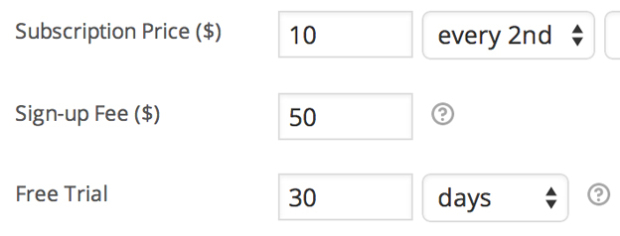
Addebita un importo iniziale per tenere conto dei costi di impostazione del cliente o consenti ai clienti di provare prima di acquistare, aggiungendo commissioni di iscrizione e prove gratuite a qualsiasi prodotto in abbonamento.
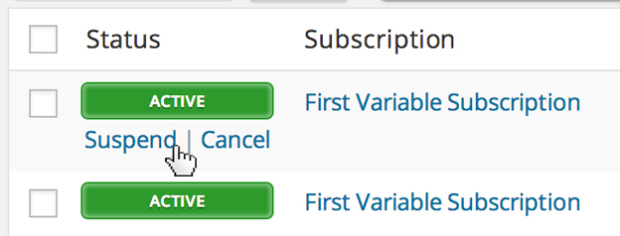
I proprietari dei negozi ottengono la gestione completa degli abbonamenti tramite la schermata di amministrazione WooCommerce > Modifica abbonamento. Puoi sospendere o annullare un abbonamento, modificare la scadenza della prova, aggiungere elementi, spedizione, commissioni o tasse all’abbonamento o modificare il totale ricorrente per i pagamenti futuri.
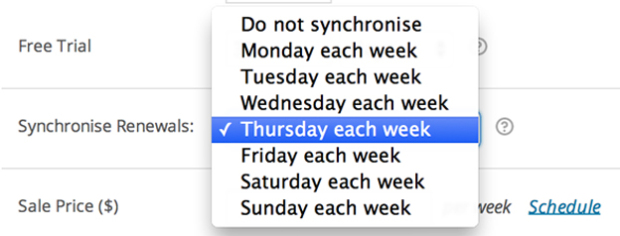
Se desideri spedire solo in alcuni giorni del mese o allineare tutti i clienti allo stesso termine di membership annuale, con la funzionalità di sincronizzazione del rinnovo di Woo Subscriptions puoi. Puoi persino rateizzare il primo pagamento per l’acquisto di un abbonamento sincronizzato.
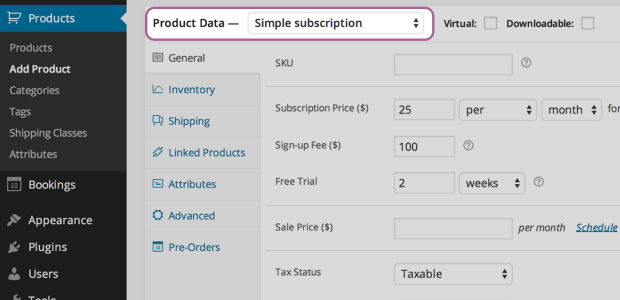
Quando crei un prodotto in abbonamento, puoi rendere il prodotto scaricabile, virtuale o fisico, addebitare pagamenti di rinnovo settimanali, mensili o annuali, limitare il prodotto a uno per cliente e persino addebitare la spedizione solo sull’ordine iniziale.
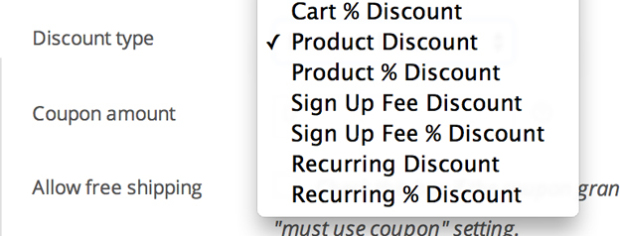
Offri ai clienti uno sconto sui loro pagamenti mensili o solo sulla quota di iscrizione. Gli abbonamenti includono sia codici promozionali di sconto ricorrenti sia codici promozionali della commissione di iscrizione.
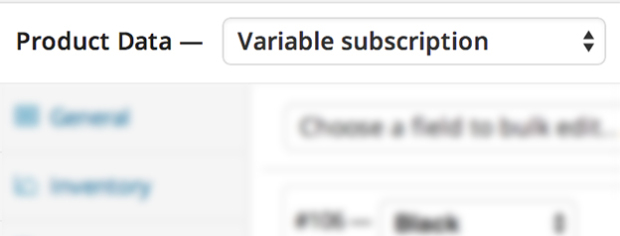
Crea prodotti in abbonamento variabili e consenti ai tuoi clienti di scegliere l’abbonamento adatto alle loro esigenze. Puoi persino consentire ai clienti di scegliere il proprio piano di fatturazione.

I clienti possono anche gestire i propri abbonamenti. Con la pagina Il mio account > Visualizza abbonamento, gli abbonati possono sospendere o annullare un abbonamento, modificare l’indirizzo di spedizione o il metodo di pagamento per i futuri rinnovi ed effettuare l’aggiornamento o il downgrade dell’abbonamento.
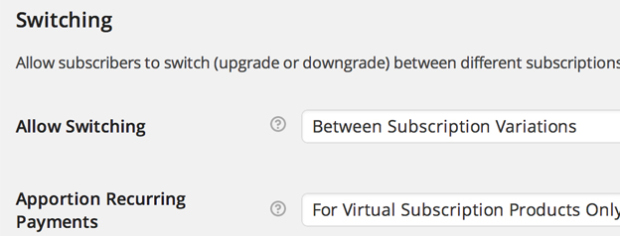
Consenti ai clienti di effettuare l’aggiornamento, il downgrade o il crossgrade tra diversi prodotti in abbonamento. Con opzioni di rateizzazione flessibile per l’importo ricorrente, la commissione di iscrizione e la durata, puoi anche personalizzare i costi del passaggio a un nuovo prodotto in abbonamento in base alle esigenze del tuo negozio.

I clienti possono anche acquistare diversi prodotti in abbonamento nella stessa transazione: Subscriptions raggrupperà i prodotti per ridurre le commissioni del gateway di pagamento e le spese generali logistiche per i futuri rinnovi.
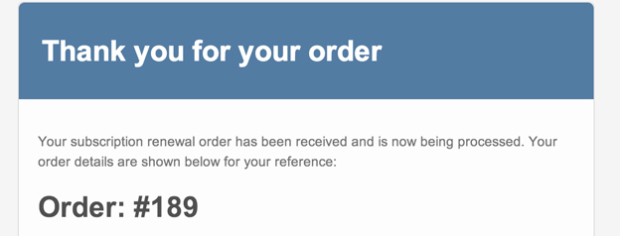
Grazie alle e-mail di abbonamento integrate avvisa automaticamente i clienti quando viene elaborato un pagamento per il rinnovo dell’abbonamento oppure un abbonamento viene annullato o è scaduto.
Se il tuo obiettivo è spedire un pacchetto di prodotti a sorpresa per i clienti più fedeli ogni mese o addebitare loro un servizio fornito di persona dalla tua piccola azienda, Woo Subscriptions può eliminare la fatica di acquisire quell’importantissima entrata residua.
Sarai in grado di tenere traccia di quanti abbonati hai, quando viene inviata loro la fattura e quanto reddito stanno generando, il che significa che saprai sempre su quali entrate il tuo negozio può contare a mano a mano che cresce.
WooCommerce Subscriptions is a recurring payments extension for WooCommerce that lets you sell products and services billed on a repeating schedule. You can charge customers weekly, monthly, or annually, and you can apply it to physical, virtual, or downloadable products. Common examples include product-of-the-month clubs, weekly service subscriptions, and yearly software billing plans.
WooCommerce Subscriptions is designed to help you turn one-time sales into recurring revenue you can count on. Instead of relying on repeat manual purchases, customers sign up once and are billed automatically on their schedule, which can help stabilize cash flow. Built-in reports let you track recurring revenue and the number of active subscribers, so you have a clearer view of what your store can expect month to month.
WooCommerce Subscriptions integrates with over 25 payment gateways for automatic recurring payments, including WooPayments, Stripe, PayPal Payments, and PayPal Braintree. If you prefer to accept manual renewal payments, those can be processed through any WooCommerce payment gateway, with automatic email invoices and receipts. For the full breakdown of which gateways support automatic versus manual renewals, see the Subscriptions payment gateways guide.
No. While you can use Stripe and many other gateways with WooCommerce Subscriptions for automatic recurring payments, the subscriptions themselves are created and managed on your own site, not inside your payment gateway. This means you manage billing schedules, renewals, and subscription changes from your WordPress dashboard rather than logging in to a separate provider account.
Yes. WooCommerce Subscriptions lets you add a free trial so customers can try before they buy, and you can charge an initial sign-up fee to cover setup costs. You can combine both on the same product, or use each on its own. This gives you flexible pricing options that can lower the barrier to signing up while still covering upfront costs.
Yes. From the My Account area, subscribers can suspend or cancel a subscription, update their shipping address or payment method for future renewals, and upgrade or downgrade their plan. Letting customers handle these changes on their own can reduce the number of support requests your team needs to answer.
Yes. WooCommerce Subscriptions supports upgrades, downgrades, and cross-grades between subscription products. It includes flexible proration options for the recurring amount, sign-up fee, and length, so you can control how switching costs are calculated. This is useful if you offer tiered plans and want customers to move between them without starting over.
WooCommerce Subscriptions includes an automatic failed payment retry system that can rebill a failed recurring payment, which helps you avoid losing revenue from a single declined charge. The retry system is a setting you turn on, and it applies to payments that fail after it is enabled. You can learn more in the failed payment retry documentation.
Yes. The renewal synchronization feature lets you align renewals to a specific day, such as the first of the month or a set weekday, which is helpful if you only ship on certain days or want all customers on the same billing term. You can also prorate the first payment so customers are charged fairly for the partial period before their first synchronized renewal.
Yes. With variable subscriptions, you can offer several options under one product and let customers choose the plan that suits them, including their own billing schedule. This works well when you sell the same service at different tiers, such as basic, standard, and premium plans, each with its own price.
Yes. WooCommerce Subscriptions adds two coupon types beyond standard WooCommerce coupons: a recurring product discount and a sign-up fee discount. You can use recurring discounts to create limited coupons that apply to only a set number of payments, which gives you control over promotions without discounting the plan forever.
Yes. Customers can purchase different subscription products in a single transaction, and WooCommerce Subscriptions groups them to reduce payment gateway fees and simplify future renewals. If you enable mixed checkout, shoppers can also buy subscription and non-subscription products together in the same order.
Yes. WooCommerce Subscriptions includes a gifting option that lets shoppers purchase a subscription for another person. This can help you reach new customers and grow recurring revenue, since the recipient becomes a subscriber on your store.
Yes. WooCommerce Subscriptions includes built-in emails that notify you and your customers when a renewal payment is processed, when a subscription is cancelled, and when a subscription expires. These automatic messages help keep customers informed so there are fewer surprises around billing.
WooCommerce Subscriptions lets you create dedicated subscription products, and you can also offer customers a choice between a one-time purchase and a subscription on your existing products.
They solve different problems and are often used together. WooCommerce Subscriptions handles recurring billing: payment schedules, renewals, and failed payment retries. WooCommerce Memberships handles access control: restricting content or products to members. If you want members billed on a recurring cycle with free trials, upgrades, or the ability to pause, the two extensions integrate so Subscriptions manages payments while Memberships manages access.
No. If your goal is simply to bill customers on a repeating schedule for products or services, WooCommerce Subscriptions handles that on its own. You would add WooCommerce Memberships only if you also need to restrict access to gated content, courses, or member-only products. For recurring memberships that combine billing and access, the two work together.
WooCommerce Subscriptions is designed for stores that sell ongoing value and want automated, recurring billing. It suits subscription box businesses, service providers billing retainers for work like maintenance or consulting, software and SaaS billing, and any store turning repeat purchases into recurring plans. If you need flexible billing schedules, free trials, and customer self-service, it is a strong fit.
WooCommerce Subscriptions is built for recurring billing, so it is not the right tool if your store only sells one-time purchases with no repeating payments. If your main need is restricting access to content or products rather than charging on a schedule, WooCommerce Memberships is a better starting point.
WooCommerce Subscriptions is built for recurring billing, which is the core of any subscription box or repeat-shipment model. You can set weekly, monthly, or annual schedules, sync renewals to a shipping day, and charge shipping in a way that fits your fulfillment.
Yes. Store owners get full subscription management from the Edit Subscription screen in the WordPress dashboard. You can suspend or cancel a subscription, change the trial expiration, add items, shipping, fees, or taxes, and modify the recurring total for future payments. This gives you hands-on control when a customer's needs change.
Categorie
Informazioni sull'estensione
Controlli di qualità
Compatibilità
Paesi