
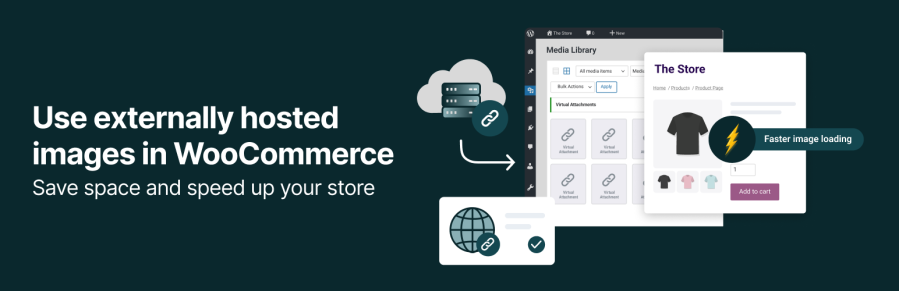
Product Icon

External Images for WooCommerce

Display product images from external URLs or CDNs in WooCommerce without uploading anything to your site.
Choose a billing option
$99
Save 20%
$198 $158.40

Subscription includes

  • Product updates and improvements
  • Customer support
  • 30-day money-back guarantee

Use External Images in WooCommerce Without Slowing Down Your Store

Stop spending hours uploading product images. With External Images for WooCommerce, you can load images from any external URL or CDN. Your store will use less storage and load pages faster, and you stay in full control of every product image.

If you manage a large catalog, sell print on demand, dropship, or get product feeds from suppliers, this plugin saves you time and money.

Why Store Owners Choose External Images for WooCommerce

  • Faster site speed, happier shoppers
    Your images load from an external server or CDN, which means your own hosting has less work to do. Faster pages help increase sales and reduce bounce rates.
  • Lower Hosting Costs
    You no longer need to store thousands of product images in WordPress. This helps avoid hosting upgrades and keeps backups lighter.
  • Works with your existing workflow
    You can use external images as featured images, galleries, variation images, and even category thumbnails. Everything works the same way as normal WordPress images.
  • Perfect for big product catalogs
    Import hundreds or thousands of product images from a CSV, JSON file, or XML feed. The plugin reads the links and creates virtual entries in your Media Library, ready to use.
  • Save hours of manual work
    Add single images or bulk import from a feed. You keep full control of where your images are hosted while avoiding upload limits and storage warnings.

How it works

External Images for WooCommerce lets you display product images that are hosted somewhere else, such as a CDN, supplier feed, or your own server. The images stay remote, and your store simply loads them when needed. Your site stays fast, and your Media Library stays clean.

You can add image URLs in several ways:
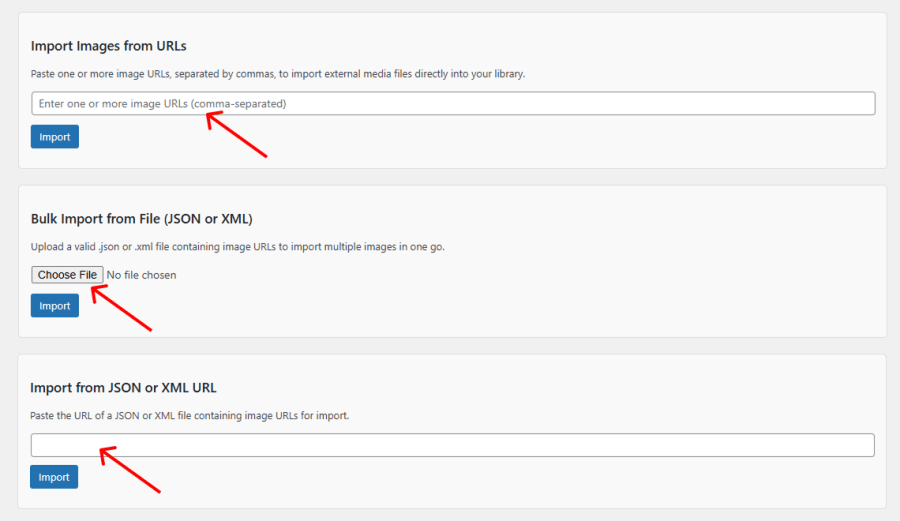
Manual image import

External Images for WooCommerce Import Options

You can import images using a direct URL or perform a bulk image import from a JSON or XML file. This process creates virtual attachments in your WordPress Media Library, which you can then use when creating or editing WooCommerce products one by one via the WooCommerce admin, just like any other image.

Using the WooCommerce CSV Importer

This is the easiest way to import large catalogs.
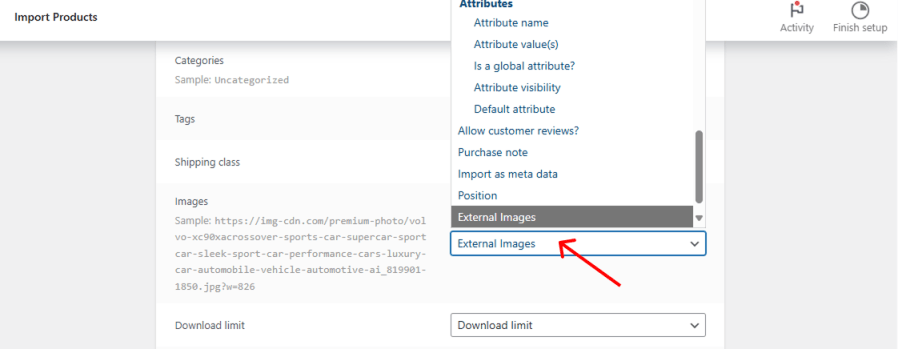
Import External Images with the WooCommerce CSV Importer

  1. Add one or more external image URLs to the Images column in your CSV.
  2. Upload your CSV in WooCommerce.
  3. On the mapping screen, map the Images column to External Images.
  4. Run the importer, your products will load images directly from the external URLs.

What You’ll Need

To import external images in a CSV, you only need two plugins installed:

  1. WooCommerce
  2. External Images

That is it. No extra tools needed.


Frequently asked questions

Can I use external images as featured images or product images?

Yes. You can use external images anywhere WooCommerce expects an image, including featured images, galleries, and category thumbnails.

Can I create product galleries with external images?

Yes. Galleries work the same way with external images, and most gallery plugins support them too.

Where are my images stored?

Your images stay on the external server. The plugin creates virtual attachments in your Media Library so you can use them like regular images, without storing the files on your site.

Does this extension work with the WooCommerce CSV Importer?

Yes. During import, map the images column to External Images and your product images will load from their external source.

Can I bulk import external images from JSON or XML files?

Yes. The extension scans JSON or XML data and automatically imports all referenced external images.

Does it work with variable products?

Yes. The plugin supports both simple and variable products. Each variation can have its own external image if needed.

Will using external images slow down my WooCommerce store?

No. Your store loads the images directly from the external source. If you host them on a reliable server or CDN, your pages can load even faster than before.

Customer reviews

Related Products

Offer add-ons like gift wrapping, special messages or other special options for your products.

Offer personalized product bundles, bulk discount packages, and assembled products.

Add shipment tracking information to your orders.




