

Product Icon

URL Coupons for WooCommerce

Add a unique URL to a coupon code to automatically apply discounts and (optionally) add products to the customer's cart.
Choose a billing option
$49
Save 20%
$98 $78.40

Subscription includes

  • Product updates and improvements
  • Customer support
  • 30-day money-back guarantee

Extend or Automate your Coupons with WooCommerce URL Coupons

The URL Coupons by SkyVerge extension allows you to add a unique URL to any coupon in your WooCommerce store. When this URL is used or clicked on, it automatically applies the coupon discount and can (optionally) add products to the customer’s shopping cart.
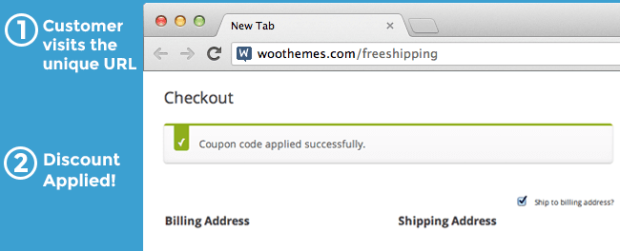
URL coupon applied notice

URL coupons gives you the perfect way to make your print advertising actionable, or you can also help customers remember coupons so that they actually complete purchases. Measure the success of your pay-per-click ad campaigns by using a coupon URL, or use the plugin to only allow URL coupons.

Increase Conversions by Removing Coupon Fields

Studies from major analytics companies like KISSmetrics have shown that coupon boxes are conversion killers. Customers leave your site to search for coupons, and may not return. URL coupons gives you the flexibility to be your only coupon method.

You can allow the plugin to hide your coupon code fields in the cart and/or checkout so that only URL coupons can be used. This way, customers with coupons automatically have them applied by visiting your URL, while other customers never leave to go coupon hunting.
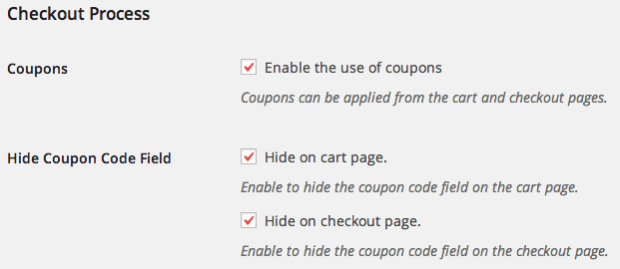
URL Coupons Hide Coupon Fields
Hide Coupons Setting

Automatically Apply Coupons for Visitors

You can use the URL of an existing page or post on your site to trigger coupons. This means that you can trigger a coupon for anyone who reads a particular blog post or visits your landing page. This is a great way to reward your fans, brand loyalists, or customers that interact with you blog by providing an automatic discount.

Redirect customers after coupon application

You can redirect customers if you choose once they’ve visited a coupon URL. This allows you to optionally add products to the cart when the URL is visited and immediately send customers somewhere, such as the cart or checkout. This reduces as many barriers to purchasing as possible, and can even be used with WooCommerce One Page Checkout for a completely seamless, one-page coupon application and purchasing experience.

Personalize Your Coupon URLs to Reward Customers

You can use a generic coupon URL, such as mystore.com/coupon/thanks, that will apply a “thank you” coupon. However, since this coupon URL doesn’t use a trailing slash, you can also use this to personalize the experience for your customers, as the URLs mystore.com/coupon/thanks-john or mystore.com/coupon/thanksjane will also work for this coupon.

You can also disable this behavior by using a trailing slash like mystore.com/coupon/thanks/ if you’d prefer to use one definite URL for coupons instead.

Other Ways to Elevate Your Coupons
  • use a unique URL or QR code on business cards to reward potential clients for checking in on you with a discount.
  • make it easier for current customers to share your products or services by simply giving them a link to send to their friends so they visit your site and get a discount at the same time!
  • prevent coupon hunting by only allowing URL coupons to be used.
  • give out personalized URL coupons, such as mysite.com/thanks-jen, to connect with your customers.
  • automatically apply coupons for customers who visit a particular page or post.

Key WooCommerce URL Coupons Features

  • Set a unique URL for a coupon that applies the coupon when the URL is visited
  • Optionally set one or more products that will be added to the customer’s cart when the unique URL is visited
  • Control if and where the customer is redirected to after visiting the URL
  • Track and increase conversions from your online and print advertisements
  • Improve conversions by automating action when the customer clicks
  • Help current customers remember, share, and use coupons
  • Optionally hide other coupon application methods
  • Supports Smart Coupons extension CSV coupon exports
  • Use WooCommerce One Page Checkout with URL coupons to provide a complete one-page coupon application and purchasing experience. NEW
  • Reduce purchase barriers by applying discounts and adding items to the cart automatically
  • Set coupon minimum amounts, expiration dates, or usage limits
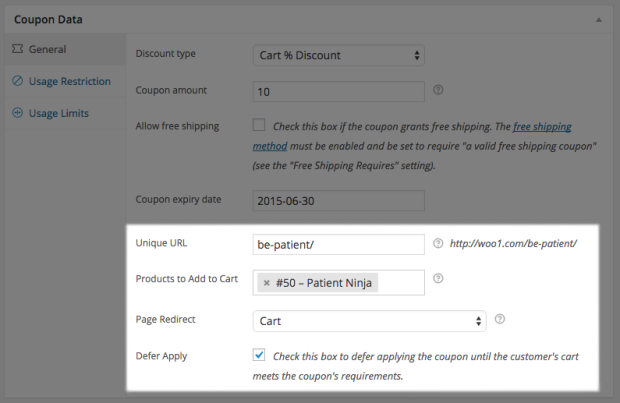
new URL Coupon settings
Set a Unique URL and other Coupon Options

Stop customers from abandoning your checkout to go coupon hunting. Improve conversions of your advertising campaigns by automating discounts to encourage purchasing. Help current customers access and share the discounts you offer. Automatically apply coupons for page or post visitors to provide “easter eggs” and rewards. URL Coupons can help you integrate your coupons throughout your site and provide advanced ways to use them.

How to Get Started

  1. Buy this extension 🙂
  2. Download and install into your WooCommerce store
  3. Setup a Coupon under WooCommerce > Coupon
  4. Add a unique URL to the coupon and start using the new link in your marketing.
  5. That’s it! Sit back and enjoy more efficient advertising and coupon handling!

Need any more reason to buy? When you purchase a SkyVerge-developed extension, you’re getting the highest quality extensions for your WooCommerce store. Gain peace of mind by knowing that when you purchase our products, your store’s performance is as important to us as it is to you.

SkyVerge


Customer reviews

Average rating 4.2
11 reviews
5 stars, 55% of reviews
4 stars, 18% of reviews
3 stars, 18% of reviews
2 stars, 9% of reviews
1 star, 0% of reviews
11 reviews
  • jessilippo
    Rated 5 out of 5
    Ease of use
    Sep 1, 2024
    Ease of use
    • SkyVerge
      Sep 23, 2024
      Hello, thanks so much for the positive rating! It means a lot to us. - S.M.
  • kevin phillips
    Rated 4 out of 5
    May 24, 2024
    not working unless an item is in your cart currently
    working with support to resolve
    • SkyVerge
      Jun 25, 2024
      Hey there, thank you for the rating! Was your issue with URL Coupons resolved with our support team? If you are still seeing this issue, please reach out to us and we will be happy to help. - S.M.
  • Sophia Kelly
    Rated 2 out of 5
    Nov 15, 2023
    Worked and then ran afoul of caching and CDN, had to disable
    I like the idea, but it needs to work with caching plugins and cloudflare. Worked on first test, implemented, told the client I'd implemented, and then found out it had stopped working. Figured out it was likely a caching issue (worked again briefly every time I cleared the cache and my own browser cache) but then stopped. I implemented the solutions provided to route around potential caching issues (set exemptions for the URL in both the caching plugin and cloudflare), then finally gave up and used a normal user-entered coupon code. When I approached tech support (letting them know I'd already done that) they suggested I disable my caching and cdn, which isn't workable for an image heavy pr...
  • Gregory
    Rated 3 out of 5
    Nov 7, 2022
    5 stars if it had ability to add multiple quantities of a single product
    I LOVE how I can auto-add a product to the cart, but I wish I could add more than just 1. For example, if I wanted to have a promotion when you order 5 or more of a product, I wish I could auto-add 5 of the item to the cart instead of just 2.
  • Chris Hagens
    Rated 5 out of 5
    May 25, 2022
    Great product and great support
    The product worked as expected and the support is excellent!

Extension information

  • PHP version required: 7.4
  • Tested with WordPress: 6.9
  • Tested with WooCommerce: 10.3.6
  • Requires at least WordPress: 5.6
  • Requires at least WooCommerce: 3.9.4

Compatibility

  • Cart & checkout blocks
  • High performance order storage (HPOS)

Countries

  • Worldwide

Languages

English (United States), Italian

Related products

Price $279 annually
Rated 3.2 out of 5 stars
Price $199 annually
Rated 4 out of 5 stars
Price $109 annually
Rated 4.6 out of 5 stars
Price $79 annually
Rated 4.2 out of 5 stars
Price $49 annually
Rated 2.7 out of 5 stars
Price $99 annually
Rated 4.7 out of 5 stars
Price $29 annually
Rated 3.5 out of 5 stars
Price $49 annually
Rated 3.8 out of 5 stars
Price $119 annually
Rated 3.5 out of 5 stars
