
A assinatura inclui
Suporte
Not every order comes from a genuine customer. Fraudulent buyers, repeat offenders, and bad-faith shoppers cost you time, money, and inventory. Left unchecked, they lead to chargebacks, wasted fulfillment costs, and unnecessary strain on your support team. Blacklist for WooCommerce gives you a proactive way to stop these users before they ever reach checkout, without disrupting the experience for your legitimate customers.
Block customers using a wide range of conditions, including name, email address, phone number, IP address, billing country, shipping country, and order total range. Combine multiple conditions to build precise, targeted rules and choose exactly what happens when a match is detected: prevent the order, cancel it automatically, or block the customer from registering on your store altogether.
Not every order comes from a genuine customer. Fraudulent buyers and bad-faith shoppers cost you time, money, and inventory. The Blacklist and Block plugin for WooCommerce lets you block customers by name, phone number, IP address, or country. When a match is detected, you choose what happens: prevent the order, cancel it automatically, or block the customer from registering altogether.
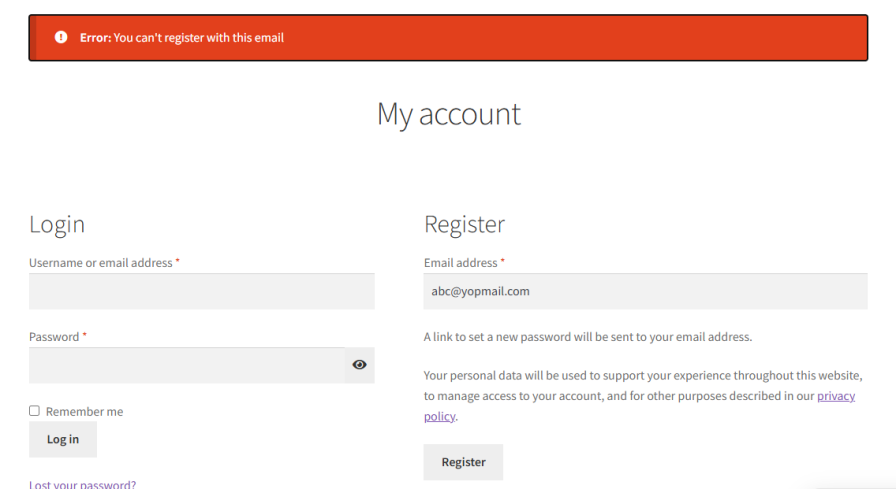
Every fraud case is different. Sometimes you need to stop a specific person, and other times you need to restrict entire regions. Blacklist and Block for WooCommerce lets you define precise blocking rules using one or more of the following criteria:
Target individuals by their billing first name. Add names one per line or as comma-separated values for quick bulk entry, which is useful when dealing with repeat offenders who share a common first-name pattern.
Block by last name alone, or combine first and last name for more accurate, pinpoint matching. This reduces false positives and ensures legitimate customers with similar names aren’t caught in your rules.
Some buyers swap emails and names but reuse the same phone number. Add specific numbers to your blocklist to catch these cases and stop suspicious orders before they go through.
Prevent the same source from making repeated purchase attempts. Blocking by IP is particularly effective against automated bots, scripted attacks, and users who create multiple accounts to bypass other restrictions.
Restrict orders originating from high-risk or unsupported billing regions. Ideal for merchants who have identified specific countries as consistent sources of chargebacks or fraudulent activity.
Define exactly where your products can and cannot be shipped. Whether you’re managing logistics limitations or avoiding problematic delivery regions, shipping country rules give you direct control over your order destinations.
Set a minimum and maximum order total to block orders that fall outside your accepted range automatically. This is particularly useful for flagging unusually large orders that may indicate fraud, or suspiciously small orders that could be testing stolen payment details.
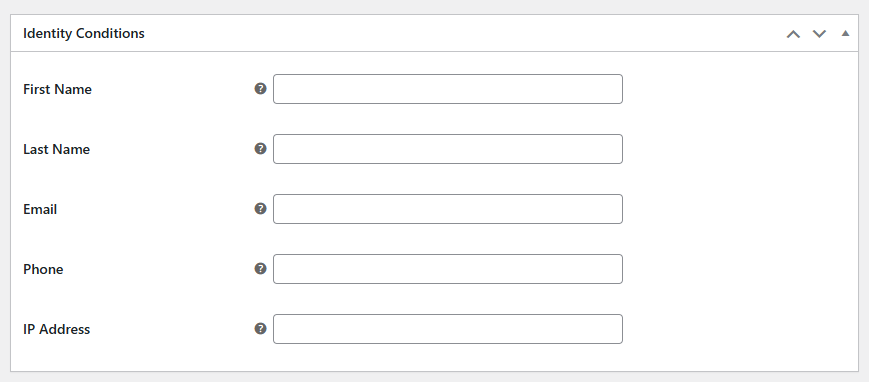
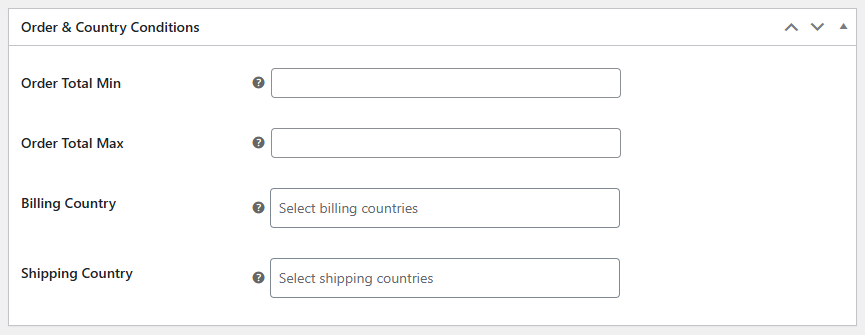
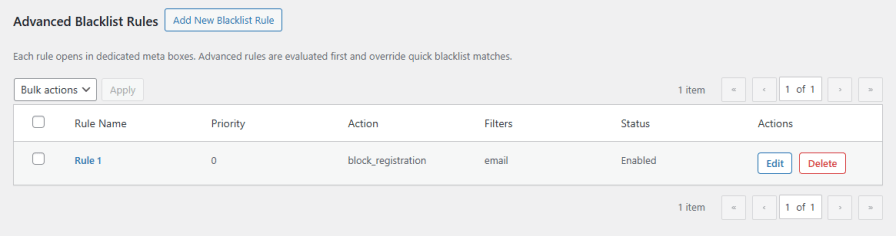
Blacklist for WooCommerce gives you a structured, rule-based system to manage who can and cannot place orders on your store. Each rule comes with its own name, status toggle, priority setting, and optional customer-facing error message, giving you complete control over how and when each rule is applied.
Define your conditions using customer identity fields such as first name, last name, email, phone number, and IP address. You can also filter by billing country, shipping country, and order total range to cover location-based and value-based restrictions. Combine any of these fields together to create precise, targeted rules that match exactly the type of order or customer you want to block.
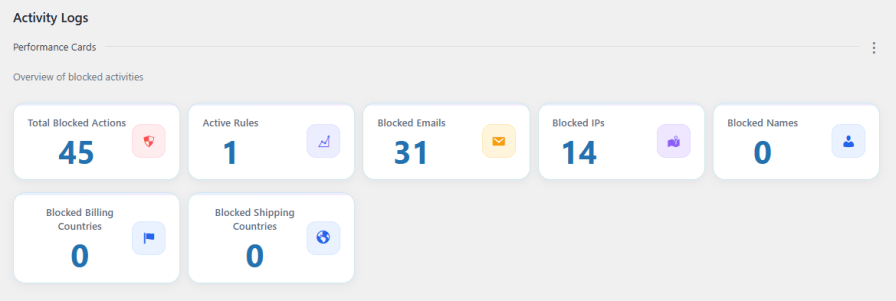
Get a real-time overview of every blocked action from a single dashboard. Track blocked emails, IP addresses, names, and countries alongside your total blocked actions and active rules. Dig deeper with a detailed activity log that records the date, username, email, action type, and IP address for every blocked event, with search and filter options to quickly spot repeat offenders and refine your blocking strategy over time.
Yes. Each rule supports multiple conditions, so you can combine name, email, phone number, IP address, country, and order total range within a single rule. This allows you to create highly targeted blocks that reduce false positives and catch specific patterns of fraudulent behavior.
You choose the action. When a rule is triggered, the plugin can prevent the order from being placed, cancel it automatically, or block the customer from registering on your store. Each rule has its own action setting, so different rules can trigger different responses.
Not unless you want them to. You can add a custom message that is displayed to blocked users at checkout. This lets you communicate professionally without revealing the actual reason for the block, helping you maintain your brand reputation while still preventing the transaction.
Yes. The plugin lets you restrict orders based on both billing country and shipping country. This is useful for merchants dealing with high-risk regions, logistics limitations, or areas that have been a consistent source of chargebacks or fraudulent activity.
Categorias
Verificações de qualidade
Países







