
Ícone do produto

Role Based Analytics para WooCommerce

Role Based Analytics for WooCommerce adds User Role Analytics to WooCommerce, providing clear insights into which customer groups drive orders, revenue, and guest checkout activity.
Escolha uma opção de cobrança
$49
Economize 20%
$98 $78.40

A assinatura inclui

  • Melhorias e atualizações de produtos
  • Suporte ao cliente
  • Garantia de 30 dias para reembolso

Role Based Analytics for WooCommerce brings User Role reporting into WooCommerce Analytics so you can compare customer groups, review guest checkout performance, view the customers behind each role, and reduce manual spreadsheet work.
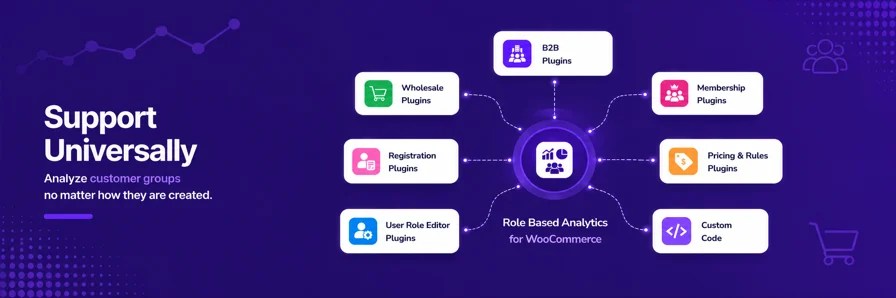
Bring User Role reporting into WooCommerce Analytics so you can compare customer groups, review guest checkout performance, view the customers behind each role, and reduce manual spreadsheet work. It works with any User Role already available on your store, including roles from plugins or custom code that you use to group customers, such as wholesale, B2B, B2C, membership, VIP, retail, or other customer groups.

What you’ll get

With Role Based Analytics for WooCommerce, you gain access to role-based reporting tools inside WooCommerce Analytics:
  • Dedicated User Roles report: Review role-level performance in one place with cards, charts, tables, comparisons, and export support.
  • Customer drilldown: Click a role to view the customers behind that customer group on the same screen.
  • User Role filters across WooCommerce Analytics: Filter WooCommerce Analytics reports, including the Customers page, by User Role, guest customer, custom role, or role alias.
  • Role comparison: Compare customer groups across orders, customers, sales, returns, and average order value.
  • Guest checkout reporting: Analyze non-registered customer activity as its own reporting group.
  • User Role table data: View User Role data directly in WooCommerce Analytics report tables.
  • User Role Aliases: Group related roles under one reporting label for cleaner grouped reporting.
  • Role-based CSV exports: Export filtered User Role data to CSV when you need deeper analysis.

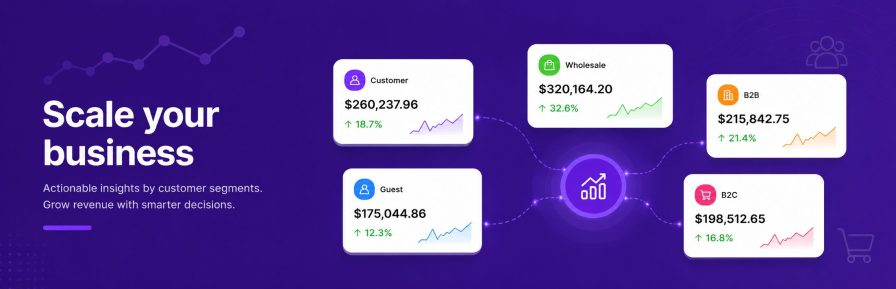
Wholesale and B2B sales report for WooCommerce showing User Role reporting insights for customer groups

Scale your business

Use User Role reporting to make faster decisions about customer groups, reduce manual spreadsheet work, and see which roles are driving orders, revenue, and guest checkout activity. Use these insights to:

  • Improve customer targeting: Better understand which customer groups drive the most orders and revenue so you can focus outreach and promotions where they matter most.
  • Maximize reporting ROI: Use role-based analytics to replace manual spreadsheet work and spend more time acting on the results.
  • Review customer behavior: See how registered customers and guest checkout customers perform so you can tailor your reporting and follow-up strategy.
  • Make informed decisions: Compare customer groups with confidence instead of relying on blended totals or guesswork.
  • Spot growth opportunities: Identify which User Roles, products, and categories are performing best and where attention is needed.
Happy Customer Review

“We were looking for a solution to get analytics of the different user roles we have in WooCommerce (b2c and different b2b-roles). I tested different plugins of which “Role Based Analytics” was the best integrated one in the WooCommerce environment. You still use the same reports as before but get the opportunity to show the stats by user-role. Also it creates dashboard widgets with the most important stats which helps a lot! At the beginning we had some functionalities that we were missing but the support-team integrated them within days and the support in generel is phenomenal! So thank you so much for that beautiful solution and the great support! This is how it should be done by all plugin-developers!”

Note: We are currently collecting verified reviews from our users. Once enough feedback has been submitted, reviews will automatically appear in the public Reviews section of this page.

Identify top-performing customer groups

Get a quick overview of your top-performing User Roles and how they contribute to orders, revenue, returns, and average order value. Use these insights to:

  • Spot high-revenue groups: See which customer groups drive the most revenue and orders.
  • Compare sales performance: Review how each User Role performs across different reporting periods.
  • Track average order value: Identify customer groups with stronger order value.
  • Review guest checkout performance: Compare guest checkout activity with registered customer groups.
  • Find follow-up opportunities: See which customer groups may need retention, outreach, or account review.

Dig deeper using comparisons across metrics

This plugin is built for total flexibility and automatically detects every User Role active on your store—no manual setup required. It works instantly with roles created by third-party membership, B2B, or wholesale plugins.

  • Wholesale & B2B segments: or instance, if you use a wholesale plugin, you can instantly see exactly how much your high-volume buyers contribute to your net sales.
  • Custom segments: Whether you have a role for “B2B,” “B2C,” or “Affiliates,” the data is automatically available for custom user role reporting.
  • Gross sales: Compare gross sales across customer groups.
  • Returns: Track returns by User Role.
  • Net sales: Understand net sales performance by customer group.
  • Total sales: Compare total sales across customer group.
  • Average order value: Identify customer group with stronger average order value.

View customers behind each customer sengments

Role-level totals show performance. Customer drilldown shows who is behind the performance.

From the User Roles report, click a role to view the customers associated with that customer group on the same screen. This helps you move from role-level totals to customer-level context without leaving the report.

Compare registered and guest checkout customers

Guest checkout customers are included as their own reporting group, making it easier to compare registered and non-registered customer performance.

Use Guest reporting to understand:

  • Guest revenue: See how much revenue comes from guest checkout customers.
  • Guest buying behavior: Review which products and categories guest checkout customers buy.
  • Registered vs guest comparison: Compare guest activity with logged-in customer groups.
  • Alias planning: Decide whether guest checkout activity should be grouped with another reporting segment using User Role Aliases.

Simplify complex reporting with Role Aliases

Running a complex store shouldn’t mean looking at messy reports. If your backend is cluttered with multiple custom roles, use Role Aliases to bundle them into logical business segments. This simplifies your charts and exports without touching your actual store permissions, pricing, or checkout behavior.

Export Customer Group reports

When you need deeper analysis, export role-based reports with selected role context included.

Role-based exports reduce cleanup before sharing data with a team, client, or spreadsheet workflow.

How to Get Started

  1. Purchase and download the Role Based Analytics for WooCommerce extension.
  2. Install and activate the .zip file in your WooCommerce store.
  3. Customize to your needs in the Analytics > Settings panel (optional).
  4. Open WooCommerce Analytics -> User Roles — You can view the user role based report and other woocommerce analytics page you will find the user role filter.

That’s it! Instantly start analyzing your WooCommerce data by user role for smarter insights.


Documentation

Need guidance? Check out the comprehensive documentation to learn everything you need to know about the Role Based Analytics for WooCommerce extension.

View documentation


Support

If you have pre-sale questions or need help, get in touch with our friendly Support Engineers.

Get support


Perguntas frequentes

How does the Role Based Analytics plugin interact with WooCommerce B2B and Wholesale plugins?
The Role Based Analytics plugin works with existing B2B and wholesale setups by reading the custom User Roles those plugins register on your store. It adds User Role reporting metrics inside WooCommerce Analytics, allowing you to track and analyze wholesale and B2B customer purchasing behavior automatically without changing customer permissions, pricing, or checkout behavior.
Which analytics pages are supported?

Role Based Analytics for WooCommerce now provides a dedicated User Roles Report page, complete with performance cards, time and role comparison charts, and detailed tables filtered by user roles.

It also introduces a User Roles Leaderboard in the Analytics Overview, where you can instantly see top-performing roles ranked by orders, gross sales, returns, net sales, and total sales.

In addition, user role filters and columns are available on these WooCommerce Analytics screens:

  • Orders
  • Products
  • Revenue
  • Variations
  • Categories
  • Coupons
  • Taxes
  • Downloads
  • Customers (Under Woocommerce -> Customers)

Since version 1.11.0, Role Based Analytics for WooCommerce supports Role Based filtering for Revenue, Variations, and Taxes reports on supported WooCommerce versions..


How can I view wholesale and B2B analytics in WooCommerce?
You can view wholesale metrics by installing the Role Based Analytics plugin. It automatically pulls data from your existing B2B or wholesale user roles. It then injects dedicated performance metrics—like net sales and average order value—directly into your WooCommerce Analytics dashboard.
How do I filter WooCommerce analytics reports by specific customer groups?
After activating the plugin, a global "User Roles" filter is added to your primary WooCommerce Analytics screens. You can easily filter reports for Orders, Revenue, Products, Variations, Categories, Coupons, Taxes, Downloads, and your Customers list.
Does this plugin track sales from guest checkout users who don't register?
Yes. It automatically groups non-registered shoppers into a dedicated "Guest" reporting segment. This allows you to compare guest buying behaviors, total revenue, and average order values directly against your registered user roles.
Can I combine multiple custom user roles into a single analytics report?

Yes, you can use the built-in User Role Aliases feature. This allows you to bundle several backend roles (like multiple tiers of B2B or wholesale groups) under one clean reporting label without altering actual site permissions or pricing.

Will Role Based Analytics display reports for my past orders and older sales?
Yes. The plugin processes your historical store data immediately upon installation. You do not need to wait for new orders to come in; you can analyze past performance and apply Role Aliases to older data right away.
Can I use this plugin to track WooCommerce customer segments or customer groups?

Yes. If you segment or group your customers using WordPress User Roles, this plugin can automatically use those exact roles inside WooCommerce Analytics.

For example, if your store uses roles such as Wholesale, B2B, VIP, Dealer, Retail, Member, or Distributor, the plugin instantly turns those groups into analytics segments and reporting filters.

How it works

Step 1: Verify your customer groups
Go to Users → All Users in your WordPress dashboard and confirm your customers are assigned to the correct WordPress User Roles.

Step 2: View analytics by customer group
After activating the Role Based Analytics for Woocommerce plugin, go to Analytics → User Roles.

You will see those same WordPress User Roles available as customer segments for analytics and reporting.

This allows you to analyze revenue, orders, customer counts, and performance by customer group directly inside WooCommerce Analytics.

Avaliações de clientes

Estamos aceitando avaliações para este produto e as exibiremos quando tivermos mais algumas.

Informações da extensão

  • Versão do WordPress obrigatória: 6.2
  • Versão do WooCommerce obrigatória: 8.1.0
  • Versão PHP necessária: 7.4
  • Testado com WordPress: 6.9.4
  • Testado com WooCommerce: 10.7.0
  • Requer pelo menos o WordPress: 6.1
  • Requer pelo menos o WooCommerce: 8.1.0

Países

  • Em todo o mundo

Related Products

Preço: $79 Anualmente
Classificado com 3.4 de 5 estrelas
Preço: $279 Anualmente
Classificado com 3.2 de 5 estrelas
Preço: $59 Anualmente
Classificado com 3.1 de 5 estrelas
Preço: $49 Anualmente
Classificado com 4.1 de 5 estrelas
Preço: $109 Anualmente
Classificado com 2.8 de 5 estrelas
Preço: $109 Anualmente
Classificado com 2 de 5 estrelas
Preço: $109 Anualmente
Classificado com 2.3 de 5 estrelas
Preço: $109 Anualmente
Classificado com 2.6 de 5 estrelas
Preço: $109 Anualmente
Classificado com 2 de 5 estrelas
Uso dos seus dados pessoais
Nós e nossos parceiros processamos seus dados pessoais (como dados de navegação, endereços IP, informações de cookies e outros identificadores únicos) com base em seu consentimento e/ou nosso interesse legítimo para otimizar nosso site, atividades de marketing e sua experiência de usuário.




