
Product Icon

Teams for WooCommerce Memberships

Adds B2B functionality to WooCommerce Memberships, allowing sites to sell team, group, corporate, or family member accounts.
Choose a billing option
$129
Save 20%
$258 $206.40

Product comparison

Subscription includes

  • Product updates and improvements
  • Customer support
  • 30-day money-back guarantee

Sell Corporate, Group, or Team Memberships for your site

This plugin requires WooCommerce Memberships version 1.9.4 or newer (purchased separately).

Teams for WooCommerce Memberships takes the memberships created by WooCommerce Memberships, and gives you the ability to sell them to teams, companies, groups, or families instead of individuals.

When selling a team product, one owner handles all billing, and can share the team access with other members they invite. Great for selling corporate training accounts, family memberships, team site access, and more!

Sell Team Access Your Way

Teams for Memberships extends your existing products to let you sell team memberships — these can be sold with per-member or per-team prices. Set a minimum and maximum seat count (optional) for the team, and you’re ready to start selling to groups!
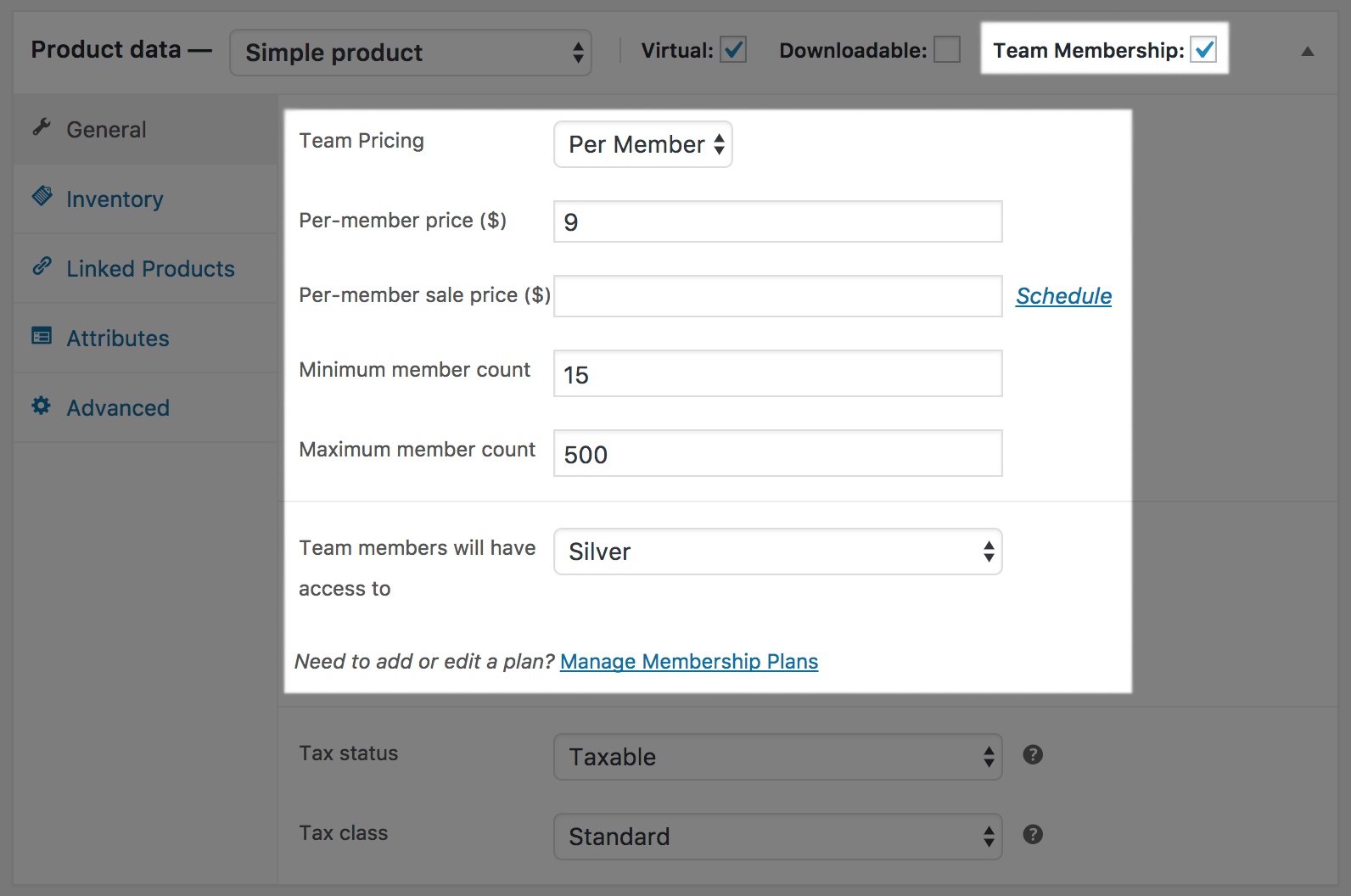
Teams for WooCommerce Memberships: per member team

Teams can be sold via simple or variable products, and your customers can purchase a configurable number of seats (per-member, e.g., $15 per member), or require them to purchase in blocks (per-team, e.g., $1000 for 500 seats).
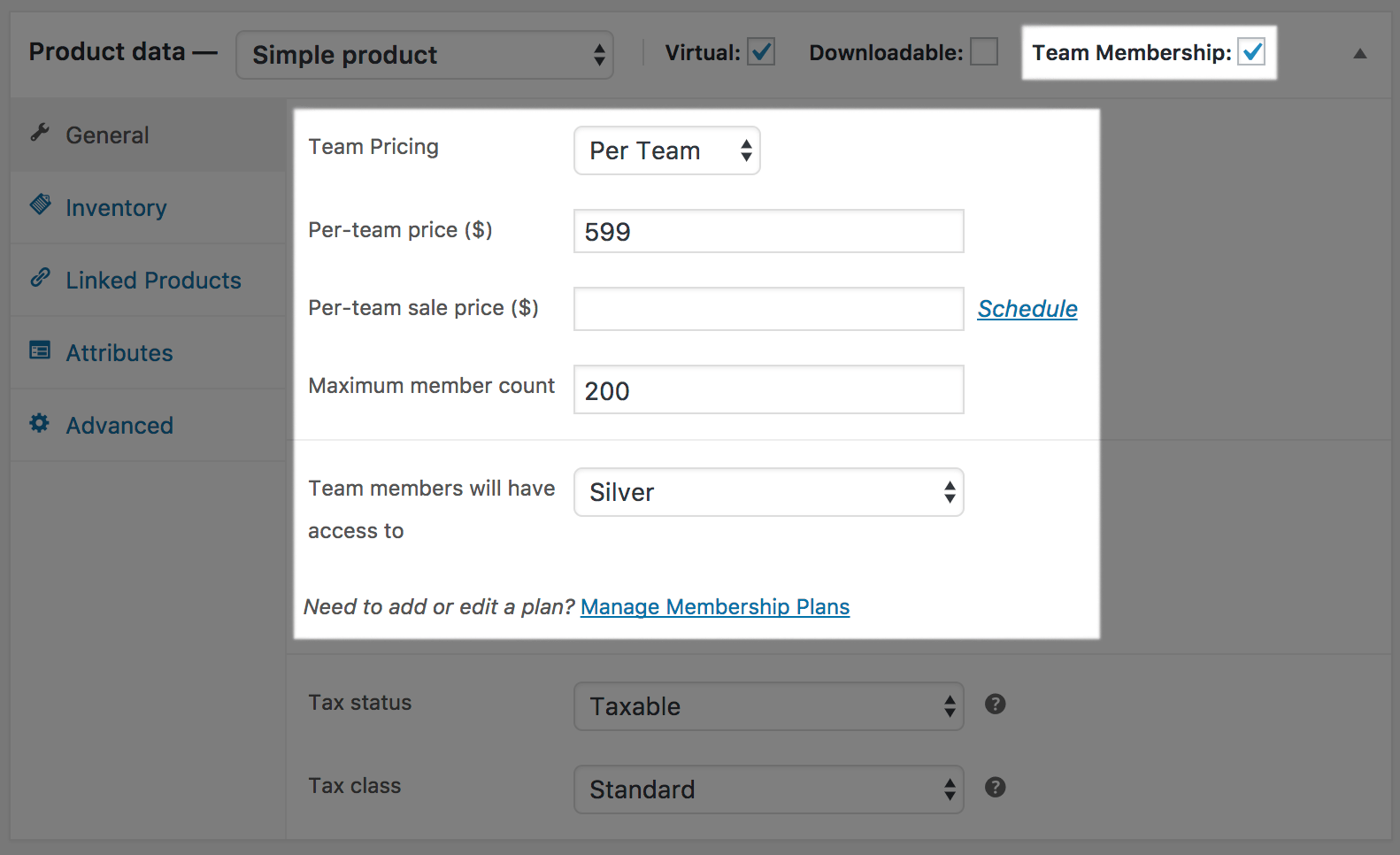
Teams for WooCommerce Memberships: per team priced team

Complete Tools for Managing Group Accounts

Team accounts can be purchased on your site, and the purchasing process is as seamless as any other product on your store.

Teams for WooCommerce Memberships: Purchasing teams

Once a team has been purchased, the owner can add new members to the team right from the account area on your site by sharing a public “join” link, or sending email invites.
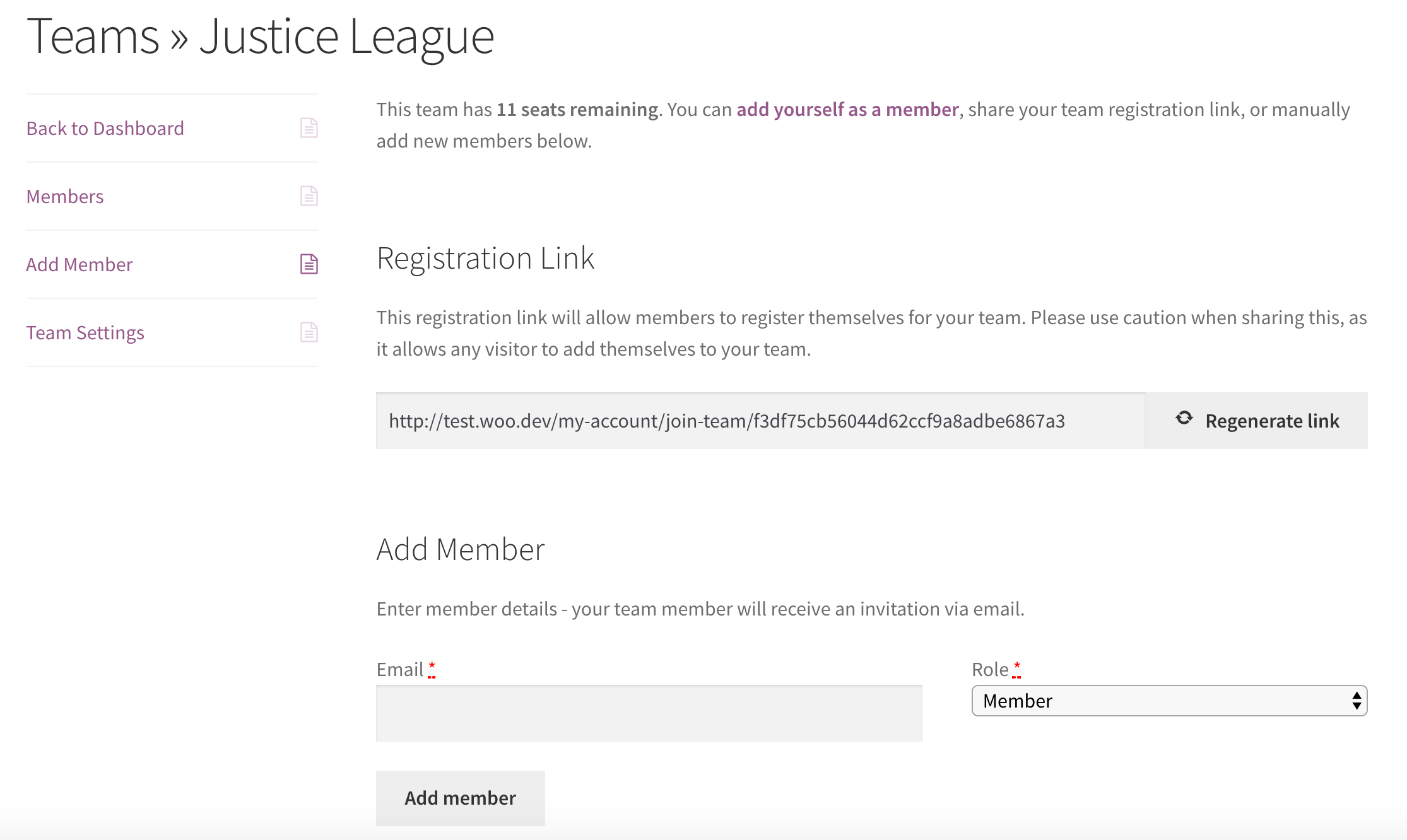
Teams for WooCommerce Memberships: add members

To help with managing team members, owners can even grant “manager” permissions to people on the team so they can help with inviting new people to the team.
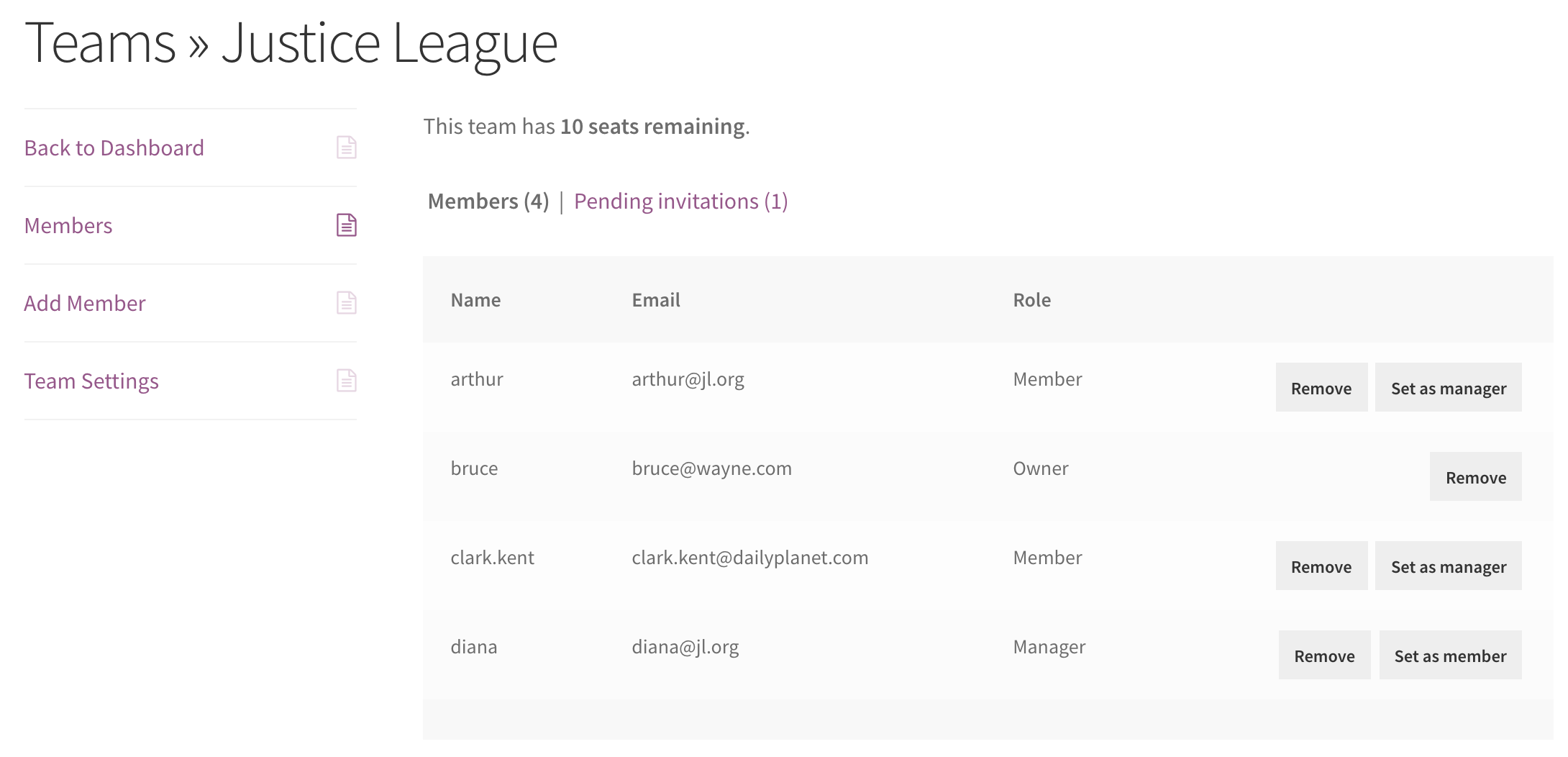
Teams for WooCommerce Memberships: team members

The best part is the entire team is tied to one billing record, so if the owner stops paying or gets a refund, the entire set of team memberships is cancelled.

Only owners can handle purchasing, while sharing member access with anyone on the team.
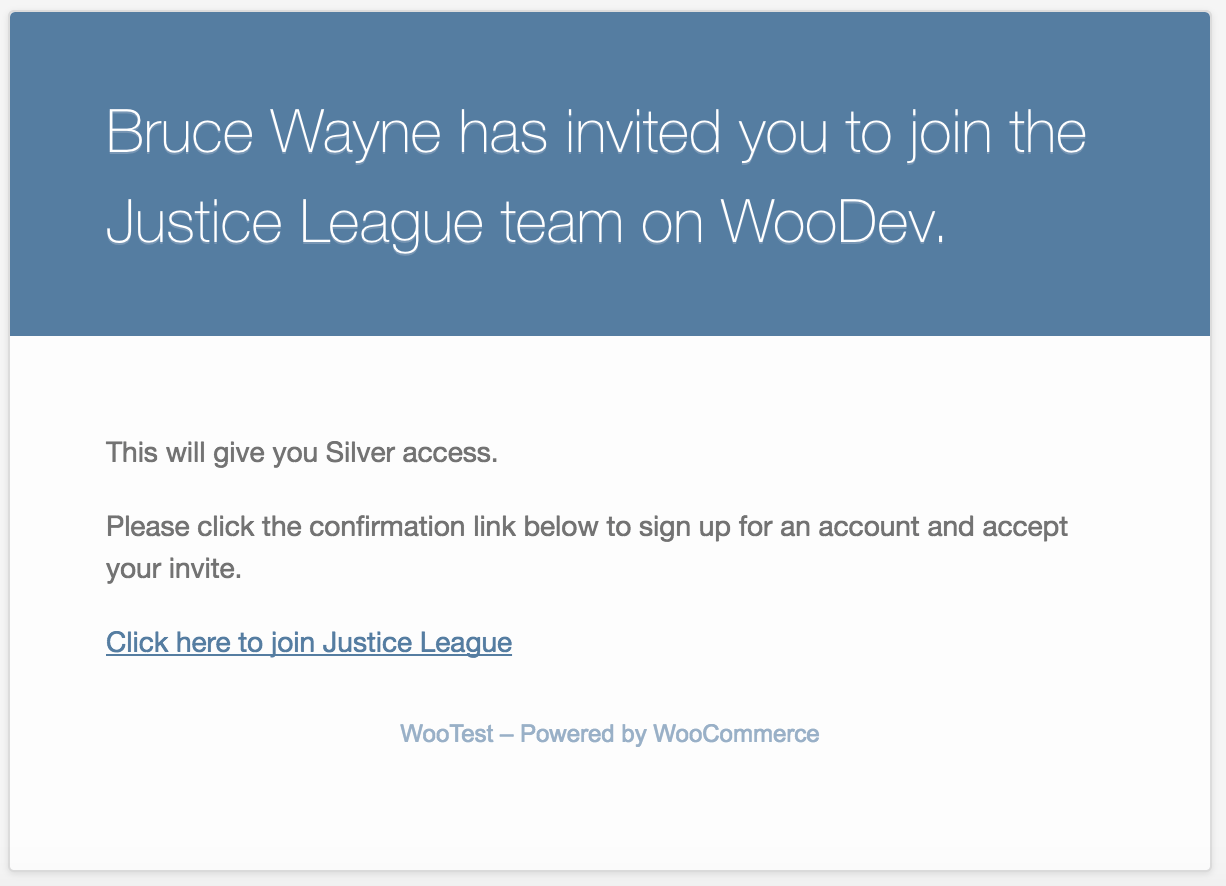
Teams for WooCommerce Memberships: new user invite

Admin Tools, Too!

Not only can owners and managers add or remove members, but store admins can also manage a team. You can view a list of teams, or see a specific team in more detail. You can also change team attributes, such as the maximum seat count, or manually add or remove members from your site dashboard.
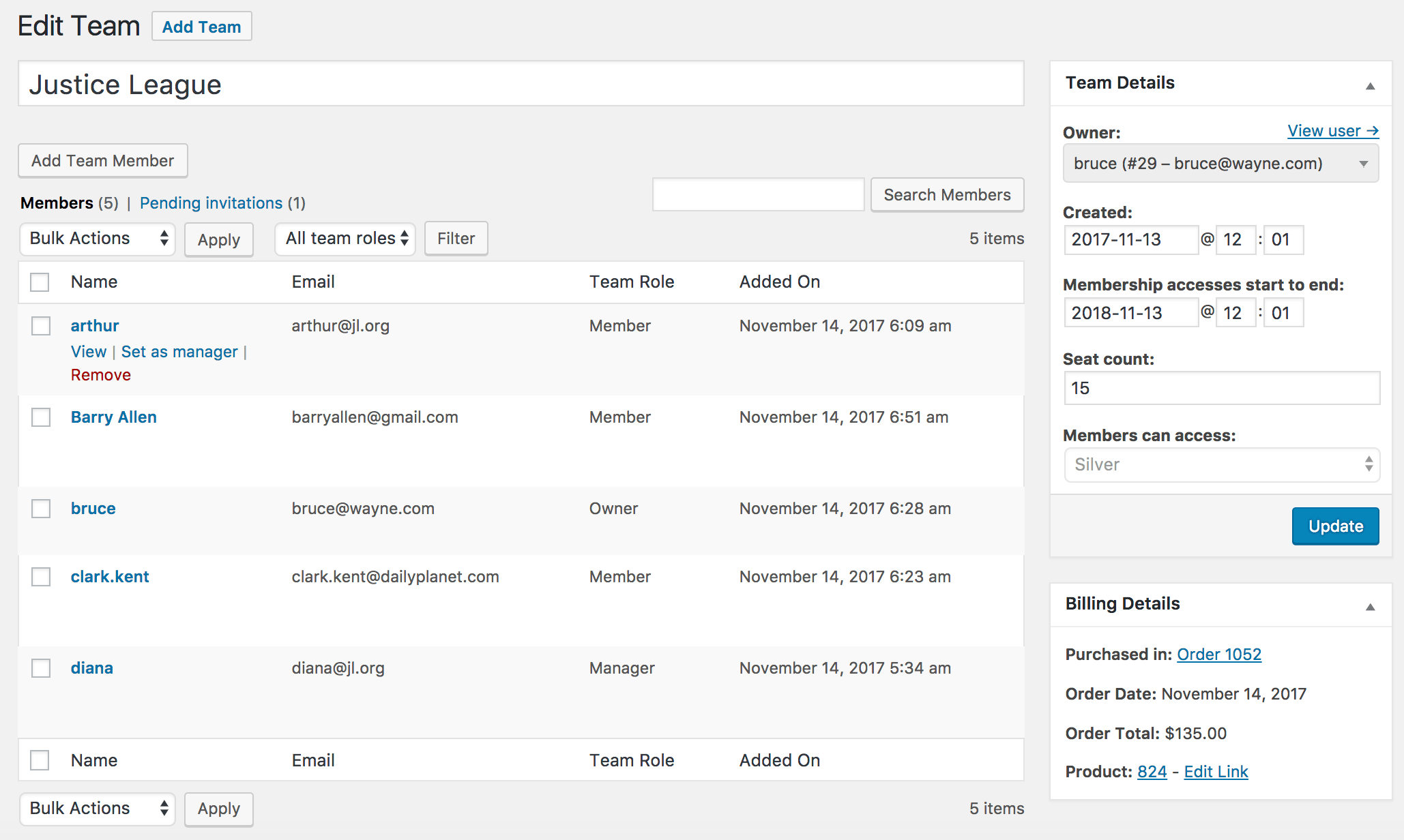
Teams for WooCommerce Memberships: edit a team

Works Great with Subscriptions

WooCommerce Memberships already works great with WooCommerce Subscriptions, and Teams for Memberships does as well.

You can sell team access via simple or variable subscriptions, too. Per-member or per-team pricing can be applied to a subscription to provide recurring billing for your team. If the team owner stops or cancels a subscription, all team members will lose access as well.
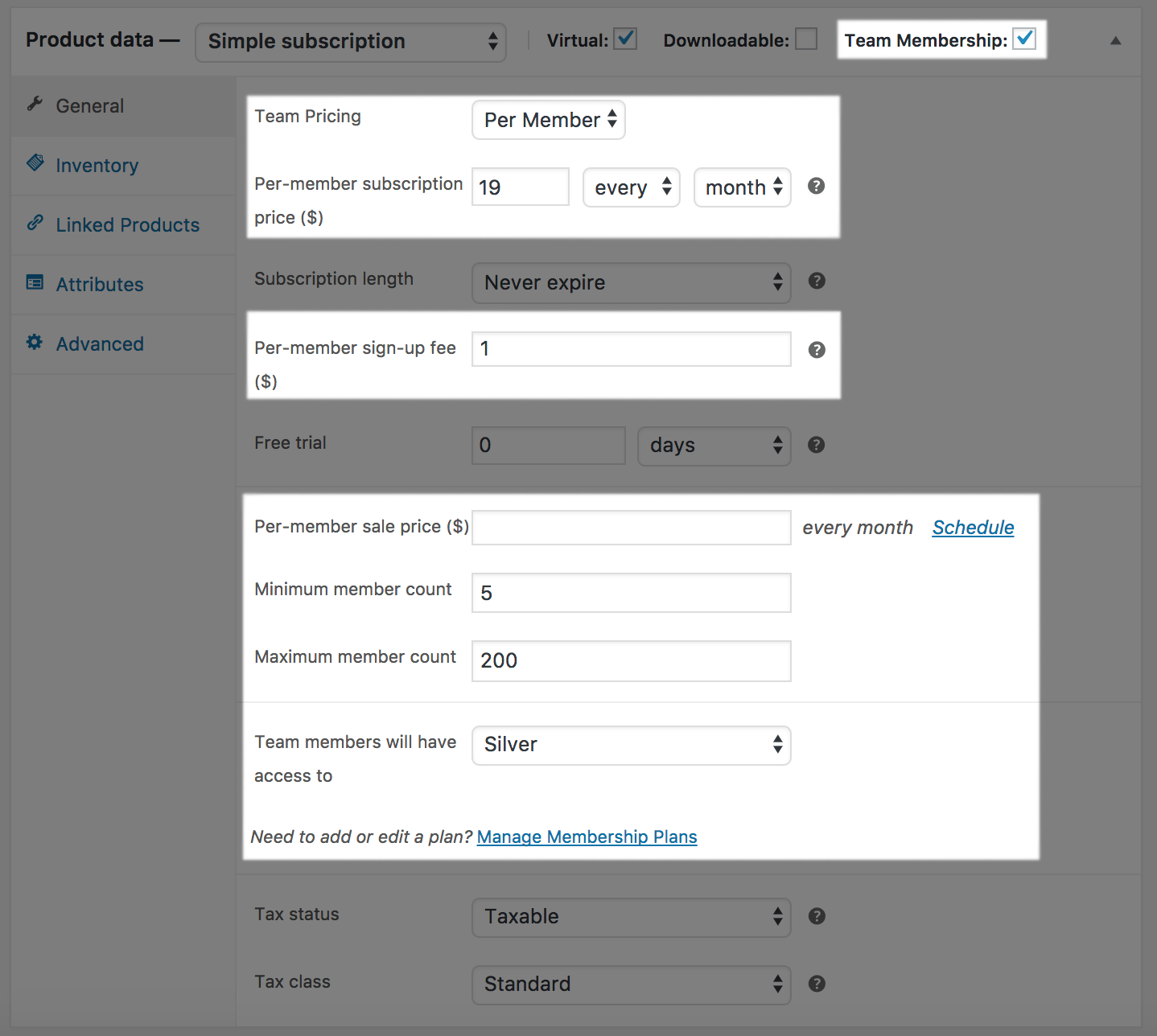
Teams for WooCommerce Memberships: subscription-type product

How to Get Started

Ready to sell group memberships on your site? You can get going with these steps:

  1. Be sure your site already has WooCommerce Memberships, or purchase it now.
  2. Buy this extension 🙂
  3. Download and install Teams for Memberships in your WooCommerce store
  4. Create a Team Product for your membership plan
  5. Check out our extensive documentation for any advanced setup help
  6. That’s it! Sit back and expand your membership sales to groups!

Need any more reason to buy? When you purchase a SkyVerge-developed extension, you’re getting the highest quality extensions for your WooCommerce store. Gain peace of mind by knowing that when you purchase our products, your store’s performance is as important to us as it is to you.


Extension information

  • PHP version required: 7.4
  • Tested with WordPress: 6.9.4
  • Tested with WooCommerce: 10.7.0
  • Requires at least WordPress: 5.6
  • Requires at least WooCommerce: 3.9.4

Countries

  • Worldwide

Languages

English (United States)

Customer reviews

Average rating 3.9

12 reviews from verified users

5 stars, 58% of reviews
4 stars, 17% of reviews
3 stars, 0% of reviews
2 stars, 8% of reviews
1 star, 17% of reviews
  • Rated 1 out of 5
    leisaharvey03b93042adNew ZealandFeb 27, 2026
    This is very clunky and unclear from the purchaser/user perspective. No clear instructions for purchaser on how to use.
  • Rated 1 out of 5
    seanderrigUnited Kingdom (UK)Sep 24, 2024
    Users can't activate members from the front end. They've acknowledged there is a problem with the plugin but no fix and no support. This has been going on for weeks. Avoid this plugin. They charge a premium price and don't offer support.
  • Rated 5 out of 5
    jarcopenningNetherlandsMar 12, 2024
    works but upgrades would make it better This plugin does technically what it states, so 5 stars for that. I would like to see some extra features for example: 1. bulk contact team leaders 2. exporting data 2. upgrade the dashboarding in general: it is plain simple wordpress right now
  • Rated 4 out of 5
    Rajeev AroraUnited Kingdom (UK)Aug 10, 2023
    A great addition to WooCommerce Memberships I've used Teams for WooCommerce Memberships on a few sites now and it's very versatile. It doesn't always do everything I need (such as single-use-seats) but there are plenty of hooks to adapt it to my needs. SkyVerge support have been brilliant too, so it's a product I use with confidence knowing they are here to help if needed.
  • Rated 2 out of 5
    awhollis18United States (US)Feb 21, 2023
    Incomplete plugin and slow support Pros 1. A plugin works well with WooCommerce and Membership plugin. 2. The code is well documented and structured. Kudos to the backend developers. Cons 1. A plugin has incomplete feature. Whenever you change the subscription for the same Team, you lose all the team data and its members. You have to re-invite all the members. This makes the plugin not useful at all with a subscription model. This wasn't mentioned in the documentation until I reported to them. They are not willing to fix this, instead they updated the documentation. Funny enough. 2. I reported another bug, it has been 12 days. First, they rejected that it's a bug. I created a WordPress instance and shared it with them to show the bug. They accepted but no progress so far in 2 weeks. 3. They do not include un-minified JS files into the plugin. So to fix any bug in the JS files, you are helpless. I thought SkyVerge is a good company but experience so far with support is horrible.

Related Products

Price $279 annually
Rated 3.2 out of 5 stars
Price $199 annually
Rated 4 out of 5 stars
Price $79 annually
Rated 4.2 out of 5 stars
Price $29 annually
Rated 3.6 out of 5 stars
Price $109 annually
Rated 2.5 out of 5 stars
Price $249 annually
Rated 2.7 out of 5 stars
Price $119 annually
Rated 3.5 out of 5 stars
Price $109 annually
Rated 4.6 out of 5 stars
Price $79 annually
Rated 4 out of 5 stars
Use of your personal data
We and our partners process your personal data (such as browsing data, IP Addresses, cookie information, and other unique identifiers) based on your consent and/or our legitimate interest to optimize our website, marketing activities, and your user experience.