
The Downloads report shows download activity for your store’s downloadable products. Go to Analytics > Downloads to open it. The count includes repeated downloads from the same IP address. The report displays download dates in your site’s time zone.
All Downloads View
↑ Back to topBy default, the report shows All downloads for the selected date range. The chart summarizes download activity, and the table lists individual downloads.
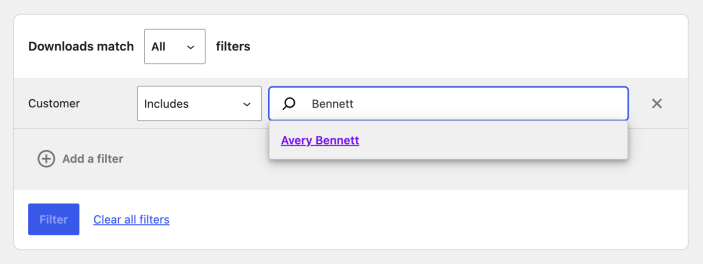
Advanced Filters
↑ Back to top- Open the Show menu and select Advanced filters.
- Select Add a filter, then choose a filter.
- Choose whether downloads must match All or Any of your conditions, then select Filter.
The available filters are:
- Product: search for a downloadable product by title.
- Customer: search for a registered customer by name, username, or email. Guest customers are not available in this filter.
- Order #: filter by order number.
- IP Address: filter by the IP address used to download the file.
Report Sorting
↑ Back to topSelect the Date or Product title column heading to sort the report table.
Report Links
↑ Back to topThree table columns contain links:
- Product title opens the product sales report for that product.
- File name opens the downloadable file in the browser.
- Order # opens the order.
Questions and support
↑ Back to topDo you still have questions and need assistance?
This documentation is about the free, core WooCommerce plugin, for which support is provided in our community forums on WordPress.org. By searching this forum, you’ll often find that your question has been asked and answered before.
If you haven’t created a WordPress.org account to use the forums, here’s how.
- If you’re looking to extend the core functionality shown here, we recommend reviewing available extensions in the WooCommerce Marketplace.
- Need ongoing advanced support or a customization built for WooCommerce? Hire a Woo Agency Partner.
- Are you a developer building your own WooCommerce integration or extension? Check our Developer Resources.
If you weren’t able to find the information you need, please use the feedback thumbs below to let us know.