
Variation Monster for WooCommerce provides an advanced option that allows you to extend the Overwrite Default Add to Cart Table Template by adding additional WooCommerce meta data alongside attributes, price, and quantity.
This powerful feature gives store admins full control over what information is displayed in the table, making it ideal for wholesale, B2B, and detail-focused stores.
What This Feature Does
↑ Back to topWhen the default Add to Cart section is replaced by the variation table:
- You can display extra meta data in the table
- Meta data appears next to attributes, price
- Any meta data provided by WooCommerce can be added
This helps customers make informed purchasing decisions directly from the table.
How to Configure This Feature
↑ Back to top- Go to WooCommerce → Settings → Variation Monster
- Open Table Settings
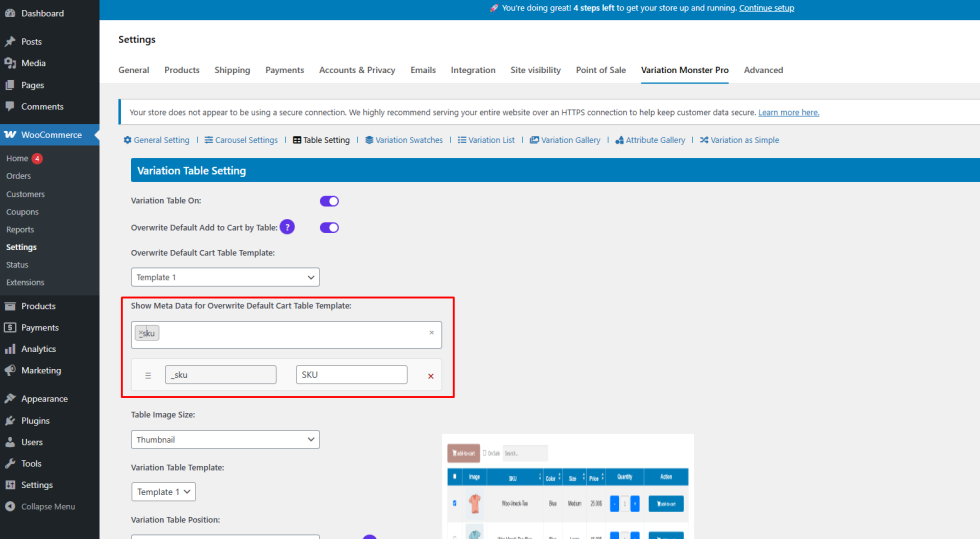
- Find Show Meta Data for Overwrite Default Cart Table Template
- Select the WooCommerce meta data you want to display
- Save the settings
All selected meta data will be loaded dynamically and shown in the overwrite cart table.
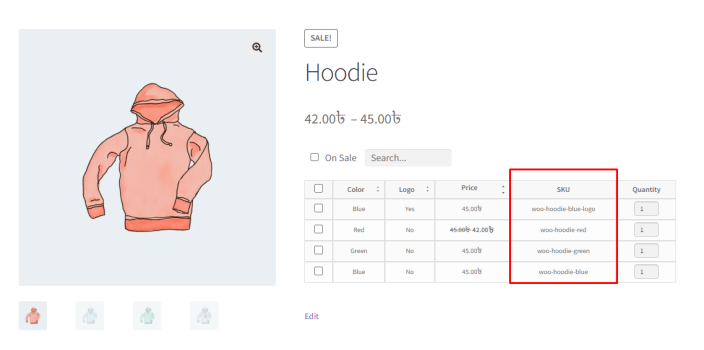
Frontend Result
↑ Back to topAfter configuration:
- The Add to Cart section is replaced by an enhanced variation table
- Additional meta data appears clearly within the table
- Customers can review details and add multiple variations at once
Benefits
↑ Back to top- Highly customizable add-to-cart experience
- Better transparency for customers
- Perfect for bulk ordering and professional storefronts