
Product Icon

ProdQueue - Production Queue for Made-to-Order Stores for WooCommerce

Turn WooCommerce orders into a clear production queue for your team.
Choose a billing option
$79
Save 20%
$158 $126.40

Subscription includes

  • Product updates and improvements
  • Customer support
  • 30-day money-back guarantee

Production tracking for made-to-order WooCommerce stores

ProdQueue is built for WooCommerce stores that make products after the order is placed. Instead of treating an order like a finished sale, ProdQueue turns it into production work your team can actually manage.

When an order reaches your chosen status, ProdQueue creates individual production jobs automatically. Each unit becomes its own job, giving your workshop, makers, or packing team a dedicated queue to work through inside WooCommerce.

That means less manual tracking, fewer missed details, and a much clearer view of what needs making next.
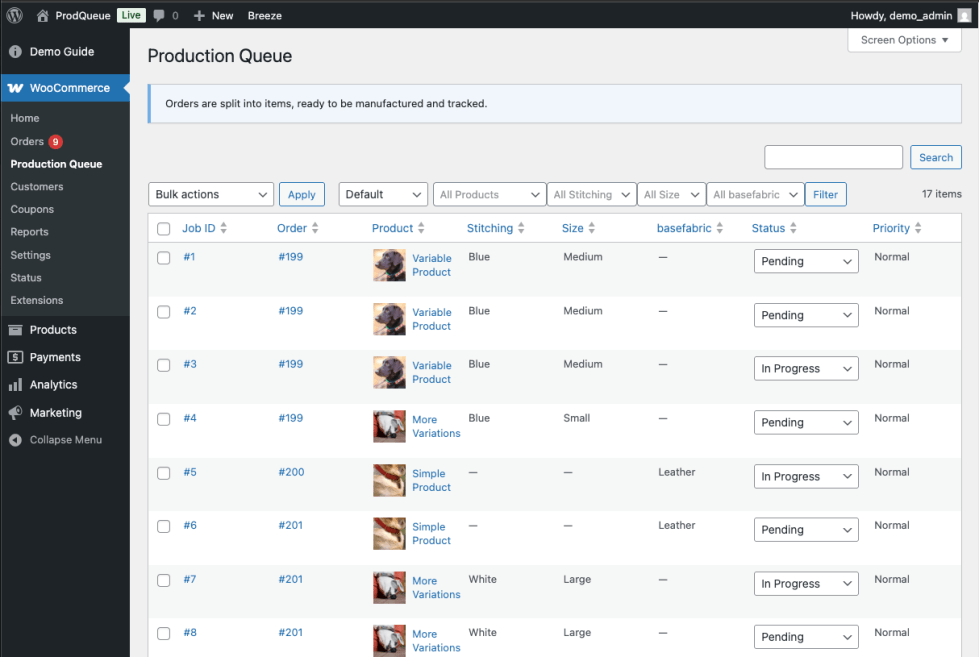
Production Queue View


Why store operators use ProdQueue

  • Automatic job creation
    Create production jobs automatically when an order reaches your chosen trigger status.
  • One job per unit ordered
    Track real production workload properly instead of trying to manage everything at order level.
  • Dedicated queue inside WooCommerce
    Give your team one clear place to search, filter, and work through production jobs.
  • Attribute-based filtering
    Choose which attributes appear on jobs so staff can quickly batch similar work together.
  • Estimated production times
    Set a production time per product and optionally display it on product pages or via shortcode.
  • Safe handling of order changes
    Reconcile edits, cancellations, and refunds while preserving production history where appropriate.


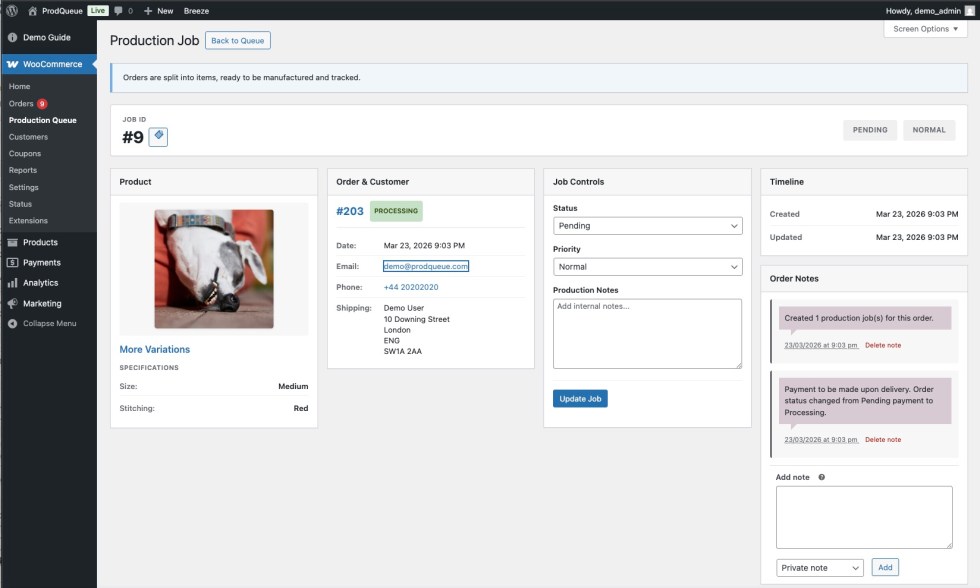
Production Job View


Built for the realities of made-to-order work

ProdQueue is a strong fit for WooCommerce stores selling made-to-order, custom, assembled, or manufactured-on-demand products.

You can enable production tracking per product, choose which attributes appear on jobs, set estimated production times, and keep each job linked back to the original order.

Staff can filter the queue by status, priority, and configured attributes, search by order number or product, and update jobs without leaving the WooCommerce admin.
Top features

  • Automatic creation of individual production jobs from WooCommerce orders.
  • Manual job creation from the order screen when needed.
  • Support for simple products and variable products through selected attributes.
  • Status and priority updates directly inside the production queue.
  • Optional automatic order completion when all linked jobs are finished.
  • Compatibility with WooCommerce HPOS and familiar admin workflows.

How it works

  1. Configure products
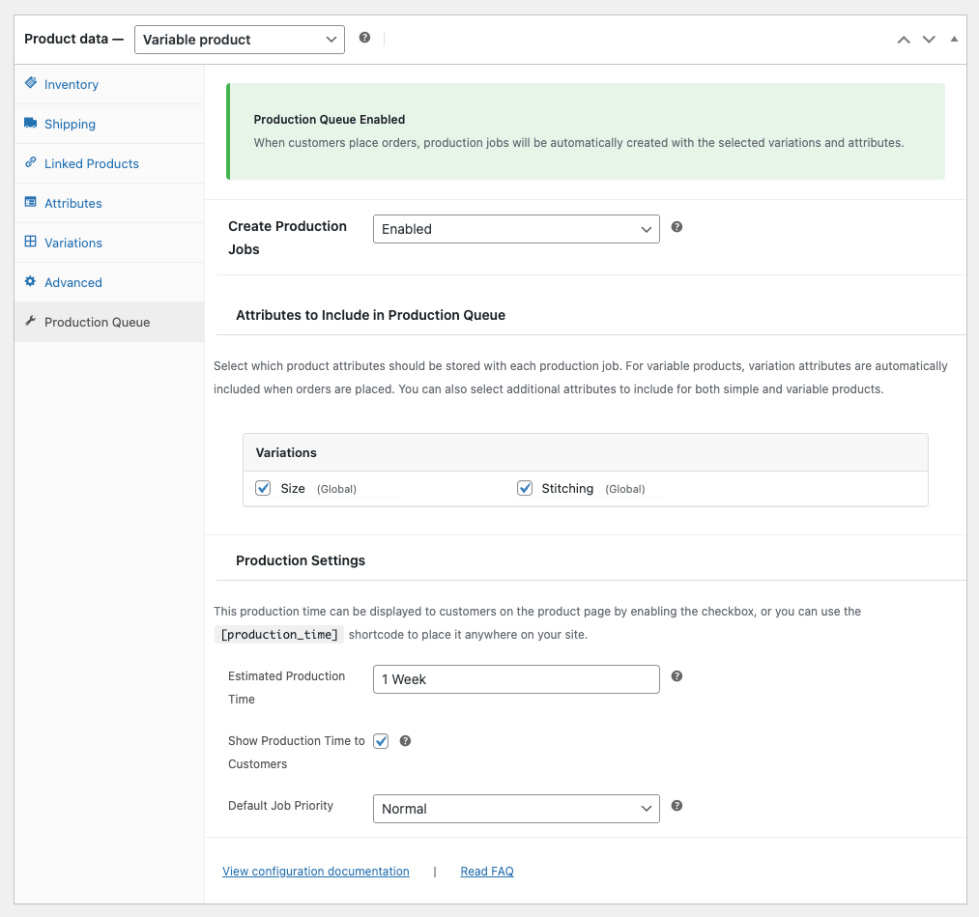
    Enable production tracking on the products you want to manage through the queue.
  2. Orders create jobs
    When an order reaches your configured status, ProdQueue creates linked production jobs automatically.
  3. Manage the queue
    Your team filters, searches, updates priorities, and works through jobs from one dedicated screen.
  4. Keep orders in sync
    As jobs are completed, WooCommerce order progress can stay aligned with your production workflow.


Enabling ProdQueue per product


Good fit for stores that

  • Make products after purchase
  • Sell custom or configurable items
  • Need one job per unit, not one note per order
  • Batch work by variation or attribute
  • Want staff to work from a shared queue inside WooCommerce
  • Need better production visibility without changing checkout or shipping flows

Keep tracking inside your WooCommerce store

ProdQueue focuses on production tracking, not checkout, shipping, or stock control. It works alongside your existing WooCommerce setup and gives operators a clearer way to manage made-to-order work from inside the admin they already use every day.

If you run a WooCommerce store where the real work starts after the customer pays, ProdQueue gives that work a proper place to live.


Frequently asked questions

Who is ProdQueue for?

ProdQueue is for WooCommerce stores that make, customise, assemble, or prepare products after the customer places an order. It is especially suited to made-to-order workflows where staff need a clear internal production queue rather than just a list of orders.

How are jobs created?

Jobs are created automatically when an order reaches your configured trigger status. You can also create jobs manually from the order screen when needed.

Is it one job per order or one job per item?

ProdQueue creates one job per unit. If a customer orders a quantity of 3, three separate jobs are created.

Can I enable it only for certain products?

Yes. Production tracking is enabled per product, so you can choose exactly which products should create jobs.

Can I include product attributes in the queue?

Yes. You can choose which attributes appear on jobs, and staff can use configured attribute filters to find similar work quickly. This is useful for batching production by variation or custom option.

Can staff update jobs from the order screen?

Yes. Each order includes a Production Jobs panel where staff can view linked jobs, update status and priority, and create jobs manually if needed.

Does ProdQueue change checkout, pricing, shipping, or stock?

No. ProdQueue is focused on production tracking. It does not change your checkout, payment, shipping, or stock flows.

What happens if an order is changed, cancelled, or refunded?

ProdQueue reconciles jobs against order changes. On cancellations or refunds, it cancels reconcilable jobs while keeping completed or already-cancelled jobs as history where appropriate.

Can I show production time to customers?

Yes. You can set an estimated production time per product and optionally display it on the product page or via shortcode.

Does it work with variable products?

Yes. Variable products are supported through selected attributes, alongside support for simple products.

Can orders be marked complete automatically?

Yes, optionally. ProdQueue can auto-complete an order when all linked jobs are completed, if that setting is enabled.

Customer reviews

We are accepting reviews for this product, and will display them when we get a few more.

Related Products

Price $79 annually
Rated 3.4 out of 5 stars
Price $59 annually
Rated 3.1 out of 5 stars
Price $279 annually
Rated 3.2 out of 5 stars
Price $109 annually
Rated 2.8 out of 5 stars
Price $49 annually
Rated 4.1 out of 5 stars
Price $109 annually
Rated 2 out of 5 stars
Price $109 annually
Rated 2.3 out of 5 stars
Price $109 annually
Rated 2.6 out of 5 stars
Price $109 annually
Rated 2.3 out of 5 stars
Use of your personal data
We and our partners process your personal data (such as browsing data, IP Addresses, cookie information, and other unique identifiers) based on your consent and/or our legitimate interest to optimize our website, marketing activities, and your user experience.




