
Subscription includes
Support
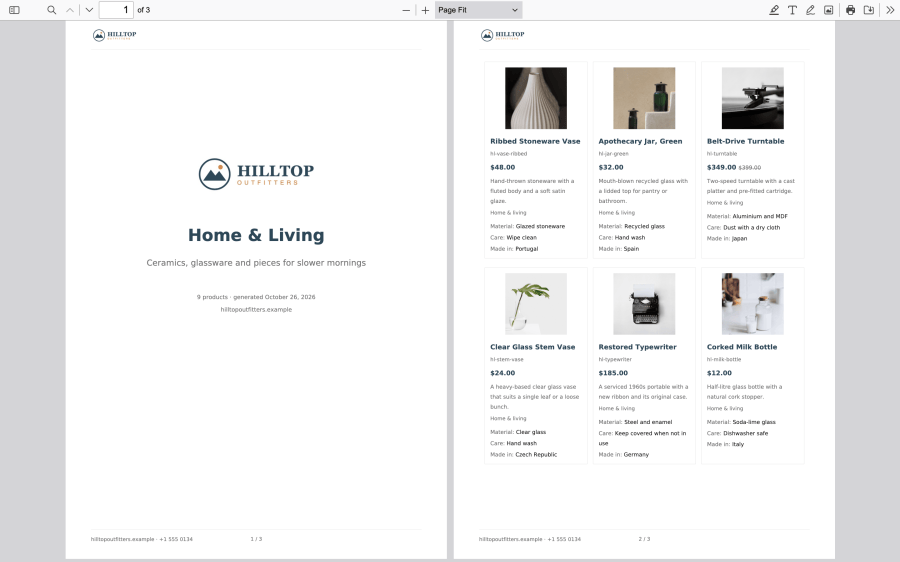
PDF Catalog Builder for WooCommerce by W7S creates PDF catalogs, price lists, lookbooks, and product sheets from the products you already sell. Pick from 15 ready-made designs, add your logo and colors, and choose which products go in. Customers then download the file from a button on your shop, a product page, a block, or a shortcode. Every PDF links back to your store, so a catalog that gets forwarded or printed still brings buyers back to you. The PDF is built on your own server, and the extension keeps it up to date as your products change.
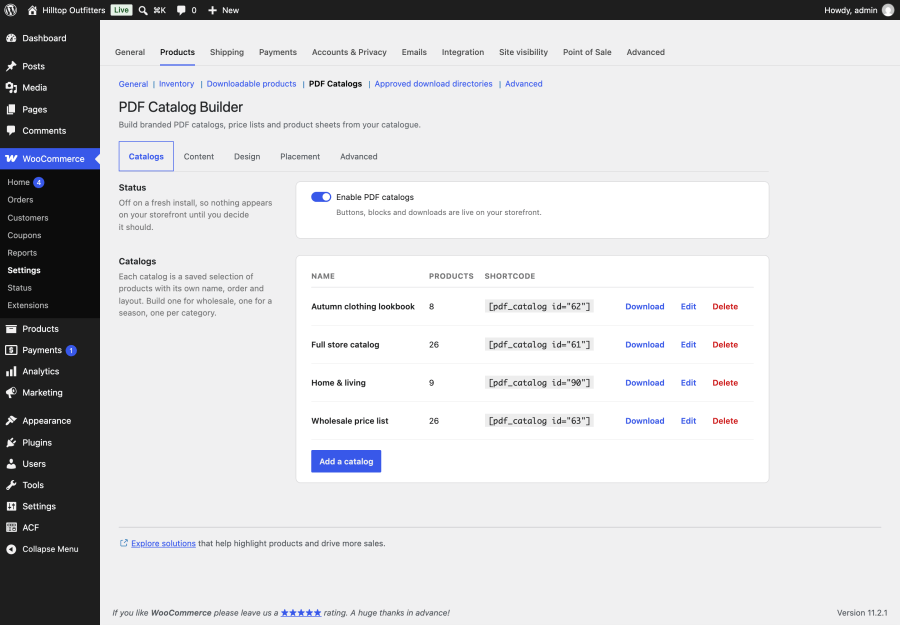
Each catalog is a saved set of products with its own name, sort order, layout, cover, and download rule. You can build a catalog from:
You can sort a catalog by catalog order, name, price, newest, or best selling, and cap it at a maximum number of products. Every catalog gets its own download link, shortcode, and block option, so you can make one for each season, one per category, or one just for trade buyers.
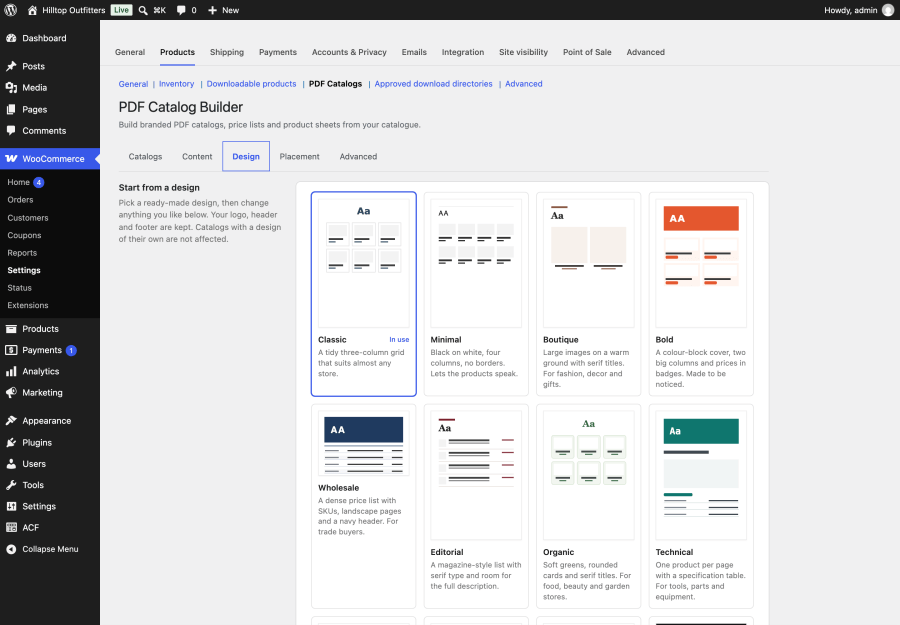
The 15 ready-made designs are Classic, Minimal, Boutique, Bold, Wholesale, Editorial, Organic, Technical, Luxe, Playful, Magazine, Noir, Index, Trade, and Nordic. Each one is a starting point. Under the designs sit eight layouts, each built for a different kind of buyer:
You can group any layout by category, with a heading or a new page for each one.
Set the page size (A4, A5, Letter, or Legal), the orientation, and the margins. Choose the text and heading fonts, the base text size, and six colors. You also choose one of four cover styles, four card styles, and plain or badge prices. Add your logo, a cover title and subtitle, a running header and footer, page numbers, and a watermark for confidential or draft price lists. Sale prices show the new price with the old one struck through.
The default fonts cover Latin, Greek, Cyrillic, and most accented alphabets, and the document is generated in your site’s language.
By default, every catalog follows your store design, so a rebrand updates all of them at once. Any catalog can also have a design of its own. That way, a dark lookbook for a premium range can sit next to a plain price list for trade buyers, and editing one never changes the other.
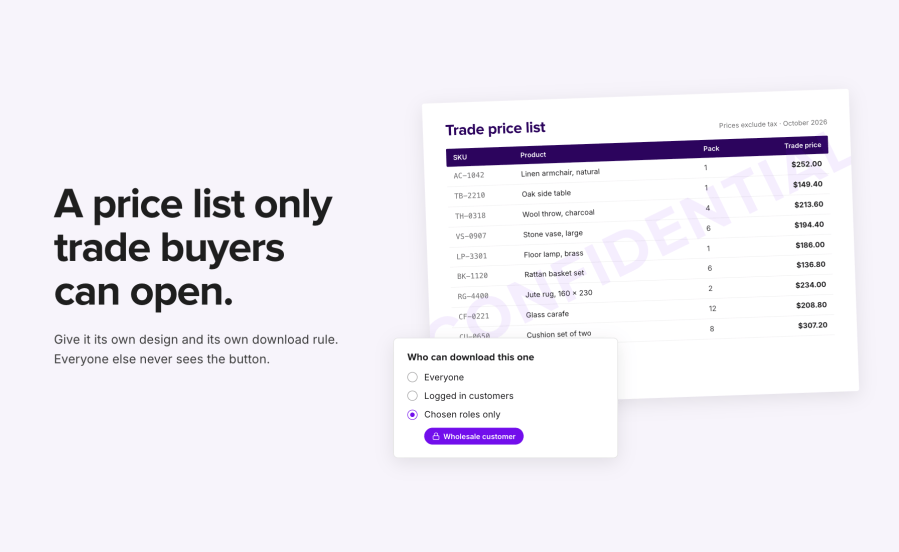
Choose whether downloads are open to everyone, to logged-in customers, or to chosen user roles. You set this store-wide, and any catalog can have its own rule. Visitors who aren’t allowed to download don’t see the button at all. Generated files are kept outside your public web folder and served through a download handler that checks access, so a restricted price list can’t be reached by guessing its file address.
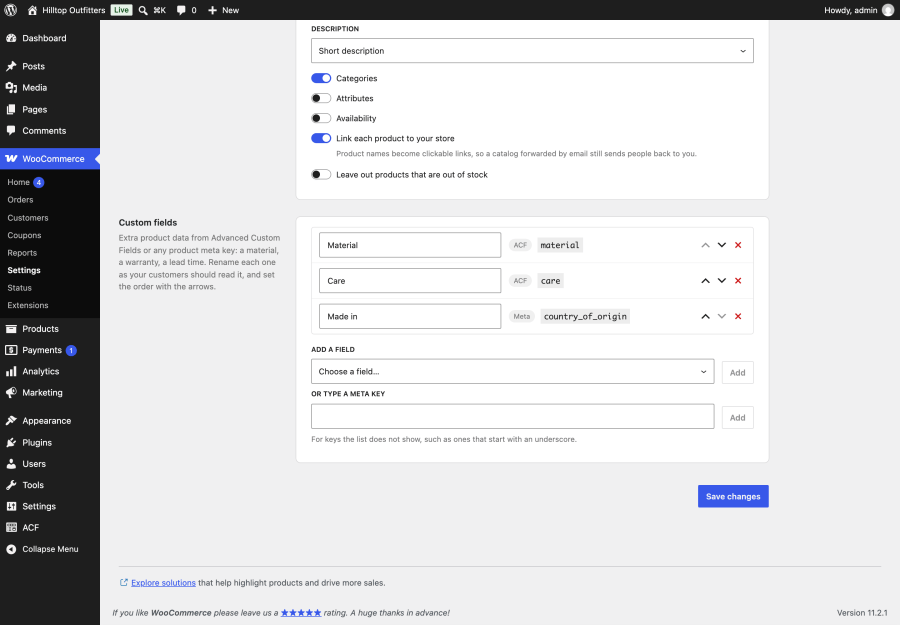
Add up to 20 extra fields to your catalogs, from Advanced Custom Fields (ACF), Secure Custom Fields, or any product meta key. You can rename each field the way your customers should read it and set the order. ACF values are printed the way ACF formats them, including units, choice labels, dates, and group and repeater fields. Fields appear under each product, as rows in the specification table on product sheets, and as columns in price lists and tables.
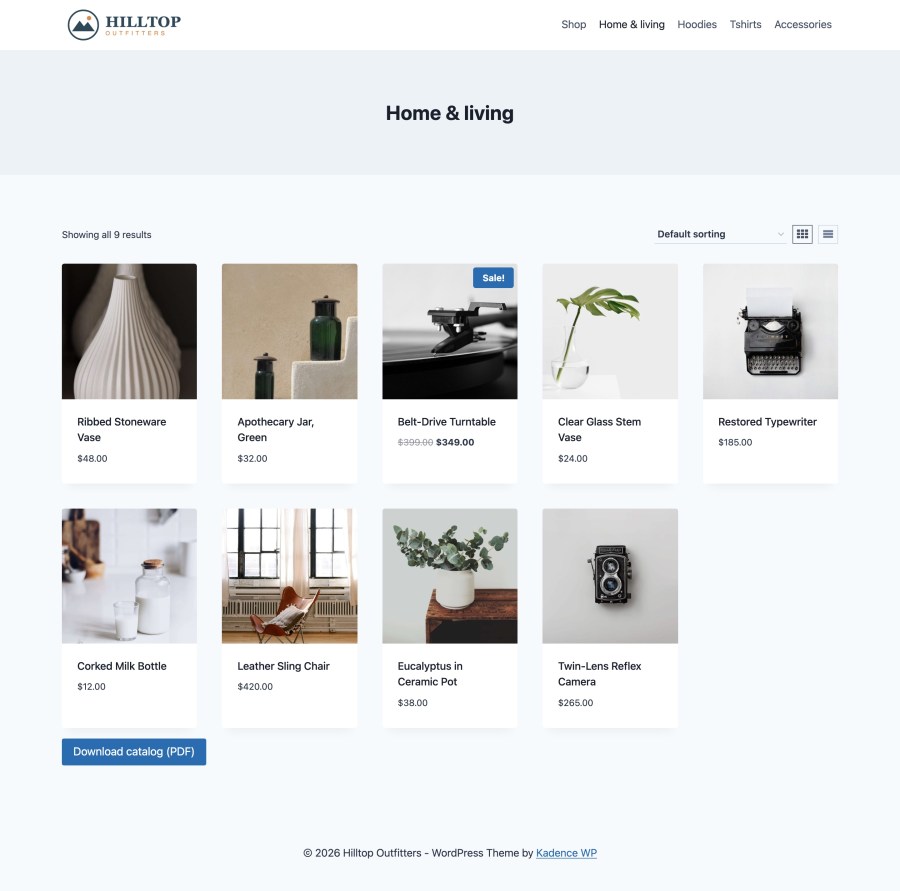
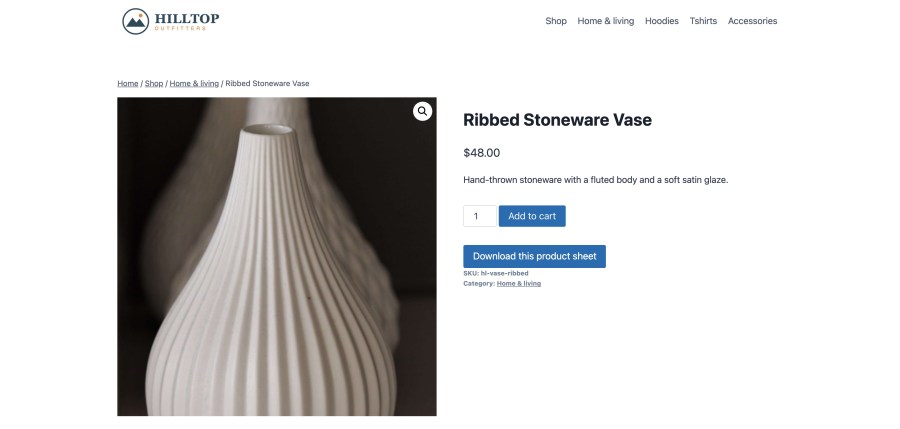
There are four ways to offer a download:
[pdf_catalog] shortcode for any page, post, or widget,On a category page, if you’ve built a catalog for exactly that category, it’s offered instead of the whole store, with no extra setup. Buttons use your theme’s button style, so they fit the rest of your store.
Each catalog is built once, stored, and served as a file after that. It’s rebuilt automatically when a product, variation, category, tag, scheduled sale, ACF field, or setting changes. Above a product count you choose, 150 by default, a catalog is built in the background through Action Scheduler. Customers who ask for it in the meantime see a “Preparing your catalog” page that starts the download as soon as the file is ready.
Choose what each product shows: the image, SKU, price, short or full description, categories, attributes, and availability. You can leave out-of-stock products out, while products on backorder stay in. To exclude a single product, tick a box on its Advanced tab. A filter on your Products list shows you which products are in your catalogs and which are left out.
Preview any catalog or design with a few of your products before customers see it. The extension is switched off after installation, so nothing appears on your storefront until you turn it on.
If you use an AI assistant connected to your site through the WordPress Abilities API, you can turn on tools that let it list, create, and build catalogs and hand back the download link. They’re off by default, and only users who can manage WooCommerce can use them. The extension doesn’t include or call any AI service itself.
From then on, the extension keeps every catalog current as your products change. Full setup steps are in the documentation.
Here’s how PDF Catalog Builder for WooCommerce compares, feature by feature, with three other WooCommerce PDF catalog plugins.
| Feature | PDF Catalog Builder for WooCommerce | Store Catalog PDF Download for WooCommerce (Kestrel) | Product PDF Catalog for WooCommerce (KoalaApps) | PDF Catalog for WooCommerce (theme funda) |
|---|---|---|---|---|
| Unlimited saved catalogs, each with its own products and name | Yes | No | No | No |
| Catalogs from chosen tags, featured products, or products on sale | Yes | No | No | No |
| Ready-made designs and layouts | 15 designs, 8 layouts | 2 layouts | 3 templates | 2 layouts |
| A separate design for each catalog | Yes | No | No | No |
| Wholesale price list and table layouts | Yes | No | No | No |
| Group products by category, with a heading or a new page for each | Yes | No | No | No |
| Cover page | Yes, 4 styles | No | Yes | No |
| Watermark | Yes | No | Yes | No |
| Page numbers | Yes | No | No | No |
| Advanced Custom Fields and Secure Custom Fields | Yes | No | No | No |
| Custom product meta fields | Yes, up to 20 | No | No | Yes |
| Download rules per catalog (everyone, logged in, or chosen roles) | Yes | No | No | No |
| Restricted PDFs protected from direct file access | Yes | No | No | No |
| The matching catalog offered on each category page automatically | Yes | No | No | No |
| Background builds for large catalogs | Yes | No | No | No |
| Stored PDFs that rebuild automatically when products change | Yes | No | No | No |
| Block for the block editor | Yes | No | No | No |
| AI catalog tools through the WordPress Abilities API | Yes | No | No | No |
| HPOS and Cart and Checkout blocks | Yes | Yes | Cart and Checkout blocks only | No |
PDF Catalog Builder for WooCommerce is the only one of the four that lets you save as many catalogs as you need, give each one its own design and download rule, print Advanced Custom Fields data, and build large catalogs in the background. If you want a PDF catalog for wholesale buyers, for retail shoppers, and for each product, all from one extension, it does more of the job than any of the alternatives.
No. PDF Catalog Builder for WooCommerce builds every PDF on your own server with a PDF engine that comes with the extension. There's no account to create and no monthly service fee.
Yes. Create a catalog, give it the Wholesale or Trade design, and set its download rule to your wholesale user role. Customers without that role don't see the button, and the file can't be reached by guessing its address. Your public catalog can stay open to everyone at the same time.
Yes. A catalog is rebuilt automatically when you change a product, a variation, a price, a category, a tag, a scheduled sale, an ACF field, or a setting. You never have to regenerate a file by hand.
PDF Catalog Builder for WooCommerce is built to avoid that. Catalogs above a size you choose, 150 products by default, are built in the background through Action Scheduler, which comes with WooCommerce. Customers see a page that starts the download when the file is ready. After the first build, the file is served instantly until something changes.
Yes. With Advanced Custom Fields or Secure Custom Fields active, your product fields are listed with their labels, ready to add to your catalogs. Values print the way ACF formats them, including units and choice labels. Any product meta key works too, with or without ACF.
Yes. Every catalog follows your store design by default. You can give any catalog its own design, starting from any of the 15, without changing the others. What each product shows, such as price, SKU, and description, is set once for the whole store.
Yes. Turn off the price for all catalogs, or keep prices on and limit a priced catalog to chosen user roles. Prices are printed the way your store displays them when the catalog is built, and the same file is served to everyone allowed to download it.
Yes. You set the logo, fonts, six colors, cover style, card style, header, footer, and watermark. You can start from one of 15 ready-made designs and change any part of it. Download buttons use your theme's button style.
Yes. Turn on the product sheet button and every product page gets a "Download this product sheet" button, which you can rename. The sheet shows the product image, price, description, attributes, and custom fields on one page. You can turn it off for individual products.
Yes. Every layout, the cover, and the page wrapper can be overridden from your theme. Documented filters cover the product data, the HTML, the stylesheet, the file name, the ready-made designs, and download permissions.