Product Icon

Shopify Migrator for WooCommerce

Migrate all or specific Shopify products, customers, orders, coupons, pages, and blogs to WooCommerce with advanced filters.
Choose a billing option
$59
Save 20%
$118 $94.40

Subscription includes

  • Product updates and improvements
  • Customer support
  • 30-day money-back guarantee

  • Migrate all or Specific Shopify Data: products, customers, orders, coupons, pages, and blog posts.
  • Flexible Data Selection: Use advanced filters to choose exactly which products, orders, and coupons to import.
  • Optimized Product Images: Import product images, process downloads in the background, and automatically convert images to WebP.
  • Preserve Essential Product Data: Import Shopify meta fields, custom attributes, barcodes, vendor information, and product dimensions.
  • Complete Migration Control: Monitor migration progress, validate imported data, review migration history, and export error reports from a dedicated dashboard.

Migrate or import your Shopify store data to WooCommerce with a simplified, four-step process. Transfer products, customers, orders, coupons, pages, and blog posts while controlling exactly what gets imported. Use advanced filters to select specific records, optimize product images automatically, preserve Shopify meta fields, and monitor every stage of the migration from a dedicated dashboard.

Import your Shopify store data

Move six types of Shopify store data into WooCommerce. Select the data you want to migrate and configure your import settings before starting.

  • Products: Import products, variations, images, metadata, and additional product information.
  • Customers: Import Shopify customer data to WooCommerce.
  • Orders: Import historical orders using financial and fulfillment status filters.
  • Coupons: Import selected coupons using start and expiration date filters.
  • Pages: Migrate Shopify pages into WooCommerce.
  • Blog Posts: Transfer Shopify blog content into WooCommerce.

Four-Step Shopify to WooCommerce migration

Complete your migration through a simple four-step workflow.
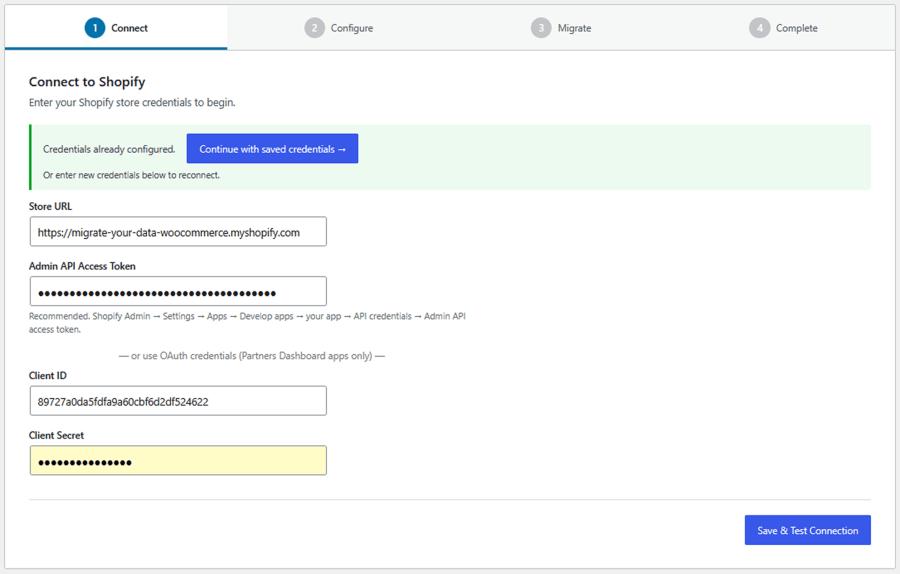
  1. Connect
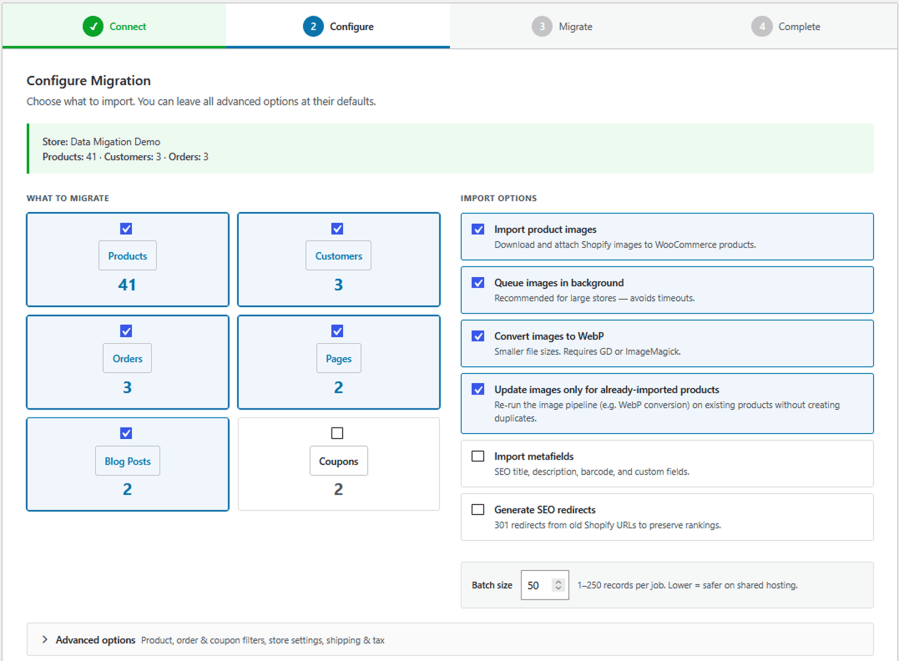
  2. Configure
  3. Migrate
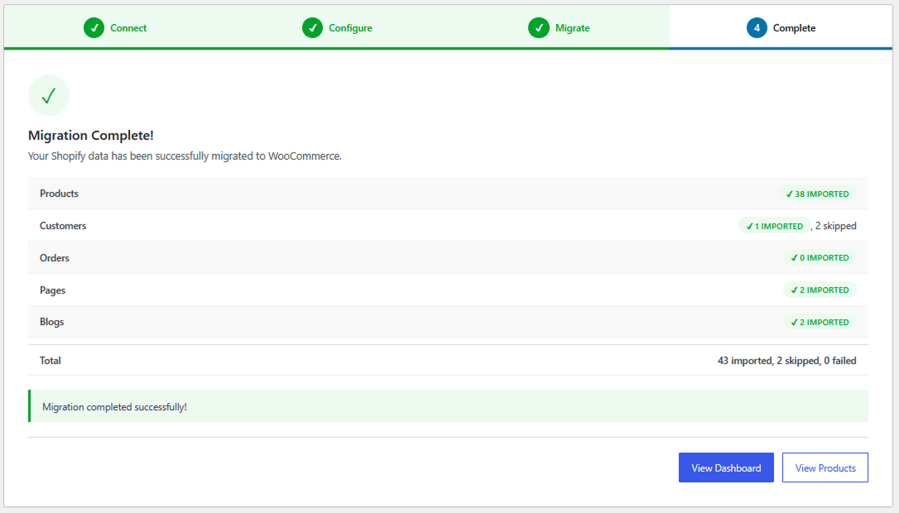
  4. Done
  1. Connect: Connect your Shopify store using the required API credentials.

Migrate Shopify to WooCommerce2. Configure: Choose the data you want to import, apply available filters, and configure your migration settings.
Migrate Shopify to WooCommerce3. Migrate: Start the import and monitor its progress directly from your WooCommerce dashboard.
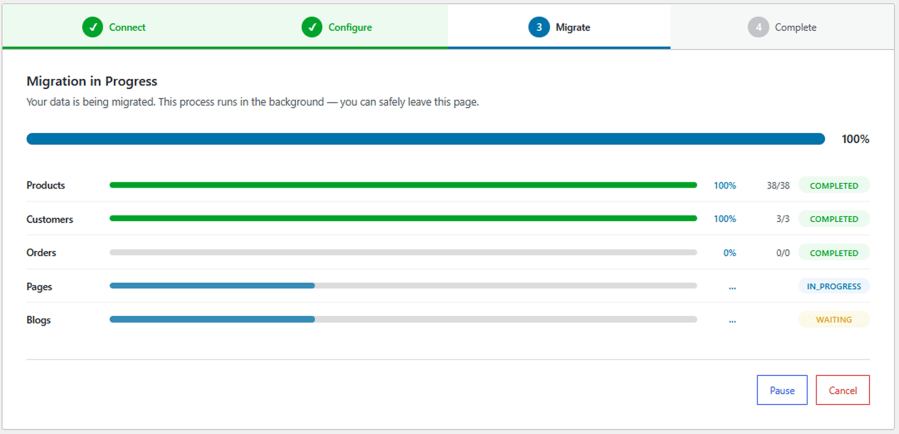
Migrate Shopify to WooCommerce

4. Done

Migrate Shopify to WooCommerce

Import Shopify products with advanced filters

Choose exactly which products to migrate using multiple filtering options. Import your complete catalog or select specific products based on their attributes and publishing information.

  • Product Status: Filter products by Active, Draft, or Archived status.
  • Product Type: Select products by their assigned types.
  • Vendor: Filter products by specific vendors.
  • Product Title: Find and import products using their titles.
  • Product ID: Select individual products using their Shopify Product IDs.
  • Date Range: Filter products by creation date or publication date.
  • CSV Import: Upload a CSV file containing specific Product IDs for bulk product selection.

Import Shopify orders with advanced filters

Select the historical orders you want to migrate using financial and fulfillment status filters.

Financial status filters

  • Authorised
  • Pending
  • Paid
  • Partially Paid
  • Refunded
  • Voided

Fulfilment status filters

  • Shipped
  • Partially Shipped
  • Unshipped
  • Unfulfilled

Use these filters to control which Shopify orders are imported into WooCommerce.

Import Shopify coupons

Choose which Shopify coupons to transfer using date-based filtering options.

  • Filter coupons by start date.
  • Filter coupons by expiration date.
  • Import coupons matching your selected date range.

Import Shopify store settings

Transfer essential Shopify store configuration details into WooCommerce alongside your store data.

  • Store name and email
  • Currency and weight unit
  • Timezone
  • Store address
  • Shipping settings
  • Tax settings

Advanced Migration Setup

Customize your migration before importing data. Choose the information you want to transfer and adjust the available settings.

  • Select data types, including products, customers, orders, pages, blog posts, and coupons.
  • Configure product and media image handling.
  • Set up SEO redirects to maintain existing URLs.
  • Adjust Shopify metafield handling.
  • Configure migration batch size.

Product image import and optimization

Import Shopify product images and manage how media files are transferred to WooCommerce.

  • Automated Image Fetching: Import main product images, variation images, and product image galleries.
  • Background Image Downloads: Process image downloads through a background queue to help avoid server timeouts.
  • Automatic WebP Conversion: Convert imported images into WebP format.
  • Image Synchronization: Update or replace product images without re-importing the entire product catalog.

Shopify metafields and product metadata

Preserve additional product information during migration with Shopify metafield support.

  • Import Shopify metafields.
  • Map metafields to custom post fields.
  • Support integration with plugins such as Advanced Custom Fields (ACF).
  • Preserve custom product attributes.
  • Retain vendor tags.
  • Preserve barcodes, including UPC, EAN, and ISBN.
  • Retain product dimensions.

Dedicated migration dashboard

Monitor your Shopify-to-WooCommerce migration from a centralized dashboard with detailed progress information and migration records.
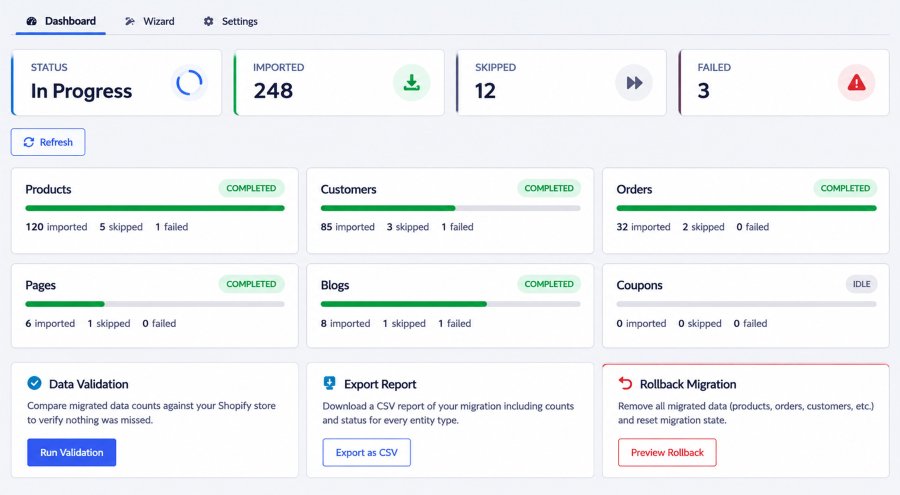
  • Live Status Cards: View total imported, skipped, and failed records alongside real-time system status.
  • Entity Progress: Track individual migration progress for products, customers, orders, pages, blogs, and coupons using itemized counters and progress bars.
  • Data Validation: Run automated checks against Shopify to verify record counts and identify discrepancies.
  • CSV Export: Download detailed error logs and audit reports for troubleshooting.
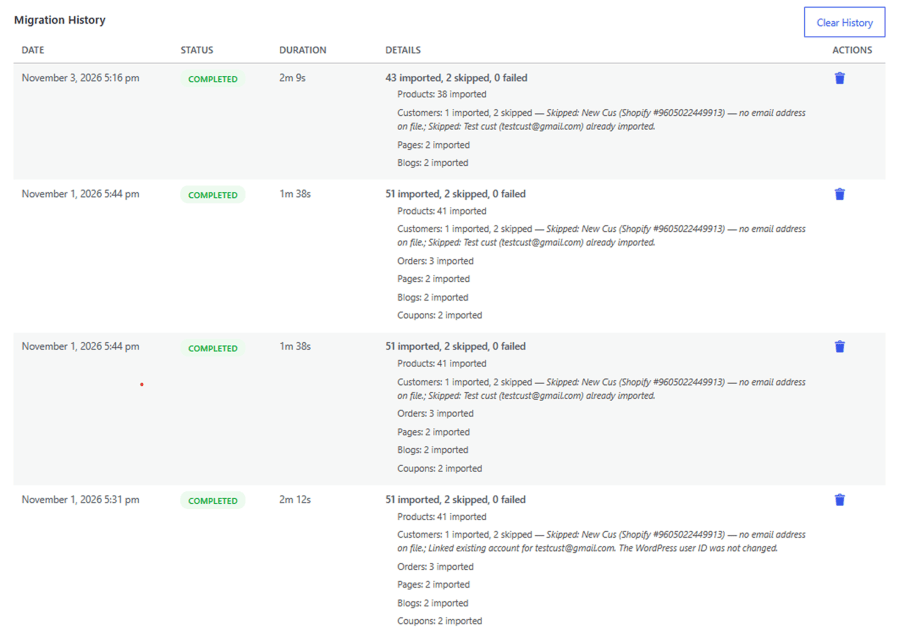
  • Migration History: Review previous migration activity.
  • Rollback Safeguard: Reset your store to its pre-migration state with a one-click reset option.

Shopify to WooCommerce Migration

Monitor import progress in real time

Follow your migration as it happens with built-in progress tracking. View import results, check individual data-type progress, and identify skipped or failed records through the migration dashboard.
Migrate Shopify to WooCommerce

Migration history

Keep track of all your previous Shopify-to-WooCommerce migrations in one place. Access a detailed history of migration activities to review completed and previous import processes.

  • Complete Migration Records: View all migration histories performed through the plugin.
  • Detailed Migration Information: Review details associated with each migration.
  • Migration Tracking: Keep a record of previous migration activities for easy reference.

Shopify to WooCommerce Migration

More Options

Configure general migration preferences from one centralized settings section. Adjust batch processing, manage email notifications, and control how you’re informed about migration activities.

  • Batch Size Configuration: Set the batch size to control how records are processed during migration.
  • Email Notifications: Configure email notification preferences for migration activities.
  • Migration Updates: Receive email notifications to stay informed about the migration process.

Benefits of using Shopify to WooCommerce Plugin

  1. Seamless Store Migration: Easily migrate products, customers, orders, coupons, pages, and blog posts from Shopify to WooCommerce.
  2. Advanced Import Flexibility: Import exactly what you need with powerful filters for products, orders, and coupons.
  3. Preserve Essential Product Data: Retain product images, variations, metafields, custom attributes, barcodes, and other important information.
  4. Optimized Image Management: Automatically convert images to WebP, process downloads in the background, and update images without re-importing products.
  5. Complete Migration Control: Manage your entire migration from a dedicated dashboard with real-time progress tracking, data validation, migration history, and detailed error reports.

Frequently asked questions

What data can I migrate from Shopify to WooCommerce?

You can migrate six types of Shopify store data: products, customers, orders, coupons, pages, and blog posts. You can choose which data types to import based on your migration requirements.

Do I need technical knowledge to migrate my Shopify store?

No. The plugin offers a simple four-step migration process: Connect, Configure, Migrate, and Done. Its user-friendly dashboard makes it easy to configure, start, and monitor your migration.

Can I migrate only selected products from Shopify?

Yes. You can use advanced product filters to import specific products based on status, product type, vendor, title, Product ID, creation date, or publication date. You can also upload a CSV file containing product IDs.

Does the plugin import product images and galleries?

Yes. The plugin imports main product images, variation images, and product image galleries. It also supports background image downloads and automatic WebP conversion.

Can I import Shopify product metafields?

Yes. You can import Shopify metafields and map them to custom post fields. The plugin also supports integrations with custom-field solutions such as Advanced Custom Fields (ACF).

Can I migrate Shopify orders based on their status?

Yes. You can filter orders by financial status, including paid, pending, refunded, authorized, partially paid, and voided. You can also filter by fulfillment status and creation date.

Can I view my previous migration records?

Yes. The Migration History section keeps a record of previous migration activities, allowing you to review migration details and track past import processes.

Related Products

Price $279 annually
Rated 3.9 out of 5 stars
Price $79 annually
Rated 3.4 out of 5 stars
Price $59 annually
Rated 3.1 out of 5 stars
Price $109 annually
Rated 2.8 out of 5 stars
Price $109 annually
Rated 2 out of 5 stars
Price $49 annually
Rated 4.1 out of 5 stars
Price $109 annually
Rated 2.5 out of 5 stars
Price $39 annually
Rated 2.8 out of 5 stars
Price $199 annually
Rated 4 out of 5 stars
Use of your personal data
We and our partners process your personal data (such as browsing data, IP Addresses, cookie information, and other unique identifiers) based on your consent and/or our legitimate interest to optimize our website, marketing activities, and your user experience.