
Product Icon

Shopify Migrator for WooCommerce

Migrate all or specific Shopify products, customers, orders, coupons, pages, and blogs to WooCommerce with advanced filters.
Choose a billing option
$59
Save 20%
$118 $94.40

Subscription includes

  • Product updates and improvements
  • Customer support
  • 30-day money-back guarantee

Migrate and import your Shopify store data to WooCommerce with a simplified, four-step process. Transfer products, customers, orders, coupons, pages, and blog posts while controlling exactly what gets imported. Use advanced filters to select specific records, optimize product images automatically, preserve Shopify meta fields, and monitor every stage of the migration from a dedicated dashboard.


Shopify to WooCommerce Migration Feature List

  • Complete Store Migration – Migrate products, customers, orders, coupons, pages, and blog posts from Shopify to WooCommerce.
  • Direct Shopify API Connection – Connect directly to Shopify without CSV files.
  • Easy Migration Wizard – Transfer your store through a simple, step-by-step migration process.
  • Advanced Product Filters – Filter products by title, type, vendor, ID, and publication date.
  • Advanced Order Filters – Filter orders by creation date, payment status, and fulfillment status.
  • Variable Product Import – Import product variations, images, stock, and SKUs.
  • Coupon Import – Filter and migrate coupons based on your requirements.
  • Order Status Mapping – Map Shopify order statuses to WooCommerce statuses.
  • Product Status Selection – Import products as Active, Draft, or Archived.
  • Image Import & Optimization – Import product images, process them in the background, and convert them to WebP.
  • Metafields & Custom Data – Import SEO details, barcodes, custom fields, and other important metadata.
  • 301 URL Redirects – Redirect old Shopify URLs to WooCommerce to help preserve SEO value.
  • Migration Progress Tracking – Monitor successful, skipped, and failed imports in real time.
  • Data Validation & CSV Reports – Verify migrated data and export detailed migration reports.
  • Migration History & Rollback – Review previous migrations and remove imported data when needed.
  • Email Notifications – Receive an email when the migration is complete.

Import your Shopify Store Data

Import six types of Shopify store data into WooCommerce. Select the data you want to migrate and configure your import settings before starting.

  • Products: Import products, variations, images, metadata, and additional product information.
  • Customers: Import Shopify customer data to WooCommerce.
  • Orders: Import historical orders using financial and fulfillment status filters.
  • Coupons: Import selected coupons using start and expiration date filters.
  • Pages: Migrate Shopify pages into WooCommerce.
  • Blog Posts: Transfer Shopify blog content into WooCommerce.

Four-Step Shopify to WooCommerce Migration Directly through API

Complete your migration through a simple four-step workflow.

  1. Connect
  2. Configure
  3. Migrate
  4. Done

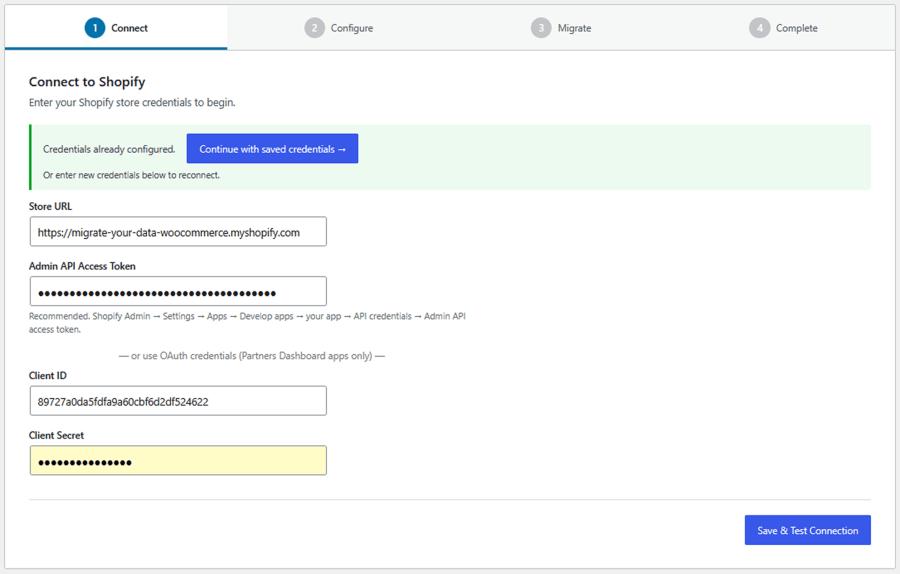
1. Connect Your Store

Connect your Shopify store using the required API credentials to establish a secure connection.
Migrate Shopify to WooCommerce

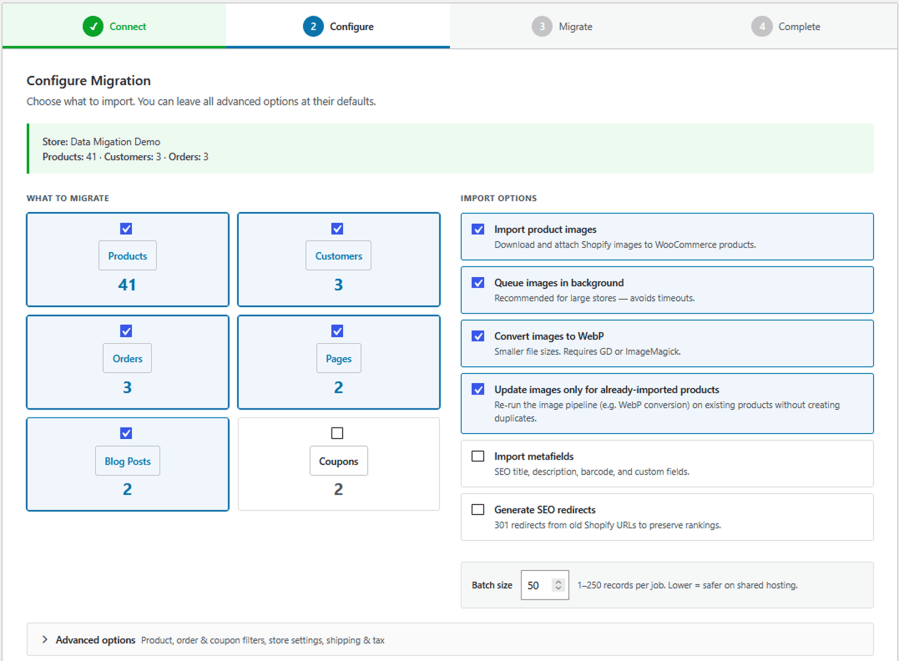
2. Configure Your Migration

Choose which data to import, apply advanced filters, and configure image handling, metafields, SEO redirects, and other migration settings.
Migrate Shopify to WooCommerce

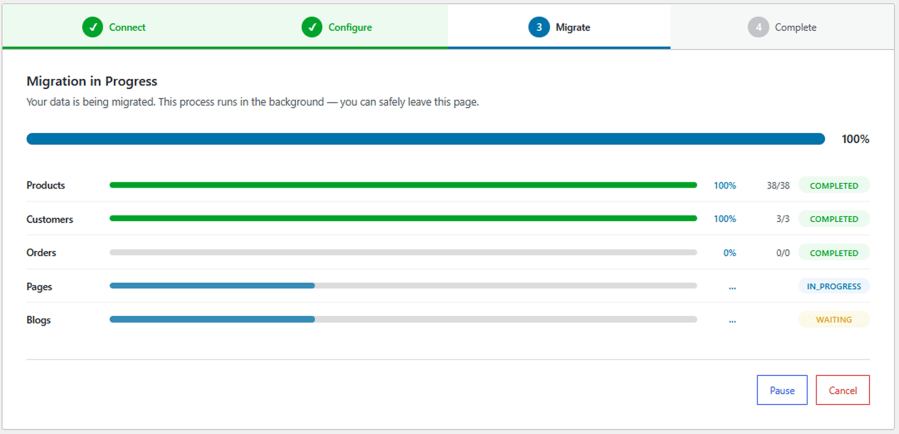
3. Start Your Migration

Start importing your selected data and monitor the progress directly from your WooCommerce dashboard.
Migrate Shopify to WooCommerce

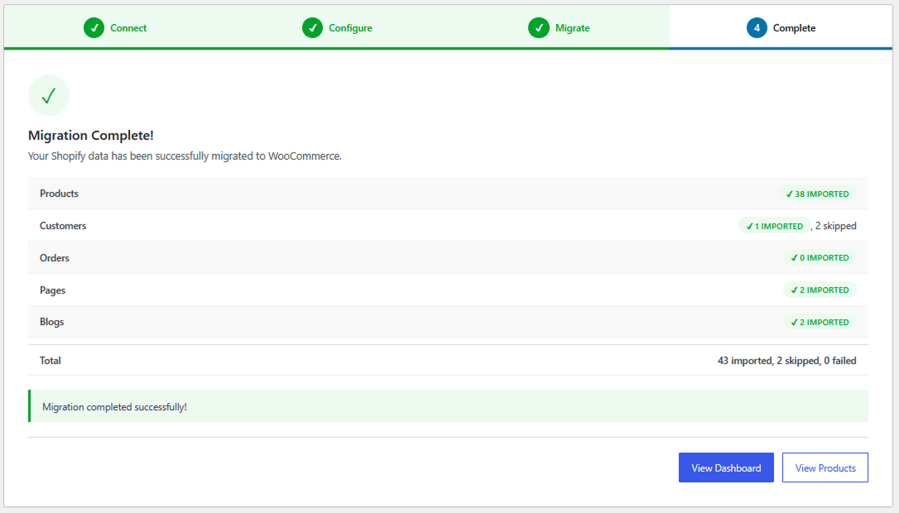
4. Review Your Imported Data

Check migration results, review imported records, identify errors, and validate your data using the dedicated migration dashboard.
Migrate Shopify to WooCommerce

Import Shopify Products to WooCommerce with Filters

Choose exactly which products to migrate using multiple filtering options. Import your complete catalog or select specific products based on their attributes and publishing information with Shopify to WooCommerce Migrator.
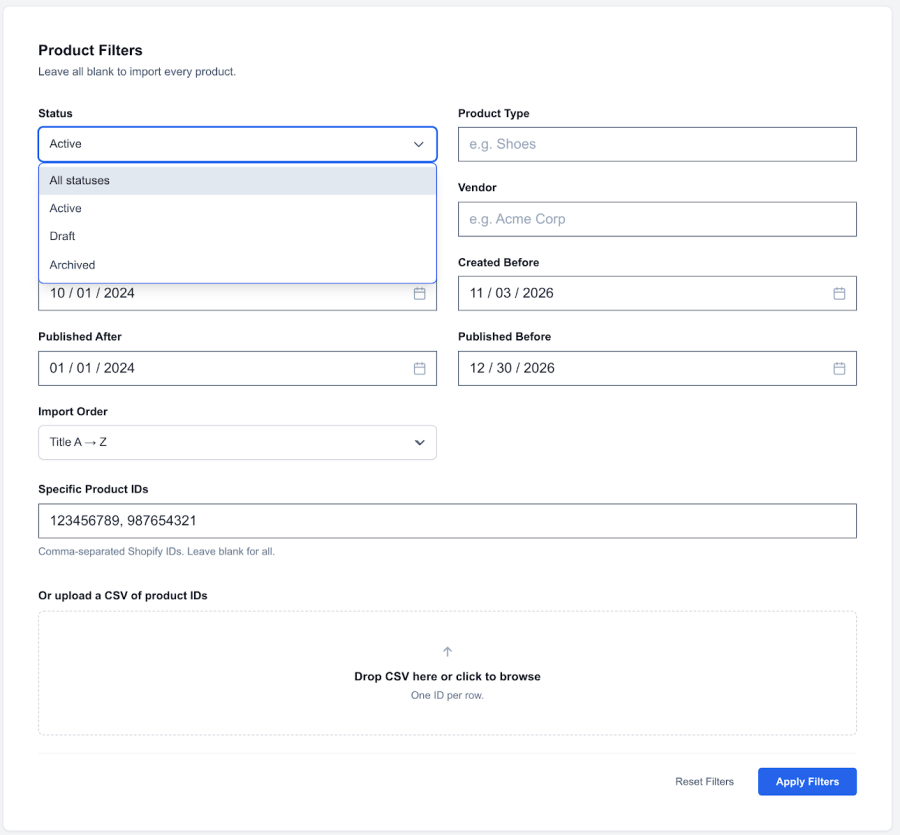
  • Product Status: Filter products by Active, Draft, or Archived status.
  • Product Type: Select products by their assigned types.
  • Vendor: Filter products by specific vendors.
  • Product Title: Find and import products using their titles.
  • Product ID: Select individual products using their Shopify Product IDs.
  • Date Range: Filter products by creation date or publication date.
  • CSV Import: Upload a CSV file containing specific Product IDs for bulk product selection.

Advanced Product Filters shopify to woocommerce migration

Import Shopify Orders with Status Filters

Select the historical orders you want to migrate using financial and fulfillment status filters.
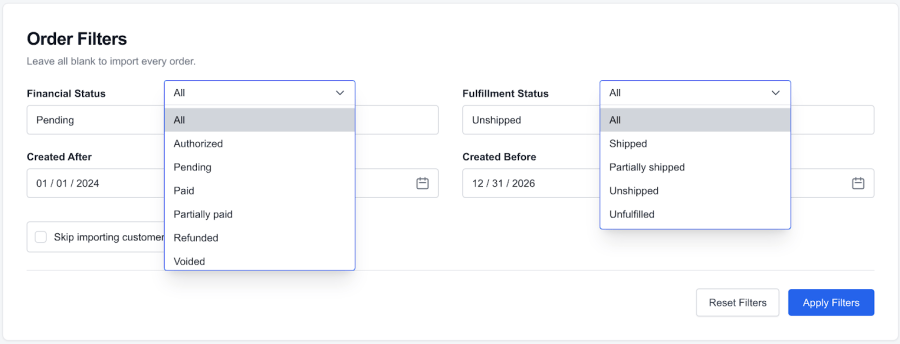
Financial status filters

  • Authorised
  • Pending
  • Paid
  • Partially Paid
  • Refunded
  • Voided

Fulfilment status filters

  • Shipped
  • Partially Shipped
  • Unshipped
  • Unfulfilled

Order Filters shopify to woocommerce migration

Import Shopify Coupons

Choose which Shopify coupons to transfer using date-based filtering options.
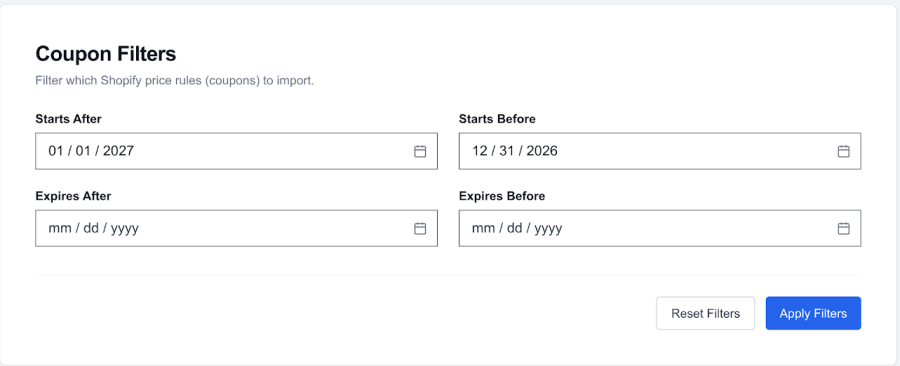
  • Filter coupons by start date.
  • Filter coupons by expiration date.
  • Import coupons matching your selected date range.

Coupon Filters shopify to woocommerce migration

Import Shopify Store Settings

Transfer essential Shopify store configuration details into WooCommerce alongside your store data.
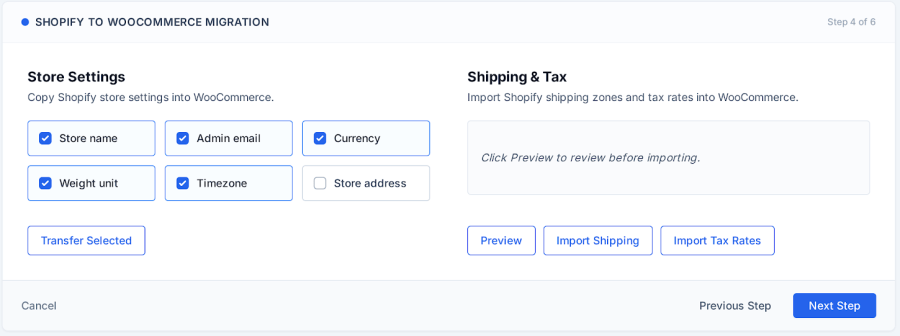
  • Store name and email
  • Currency and weight unit
  • Timezone
  • Store address
  • Shipping settings
  • Tax settings

Store Settings shopify to woocommerce migration

Import Pages & Blog Posts

Migrate CMS pages and blog posts with titles, content, tags, and featured images.

Advanced Migration Options

Choose the information you want to transfer and adjust the available settings.

  • SEO Redirects: Preserve rankings by importing Shopify 301 redirects.
  • Batch Size Configuration: Configure migration batch size.

Import Product Images

Import Shopify product images and manage how media files are transferred to WooCommerce.

  • Automated Image Fetching: Import main product images, variation images, and product image galleries.
  • Background Image Downloads: Process image downloads through a background queue to help avoid server timeouts.
  • Automatic WebP Conversion: Convert imported images into WebP format.
  • Image Synchronization: Update or replace product images without re-importing the entire product catalog.

Import Shopify Metafields and Product Metadata

Preserve additional product information during migration with Shopify metafield support.

  • Metafield Import: Import Shopify metafields.
  • Custom Field Mapping: Map metafields to custom post fields.
  • ACF Integration: Support integration with plugins such as Advanced Custom Fields (ACF).
  • Custom Product Attributes: Preserve custom product attributes.
  • Vendor Tags: Retain vendor tags.
  • Barcode Preservation: Preserve barcodes, including UPC, EAN, and ISBN.
  • Product Dimensions: Retain product dimensions.

Migration Dashboard

Monitor your Shopify to WooCommerce migration from a centralized dashboard with detailed progress information and migration records.
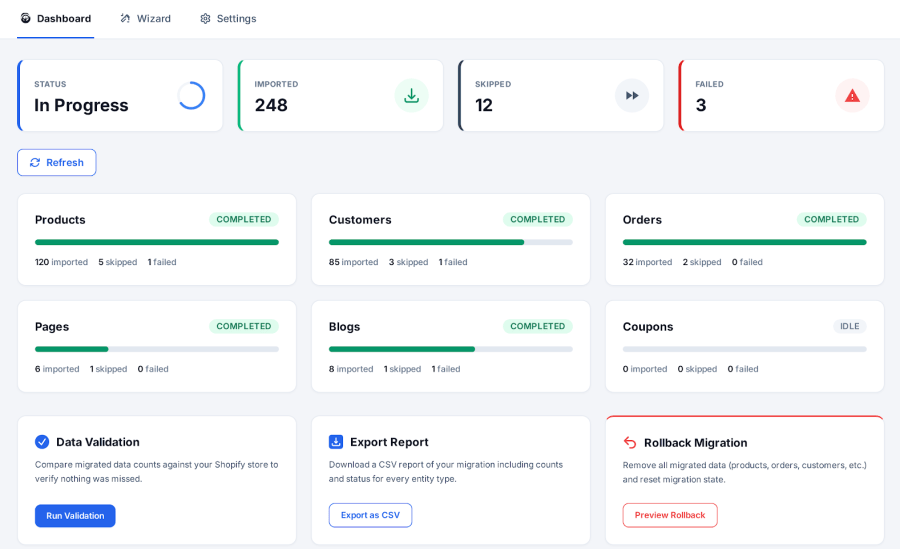
  • Live Status Cards: View total imported, skipped, and failed records alongside real-time system status.
  • Entity Progress: Track individual migration progress for products, customers, orders, pages, blogs, and coupons using itemized counters and progress bars.
  • Data Validation: Run automated checks against Shopify to verify record counts and identify discrepancies.
  • CSV Export: Download detailed error logs and audit reports for troubleshooting.
  • Migration History: Review previous migration activity.
  • Rollback Safeguard: Reset your store to its pre-migration state with a one-click reset option.

Dashboard shopify to woocommerce migration

Monitor Import Progress in Real Time

Follow your migration as it happens with built-in progress tracking. View import results, check individual data-type progress, and identify skipped or failed records through the migration dashboard.

Migrate Shopify to WooCommerce

Migration History

Keep track of all your previous Shopify-to-WooCommerce migrations in one place. Access a detailed history of migration activities to review completed and previous import processes.
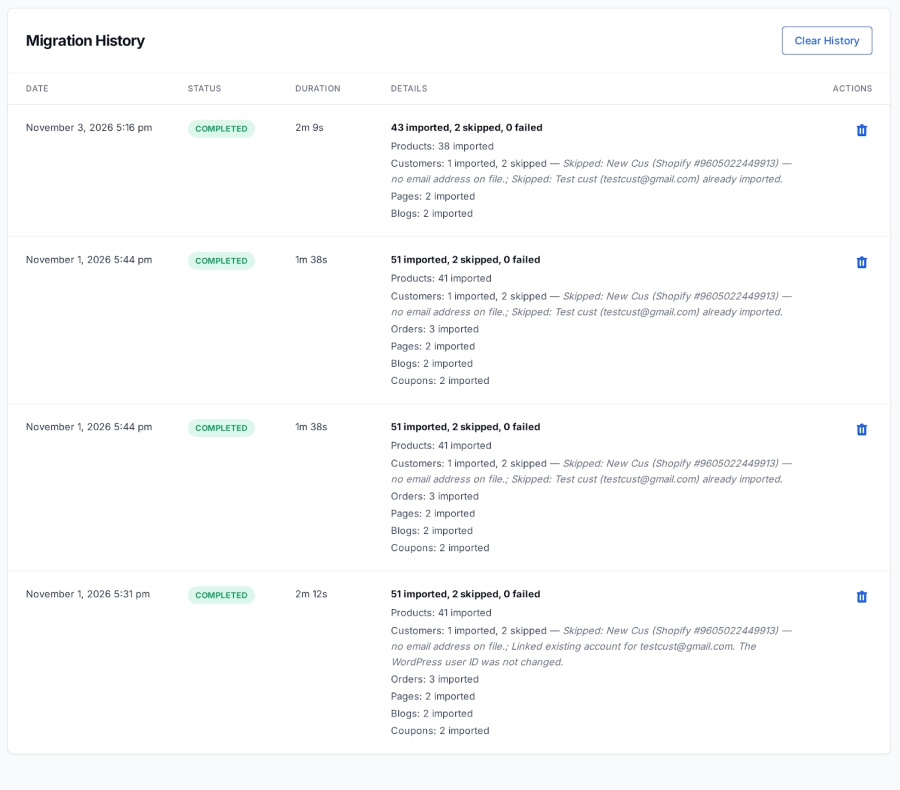
  • Complete Migration Records: View all migration histories performed through the plugin.
  • Detailed Migration Information: Review details associated with each migration.
  • Migration Tracking: Keep a record of previous migration activities for easy reference.

Migration History shopify to woocommerce migration

More Options

Configure general migration preferences from one centralized settings section. Adjust batch processing, manage email notifications, and control how you’re informed about migration activities.
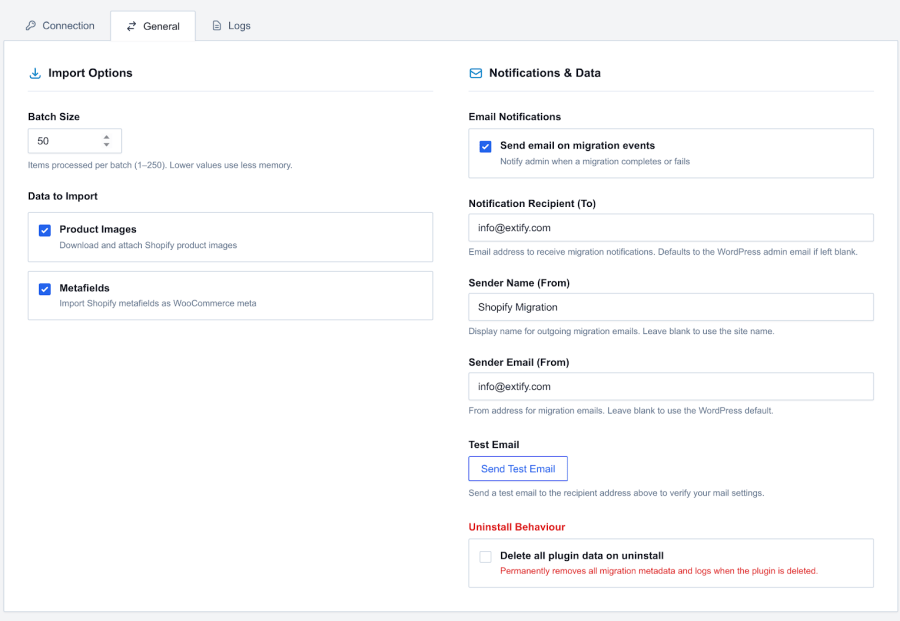
  • Batch Size Configuration: Set the batch size to control how records are processed during migration.
  • Email Notifications: Configure email notification preferences for migration activities.
  • Migration Updates: Receive email notifications to stay informed about the migration process.

Settings shopify to woocommerce migration

Compatibility

Shopify Migrator for WooCommerce is designed to work seamlessly with WooCommerce and its supported environments, making it easier to migrate your Shopify store into your WooCommerce store.

How to Get Started

Getting started with Shopify Migrator is simple:

  1. Purchase Shopify Migrator for WooCommerce from WooCommerce.com.
  2. Download and install the plugin on your WordPress website.
  3. Activate the plugin.
  4. Navigate to WooCommerce → Settings → Shopify Migration.
  5. Configure your Shopify connection and migration settings.
  6. Select the data you want to import and start your migration.

For detailed setup instructions, read the complete installation and migration guide.


Frequently asked questions

What data can I migrate from Shopify to WooCommerce?

You can migrate six types of Shopify store data: products, customers, orders, coupons, pages, and blog posts. You can choose which data types to import based on your migration requirements.

Do I need technical knowledge to migrate my Shopify store?

No. The plugin offers a simple four-step migration process: Connect, Configure, Migrate, and Done. Its user-friendly dashboard makes it easy to configure, start, and monitor your migration.

Can I migrate only selected products from Shopify?

Yes. You can use advanced product filters to import specific products based on status, product type, vendor, title, Product ID, creation date, or publication date. You can also upload a CSV file containing product IDs.

Does the plugin import product images and galleries?

Yes. The plugin imports main product images, variation images, and product image galleries. It also supports background image downloads and automatic WebP conversion.

Can I import Shopify product metafields?

Yes. You can import Shopify metafields and map them to custom post fields. The plugin also supports integrations with custom-field solutions such as Advanced Custom Fields (ACF).

Can I migrate Shopify orders based on their status?

Yes. You can filter orders by financial status, including paid, pending, refunded, authorized, partially paid, and voided. You can also filter by fulfillment status and creation date.

Can I view my previous migration records?

Yes. The Migration History section keeps a record of previous migration activities, allowing you to review migration details and track past import processes.

Related Products

Price $279 annually
Rated 3.9 out of 5 stars
Price $79 annually
Rated 3.4 out of 5 stars
Price $59 annually
Rated 3.1 out of 5 stars
Price $109 annually
Rated 2 out of 5 stars
Price $109 annually
Rated 2.8 out of 5 stars
Price $49 annually
Rated 4.1 out of 5 stars
Price $199 annually
Rated 4 out of 5 stars
Price $29 annually
Rated 3.7 out of 5 stars
Price $109 annually
Rated 2.5 out of 5 stars
Use of your personal data
We and our partners process your personal data (such as browsing data, IP Addresses, cookie information, and other unique identifiers) based on your consent and/or our legitimate interest to optimize our website, marketing activities, and your user experience.