

Subscription includes
Support
Want to grow your sales by letting other people sell your products? Dropshipfy makes it easier to run and manage a dropshipping business directly from your WooCommerce store.
Dropshipfy – Easy Dropshipping is a WooCommerce dropshipping plugin that helps store owners manage multiple dropshippers, control which products are available for dropshipping, configure product prices and fees, and track dropshipping orders.
Whether you’re a manufacturer, wholesaler, distributor, or ecommerce business, Dropshipfy gives you the tools to organize your dropshipping operations without relying on an external dropshipping platform.
– Manage Multiple Dropshippers:
Manage your dropshipping network directly from WooCommerce. Dropshipfy provides a dedicated Dropshipper role and dashboard to help organise dropshipper activities.
– Control Product Availability:
Make all WooCommerce products available for dropshipping, select multiple products, or enable dropshipping individually at the product level. Choose which products dropshippers can access.
– Set Dropshipping Prices:
Take full control of your dropshipping pricing. Choose to use your regular WooCommerce product prices or set separate prices for products available for dropshipping.
– Choose Who Can Dropship:
Restrict access to users with the dedicated Dropshipper role or allow anyone, including guests and regular customers, to participate.
– Configure Dropshipping Fees:
Set fixed or percentage-based fees for dropshipping orders whenever you need to charge additional fees, or leave them disabled when they aren’t needed.
– Manage Dropshipping Orders:
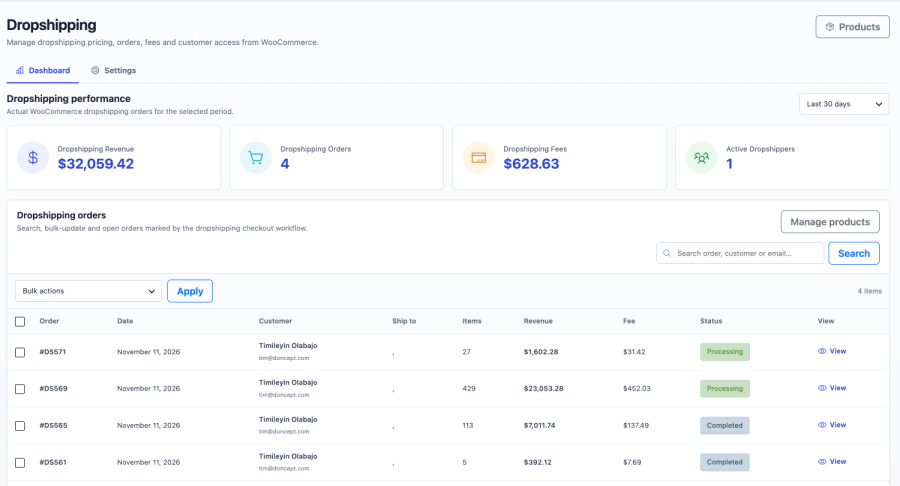
Identify and track dropshipping orders separately from regular WooCommerce orders. Configure custom order prefixes to make dropshipping orders easy to identify and fulfill, and customize email notifications for dropshipping orders.
– Monitor Your Dropshipping Business:
View important dropshipping statistics, including orders, revenue, fees, and active dropshippers, from your dashboard.
Set up Dropshipfy in three simple steps.
1. Install and Activate Dropshipfy:
Install and activate Dropshipfy to add dropshipping management features to your WooCommerce store.
2. Configure Your Settings:
Go to WooCommerce > Dropshipping > Settings to enable dropshipping and configure access, product visibility, pricing, fees, and order preferences.
3. Make Products Available:
Choose the products you want to offer for dropshipping, configure their pricing where needed, and start growing your dropshipping network.
Dropshipfy is designed for businesses that want to expand their sales through independent dropshippers and resellers.
It’s particularly useful for:
Build your own dropshipping network and expand your sales through WooCommerce. Manage your dropshippers and dropshipping operations from one place with Dropshipfy.
Dropshipfy is a WooCommerce dropshipping plugin that helps store owners manage multiple dropshippers, product availability, dropshipping prices, fees, and orders directly from WordPress.
Yes. Dropshipfy includes a dedicated Dropshipper user role and dashboard to help you manage multiple dropshippers within your WooCommerce store.
Yes. You can enable dropshipping for all products, select multiple products, or enable it individually at the product level. This gives you full control over which products are available to dropshippers.
Yes. Dropshipfy allows you to configure optional dropshipping prices for individual products, separately from their regular store prices.
Yes. You can configure optional fees for dropshipping orders.
Yes. Dropshipfy helps you identify and manage dropshipping orders separately from regular WooCommerce orders.
Yes. Dropshipfy provides a dedicated dashboard for dropshipper activities and access to eligible products.
Yes. You can allow anyone, including guests and regular customers, to place dropshipping orders without requiring the dedicated Dropshipper role. Alternatively, you can restrict dropshipping access to users with the Dropshipper role.
No. Dropshipfy works directly within WooCommerce, allowing you to manage your dropshipping operations from your WordPress dashboard.
Extension information
Quality Checks
Countries







