Product Icon

Sequential Order Numbers Pro for WooCommerce

Tame your order numbers! Upgrade from Sequential Order Numbers with advanced features and with optional prefixes/suffixes.
Choose a billing option
$49
Save 20%
$98 $78.40

Subscription includes

  • Product updates and improvements
  • Customer support
  • 30-day money-back guarantee

Use sequential order numbers with custom prefixes and suffixes

Custom Order Numbers for WooCommerce

The WooCommerce Sequential Order Numbers Pro plugin allows your store to have sequential, rather than random, order numbers. Additionally you can customize your order numbers by setting a starting number, order number length, and custom prefixes and suffixes. Instead of your order numbers looking like 15, 16, 37, and so on, they could now be WT-01000-UK, WT-01001-UK, or whatever format you prefer!
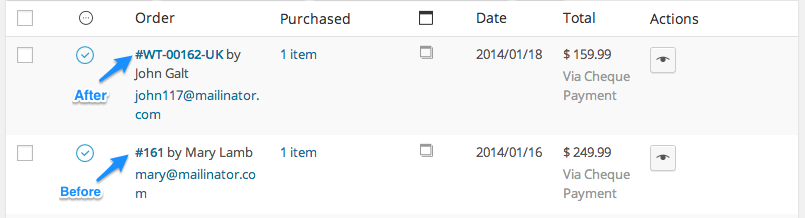
WooCommerce Sequential Order Numbers Pro Updated Order Numbers
Updated Order Numbers

Tame your WooCommerce order numbers!

This plugin works equally well for new and established stores: if your WooCommerce site already has orders placed, the sequential order numbers will pick up from the last order number, or begin with the starting number you configure. It’s your choice!
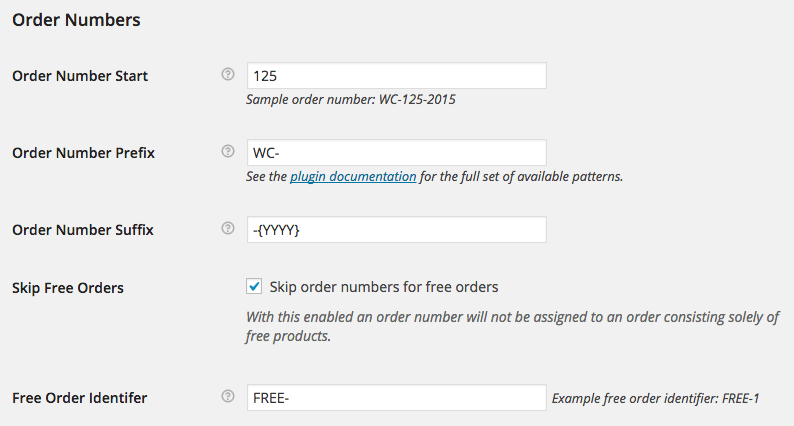
WooCommerce sequential order numbers pro settings
Highly Configurable Custom Order Numbers

Why Use Sequential Order Numbers Pro?

  • Generate sequential order numbers for your shop
  • Start the order numbering at any number (or for shops with existing order numbers, any number greater than your current largest order number)
  • Set a custom order number prefix
  • Set a custom order number suffix
  • Include the current day, month, or year in your custom order number prefix or suffix
  • Include the current time: hour, minute, second in your custom order number prefix or suffix
  • Order number length can be set automatically by adding as many zeroes to the beginning of the order number as needed
  • Orders with only free products can be excluded from the paid order sequence for accounting purposes, and assigned their own custom prefix

How to Get Started

  1. Buy this extension 🙂
  2. Download and install into your WooCommerce store
  3. Update your Order Numbers under WooCommerce Settings > General and save
  4. That’s it! Sit back and enjoy order numbers that make sense!

See the full documentation for more detailed help in setup.

Need any more reason to buy? When you purchase a SkyVerge-developed extension, you’re getting the highest quality extensions for your WooCommerce store. Gain peace of mind by knowing that when you purchase our products, your store’s performance is as important to us as it is to you.


Extension information

  • WordPress version required: 5.2
  • WooCommerce version required: 3.6.0
  • PHP version required: 7.4
  • Tested with WordPress: 7.0
  • Tested with WooCommerce: 10.8.1
  • Requires at least WordPress: 5.6
  • Requires at least WooCommerce: 3.9.4

Compatibility

  • Cart & checkout blocks
  • High performance order storage (HPOS)

Countries

  • Worldwide

Languages

English (United States), Italian

Customer reviews

Average rating 3.6

24 reviews from verified users

5 stars, 54% of reviews
4 stars, 8% of reviews
3 stars, 8% of reviews
2 stars, 4% of reviews
1 star, 25% of reviews
  • Rated 1 out of 5
    jameslescrocCanadaJun 21, 2026
    The team managing this plugin is not very good. I have been contacting them for 5 months to tell them that versions above 1.21.7 break the search function. The funniest part is that they break the search for order numbers that the plugin itself generates. It's completely ridiculous. This plugin is supposed to provide sequential numbers, but with version 1.21.7 and above, if you search for an order with that sequential number, it doesn't find it. They just released an update and still haven't fixed anything; they only fixed the deprecated `wc_enqueue_js()` function usage, which I had already repaired in their previous version using Claude’s code in 5 minutes.
  • Rated 2 out of 5
    Coaches Rising BVNetherlandsJan 8, 2026
    same problem, after 1.21.7 things broke. Many woocommerce subscriptions orders are now being given order numbers of FREE even though they're not free orders. Support has been unable to fix.
  • Rated 5 out of 5
    mikeassadUnited States (US)Dec 15, 2025
    Does exactly what it says. Latest version works with the high performance database. Allows me to use the WebToffee order import when moving from Staging to production and works perfectly.
  • Rated 5 out of 5
    John VeerkampNetherlandsDec 9, 2025
    Same here! After the latest update, Sequential Order Numbers Pro stopped working correctly. The plugin now skips order numbers, which causes confusion in our workflow. It used to work perfectly, but this issue makes it unreliable at the moment. Hoping for a quick fix from the developers. Fortunately, the developers reacted quickly and released a fix shortly after, so everything is working smoothly again. 👍
  • Rated 1 out of 5
    frankadamusGermanyDec 9, 2025
    Same here! After the latest update to 1.21.7 , Sequential Order Numbers Pro stopped working correctly. The plugin now skips 3 order numbers, which causes confusion in our workflow. Change order status causes a new order number for the same order and more. Hoping for a quick fix from the developers.

Related Products

Price $119 annually
Rated 3.5 out of 5 stars
Price $29 annually
Rated 3.6 out of 5 stars
Price $109 annually
Rated 4.6 out of 5 stars
Price $279 annually
Rated 3.2 out of 5 stars
Price $49 annually
Rated 3.9 out of 5 stars
Price $79 annually
Rated 4.2 out of 5 stars
Price $79 annually
Rated 4 out of 5 stars
Price $199 annually
Rated 4 out of 5 stars
Price $49 annually
Use of your personal data
We and our partners process your personal data (such as browsing data, IP Addresses, cookie information, and other unique identifiers) based on your consent and/or our legitimate interest to optimize our website, marketing activities, and your user experience.