
Product Icon

AutomateWoo

von Woo
Leistungsfähige Marketing-Automation für WooCommerce. AutomateWoo verfügt über die Tools, die du brauchst, um deinen Shop auszubauen und mehr Geld zu verdienen.
Choose a billing option
$159
Save 20%
$318 $254.40

Das Abonnement beinhaltet

  • Product updates and improvements
  • Kundensupport
  • 30-tage geld-zurück-garantie

Bau deinen Shop aus und verdiene mehr Geld mit AutomateWoo

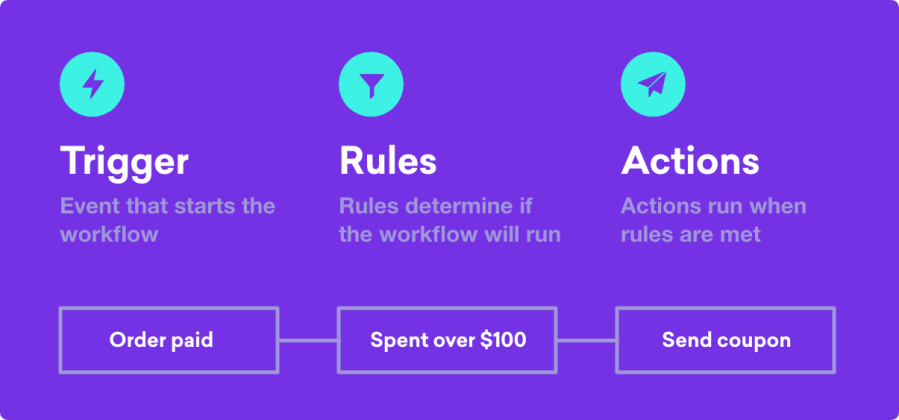
Mit den in AutomateWoo verfügbaren leistungsstarken, funktionsreichen Automatisierungen kannst du eine riesige Auswahl an automatisierten Workflows erstellen, die dir helfen, deinen Shop mit einem Bruchteil des Aufwands auszubauen! Mit AutomateWoo kannst du Workflows erstellen, die aus verschiedenen Kombinationen von Auslösern, Regeln und Aktionen in WooCommerce bestehen.

  • Auslöser bestimmen die Umstände, unter denen der Workflow abläuft. Ein Beispiel für einen Auslöser wäre, etwas zu tun, wenn eine Bestellung aufgegeben wird.
  • Regeln ermöglichen es dir, eine erweiterte Logik auf deine Workflows anzuwenden, sodass sie nur in bestimmten Situationen ausgelöst werden. Ein Beispiel für eine Regel wäre, den Workflow nur bei Bestellungen mit einem Gesamtwert von über 100 USD auszulösen.
  • Aktionen definieren, was passiert, wenn ein Workflow ausgelöst wird. Mit AutomateWoo stehen dir vielfältige individuelle Aktionen zur Verfügung, z. B. das Senden einer E-Mail oder das Ändern des Bestellstatus. Als Entwickler kannst du auch eine individuelle Funktion definieren.

Sobald du deinen Workflow erstellt hast, kannst du ihn so planen, dass er praktisch zu jedem beliebigen Zeitpunkt ausgeführt wird. Dies kann sofort sein, nach einer festgelegten Zeitspanne oder sogar zu einer bestimmten Stunde oder einem bestimmten Tag der Woche.
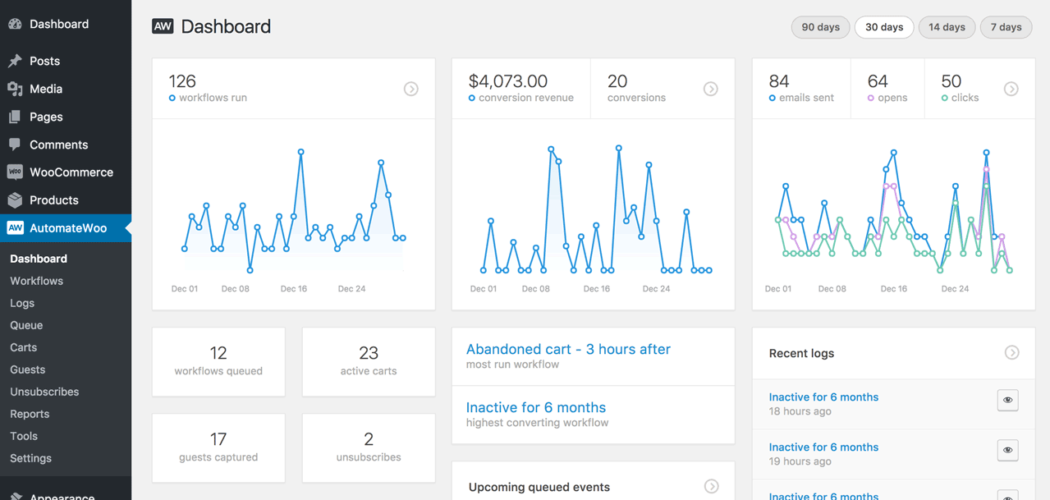

Lass dir die harte Arbeit für Kundenkonversion und -bindung von gezieltem Marketing abnehmen

Automatisiere und optimiere die Kundenkommunikation, indem du ansprechende Follow-up-E-Mails versendest.
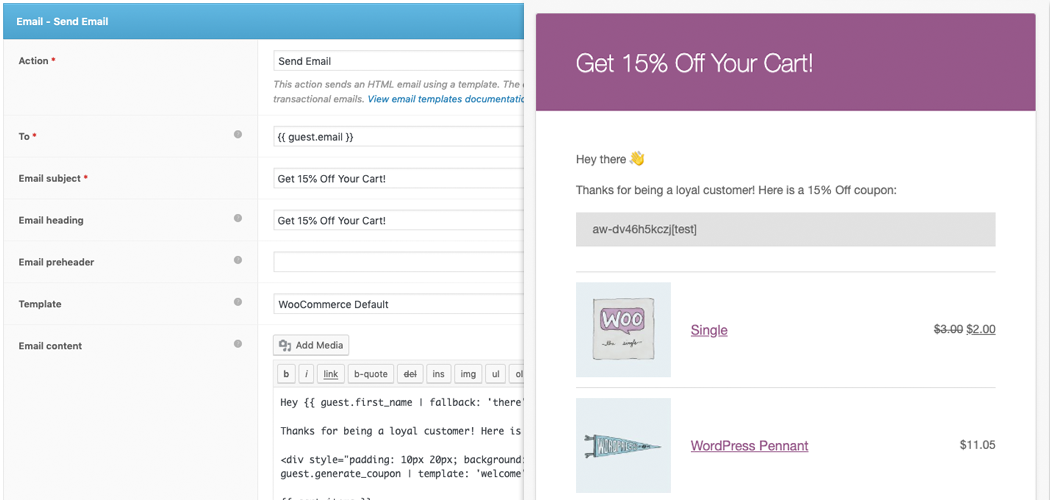
Richte E-Mails zu verlassenen Warenkörben für WooCommerce ein – angesichts einer 63-prozentigen Chance, einen entgangenen Umsatz zurückzugewinnen, ist das Senden von E-Mails zu verlassenen Warenkörben eine der besten Methoden, deinen Shop auszubauen.
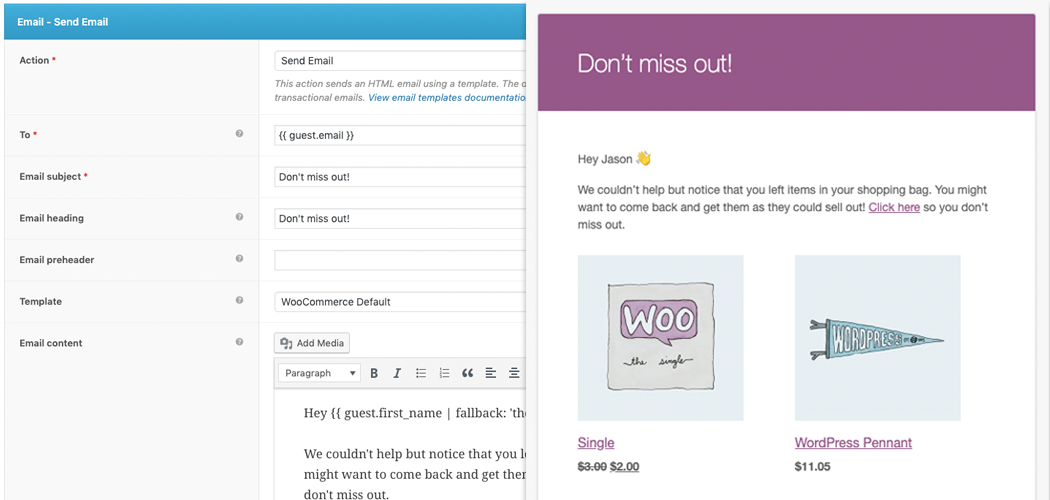

Funktionen von AutomateWoo

  • Follow-up-E-Mails – Sende automatisch E-Mails an Kunden, die bestimmte Produkte kaufen, und bitte um eine Bewertung oder schlage andere Produkte vor, die ihnen gefallen könnten.
  • Verlassener Warenkorb – Erinnere Kunden, die Artikel in ihrem Warenkorb gelassen haben, mit in festgelegten Abständen gesendeten E-Mails.
  • Inaktive Kunden zurückgewinnen – Sprich inaktive Kunden mit E-Mail-Marketingkampagnen an. Füge Sonderangebote und Empfehlungen hinzu.
  • SMS-Benachrichtigungen – Sende für jegliche Auslöser von AutomateWoo SMS-Benachrichtigungen an Kunden oder Administratoren. (Dazu ist ein kostenpflichtiges Twilio-Konto erforderlich.)
  • Bewertungsprämien – Ermutige zu mehr Produktbewertungen, indem du Rabatte anbietest. Begrenze den Rabatt basierend auf der Anzahl der veröffentlichten Bewertungen und der abgegebenen Bewertung.
  • Wunschlisten-Marketing – Sende zeitgesteuerte E-Mails mit einer Wunschlisten-Erinnerung und benachrichtige Kunden, wenn ein gewünschtes Produkt in den Verkauf geht. Integriert mit WooCommerce Wishlists oder YITH Wishlists.
  • Geburtstags-E-Mails – Erfreue Kunden mit einer besonderen WooCommerce-Geburtstags-E-Mail und einem Gutschein über das AutomateWoo-Add-on „Birthdays“ (separat erhältlich).
  • Kartenablaufbenachrichtigungen – Benachrichtige Kunden, bevor eine registrierte Kredit- oder Debitkarte abläuft. Damit kannst du beim Verkauf von Abonnements fehlgeschlagene Zahlungen und Kundenabwanderungen reduzieren.
  • Personalisierte Gutscheine – Generiere dynamisch angepasste Gutscheine für Kunden, um die Kaufrate zu erhöhen.
  • Subscriptions-Automatisierung – Erstelle automatische Aktionen für WooCommerce Subscription-Ereignisse wie Statusänderungen, fehlgeschlagene Zahlungen und Verlängerungserinnerungen.
  • Bookings-Automatisierungen – Sende E-Mails zu WooCommerce Bookings-Ereignissen wie Buchungsbestätigung oder -abschluss.
  • Refer A Friend (Freunde werben) – Steigere Umsätze durch Mundpropaganda mit dem AutomateWoo-Add-on „Refer A Friend“ (separat erhältlich).
  • Automatischer VIP-Status – Belohne deine besten Kunden mit einem auf unterschiedlichen Ausgabenanforderungen basierenden VIP-Status.

Warum AutomateWoo nutzen?

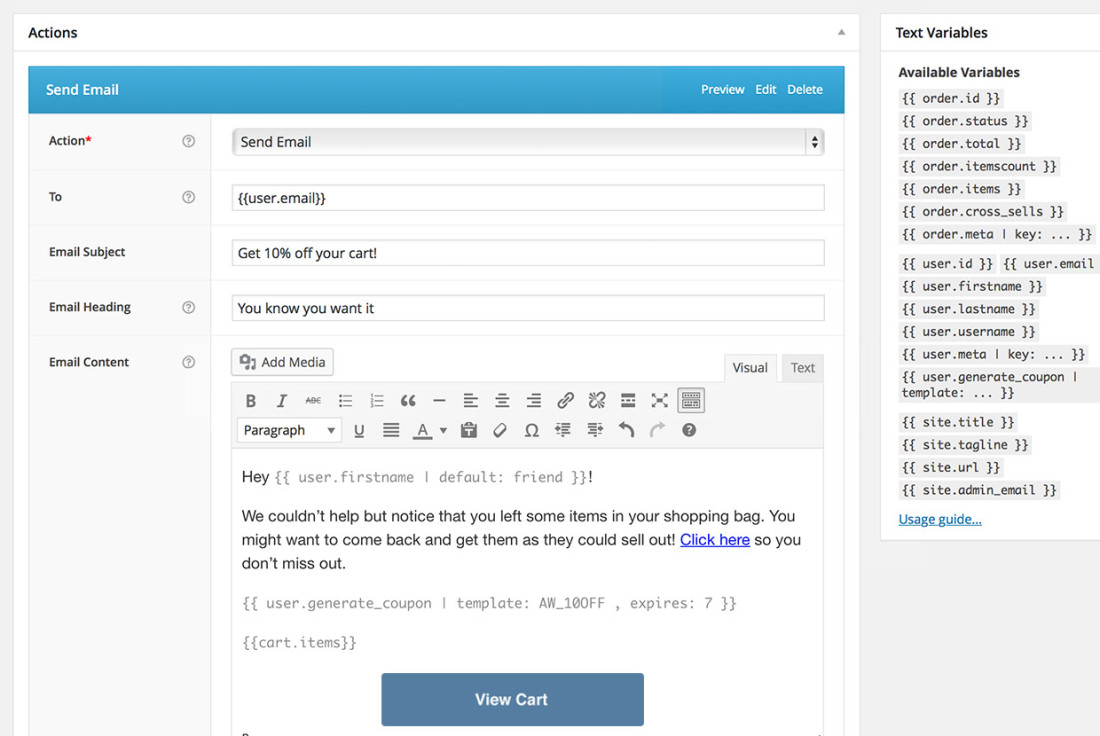
Mühelose Einrichtung und Verwaltung direkt von deinem WordPress-Backend aus

Versende sofort E-Mails mit dem bereits für WooCommerce-Transaktions-E-Mails eingerichteten Template. Gestalte E-Mails im vertrauten WordPress-Editor, mit dessen Variablen du Produkte mit einer Vielzahl von Anzeigeoptionen sowie dynamische Inhalte einfügen kannst.
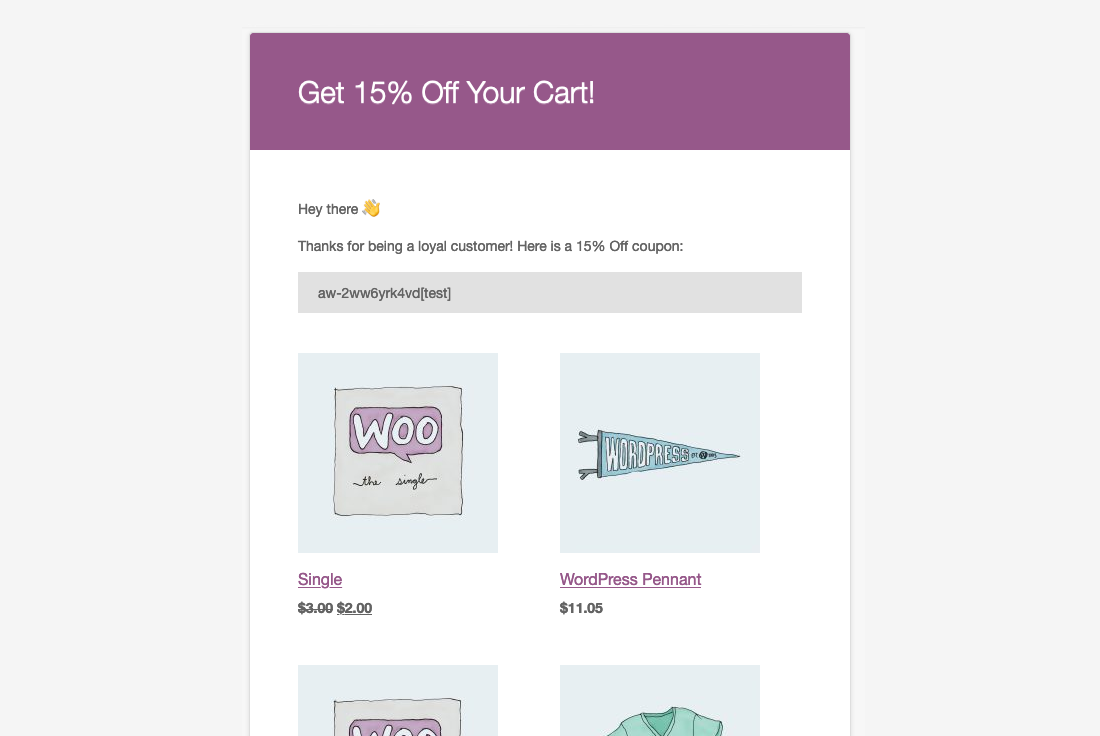
Versende gezielte, mehrstufige Kampagnen und biete Kundenanreize

Mit AutomateWoo hast du die vollständige Kontrolle über Kampagnen. Plane verschiedene E-Mails, die in Intervallen oder nach bestimmten Kundeninteraktionen versendet werden, und biete Anreize mit dem personalisierten Gutschein-System.
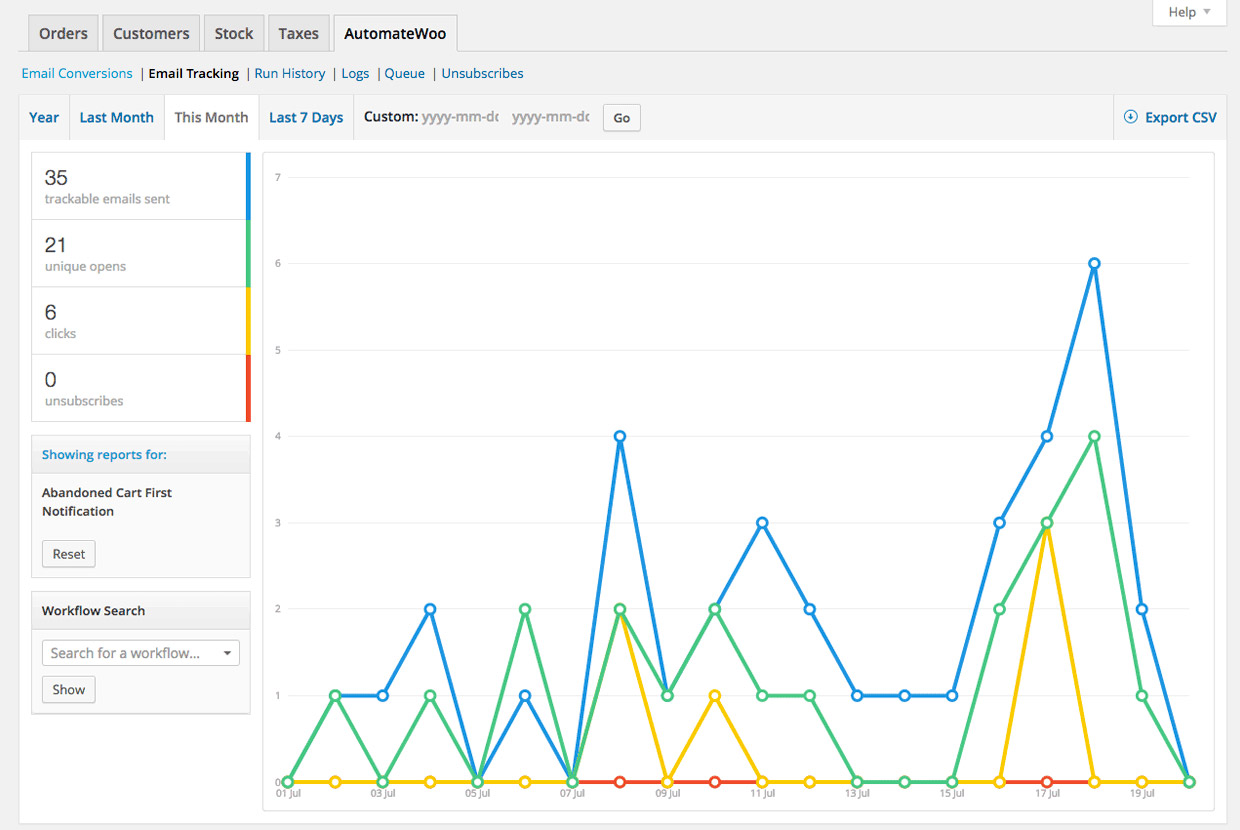
Verfolge Öffnungen, Klicks und Conversions

AutomateWoo erweitert WooCommerce-Berichte – nutze die vielfältigen in AutomateWoo enthaltenen Berichte, um den Erfolg deiner Kampagnen zu messen. Du kannst auch ein detailliertes Protokoll jeder gesendeten E-Mail und aufgezeichneten Conversion anzeigen.
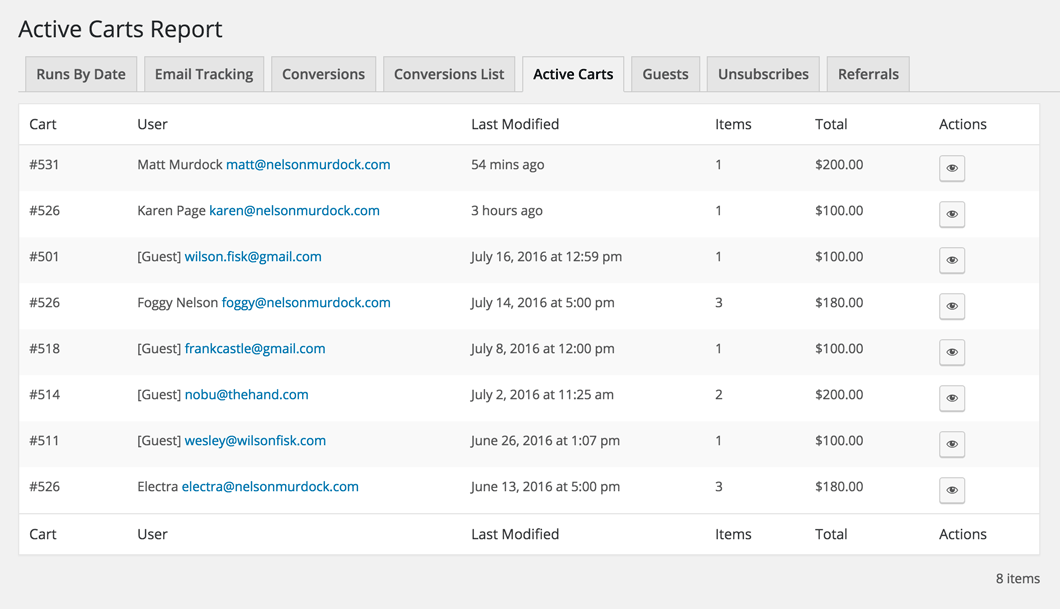
Intelligentes Sitzungs-Tracking und vorzeitige E-Mail-Erfassung

Die Sitzungs-Tracking-Technologie von AutomateWoo kann registrierte Benutzer schon vor der Anmeldung erkennen und Gast-E-Mails während des Bezahlens mit dem üblichen Vorabverfahren erfassen. Auch Gast-E-Mails können aus jedem Formular auf deiner Website erfasst werden, z. B. aus der Newsletter-Anmeldung.
Unbegrenzter E-Mail-Versand

Viele Dienste rechnen nach dem E-Mail-Volumen ab, aber bei AutomateWoo brauchst du dir keine Gedanken zu machen, dass du deinen Tarif überschreitest.

Entwicklerfreundlich

AutomateWoo ist zu 100 % erweiterbar und in unserer Dokumentation gibt es Codebeispiele, um Entwicklern den Einstieg zu erleichtern.

WPML-Unterstützung

Musst du mehrsprachige E-Mails versenden? AutomateWoo unterstützt das beliebte WPML-Plugin.


Integrationen

AutomateWoo lässt sich in deine bevorzugten Plugins und Dienste integrieren und verschafft dir den Marketingvorteil, den du brauchst.

  • WooCommerce Subscriptions: Profitiere von einer fast mühelosen Verwaltung von Abonnements in WooCommerce Subscriptions. Mit AutomateWoo kannst du Workflows basierend auf Abonnement-Ereignissen erstellen, wie z. B. einer Statusänderung oder einer fehlgeschlagenen Verlängerungszahlung.
  • WooCommerce Memberships: Hebe WooCommerce Memberships mit AutomateWoo auf die nächste Stufe. Erstelle Workflows, die automatisch Follow-up-E-Mails versenden, belohne treue Kunden mit einem VIP-Status und behalte Mitgliedschafts-Kündigungen im Auge.
  • WooCommerce Bookings: Integriere WooCommerce Bookings in AutomateWoo, um die Erfahrung deiner Kunden zu verbessern, Stornierungen zu reduzieren oder sogar Upsells zu erzielen, indem du Kunden nach ihrer Buchung automatisierte E-Mails zur Buchungsbestätigung oder zum Buchungsabschluss sendest.
  • WooCommerce Points and Rewards: Richte automatisierte Workflows mit AutomateWoo ein, um bestimmte Kundenaktionen zu belohnen, und erstelle auf einfache Weise komplexe Belohnungsszenarien für WooCommerce Points and Rewards. Das Vergeben von Punkten ist eine großartige Möglichkeit, Kundentreue aufzubauen.
  • WooCommerce Wishlists: Profitiere von WooCommerce Wishlists. Verwende individuelle Auslöser in AutomateWoo, um Kunden zu benachrichtigen, wenn Produkte auf ihrer Wunschliste in den Verkauf gehen, und/oder sende in unterschiedlichen Intervallen Erinnerungen für nicht gekaufte Artikel, um Kunden auf deine Website zurückzubringen.

Und vieles mehr …

  • Active Campaign
  • AgileCRM
  • Campaign Monitor
  • MadMimi
  • Mailchimp
  • Twilio SMS
  • YITH Wishlist

AutomateWoo-Add-ons

  • Refer A Friend (Freunde werben) – Steigere Umsätze durch Mundpropaganda mit dem AutomateWoo-Add-on „Refer A Friend“.
  • Birthdays (Geburtstage) – Erfreue Kunden und steigere deinen organischen Umsatz mit einer besonderen WooCommerce-Geburtstags-E-Mail und einem Gutschein an ihrem Ehrentag.
AutomateWoo ist kompatibel mit den neuen Warenkorb- und Bezahlen-Blöcken – ein anpassbarer, konversionsoptimierter Bezahlvorgang, der bald für WooCommerce erhältlich sein wird.

Häufig gestellte Fragen


Häufig gestellte Fragen

What is AutomateWoo, and what can it do for my store?

AutomateWoo is a marketing automation extension for WooCommerce that helps you convert and retain customers without adding manual work. It runs on Workflows, which combine Triggers (when something happens, such as a completed order), Rules (conditions that narrow when a workflow runs, such as an order total over a set amount), and Actions (what happens next, such as sending an email or SMS). You can use it for follow-up emails, abandoned cart reminders, win-back campaigns, review requests, personalized coupons, and more, all managed from your WordPress dashboard.

Can I run custom code using AutomateWoo?

Yes. You can use custom code in a few ways—including Custom Triggers and Custom Actions/Functions—to build out the site’s automations. Note that our support team doesn’t write or troubleshoot custom code, but we can point you to trusted WooCommerce developers for hire.

Do you have a demo of the AutomateWoo extension we could try out before deciding to purchase?

We don’t offer a demo of AutomateWoo. We encourage you to buy the extension and take advantage of our 30-day refund policy if it doesn’t meet your needs.

How can I automate abandoned cart emails in WooCommerce?

AutomateWoo includes abandoned cart automation that reminds shoppers who left items in their cart with a series of emails sent at intervals you choose. You can personalize each message with the customer's name and the products they left behind, and add a personalized coupon to encourage them to return. This is one of the highest-impact ways to recover sales that would otherwise slip away. For more on building an effective recovery sequence, see this guide to converting more abandoned carts.

Can AutomateWoo help me recover lost sales?

Yes. AutomateWoo is designed to help recover sales through abandoned cart emails, win-back campaigns for inactive customers, and card expiry notifications that can reduce failed subscription payments. Its session tracking can detect registered customers before they sign in, and it can capture guest emails during checkout so you can follow up even when a shopper does not complete an order. These tools give you multiple ways to re-engage shoppers at the moments they are most likely to come back.

Can AutomateWoo help increase repeat purchases and customer loyalty?

Yes. AutomateWoo gives you tools to build repeat business, including follow-up emails that suggest related products, win-back campaigns for customers who have not ordered in a while, automatic VIP status for your best customers, and review reward coupons. You can also send personalized coupons to encourage the next purchase. For broader ideas on keeping customers coming back, see these customer retention strategies for stores.

Can AutomateWoo help reduce manual marketing work?

Yes. AutomateWoo runs your campaigns in the background using workflows, so once you set up a trigger, rules, and an action, the extension handles the sending for you. You can schedule messages to go out immediately, after a set delay, or at a specific hour or day of the week. Preset workflows for common use cases give you a starting point you can customize to fit your store.

Can I send SMS messages with AutomateWoo?

Yes. AutomateWoo can send SMS notifications to customers or admins for any of its triggers, which is useful for order updates, reminders, and time-sensitive campaigns. SMS sending is handled through an integration with Twilio, so you will need a paid Twilio account to use this feature. Email and SMS can be combined across your workflows to reach customers on the channel they respond to best.

Does AutomateWoo work with WooCommerce Subscriptions?

Yes. AutomateWoo integrates with WooCommerce Subscriptions so you can create workflows based on subscription events such as status changes, failed payments, and renewal reminders. It also offers card expiry notifications that warn customers before a saved card expires, which can help reduce failed payments and churn. This makes it a strong companion for stores that rely on recurring revenue.

Does AutomateWoo integrate with other WooCommerce extensions?

Yes. AutomateWoo integrates with several WooCommerce extensions to extend what you can automate, including WooCommerce Subscriptions, WooCommerce Memberships, WooCommerce Bookings, WooCommerce Points and Rewards, and WooCommerce Wishlists. It also connects with email and messaging services such as Mailchimp, ActiveCampaign, Campaign Monitor, and Twilio for SMS. These integrations let you trigger automations from events across your store.

Can AutomateWoo help me manage bookings and reduce cancellations?

Yes, when paired with WooCommerce Bookings. AutomateWoo can send automated emails on booking events such as confirmations and completions, which helps improve the customer experience and can reduce no-shows and cancellations. You can also follow up after a booking to upsell related products or services.

Can I add a referral program with AutomateWoo?

Yes, with the AutomateWoo Refer A Friend add-on, which is a separate purchase and requires AutomateWoo to be installed and active. It lets you run coupon-based or link-based referral campaigns, where advocates share a unique coupon or link and earn store credit for successful referrals. The add-on includes built-in fraud prevention, reporting, and post-purchase share widgets to encourage word-of-mouth sales.

Can I send automated birthday emails to customers?

Yes, with the AutomateWoo Birthdays add-on, which is a separate purchase. It lets you send a special birthday email and coupon to customers on their day, which can encourage a purchase and add a personal touch to your marketing.

Can I track how my campaigns are performing?

AutomateWoo styles its emails using the same template as your default WooCommerce transactional emails, and you can personalize content with variables that insert products, customer details, and dynamic content. It is built for automation rather than advanced email design, so if you want a feature-rich email builder with more template customization, MailPoet may be a better fit for that part of your marketing. Many stores use AutomateWoo for behavior-based automation alongside a dedicated email design tool.

Can I fully customize the design of my emails in AutomateWoo?

AutomateWoo styles its emails using the same template as your default WooCommerce transactional emails, and you can personalize content with variables that insert products, customer details, and dynamic content. It is built for automation rather than advanced email design, so if you want a feature-rich email builder with more template customization, MailPoet may be a better fit for that part of your marketing. Many stores use AutomateWoo for behavior-based automation alongside a dedicated email design tool.

Who is AutomateWoo best for?

AutomateWoo is a good fit for WooCommerce store owners who want behavior-based marketing automation tied directly to store events, without moving their data to a separate platform. It is especially useful for stores selling subscriptions, memberships, or bookings, and for any store that wants to recover abandoned carts, win back inactive customers, and reward loyal shoppers. Because it offers unlimited email sending, it suits stores that want to send a high volume of automated messages without volume-based pricing.

When might AutomateWoo not be the right fit?

AutomateWoo focuses on automated, event-driven workflows inside WooCommerce rather than being a full email design and broadcast newsletter platform. If your main goal is designing highly styled newsletters or managing large contact lists with advanced template editing, a dedicated email marketing tool such as MailPoet may suit you better. Some stores run AutomateWoo for automation and pair it with an email platform for campaign design.

Does AutomateWoo support multilingual stores?

AutomateWoo has built-in support for WPML, though this excludes multiple currencies. When WPML is active, emails are sent in the language the customer uses to view your site. Other multilingual plugins may work, but compatibility is not guaranteed.

Do I need to worry about email sending limits?

No. AutomateWoo offers unlimited email sending, so you are not charged based on email volume the way many marketing services are. This can make it a cost-predictable choice for stores that plan to send a large number of automated emails.

How does AutomateWoo handle marketing opt-ins and unsubscribes?

AutomateWoo lets you choose opt-in or opt-out mode for your workflows and adds an unsubscribe link to the footer of every non-transactional email. In opt-in mode, customers can subscribe at checkout, during account registration, in their account area, or through the AutomateWoo signup page. Transactional workflows can be excluded from the opt-in requirement, which helps you stay aligned with customer communication preferences.

What is the best way to set up marketing automation in WooCommerce without a developer?

AutomateWoo is built for store owners, not only developers, and you create automations by combining a trigger, optional rules, and an action inside your WordPress dashboard. Preset workflows for common scenarios, such as a welcome email for new customers, give you a ready-made starting point you can adjust to your store. Over 80 variables let you add dynamic content like a customer's name or their recent products at the click of a button.

Can AutomateWoo help me get more product reviews?

Yes. AutomateWoo can automatically follow up with customers after a purchase to request a review, and its Review Rewards feature can offer a discount to encourage more reviews. You can set conditions based on the number of reviews posted and the rating given, which helps you gather social proof while managing how rewards are used.

Kundenbewertungen

Average rating 3.5
28 reviews
5 stars, 43% of reviews
4 stars, 14% of reviews
3 stars, 18% of reviews
2 stars, 4% of reviews
1 star, 21% of reviews
28 reviews
  • fariazz
    Bewertet mit 3 von 5
    Functionality
    Jun 9, 2026
    Functionality
    Poor for 2026. Lacking webhook support as trigger or action. Lacking ability to create workflows using json so that one could use AI to write them like in n8n. It was a 5-star plugin maybe two years ago. Today it's far behind what one would want from an automation plugin.
    • simplysaru
      Jun 9, 2026
      Hey, thanks for taking the time to share this — and we can tell it comes from a place of genuinely wanting AutomateWoo to be great! Webhook support and JSON-based workflow creation are solid feature ideas, especially as AI-assisted automation becomes more of an expectation. We'd love to make sure these get in front of the right people — the best place to share them is our feature request board at https://woocommerce.com/feature-requests/automatewoo/, where you can post the details and other users can vote them up. Feedback like yours is exactly what shapes the roadmap, so we appreciate you flagging it!
  • chrismark1usa
    Bewertet mit 2 von 5
    Support
    May 13, 2026
    Support
    Using all the plugin's features, when they worked, were great. I am experiencing a bug where manual workflows require the use of the WooCommerce Admin plugin, which is no longer supported or available for download. The contact form for tech support is non-functional. Update: Woo reached out to us after I posted this review and is attempting to resolve the issue.
    • simplysaru
      May 12, 2026
      Hi, thank you for your feedback — we're sorry to hear about your experience. We want to assure you this isn't reflective of our intentions, and we take your concerns seriously. We've reached out to you directly via email to work through the WooCommerce Admin plugin dependency issue and ensure your issues with AutomateWoo are resolved. Please keep an eye on your inbox and we look forward to making this right.
  • rob0976
    Bewertet mit 1 von 5
    Support
    May 7, 2025
    Support
    There's a total lack of support, they make it impossible to contact them even when you're trying to report one of the many bugs in their products that you have paid for. Plus their products are massively over priced and really are a rippoff
  • anonymized-2727349
    Bewertet mit 4 von 5
    Functionality
    Apr 3, 2025
    Functionality
    I am using this plugin for years. There are 2 things I don't like. 1. Plugin has plugins. Like birthday and referrals. They should not be sold separately. 2. There is almost no new features. Maybe 1 in every 2-3 years. Updates are mostly to maintain.
  • woollywormhead
    Bewertet mit 3 von 5
    Ease of use
    Feb 15, 2025
    Ease of use
    I've revised my original 1-star review. 9 months ago I purchased this plug-in, recommeded by Woo on the forums, for managing updates to digital purchases. For months I went round in circles with support, getting next to no help - one agent even suggested I manually email the new PDFs! - that I was ready to give up. After pushing through, I did eventually get someone to listen to what was needed and they were very helpful, hence editing my review from 1-star to 3-star. I can't give it higher for 2 reasons: a) it should not have taken that long to get the help I needed b) there are limitations to the plug-in for digital products; it is geared towards tangibles, and I'm still not sure it's the...

Extension information

  • Tested with WordPress: 7.0
  • Tested with WooCommerce: 10.9
  • Requires at least WordPress: 6.9
  • Requires at least WooCommerce: 10.8

Kompatibilität

  • Cart & checkout blocks
  • High performance order storage (HPOS)

Länder

  • Worldwide

Anforderungen

  • WooCommerce 6.7+
  • WordPress 5.9+

Related Products

Price $109 Jährlich
Rated 2.3 out of 5 stars
Price $109 Jährlich
Rated 2.6 out of 5 stars
Price $109 Jährlich
Rated 2 out of 5 stars
Price $109 Jährlich
Rated 2.3 out of 5 stars
Price $49 Jährlich
Rated 4.1 out of 5 stars
Price $109 Jährlich
Rated 2 out of 5 stars
Free download
Rated 2.4 out of 5 stars
Price $59 Jährlich
Rated 4.1 out of 5 stars
Price $39 Jährlich
Rated 2.8 out of 5 stars
Use of your personal data
We and our partners process your personal data (such as browsing data, IP Addresses, cookie information, and other unique identifiers) based on your consent and/or our legitimate interest to optimize our website, marketing activities, and your user experience.





