
Variation Monster for WooCommerce includes a modern Quick Cart feature that allows customers to select product variations and add items to the cart directly from the shop or archive pages, without visiting the single product page.
How the Quick Cart Works
↑ Back to topOn shop and archive pages, a list of variation swatches appears below each variable product. These swatches display all available variation attribute terms as clickable options, allowing customers to quickly choose their preferred variation before adding the product to the cart. Here, when the customer selects one variation, it will be added to the cart.
Note: On shop and archive pages, the Quick Cart supports only
Button, Color, and Image swatches.
Select dropdowns and Radio buttons are not supported in this view.
Step 1: Enable Quick Cart for Archive Pages
↑ Back to topTo activate this feature:
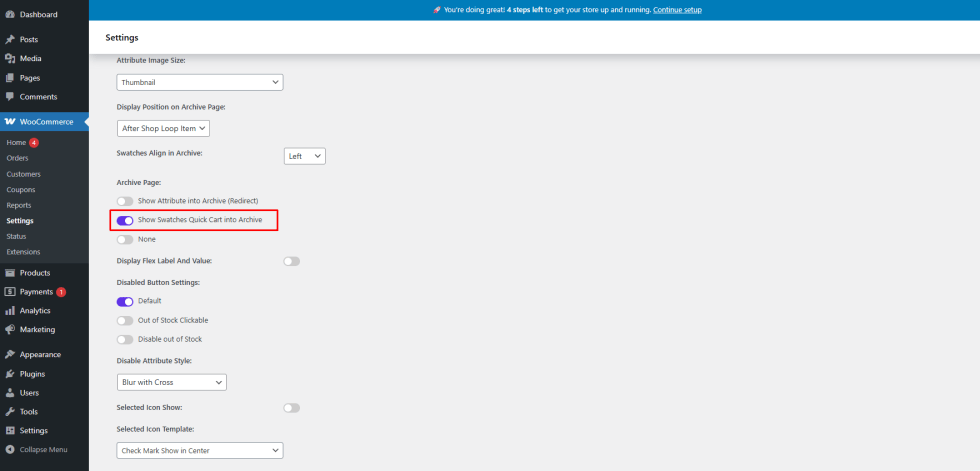
- Go to WooCommerce → Settings → Variation Monster
- Open the Variation Swatches tab
- Enable Archive Page – Show Swatches Quick Cart into Archive
Save the settings to apply the changes.
Step 2: Configure Product-Level Control (Optional)
↑ Back to topVariation Monster also allows you to control this feature per product:
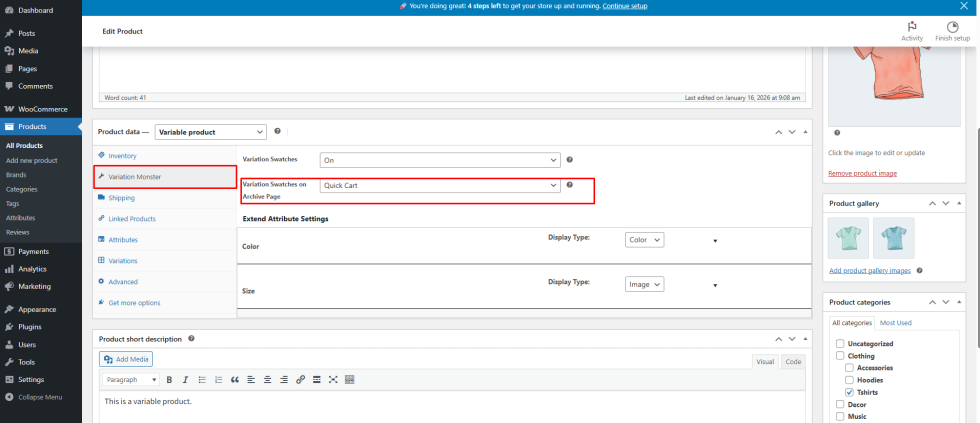
- Edit the desired variable product
- Open the Variation Monster tab under Product Data
- Choose options “Quick Cart” from “Variation Swatches on Archive Page.”
Customer Experience
↑ Back to topOnce enabled:
- Customers can select their desired variation directly from the shop or category page
- The product can be added to the cart without loading the single product page
- This significantly reduces friction and improves conversion rates
Benefits
↑ Back to top- Faster purchasing experience
- Fewer page loads
- Better visibility of available variations
- Ideal for stores with simple or frequently purchased variable products

