
You can transfer ownership of a WooCommerce.com subscription to another WooCommerce.com account. Transferring a subscription moves both ownership and billing to the new account holder. Once accepted, the subscription no longer appears in your account.
If you want to give someone else access to use an extension without transferring ownership or billing, see Share a subscription instead.
When to transfer a subscription
↑ Back to topCommon scenarios for transferring a subscription include:
- Handing off a client project — You built a site for a client and purchased extensions during development. Now the client should own and manage those subscriptions.
- Changing business ownership — The store is being sold or transferred to a new owner who needs to manage the extensions.
- Consolidating accounts — You have subscriptions spread across multiple WooCommerce.com accounts and want to bring them under one account.
How to transfer a subscription
↑ Back to top- Log in to your WooCommerce.com account and go to My Subscriptions.
- Find the subscription you want to transfer and click the three-dot menu icon (⋮) on the right.
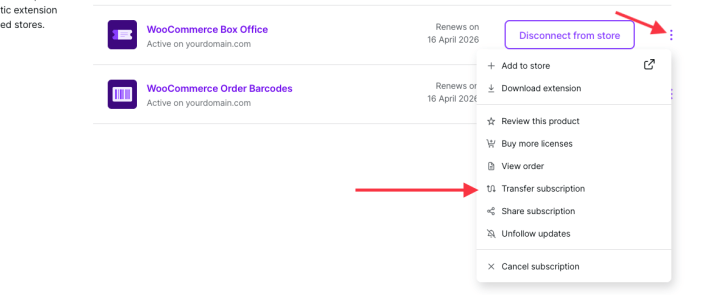
- Select Transfer subscription from the menu.
- Enter the email address of the WooCommerce.com account you want to transfer the subscription to.
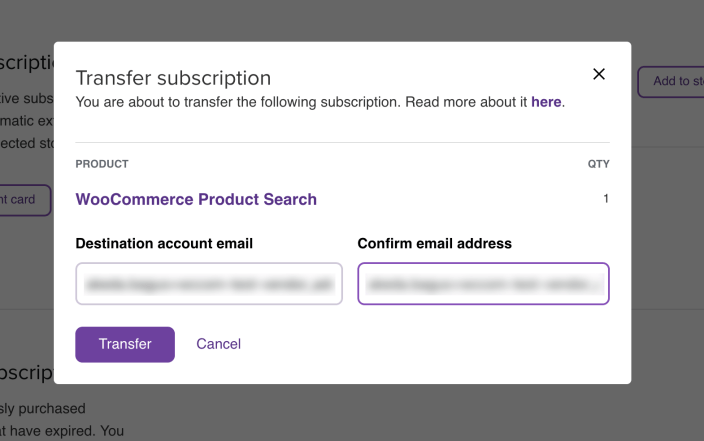
- Click the Transfer button to confirm.
A notice appears at the bottom of your My Account page confirming the transfer has started. The subscription displays a “Transferring to…” note with the recipient’s email address.
Note: The recipient must have a WooCommerce.com account associated with the email address you enter. If they do not have an account, they need to create one before you can initiate the transfer.
How the recipient accepts a transfer
↑ Back to topAfter you initiate a transfer:
- The recipient receives a notification email asking them to accept the transfer.
- A notice also appears on their My Account page on WooCommerce.com, informing them of the incoming transfer.
- The recipient can accept or reject the transfer from their My Account page.
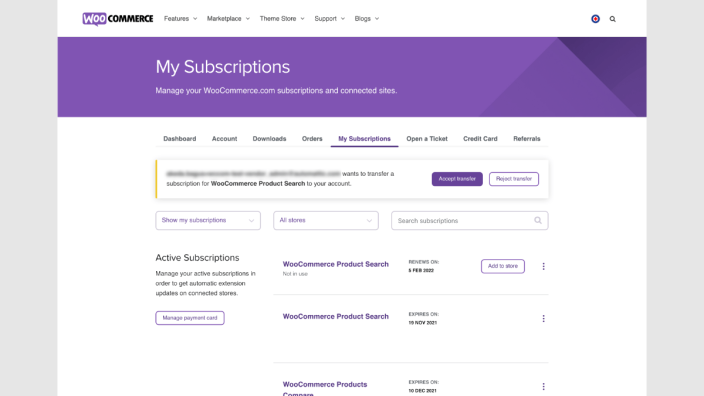
Once the recipient accepts the transfer:
- The subscription moves from your account to theirs.
- Billing responsibility transfers to the recipient.
- The subscription no longer appears in your My Subscriptions list.
- Plan length is preserved. If you transfer a 2-year subscription, it will continue to renew on a 2-year cycle for the new owner.
If the recipient rejects the transfer, the subscription remains in your account with no changes.
What transfers with the subscription
↑ Back to top| Transfers to the new owner | Does NOT transfer |
|---|---|
| Ownership of the subscription | The extension files already installed on your site (they remain installed) |
| Billing responsibility for future renewals | Your site’s connection to WooCommerce.com (this stays linked to your account) |
| The ability to manage, share, or re-transfer the subscription | |
| Access to support for that product | |
| Access to product updates |
After a transfer, the extension remains installed on the original site but will no longer receive updates or support through the original owner’s account. The new owner needs to connect the subscription to their own site to receive updates and support.
Transferring multi-site subscriptions
↑ Back to topIn the past, WooCommerce.com offered 5-site and 25-site subscription packages. These multi-site subscriptions cannot be split — you cannot transfer individual keys from a multi-site package to different accounts. The key number belongs to the full package.
If you need to give individual clients their own subscription:
- Purchase a separate subscription for each client, or have each client purchase the subscription on their own WooCommerce.com account.
- Share a single key from a multi-site subscription using the sharing feature. In this case, you retain ownership.
Note: It is not possible to link two different WooCommerce.com accounts to the same site as a way to share ownership of extensions.
Canceling a pending transfer
↑ Back to topIf you initiated a transfer but the recipient has not yet accepted it, you can cancel the transfer from your My Subscriptions page. The subscription returns to its normal state in your account.
Related documentation
↑ Back to top- What are WooCommerce.com subscriptions?
- Activate and manage your subscriptions
- Share a subscription
- Auto-renewals, cancellation, refunds
- Adding collaborators to your WooCommerce.com account
Questions and support
↑ Back to topDo you still have questions and need assistance?
- Get in touch with a Happiness Engineer via our Help Desk. We provide support for extensions developed by and/or sold on WooCommerce.com, and Jetpack/WordPress.com customers.
- If you are not a customer, we recommend finding help in the WooCommerce support forum or hiring a Woo Agency Partner. These are trusted agencies with a proven track record of building highly customized, scalable online stores. Learn more about Woo Agency Partners.